
Running out of storage can slow down your workflow, especially when you work with large video files, high-resolution photos, demanding games, or extensive project libraries. A 4 TB SSD offers a practical way to expand your storage without constantly deleting files or moving them between devices.
However, not every 4 terabyte SSD is designed for the same purpose. Some models connect externally through USB-C or Thunderbolt, while others install directly inside a desktop computer, laptop, or compatible gaming system. Their speeds, compatibility, and portability can vary significantly.
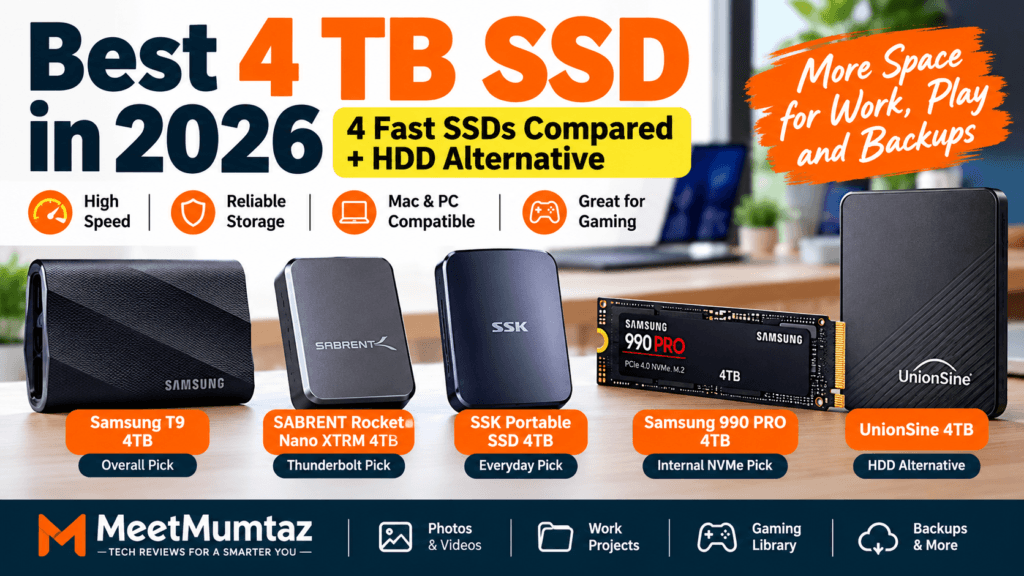
In this guide, we compare four SSD options: the Samsung T9, SABRENT Rocket Nano XTRM, SSK Portable SSD, and Samsung 990 PRO. We also include the UnionSine 4TB external hard drive as a lower-cost HDD alternative for readers who prioritize capacity over speed.
Whether you need portable storage for a MacBook, a fast internal NVMe upgrade, or additional space for backups, this comparison will help you choose the right drive.
Affiliate Disclosure: This article contains affiliate links. MeetMumtaz may earn a commission from qualifying purchases at no additional cost to you.
Quick Comparison: Best 4 TB SSD Options in 2026
The table below highlights the differences between the five selected products.
| Product | Storage Type | Advertised Speed | Best For | Check Price |
|---|---|---|---|---|
| Samsung T9 4TB ★ Overall Pick | External USB-C SSD | Up to 2,000 MB/s | Portable high-speed storage | View Deal → |
| SABRENT Rocket Nano XTRM 4TB | Thunderbolt 3 / USB SSD | Up to 2,700 MB/s (Thunderbolt) | Creative professionals | View Deal → |
| SSK Portable SSD 4TB | External USB-C SSD | Up to 1,050 MB/s (listed) | Everyday portable storage | View Deal → |
| Samsung 990 PRO 4TB | Internal PCIe 4.0 NVMe SSD | Up to 7,450 MB/s read | PC and compatible console upgrades | View Deal → |
| UnionSine 4TB HDD Alternative | External USB 3.0 HDD | HDD-class performance | Bulk storage and backups | View Deal → |
Advertised speeds are maximum specifications under suitable conditions. Actual performance depends on the computer, port, cable, workload, and drive configuration. Prices and availability may change.
1. Samsung T9 Portable SSD 4TB — Best Overall External 4 TB SSD
The Samsung T9 Portable SSD 4TB is our overall recommendation for readers who want fast, reliable portable storage without opening their computer.
It uses USB 3.2 Gen 2×2 connectivity and supports advertised sequential transfer speeds of up to 2,000 MB/s. This makes it a compelling choice for transferring large creative projects, managing video footage, and moving files between compatible devices. Samsung also includes hardware encryption, a rubberized exterior, and support for Samsung Magician software.
One important consideration is the USB connection. To approach its maximum advertised speed, the host device must support USB 3.2 Gen 2×2. Many computers, including numerous Mac configurations, do not support that specific 20Gbps USB mode, so transfer rates can be lower.
For buyers who need a portable 4 terabyte SSD for work, travel, or media projects, the T9 offers a strong balance of speed, durability, and convenience.
Samsung T9 — Key Features, Pros & Cons
- • 4TB portable SSD capacity
- • USB 3.2 Gen 2×2 interface
- • Up to 2,000 MB/s sequential speeds
- • AES 256-bit hardware encryption
- • Compact, rubberized exterior
- • USB-C and USB-A cables included
- ✓ Excellent transfer-speed potential
- ✓ Portable and easy to carry
- ✓ Hardware encryption support
- ✓ Broad device compatibility
- ✓ Useful for large creative projects
- ✕ Full speed requires a compatible port
- ✕ More expensive than basic HDD storage
- ✕ Performance can vary with workload
Our verdict: Choose the Samsung T9 if you want a versatile external 4 TB SSD and your priority is fast portable storage rather than an internal computer upgrade.
2. SABRENT Rocket Nano XTRM 4TB — Best for Thunderbolt Workflows
The SABRENT Rocket Nano XTRM 4TB is designed for users who regularly work with large files and have access to a compatible Thunderbolt port.
Unlike a typical USB-only portable SSD, this model supports Thunderbolt 3 transfer speeds of up to 2,700 MB/s. It also offers a USB fallback mode rated up to 900 MB/s, making it useful across different systems. Its compact aluminum body helps dissipate heat, and the included protective silicone sleeve adds practical protection for travel.
This drive is particularly appealing to video editors, photographers, and other creative professionals who need portable high-capacity storage. The included cables make it easier to connect to different computers without purchasing additional accessories.
However, the performance difference between Thunderbolt and USB operation is substantial. Before buying, check whether your computer supports the Thunderbolt connection required for its fastest mode.
SABRENT Rocket Nano XTRM — Key Features, Pros & Cons
- • 4TB external SSD capacity
- • Thunderbolt 3 connectivity
- • Up to 2,700 MB/s in Thunderbolt mode
- • Up to 900 MB/s in USB mode
- • Compact aluminum enclosure
- • Protective silicone sleeve
- ✓ Fast Thunderbolt performance
- ✓ Very compact construction
- ✓ Supports USB fallback
- ✓ Includes connection cables
- ✓ Suitable for creative workflows
- ✕ Full performance requires Thunderbolt
- ✕ USB mode is considerably slower
- ✕ Premium storage investment
Our verdict: The SABRENT Rocket Nano XTRM is a compelling choice for users with Thunderbolt-equipped computers who want fast portable storage for demanding professional tasks.
3. SSK Portable SSD 4TB — Best for Everyday Portable Storage
The SSK Portable SSD 4TB is worth considering if you need a spacious external drive for documents, media libraries, project files, and routine backups.
According to the supplied product description, this model uses USB-C connectivity and advertises transfer speeds of up to 1,050 MB/s. That places it in a different performance class from the Samsung T9’s 20Gbps USB mode and the SABRENT’s Thunderbolt mode, but it can still offer a substantial improvement over a conventional portable hard drive.
A drive like this can be particularly useful for students, remote workers, and laptop owners who want to expand their available storage without modifying their computers.
Before purchasing, check the exact model’s current listing for compatibility, warranty terms, included cables, and supported transfer speeds. Those details can vary between similarly named SSK products.
SSK Portable SSD — Key Features, Pros & Cons
- • 4TB external SSD capacity
- • USB-C connectivity
- • Advertised speeds up to 1,050 MB/s
- • Portable storage design
- • Suitable for backups and file transfers
- ✓ Large portable capacity
- ✓ Convenient external connection
- ✓ Useful for everyday file management
- ✓ No internal installation needed
- ✕ Slower advertised speed than premium picks
- ✕ Host USB speed can limit performance
- ✕ Check exact warranty and model details
Our verdict: Consider the SSK Portable SSD 4TB if you want straightforward portable storage and do not require the highest Thunderbolt or USB 20Gbps speeds.
4. Samsung 990 PRO 4TB — Best Internal NVMe SSD for High-Performance PCs
The Samsung 990 PRO 4TB is fundamentally different from the previous three products. Instead of connecting externally through USB-C, it installs inside a compatible computer using an M.2 NVMe slot.
This 4TB SSD NVMe drive uses PCIe 4.0 technology and offers advertised sequential read speeds of up to 7,450 MB/s. That makes it particularly attractive for high-performance desktop computers, gaming systems, and demanding productivity workflows. Samsung’s product lineup includes a 4TB 990 PRO model.
For gamers, a fast internal SSD can improve game loading and provide generous room for large installations. Content creators can also benefit from high-speed access to active project files.
However, buyers should check motherboard compatibility, available M.2 slots, cooling requirements, and whether a heatsink is needed. The standard internal model cannot be connected directly to a laptop’s USB-C port without an appropriate external NVMe enclosure.
Samsung 990 PRO — Key Features, Pros & Cons
- • 4TB internal SSD capacity
- • PCIe 4.0 NVMe interface
- • M.2 2280 form factor
- • Up to 7,450 MB/s sequential read
- • Designed for compatible PCs and gaming systems
- • Samsung Magician software support
- ✓ Excellent advertised read performance
- ✓ Spacious internal storage
- ✓ Ideal for demanding PC workloads
- ✓ No external USB cable required
- ✓ Strong option for system upgrades
- ✕ Requires a compatible M.2 NVMe slot
- ✕ Not a ready-to-use portable drive
- ✕ Installation and cooling may be required
Our verdict: Choose the Samsung 990 PRO 4TB if your priority is high-performance internal storage and your computer supports PCIe NVMe SSD installation.
5. UnionSine 4TB Ultra Slim External Hard Drive — Best HDD Alternative
The UnionSine 4TB Ultra Slim Portable External Hard Drive is included for buyers who want additional storage capacity but do not necessarily need SSD-level transfer speeds.
Unlike the other four products in this guide, UnionSine is a traditional external HDD, not a solid-state drive. It uses mechanical storage technology and connects through USB 3.0.
This type of drive can be suitable for archiving photographs, keeping backup copies of documents, storing media collections, and transferring files that do not require especially fast access.
An HDD may be more economical per terabyte than an SSD, depending on current prices. However, mechanical drives are generally slower and more sensitive to physical shocks while operating.
If you are also researching an external hard drive for Mac, remember that macOS compatibility can depend on the drive’s file system. Reformatting may be necessary for some workflows, and formatting erases existing data.
UnionSine 4TB HDD — Key Features, Pros & Cons
- • 4TB storage capacity
- • Traditional external HDD
- • USB 3.0 connection
- • Slim portable design
- • Suitable for file storage and backups
- ✓ Large storage capacity
- ✓ Useful for bulk file archives
- ✓ Portable external format
- ✓ May cost less than comparable SSD storage
- ✕ Not an SSD
- ✕ Slower than solid-state alternatives
- ✕ Mechanical components are shock-sensitive
- ✕ Not ideal for demanding active workflows
Our verdict: UnionSine 4TB is an alternative for bulk storage and backups, not a direct replacement for a high-performance 4 TB SSD.
Buying Guide: How to Choose the Best 4 TB SSD
Buying the right storage device requires more than comparing maximum advertised transfer speeds. The connection type, intended use, compatibility, and budget can be just as important.
1. External SSD vs. Internal NVMe SSD
External SSDs are convenient because they connect through USB-C or Thunderbolt without requiring internal installation. They are particularly useful for people who work across multiple computers or need portable storage.
Internal NVMe SSDs connect directly to a compatible motherboard and can deliver substantially higher transfer speeds.
For example, the Samsung T9 is designed for portable USB storage, while the Samsung 990 PRO is intended for internal installation.
If you need to carry files between computers, an external SSD is generally the simpler choice. If you want to upgrade your primary computer’s storage and performance, an internal NVMe SSD may be more appropriate.
2. Understand Advertised Transfer Speeds
Not every USB-C port delivers the same performance.
A USB-C connector can support different underlying protocols and bandwidth limits. As a result, a drive advertised at 2,000 MB/s may transfer data significantly more slowly when connected to a computer that does not support its fastest USB mode.
Thunderbolt also has its own compatibility requirements.
Before buying, compare the drive’s interface with your computer’s actual port specifications rather than assuming all USB-C connections are equally fast.
3. Is 4TB Better Than a 1TB External SSD?
A 1TB external SSD may be enough for documents, everyday backups, and a modest photo collection.
However, users working with 4K video, large game libraries, or extensive professional projects may benefit from the additional capacity of a 4TB drive.
A 4TB SSD offers four times the nominal capacity of a 1TB model, although usable space will be lower after formatting and system overhead.
The right capacity depends on your workload and how quickly your storage needs are growing.
4. Check Mac and Windows Compatibility
External SSDs can work with both Mac and Windows computers, but the file system matters.
For example, exFAT is commonly used when a drive needs to exchange files between macOS and Windows. APFS may be preferable for certain Mac-only workflows, while NTFS is common on Windows.
If you are comparing external storage options for Apple computers, read our guide to the external hard drive for Mac for additional buying considerations.
Remember that reformatting a drive erases its contents, so back up important files first.
5. Consider Heat, Durability, and Portability
Fast SSDs can generate heat during sustained transfers. Some models use metal enclosures, thermal management, or other cooling measures to maintain stable operation.
For frequent travel, also consider the drive’s size, weight, enclosure design, and resistance to accidental drops.
An SSD has no moving mechanical storage parts, but it is not immune to damage or data loss.
6. Compare Total Value, Not Just Price
A cheaper drive is not necessarily the better purchase if it lacks the performance or compatibility required for your workflow.
Compare the cost per terabyte, interface, advertised speed, warranty, software support, and physical design.
If you are comparing lower-capacity storage, our external solid state drive 2TB guide provides another starting point.
For buyers who mainly need inexpensive bulk storage, our external hard drive 4TB comparison may also be useful.
4 TB SSD vs. 4TB HDD: Which Should You Buy?
The choice between SSD and HDD storage depends on how frequently you access your files and how important transfer speed is to your workflow.
| Feature | 4TB SSD | 4TB HDD |
|---|---|---|
| Storage technology | Solid-state memory | Mechanical magnetic storage |
| Typical performance | Faster | Slower |
| Moving parts | No | Yes |
| Portability | Often compact | Portable models available |
| Best use | Active projects, gaming, editing | Archives and backups |
| Cost per TB | Often higher | Often lower |
For most users who regularly edit files directly from an external drive, an SSD is the better performance-oriented option.
However, a traditional HDD can still make sense for large archives or secondary backups where maximum speed is less important.
Frequently Asked Questions
Is a 4 TB SSD worth buying in 2026?
A 4 TB SSD can be worthwhile for gamers, video editors, photographers, and users who manage large files. It offers substantial storage capacity while avoiding the mechanical limitations of traditional hard drives. Whether it is worth the cost depends on your workload and budget.
What is the difference between a 4 terabyte SSD and a 4TB HDD?
Both offer approximately 4TB of nominal storage capacity, but they use different technologies. SSDs store data in flash memory and generally offer faster access, while HDDs use spinning disks and mechanical components.
Which 4 TB SSD is best for Mac?
For portable use, the Samsung T9 and SABRENT Rocket Nano XTRM are both options worth evaluating. The best choice depends on the Mac’s supported USB and Thunderbolt interfaces. Check compatibility carefully because the Samsung T9’s fastest USB 3.2 Gen 2×2 mode is not supported by many Macs.
Is a 4TB SSD NVMe faster than an external SSD?
A PCIe 4.0 internal NVMe drive such as the Samsung 990 PRO can deliver much higher advertised sequential speeds than many USB external SSDs. However, actual results depend on the workload, computer hardware, cooling, and connection.
Can I use a 4TB external SSD for gaming?
Yes. An external SSD can provide additional storage for compatible gaming systems. However, some consoles restrict which games can run directly from external USB storage. Check the console’s storage requirements before buying.
How long does a 4TB SSD last?
SSD lifespan depends on factors such as write volume, operating temperature, controller design, NAND flash quality, and workload. A higher capacity alone does not guarantee a particular lifespan. Check the manufacturer’s endurance and warranty specifications.
Is a 1TB external SSD enough, or should I buy 4TB?
A 1TB external SSD may be sufficient for everyday documents and smaller media libraries. A 4TB model is better for large video projects, extensive game collections, and users who want extra room for future storage needs.
Final Verdict: Which 4 TB SSD Should You Buy?
The best 4 TB SSD depends on whether you need portable convenience, professional transfer speeds, or high-performance internal storage.
For most readers looking for a portable external drive, the Samsung T9 Portable SSD 4TB is our overall pick because it combines high advertised speeds, useful security features, and a travel-friendly design.
The SABRENT Rocket Nano XTRM 4TB is especially appealing for Thunderbolt-equipped creative workstations. The SSK Portable SSD 4TB offers a straightforward option for everyday external storage, while the Samsung 990 PRO 4TB is better suited to compatible internal NVMe upgrades.
Finally, the UnionSine 4TB HDD is worth considering when affordable bulk storage matters more than SSD performance.
Before you buy, confirm the drive’s compatibility, current specifications, warranty, and price. Choosing a drive that matches your computer and workload is more important than simply selecting the highest advertised speed.

