Introduction
A reliable wireless presentation clicker can make a noticeable difference when presenting slides in a classroom, conference room, office meeting, or training session. Instead of standing beside your laptop to change slides, you can move around the room, maintain eye contact, and focus on your audience.
Modern presentation remotes offer more than simple forward and backward controls. Depending on the model, you can find USB-A and USB-C connectivity, red laser pointers, volume adjustment, Bluetooth connectivity, digital highlighting, and rechargeable batteries.
However, not every presentation remote works equally well with every laptop or presentation setup. Some models are better suited to traditional PowerPoint presentations, while others are designed for modern displays and hybrid meetings.
In this guide, we’ll compare five presentation clickers, explain their advantages and limitations, and help you choose the best presentation clicker for your needs.
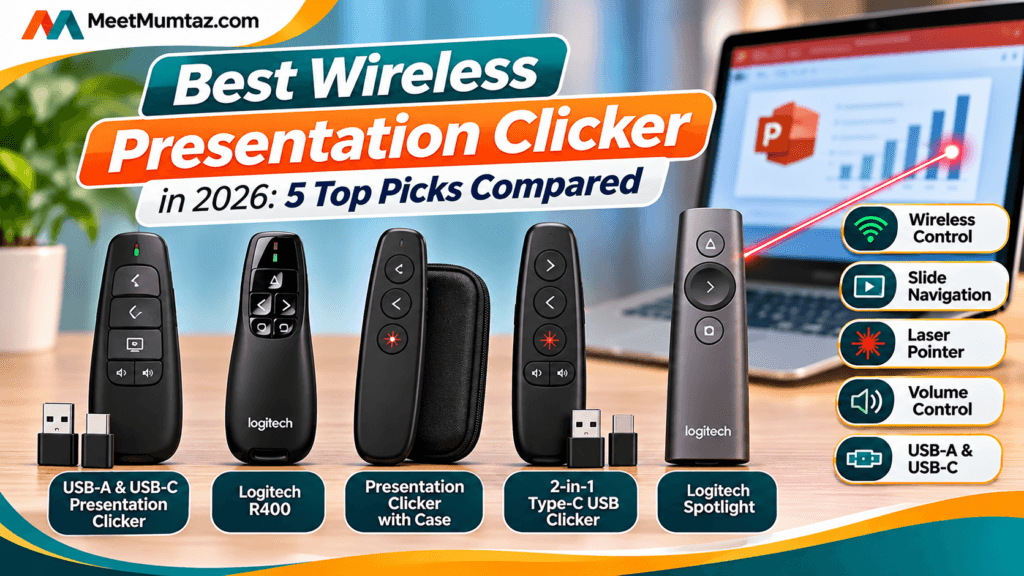
Quick Comparison: 5 Best Wireless Presentation Clickers in 2026
| Presentation Clicker | Key Feature | Best For | Amazon |
|---|---|---|---|
| USB-A & USB-C Presentation Clicker | Dual USB receiver, volume control, red pointer | Overall versatility | Check Price |
| Logitech R400 | Simple controls, red laser, USB-A | Traditional PowerPoint presentations | Check Price |
| Presentation Clicker with Case | Red laser and protective case | Travel and portability | Check Price |
| 2-in-1 Type-C USB Clicker | Dual USB connectivity and volume control | USB-C laptops | Check Price |
| Logitech Spotlight | Digital pointing, Bluetooth and USB | Professional presentations | Check Price |
Note: Product descriptions are based on the supplied listings and available manufacturer information. Check the exact Amazon listing for the included receiver, supported operating systems, and current price before purchasing.
1. Presentation Clicker with USB-A & USB-C Receiver — Best Overall for Versatility
The Presentation Clicker with USB-A & USB-C Receiver is a practical option for users who frequently switch between laptops and presentation environments.
Its main advantage is the dual-connector receiver design. Traditional presentation remotes often rely on USB-A, which can be inconvenient for users with newer laptops that primarily offer USB-C ports.
This model is advertised with both USB-A and USB-C connectivity, helping reduce the need to carry an additional adapter.
The clicker uses 2.4GHz wireless technology and includes a red light pointer for highlighting content during presentations.
Another useful feature is volume control, which may be helpful when presenting slides containing audio or video.
Why Choose This Wireless Presentation Remote?
For teachers, office professionals, and students, convenience matters. A presentation remote that works with different USB ports can make it easier to prepare for meetings without worrying about adapters.
Its plug-and-play design also appeals to users who prefer a straightforward setup.
The combination of slide navigation, volume control, and red pointer functionality makes it a versatile choice for conventional presentations.
Key Features, Pros and Cons
| USB-A & USB-C Presentation Clicker | |
|---|---|
| Key Features | USB-A and USB-C receiver, 2.4GHz wireless connectivity, PowerPoint slide controls, volume control, red light pointer and plug-and-play setup. |
| ✓ Pros | Convenient dual USB connectivity; useful volume controls; no separate USB-C adapter needed when the supplied receiver supports both connectors; practical for classrooms and offices. |
| − Cons | Red pointers can be difficult to see on some digital screens; exact wireless range and platform compatibility should be verified; advanced digital highlighting is not advertised. |
| Best For | Teachers, students, trainers and business professionals using different laptops. |
| Amazon | Check Price on Amazon |
Our Verdict: This is our best overall choice for buyers who prioritize USB-A/USB-C convenience and everyday slide controls over advanced presentation effects.
2. Logitech Wireless Presenter R400 — Best for Traditional PowerPoint Presentations
The Logitech Wireless Presenter R400 is a well-established presentation remote designed around simplicity and reliable slide navigation.
Instead of providing a large number of advanced functions, the R400 focuses on the essentials: moving between slides, starting a presentation, and highlighting important points with a red laser pointer.
Its ergonomic design and tactile controls help presenters locate the correct buttons without constantly looking down.
According to Logitech, the R400 offers a wireless operating range of up to 15 meters (approximately 50 feet), although actual range depends on environmental conditions. It uses a USB-A receiver and two replaceable AAA batteries. Logitech+1
Why Choose the Logitech R400?
The R400 is particularly suitable for traditional PowerPoint presentations in classrooms, training rooms, and conference settings.
Its straightforward button layout reduces the learning curve for users who simply want to control slides without dealing with complicated software.
The USB receiver stores inside the presenter when not in use, making transport easier.
However, this model is primarily designed for compatible Windows computers. Mac users should check compatibility carefully rather than assuming all functions will work.
Key Features, Pros and Cons
| Logitech Wireless Presenter R400 | |
|---|---|
| Key Features | USB-A receiver, up to 15m wireless range, red laser pointer, intuitive slide controls, battery indicator, storable receiver and two AAA batteries. |
| ✓ Pros | Simple controls; established manufacturer; documented operating range; convenient receiver storage; suitable for traditional PowerPoint presentations. |
| − Cons | No native USB-C connector; primarily Windows-oriented; no Bluetooth; red laser is less suitable for certain TV and LCD displays. |
| Best For | Windows PowerPoint users, educators and conference speakers. |
| Amazon | Check Price on Amazon |
Our Verdict: The Logitech R400 is a sensible option for anyone who values straightforward controls and established product specifications over additional features.
3. Presentation Clicker with Case and Red Laser — Best for Travel
A presentation remote is a small accessory, but it can be easy to misplace when moving between classrooms, offices, and conference venues.
The Presentation Clicker with Case addresses that concern by including a protective carrying case, making it an appealing option for frequent travelers.
Based on the supplied product description, this model combines wireless slide navigation with a red laser pointer.
Its design is intended for conventional presentations where the presenter needs to move forward and backward through slides while drawing attention to important information.
Why Choose a Presentation Clicker with a Case?
For teachers who move between classrooms or professionals who regularly attend conferences, protecting small accessories can be important.
A carrying case can help keep the remote and its accessories together when stored in a backpack, laptop bag, or office drawer.
This is particularly useful if you travel with multiple accessories, such as a mouse, laptop charger, USB hub, or external display cable.
For a more organized workstation, our Under Desk Cable Management Tray guide also covers practical accessories for keeping a desk setup tidy.
Key Features, Pros and Cons
| Presentation Clicker with Case | |
|---|---|
| Key Features | Wireless presentation remote, red laser pointer, slide navigation and included carrying case. |
| ✓ Pros | Convenient for travel; carrying case helps protect the remote; straightforward presentation controls; practical for classroom and meeting use. |
| − Cons | Receiver type, wireless range, battery requirements and operating-system compatibility need confirmation from the current listing; no advanced digital pointer features are specified. |
| Best For | Traveling professionals, teachers, lecturers and frequent presenters. |
| Amazon | Check Price on Amazon |
Our Verdict: This model is worth considering when portability and keeping accessories organized are more important than premium presentation controls.
4. 2-in-1 Type-C USB Presentation Clicker — Best for USB-C Laptops
Modern laptops increasingly use USB-C ports for charging, data transfer, and connecting accessories.
That makes USB-C compatibility an important factor when choosing a wireless presentation remote, especially for MacBook owners and users of newer Windows laptops.
The 2-in-1 Type-C USB Presentation Clicker is designed for users who want a presentation remote with both USB-C and conventional USB connectivity.
According to the supplied product description, it supports slide advancement and volume control, making it useful for presentations that include multimedia content.
Why Choose a Type-C Presentation Clicker?
One of the biggest advantages is convenience.
If your laptop only has USB-C ports, using a traditional USB-A presentation remote may require an adapter or docking station.
A dual-interface receiver can eliminate that extra accessory, provided the receiver is compatible with your laptop.
This is useful for professionals who frequently present from different computers or need to connect quickly before a meeting.
For users building a more complete laptop workstation, our Best Laptop Stand guide explores accessories that can improve desk ergonomics.
Key Features, Pros and Cons
| 2-in-1 Type-C USB Presentation Clicker | |
|---|---|
| Key Features | 2-in-1 USB connectivity, wireless slide advancement, volume control and presentation support for compatible laptops. |
| ✓ Pros | Suitable for USB-C-focused setups; versatile receiver design; volume adjustment; useful for Mac and Windows users where supported. |
| − Cons | Exact Mac compatibility should be checked; wireless range and battery type are not confirmed; additional advanced controls are not specified. |
| Best For | MacBook users, modern laptop owners and professionals who regularly switch computers. |
| Amazon | Check Price on Amazon |
Our Verdict: This is a practical alternative to a conventional USB-A clicker for presenters who use modern laptops and want straightforward slide and volume controls.
5. Logitech Spotlight Presentation Remote — Best Premium Wireless Presenter
The Logitech Spotlight Presentation Remote is designed for professionals who want more than basic slide navigation.
Unlike conventional presentation clickers that rely on a physical red laser, Spotlight offers digital pointer effects that can be displayed directly on a screen.
These effects include highlighting, magnifying, and digitally pointing to specific content.
That makes Spotlight particularly useful for presentations involving televisions, computer monitors, video conferencing, or hybrid meetings.
According to Logitech, Spotlight supports USB receiver and Bluetooth connections, offers a wireless range of up to 30 meters (100 feet), and uses a rechargeable battery.
It also supports customizable controls through Logitech software. Logitech+1
Why Choose Logitech Spotlight?
Spotlight is designed to help presenters interact with visual content in a more dynamic way.
Instead of simply moving from one slide to another, you can draw attention to specific sections, enlarge details, and create digital highlighting effects.
This can be valuable when presenting charts, financial reports, diagrams, or detailed technical information.
The rechargeable battery is another advantage for users who prefer not to replace disposable batteries.
Logitech also advertises rapid charging, with approximately three hours of use from a one-minute charge under its stated conditions. Logitech
Key Features, Pros and Cons
| Logitech Spotlight Presentation Remote | |
|---|---|
| Key Features | Digital highlighting, magnification, digital laser pointer, Bluetooth and USB connectivity, rechargeable battery, up to 30m range and customizable controls. |
| ✓ Pros | Advanced digital pointer effects; useful on screens and in hybrid meetings; rechargeable battery; broad presentation software support; professional control options. |
| − Cons | Typically more expensive than basic remotes; some advanced features require compatible software; more functionality than occasional presenters may need. |
| Best For | Executives, conference speakers, trainers, educators and frequent professional presenters. |
| Amazon | Check Price on Amazon |
Our Verdict: Logitech Spotlight is our premium recommendation for presenters who need digital highlighting, modern screen compatibility, and more sophisticated presentation controls.
How to Choose the Best Wireless Presentation Clicker
Choosing the right presentation remote depends on your laptop, presentation software, room size, and the features you actually need.
1. Check USB-A and USB-C Compatibility
Before purchasing, identify the available ports on your laptop.
Traditional presentation remotes often use USB-A receivers, while newer laptops may primarily offer USB-C connections.
If you regularly switch between devices, a dual USB receiver may be more convenient.
2. Consider Wireless Range
Wireless range determines how far you can move from your computer while controlling slides.
For small classrooms and meeting rooms, a modest operating range may be sufficient.
Larger conference rooms and auditoriums may benefit from a longer-range remote.
Remember that advertised range can vary depending on obstacles, interference, and environmental conditions.
3. Choose Between Red Laser and Digital Pointer
A red laser pointer is useful for highlighting information on many traditional projection surfaces.
However, red laser pointers can be less visible on some televisions and LCDs.
A digital pointer, such as the one offered by Logitech Spotlight, may be more suitable for modern screen-based and online presentations.
4. Evaluate Slide and Volume Controls
Most presentation remotes offer forward and backward slide navigation.
Some models also include presentation start controls, blank-screen functions, volume adjustment, or programmable buttons.
If your presentations contain video and audio, volume controls can be particularly helpful.
5. Consider Battery Type
Presentation clickers generally use either replaceable batteries or rechargeable batteries.
Replaceable batteries are convenient when you can carry spares, while rechargeable models reduce the need to purchase disposable batteries.
6. Check Presentation Software Compatibility
A clicker that works well with PowerPoint on Windows may not offer identical functionality in Keynote or Google Slides on macOS.
Before buying, confirm compatibility with the presentation software and operating system you use most frequently.
Wireless Presentation Remote vs Wireless Pointing Device
A wireless pointing device is a broad term that can refer to a wireless mouse, trackball, or presentation controller.
A wireless presentation remote is specifically designed for controlling slides and, in many cases, highlighting information.
| Feature | Presentation Clicker | Wireless Mouse |
|---|---|---|
| Slide navigation | Dedicated controls | Usually requires configuration |
| Laser or digital pointer | Available on selected models | Generally not included |
| Handheld presentation use | Designed for it | Less convenient |
| Desktop cursor control | Limited or model-dependent | Primary function |
| Best use | Presentations and lectures | Everyday computer navigation |
If you spend long hours using a computer outside presentations, choosing an ergonomic mouse can also improve comfort. Our Ergonomic Mouse for Small Hands guide compares options for different hand sizes and desk setups.
Is a Wireless Presentation Clicker Worth Buying?
For people who present regularly, a wireless clicker can be a worthwhile accessory.
It allows presenters to move more freely, maintain eye contact, and control slides without repeatedly returning to their laptop.
This is especially useful for teachers, trainers, lecturers, business professionals, and public speakers.
Even occasional presenters may appreciate the convenience of having dedicated slide controls.
However, if you rarely give presentations and only need to advance slides occasionally, keyboard shortcuts or a basic wireless mouse may be sufficient.
The value of a presentation clicker depends on how frequently you present and whether its features make your workflow easier.
Frequently Asked Questions
What is the best wireless presentation clicker in 2026?
For general-purpose use, a dual USB-A/USB-C presentation clicker is a versatile option. The Logitech R400 is well suited to traditional Windows PowerPoint presentations, while Logitech Spotlight offers advanced features for professional presenters.
Can a wireless presentation clicker work with a MacBook?
Yes, many presentation clickers support macOS. However, compatibility varies by model. Check the receiver type, operating-system requirements, and supported presentation software before purchasing.
Does a presentation clicker need Wi-Fi?
Most USB-receiver presentation remotes use their own wireless connection, commonly 2.4GHz radio frequency, rather than connecting through your Wi-Fi network. Some advanced models also support Bluetooth.
Can I use a wireless presentation remote with Google Slides?
Many remotes can control Google Slides, but compatibility depends on the model and operating system. Logitech Spotlight officially supports Google Slides, while other models may provide basic slide navigation through standard keyboard commands.
What is the difference between a presentation clicker and a laser pointer?
A presentation clicker controls slides remotely. A laser pointer highlights physical surfaces or projected content. Many presentation remotes combine both functions, while advanced models use digital highlighting instead.
Is USB-C better than USB-A for a presentation remote?
Neither connection automatically improves presentation performance. USB-C is more convenient for laptops without USB-A ports, while USB-A works well with compatible computers. The best choice depends on your laptop’s available ports.
How far does a wireless presentation clicker work?
Wireless range varies by model. Logitech specifies up to 15 meters for the R400 and up to 30 meters for Spotlight. Actual performance depends on environmental conditions and interference.
Are rechargeable presentation clickers better?
Rechargeable remotes can be convenient for frequent presenters, while models using replaceable batteries make it easy to carry spares. Neither approach is universally better.
Final Verdict: Which Wireless Presentation Clicker Should You Buy?
The best wireless presentation clicker is the one that matches your presentation environment and laptop setup.
For users who need flexibility between USB-A and USB-C laptops, the dual-receiver Presentation Clicker is our recommended starting point.
For traditional PowerPoint presentations, the Logitech R400 offers straightforward controls and a documented wireless operating range.
If portability is your priority, the Presentation Clicker with Case is worth considering.
For modern USB-C laptops, the 2-in-1 Type-C USB Clicker offers a practical connectivity-focused option.
And for professionals who frequently present on large displays, in conference rooms, or during hybrid meetings, Logitech Spotlight stands out for its advanced digital pointer features.
Find Your Ideal Presentation Clicker
Compare everyday convenience with advanced presentation features and choose the remote that fits your setup.
Prices and availability may change. Always verify product specifications, compatibility, and current offers on Amazon before ordering.
Affiliate Disclosure: This article contains affiliate links. MeetMumtaz may earn a commission from qualifying purchases at no additional cost to you. Product recommendations are based on available specifications and intended use, not hands-on testing.