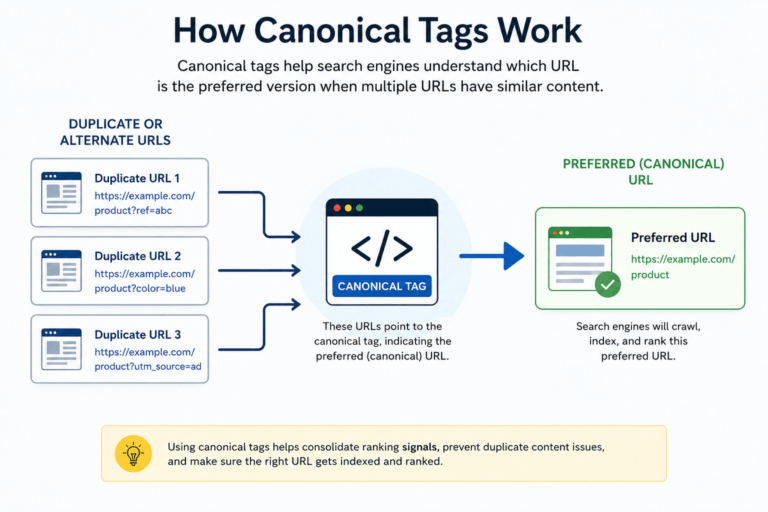
Imagine visiting a website to read an article, compare products, or download a useful resource. You click a link expecting valuable information, but instead you’re greeted with a missing-page error. It’s frustrating, interrupts your browsing experience, and often makes you leave the website immediately.
Now imagine that happening on your own website.
Broken links are one of the most common technical SEO problems, yet they are frequently ignored. Over time, pages are deleted, URLs change, files are moved, products are discontinued, and external websites remove content. As a result, links that once worked perfectly become dead links that no longer lead visitors to the intended destination.
A few broken links may not seem like a big issue, but they can quickly affect your website’s credibility, user experience, and overall SEO performance if left unresolved.
This is where a Broken Link Checker becomes an essential website maintenance tool. It helps identify broken internal and external links before they negatively impact visitors or search engines.
In this complete guide, you’ll learn what broken links are, why they matter, how they affect SEO, the best ways to find and fix them, and practical strategies to prevent them from returning. Whether you’re a blogger, website owner, SEO professional, developer, or business owner, this guide will help you keep your website healthy and search-engine friendly.
What Is a Broken Link?
A broken link, also known as a dead link, is a hyperlink that no longer points to a working webpage or file. Instead of taking visitors to the expected destination, it displays an error page or fails to load the requested resource.
Common error responses include:
- HTTP status 404 (missing resource)
- 410 Gone
- 403 Forbidden
- 500 Internal Server Error
- DNS Lookup Failed
Broken links can appear anywhere on a website, including:
- Blog articles
- Landing pages
- Navigation menus
- Product pages
- Images
- PDF downloads
- Buttons
- Footer links
- Sidebar widgets
Every broken link creates a poor experience for visitors because it interrupts their journey and prevents them from accessing the information they were looking for.
Why Are Broken Links Important?
Many website owners only think about broken links after users report them. However, search engines and visitors notice them much earlier.
Keeping links healthy is an important part of technical SEO because it directly affects website quality.
1. Better User Experience
Users visit your website expecting every link to work.
When they repeatedly encounter broken pages, they may:
- Leave your website immediately
- Lose trust in your content
- Stop exploring additional pages
- Avoid returning in the future
A website with working links creates a smoother browsing experience and encourages visitors to continue reading.
2. Improved SEO
Search engines discover webpages by following links.
Broken links can interrupt this process by creating dead ends during crawling.
Although a few broken links won’t automatically destroy your rankings, hundreds of broken links can make your website appear poorly maintained and reduce crawling efficiency.
Keeping your links updated helps search engines understand your website structure more effectively.
3. Higher Website Credibility
Imagine reading a detailed tutorial that contains multiple broken references.
Your first impression would probably be:
“This website hasn’t been updated in years.”
Working links demonstrate professionalism and show visitors that your content is actively maintained.
4. Better Conversion Rates
Broken links don’t just affect SEO—they can also cost you customers.
Examples include:
- Broken product pages
- Missing checkout pages
- Invalid contact forms
- Expired booking pages
- Dead affiliate links
Every broken conversion path represents a missed opportunity.
Types of Broken Links
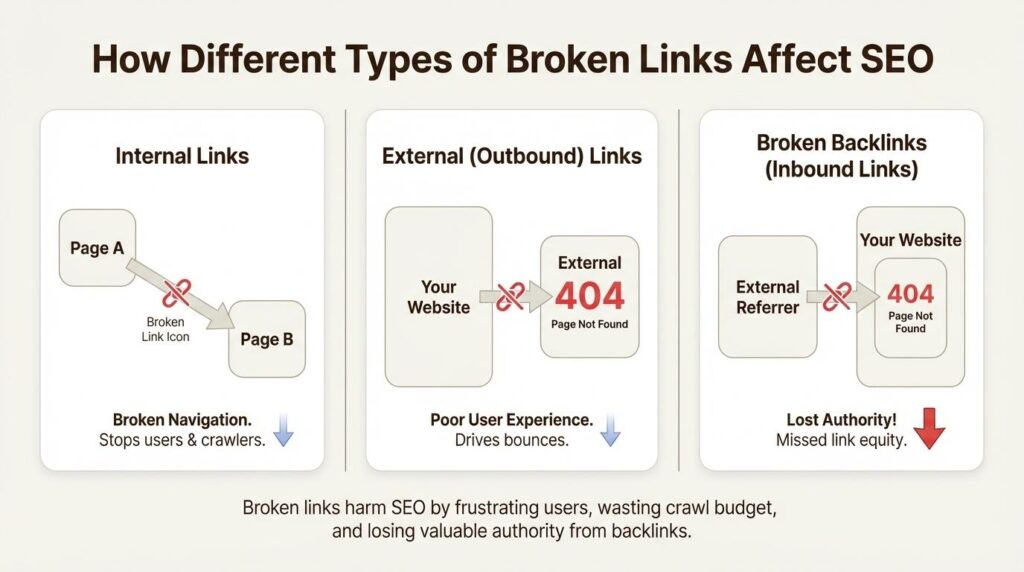
Not every broken link is the same. Understanding the different types makes troubleshooting much easier.
Internal Broken Links
Internal links connect one page of your website to another.
For example:
- Homepage → SEO Tools
- SEO Tools → Broken Link Checker
- Blog → Related Article
If one of those destination pages is deleted or renamed without updating the link, it becomes an internal broken link.
These are usually the easiest links to fix because you control your own website.
External Broken Links
External links point to another website.
For example, your article may reference:
- Research papers
- Government websites
- Statistics
- Third-party tools
If those websites remove or change their pages, your outbound links become broken.
Regular website audits help identify these issues before they affect readers.
Image Links
Images can also become broken due to:
- Deleted files
- Incorrect URLs
- Server migration
- Folder changes
- Permission issues
Broken images make a webpage look incomplete and unprofessional.
Download Links
Many websites offer downloadable resources such as:
- PDF guides
- Checklists
- Templates
- ZIP files
- Software
If these files are moved or deleted, visitors receive download errors instead of the intended resource.
Common Signs Your Website Has Broken Links
You don’t always need specialized SEO software to suspect broken links.
Some warning signs include:
- Visitors reporting missing pages.
- Google Search Console crawl errors.
- Images failing to load.
- Download buttons not working.
- Navigation links opening error pages.
- Older blog posts containing outdated references.
- Increased bounce rate on important pages.
- Website migration completed recently.
If you notice any of these issues, it’s time to scan your website using a reliable Broken Link Checker.
What Causes Broken Links?
Broken links don’t appear randomly. In most cases, they are created when changes are made to a website without updating existing URLs. Understanding these causes can help you prevent future SEO problems and reduce the amount of maintenance your website requires.
Below are the most common reasons broken links occur.
1. Deleted Pages
The most common cause of broken links is deleting webpages without updating existing links.
For example, suppose you published a blog post in 2024 and later decided to remove it because the information became outdated. Other articles on your website may still point to that deleted page.
When visitors click those links, they receive a missing-page error instead of the expected content.
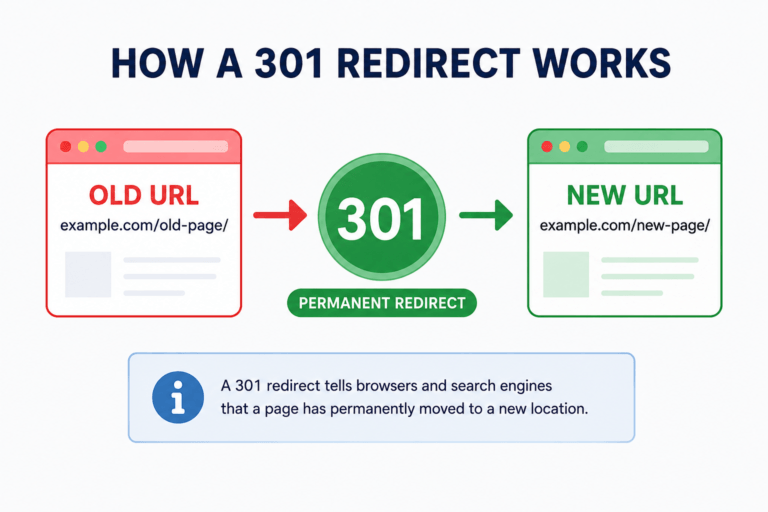
Before deleting any page, always check whether other pages on your website link to it. If they do, update those links or create a proper 301 redirect.
2. Changed URLs
Changing a page URL without setting up a redirect is another common mistake.
For example:
Old URL
https://example.com/seo-guideChanged to
https://example.com/complete-seo-guideIf the old address isn’t redirected to the new one, every existing link pointing to the original URL becomes broken.
This issue often occurs after website redesigns, permalink updates, or content restructuring.
3. Website Migration
Moving your website to:
- a new domain,
- another hosting provider,
- HTTPS,
- or a different CMS
can accidentally create hundreds of broken links if redirects are not configured correctly.
A complete website audit should always be performed after migration.
4. Removed Images or Files
Broken links aren’t limited to webpages.
They also occur when:
- Images are deleted
- PDF files are removed
- ZIP downloads disappear
- Videos are relocated
Visitors clicking these resources will receive an error instead of the expected download or media file.
5. External Websites Removing Content
Sometimes the problem isn’t on your website.
Suppose your article links to:
- research papers,
- statistics,
- government resources,
- or third-party tools.
If those websites remove or rename their pages, your outbound links become broken.
Although you can’t control external websites, you should periodically review outbound links to keep your content useful.
6. Typing Mistakes
Simple typing errors can also create broken links.
Examples include:
- Missing letters
- Extra characters
- Wrong folder names
- Incorrect file extensions
- Capitalization differences on case-sensitive servers
Even a small typo can make an otherwise valid link inaccessible.
How Broken Links Affect SEO
Broken links don’t usually cause an immediate ranking drop, but they can gradually weaken your website’s overall SEO performance.
Let’s understand how.
Poor Crawl Efficiency: Search engines discover webpages by following links.
When crawlers repeatedly encounter broken URLs, they spend time requesting pages that no longer exist instead of discovering useful content.
This can reduce crawling efficiency, especially on larger websites.
Reduced User Signals
Visitors who repeatedly encounter broken links often:
- Leave the website
- Visit fewer pages
- Spend less time reading
- Return less frequently
These behavioral signals indicate a poor user experience, which is something every website owner should work to improve.
Loss of Link Equity
Internal links pass authority from one page to another.
If an important page receives internal links that point to deleted URLs instead of live content, some of that linking value is effectively wasted.
Maintaining a healthy internal linking structure helps distribute authority across your website more efficiently.
Lower Trust
Imagine reading a detailed guide that contains several broken references.
Would you trust that website?
Probably not.
Search engines and visitors both value websites that are regularly maintained and provide a reliable browsing experience.
How to Find Broken Links
Finding broken links manually is possible, but it quickly becomes difficult as your website grows.
Fortunately, there are several effective methods.
Method 1 – Manual Checking
This approach works well for very small websites.
Simply:
- Open important pages.
- Click every internal link.
- Test every external reference.
- Verify images and downloads.
Although simple, this process becomes time-consuming for websites with dozens or hundreds of pages.
Method 2 – Google Search Console
Google Search Console reports crawling issues detected by Google.
Common reports include:
- Missing-page responses
- Pages that appear missing despite returning a successful response
- Redirect problems
- Indexed pages with issues
Checking these reports regularly helps identify broken pages that Google has already discovered.
Method 3 – Website Crawlers
Professional SEO crawlers scan your website automatically.
They can detect:
- Broken internal links
- Broken external links
- Redirect chains
- Redirect loops
- Missing resources
- Server errors
These tools save significant time compared to manual checking.
You can also use the free MeetMumtaz Broken Link Checker to review potential link issues in a page’s HTML source.
To check broken links on your website:
- Open the webpage you want to inspect and copy its HTML source.
- Visit the MeetMumtaz Broken Link Checker.
- Paste the HTML into the tool and run the analysis.
- Review flagged URLs, empty links, duplicate destinations, and other available link signals.
- Verify suspected broken destinations separately by checking their HTTP responses.
This method helps you review potential link problems without manually inspecting every anchor element in the HTML.
Important: Reviewing link markup is not the same as crawling an entire website or confirming that every destination returns a 404 error. For a complete website-wide broken link audit, use a crawler that checks actual HTTP status codes.
Common Mistakes Website Owners Make
Even experienced website owners make mistakes that create unnecessary broken links.
Avoid these common issues:
Deleting pages without redirects
Always redirect important deleted pages to the most relevant alternative.
Forgetting old blog posts
Older articles often contain outdated references that nobody checks.
Review your evergreen content regularly.
Ignoring external links
Many people only monitor internal links.
External resources also disappear over time and should be checked periodically.
Performing website migrations without testing
Always crawl your website after:
- changing hosting,
- redesigning your website,
- changing URL structure,
- enabling HTTPS,
- or switching CMS platforms.
This helps identify issues before visitors encounter them.
Relying on manual checking forever
Manual testing works for small websites but becomes impractical as your content grows.
Using a reliable scanning tool saves time and improves accuracy.
How to Fix Broken Links
Finding broken links is only half the job. Once you’ve identified them, the next step is fixing them correctly. The right solution depends on why the link is broken and whether it’s an internal or external link.
Let’s explore the most effective methods.
1. Update the Broken URL
If the destination page still exists but its URL has changed, simply replace the old link with the new one.
For example:
Instead of linking to:
https://example.com/seo-guideUpdate it to:
https://example.com/complete-seo-guideThis is the easiest and most effective solution when content has simply moved.
2. Create a 301 Redirect
If a webpage has permanently moved to a new location, create a 301 Redirect.
A 301 redirect tells both visitors and search engines that the page has permanently changed its address.
Benefits include:
- Preserves SEO value
- Passes link authority
- Prevents missing-page errors
- Improves user experience
Whenever possible, redirect users to the most relevant replacement page instead of the homepage.
3. Restore Deleted Content
Sometimes an important page is deleted by mistake.
If the page previously generated traffic, backlinks, or conversions, restoring it is often a better option than deleting it permanently.
Before removing any page, ask yourself:
- Does it receive organic traffic?
- Does another page link to it?
- Are external websites linking to it?
If the answer is yes, restoring the content may be the best decision.
4. Remove Invalid Links
Not every broken link needs to be fixed.
If a link points to outdated information that no longer exists and no suitable replacement is available, simply remove it.
This keeps your content clean and avoids sending visitors to dead pages.
5. Replace Broken External Links
External websites change frequently.
If a referenced page has disappeared, replace it with:
- an updated source,
- a more authoritative resource,
- or another reliable website covering the same topic.
Always verify external references before publishing important articles.
How to Fix Broken Links in WordPress
WordPress websites frequently develop broken links due to content updates, plugin changes, permalink modifications, and website migrations.
Follow these steps to keep your WordPress site healthy.
Step 1
Scan your website using a Broken Link Checker.
Create a list of:
- Broken internal links
- Broken external links
- Missing images
- Invalid downloads
Step 2
Review every reported URL individually.
Determine whether the page:
- Exists
- Has moved
- Has been deleted
- Requires a redirect
Step 3
Update the incorrect URLs inside:
- Posts
- Pages
- Menus
- Widgets
- Footer links
Step 4
Create 301 redirects for permanently moved pages.
Avoid redirect chains whenever possible.
Step 5
Run another scan.
Confirm every broken link has been resolved.
Best Practices for Preventing Broken Links
Fixing broken links is important, but preventing them saves even more time.
Here are some proven best practices.
Perform Regular Website Audits
Don’t wait until visitors report problems.
Schedule regular website scans to identify issues before they affect users.
Monthly audits are recommended for most websites.
Large websites may benefit from weekly scans.
Avoid Changing URLs Unnecessarily
Changing URLs creates additional maintenance work.
If a page is already indexed and performing well, avoid modifying its permalink unless necessary.
Use Permanent Redirects
Whenever a page moves permanently, always create a proper 301 redirect.
Redirecting visitors preserves both SEO value and user experience.
Check Older Content
Older blog posts often contain outdated references.
Review evergreen articles periodically and update any links that no longer work.
Monitor External Resources
External websites frequently:
- remove pages,
- change URLs,
- or discontinue services.
Regularly reviewing outbound links helps maintain article quality.
Keep Your Website Organized
A logical website structure reduces the chances of broken internal links.
Well-organized websites are easier to maintain and easier for search engines to crawl.
Professional SEO Tips
Experienced SEO professionals don’t just fix broken links—they prevent them.
Here are some practical tips.
Keep URL structures simple.
Avoid unnecessary URL changes.
Never delete high-performing pages without a replacement strategy.
Traffic is difficult to earn and easy to lose.
Monitor crawl reports regularly.
Search engine reports often identify problems before users notice them.
Review internal linking after publishing new content.
Every new article should connect naturally with existing pages.
Update old content.
Refreshing older articles often uncovers broken references that need attention.
Common Myths About Broken Links
There are several misconceptions about broken links.
Let’s clear them up.
Myth 1
“A few broken links don’t matter.”
Reality:
A single broken link isn’t a disaster, but allowing many broken links to accumulate gradually damages the user experience and the website’s quality.
Myth 2
“Broken links instantly destroy rankings.”
Reality:
SEO performance depends on many factors.
Broken links contribute to technical issues but rarely cause dramatic ranking losses on their own.
Myth 3
“Only internal links matter.”
Reality:
Both internal and external links should be monitored.
Visitors expect every link on your website to work correctly.
Myth 4
“Once fixed, broken links never return.”
Reality:
Websites constantly evolve.
Regular monitoring remains essential.
Practical Example
Imagine your website contains 500 published articles.
Each article contains approximately:
- 8 internal links
- 5 external links
That’s more than 6,500 links across the entire website.
Checking each one manually would be extremely time-consuming.
A website crawler can check links across multiple pages and help identify broken destinations. You can also use the MeetMumtaz Broken Link Checker to review link information in a page’s HTML source and identify potential issues for further verification.
Frequently Asked Questions (FAQs)
1. What is a broken link?
A broken link is a hyperlink that no longer leads to its intended destination. Instead of opening the correct webpage, it usually displays an error such as HTTP status 404, 410 Gone, or another server-related message. Broken links can occur on both internal and external webpages.
2. Why are broken links bad for SEO?
Broken links create a poor user experience and can make it harder for search engines to crawl your website efficiently. While a few broken links are unlikely to cause major ranking losses, regularly monitoring and fixing them is considered a technical SEO best practice.
3. How often should I check my website for broken links?
The ideal frequency depends on how often your website changes.
- Small websites: Once a month
- Business websites: Every two to four weeks
- News or large websites: Weekly
- eCommerce stores: Weekly or after major updates
Regular scans help identify issues before visitors encounter them.
4. What’s the difference between a broken link and an HTTP missing-page response?
A broken link is the hyperlink that points to an unavailable resource.
An HTTP 404 response is returned by the server when that resource cannot be found.
In simple terms:
Broken link → Cause
HTTP missing-page response → Result
5. Can broken links affect Google rankings?
Broken links alone rarely cause significant ranking drops. However, a large number of broken links can reduce website quality, waste crawl resources, and negatively affect user experience over time.
Maintaining healthy links supports better technical SEO.
6. What’s the difference between internal and external broken links?
Internal broken links point to missing pages on your own website.
External broken links point to pages that no longer exist on another website.
Both should be reviewed regularly to maintain a positive user experience.
7. Should I delete broken links?
Not always.
The best solution depends on the situation.
You can:
- Update the URL
- Create a 301 redirect
- Restore the deleted page
- Replace the resource
- Remove the outdated link
Choose the option that provides the best experience for users.
8. What causes broken links?
Common causes include:
- Deleted pages
- URL changes
- Website migration
- Typing mistakes
- Removed files
- Expired external resources
- Incorrect redirects
Understanding these causes helps prevent future problems.
9. Can a Broken Link Checker scan external links?
Yes.
Most professional tools scan both:
- Internal links
- External links
This allows website owners to identify outdated references across their entire website.
10. Is a Broken Link Checker necessary for small websites?
Yes.
Even small websites can develop broken links after content updates, redesigns, or URL changes.
Regular checks help maintain a professional website and improve visitor satisfaction.
Final Thoughts
Broken links are an inevitable part of managing any website. Pages evolve, content changes, URLs are updated, and external resources disappear over time. While these changes are normal, leaving broken links unresolved can gradually reduce user trust, interrupt navigation, and create unnecessary technical SEO issues.
The good news is that maintaining healthy links doesn’t have to be difficult. By performing regular website audits, updating outdated URLs, using proper redirects, and monitoring both internal and external links, you can significantly improve your website’s overall quality.
Think of broken link management as routine website maintenance rather than a one-time task. A few minutes spent reviewing links each month can prevent larger issues in the future and ensure visitors always reach the information they’re looking for.
Try the MeetMumtaz Broken Link Checker
Instead of manually checking hundreds of pages, use the MeetMumtaz Broken Link Checker to quickly scan your website for broken internal and external links.
Try the MeetMumtaz Broken Link Checker today and keep your website free from broken links.
Whether you manage a blog, business website, online store, or portfolio, regularly checking your links can improve user experience and support a healthier website.
Try the MeetMumtaz Broken Link Checker today and keep your website free from broken links.
Recommended Reading
After learning about broken links, you may also find these topics useful:
- XML Sitemap Guide
- Robots.txt Guide
- Meta Tags Guide
- Canonical URL Guide
- Technical SEO Basics
- Website Audit Checklist
(We’ll add internal links to these articles once they are published.)
Understanding the content may improve visibility in search results.