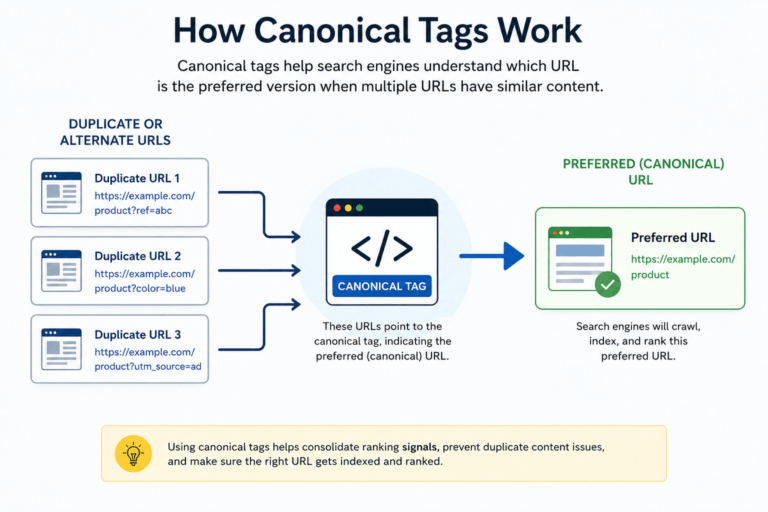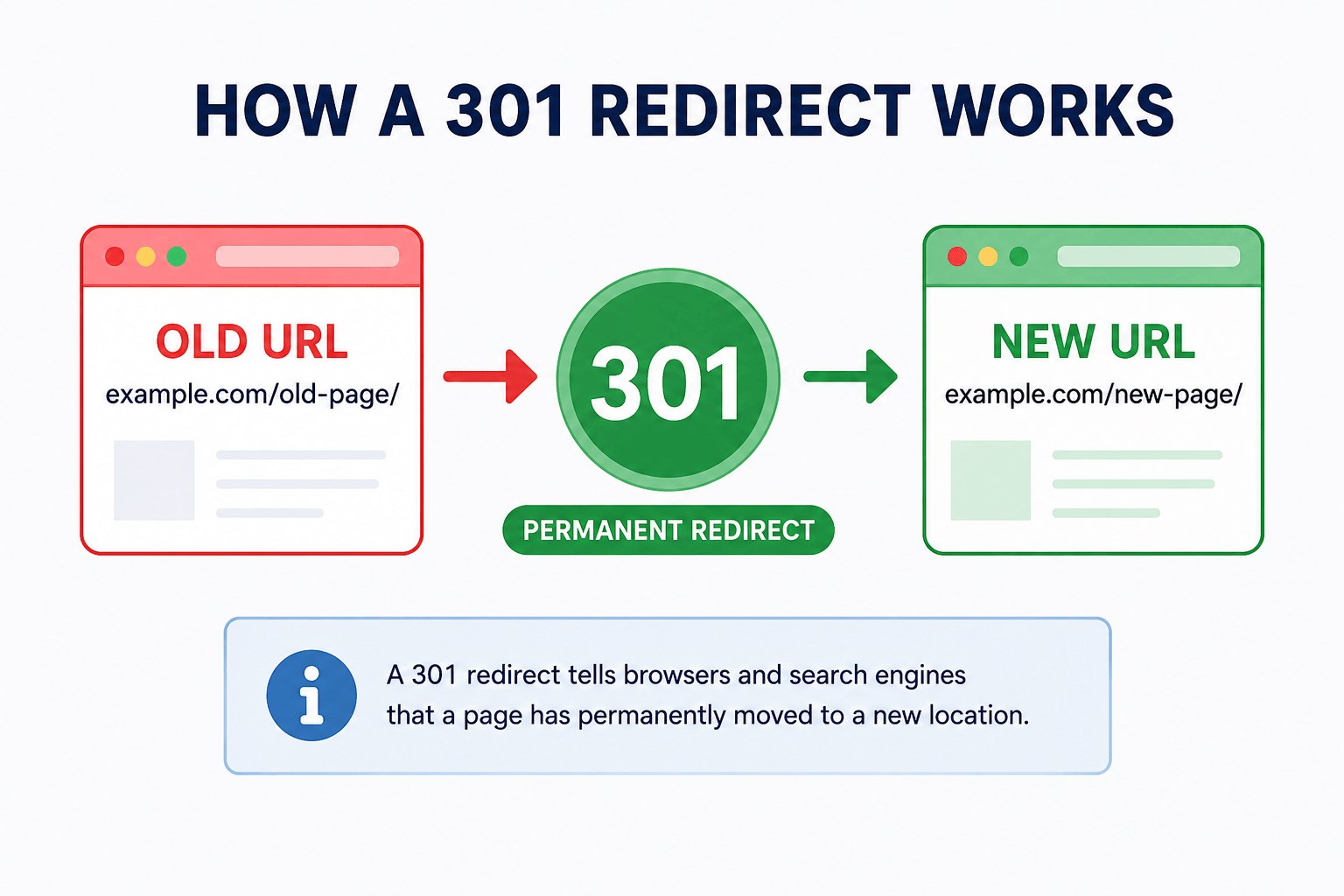
Changing a URL might look like a small website update, but doing it without a proper redirect can cause broken links, send visitors to 404 pages, and make it harder for search engines to understand where your content has moved.
A 301 Redirect Generator simplifies this process by helping you create permanent redirect rules that send visitors and search engines from an old URL to the correct new destination.
Whether you’re changing a page slug, reorganizing your website, merging similar content, or migrating pages, understanding 301 redirects can help you maintain a cleaner website structure and avoid unnecessary SEO problems.
In this guide, you’ll learn how 301 redirects work, when to use them, how to create a 301 redirect in .htaccess, how RedirectMatch works, how Google treats 301 redirects, and what happens to backlinks when a URL is redirected.
What Is a 301 Redirect?
A 301 redirect is an HTTP redirect that indicates a page or resource has permanently moved to a different URL.
For example, suppose this page no longer exists:
example.com/old-page/
and its replacement is:
example.com/new-page/
Instead of allowing visitors to land on a 404 page, you can create a 301 redirect that automatically sends them to the replacement page.
The process looks like this:
Old URL → 301 Permanent Redirect → New URL
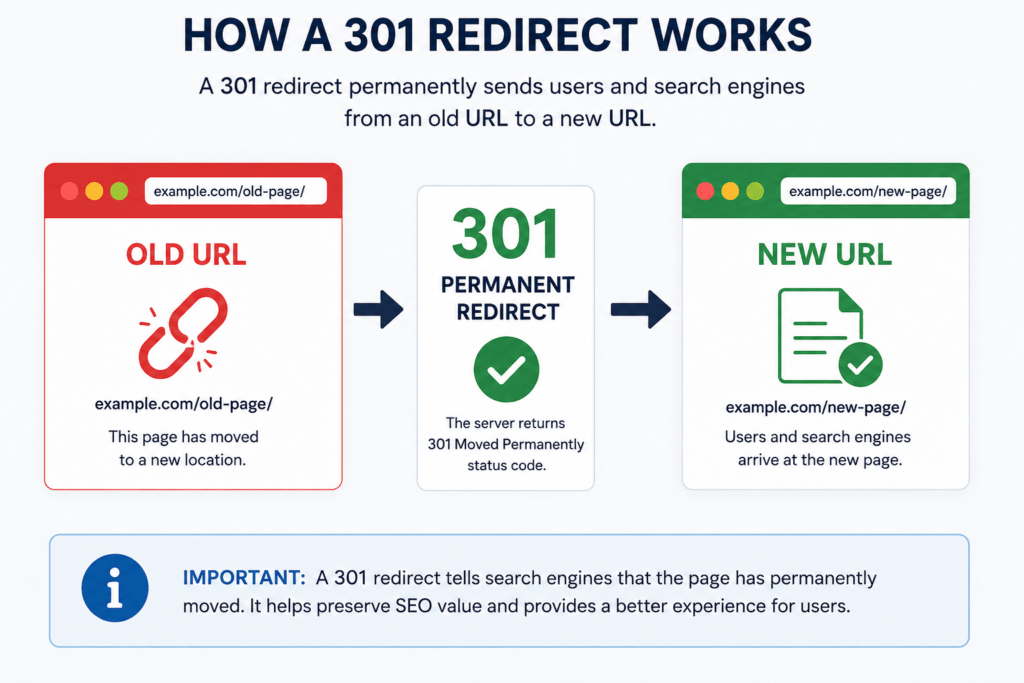
Use the “How a 301 Redirect Works” image we just created.
Filename: how-301-redirect-works.webp
ALT: How a 301 redirect works from an old URL to a new URL using a permanent redirect
Caption: How a 301 redirect permanently sends visitors and search engines from an old URL to a new URL.
When a browser or search engine requests the old address, the server responds with a 301 status and provides the new destination.
This makes the transition much smoother than simply deleting the old page.
Why Are 301 Redirects Important?
URLs change for many reasons. You might redesign your website, improve your URL structure, delete outdated pages, move content, or combine several articles into one stronger resource.
Without redirects, old links pointing to those URLs may stop working.
A properly configured 301 redirect can help:
- Send visitors to the correct replacement page.
- Reduce unnecessary 404 errors.
- Preserve useful navigation paths.
- Help search engines understand permanent URL changes.
- Maintain the value of relevant links pointing to an old URL.
- Make website migrations and restructuring easier to manage.
However, redirects should have a logical destination. Redirecting every deleted page to the homepage, for example, is generally less useful than sending users to the closest relevant replacement.
What Is a 301 Redirect Generator?
A 301 Redirect Generator helps you prepare redirect rules without manually writing the complete server configuration yourself.
Typically, you provide an old URL and the destination URL, and the tool generates the redirect rule that you can use for your website.
This is particularly useful when you’re working with .htaccess redirects and don’t want to repeatedly write the syntax by hand.
Try the MeetMumtaz 301 Redirect Generator
You can use our 301 Redirect Generator to create redirect rules for your URLs.
Internal link:
Anchor text: 301 Redirect Generator
URL: /301-redirect-generator/
Enter your old and new URLs, generate the rule, review it carefully, and then implement it in the appropriate location on your website.
Important: Always create a backup before modifying server configuration files such as
.htaccess.
When Should You Use a 301 Redirect?
A 301 redirect is appropriate when the URL change is intended to be permanent.
Common examples include:
Changing a Page URL
Suppose you change:
example.com/best-seo-tips-2025/
to:
example.com/seo-tips/
The old address may already appear in search results, bookmarks, internal links, or backlinks. A 301 redirect can send those requests to the new URL.
Moving Content to Another Page
Sometimes two pages cover almost the same subject. Instead of maintaining both, you may consolidate the useful information into one stronger page and redirect the outdated URL to it.
Deleting Outdated Content
If an old page is no longer useful but you have a closely related replacement, redirecting it can provide visitors with a better experience than a dead page.
Changing Your Website Structure
A website might move from:
example.com/blog/seo/guide/
to:
example.com/seo-guide/
Permanent redirects help connect the old structure with the new one.
Website or Domain Migration
Redirects become especially important when pages move between domains or when a website undergoes a major URL restructuring.
The goal should be to map old URLs to their most relevant new equivalents, rather than sending everything to one generic destination.
301 Redirect vs 302 Redirect: What’s the Difference?
301 and 302 redirects can appear similar to visitors because both can send a browser from one URL to another.
The key difference is the intention behind the move.
| Feature | 301 Redirect | 302 Redirect |
|---|---|---|
| Meaning | Permanent move | Temporary move |
| Old URL | Permanently replaced | Expected to remain relevant |
| Typical use | URL changes, migrations, content consolidation | Temporary campaigns, testing or temporary page moves |
| Search engine signal | Destination is intended to replace the old URL | Move is intended to be temporary |
Use a 301 redirect when you expect the new destination to permanently replace the old URL.
Use a temporary redirect when you genuinely expect the original URL to be used again.
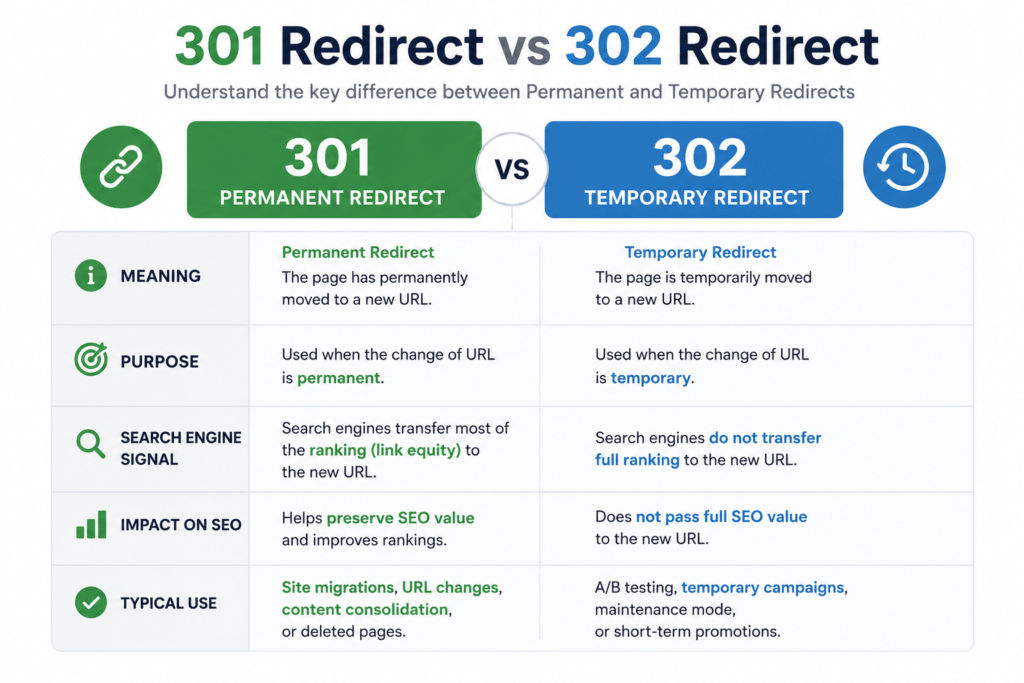
This should be a single comparison graphic only.
Image concept:
Large 301 card on the left labelled Permanent, large 302 card on the right labelled Temporary, with 3 short differences underneath.
Filename: 301-vs-302-redirect.webp
ALT: 301 redirect vs 302 redirect showing permanent and temporary URL redirects
Caption: The main difference between 301 and 302 redirects is whether the URL move is permanent or temporary.
How to Create a 301 Redirect in .htaccess
The keyword 301 redirect htaccess commonly comes up because .htaccess is one method used to configure redirects on Apache web servers.
A basic redirect can look like this:
Redirect 301 /old-page/ https://example.com/new-page/Here:
Redirect 301 identifies the permanent redirect.
/old-page/ is the old path.
https://example.com/new-page/ is the destination.
For example, if:
Old URL:
New URL:
The rule could be:
Redirect 301 /old-seo-guide/ https://example.com/seo-guide/After implementing the rule correctly, visiting the old URL should send the visitor to the new destination.
Be Careful When Editing .htaccess
The .htaccess file can control important server behavior. Incorrect syntax can cause unexpected redirects or even make parts of a website inaccessible.
Before making changes:
- Download or create a backup of the existing
.htaccessfile. - Add only the redirect rules you need.
- Save the changes.
- Test the old URL.
- Confirm that it reaches the exact intended destination.
Avoid changing unrelated .htaccess rules unless you understand what they do.
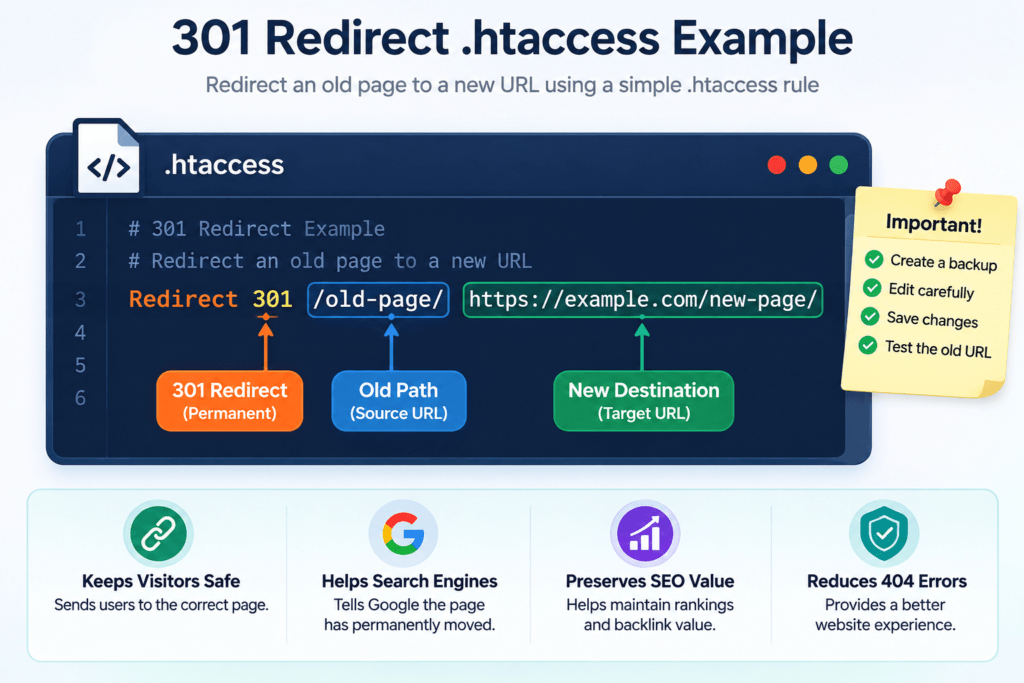
This should be one standalone .htaccess illustration, not multiple screenshots.
Image concept: A clean code-editor window displaying:
Redirect 301 /old-page/ https://example.com/new-page/
with small labels identifying Old Path, 301 Redirect, and New Destination.
Filename: 301-redirect-htaccess-example.webp
ALT: 301 redirect htaccess rule example for redirecting an old page to a new URL
Caption: Example of a simple .htaccess 301 redirect rule on an Apache server.
What Is htaccess RedirectMatch?
For straightforward one-to-one redirects, a basic Redirect 301 rule may be enough. More complex URL patterns may require pattern-based matching.
Apache’s RedirectMatch directive can match requested URL paths using regular expressions.
A simplified example is:
RedirectMatch 301 ^/old-section/(.*)$ https://example.com/new-section/$1This type of rule can be useful when an entire group of URLs follows a predictable pattern.
For example:
/old-section/page-one/
could map to:
/new-section/page-one/
while:
/old-section/page-two/
could map to:
/new-section/page-two/
without writing a completely separate rule for every URL.
However, pattern-based redirects require more care than simple one-to-one redirects. A poorly constructed expression can unintentionally redirect URLs you never intended to change.
For a small number of pages, explicit individual redirects are often easier to review and troubleshoot.
How Does Google Handle 301 Redirects?
When you permanently move a page, search engines need to understand that the old URL has been replaced by a new one. A properly implemented 301 redirect provides that signal.
When Google encounters a 301 redirect, it can follow the redirect to the destination URL and process the new location as part of its normal crawling and indexing systems.
For example:
example.com/old-seo-guide/
301 Redirect ↓
example.com/new-seo-guide/
Over time, Google may replace the old URL with the new destination in its search results when the redirect and other signals consistently indicate that the move is permanent.
This is why Google 301 redirects are especially important during URL changes, website restructuring, HTTPS migrations, and content consolidation.
How Long Does Google Take to Process a 301 Redirect?
There is no single fixed timeframe for every website.
Google first needs to crawl the old URL, discover the redirect, crawl or otherwise process the destination, and update its indexing signals. The timing can therefore vary depending on factors such as crawl frequency, site size, internal linking, sitemap updates, and how clearly the new URL replaces the old one.
After implementing an important redirect, make sure that:
- The new URL returns a successful response.
- Internal links point directly to the new URL.
- Your XML sitemap contains the preferred new URL rather than obsolete redirected URLs.
- Canonical signals are consistent with the new location.
- The old URL redirects directly to the intended destination.
- You avoid unnecessary redirect chains.
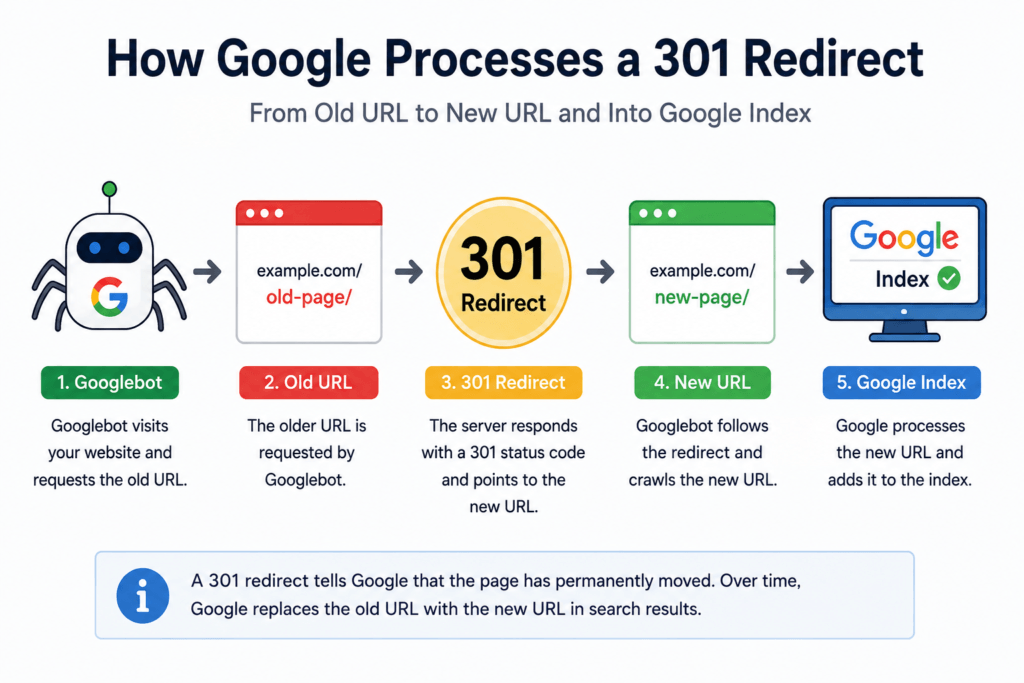
Image concept: A single flow diagram showing:
Googlebot → Old URL → 301 Redirect → New URL → Google Index
Do not combine it with other diagrams.
Filename: google-301-redirect-process.webp
ALT: How Google processes a 301 redirect from an old URL to a new URL
Caption: A 301 redirect helps Google understand that an old URL has permanently moved to a new location.
Do 301 Redirects Pass Backlink Value?
This brings us to an important related topic: 301 redirect backlinks.
Suppose another website links to:
example.com/old-page/
but you later move that content to:
example.com/new-page/
Without a redirect, users following the backlink may reach a missing page. With a correctly implemented 301 redirect, visitors can reach the replacement URL and search engines can understand the relationship between the old and new locations.
This makes 301 redirects particularly important when changing URLs that already have valuable backlinks.
Relevance Matters When Redirecting Backlinks
A redirect should lead to a destination that genuinely replaces or closely matches the old content.
For example, if you have:
example.com/technical-seo-guide/
and replace it with:
example.com/technical-seo/
redirecting the old page to the updated technical SEO resource makes logical sense.
But redirecting an unrelated page to your homepage merely because the old URL has backlinks is not a good content-mapping strategy.
The destination should satisfy approximately the same user intent whenever possible.
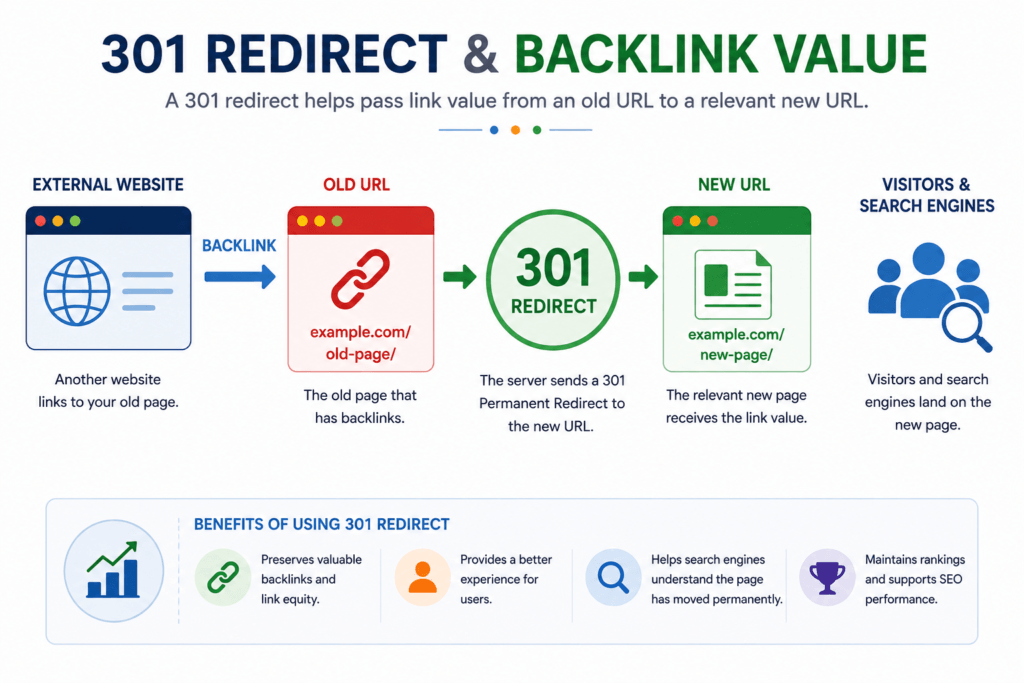
Image concept: One simple backlink-flow illustration:
External Website → Backlink → Old URL → 301 → Relevant New URL
Show a small SEO/link-value flow underneath.
Filename: 301-redirect-backlink-value.webp
ALT: 301 redirect backlink flow from an old URL to a relevant new page
Caption: Redirecting an old URL to a relevant replacement helps preserve a useful path for visitors arriving through existing backlinks.
Can a 301 Redirect Cause an SEO Penalty?
Another useful long-tail topic is 301 redirect SEO penalty.
A normal, legitimate 301 redirect is a standard web mechanism. Using one because a page has genuinely moved does not by itself mean that a website receives an SEO penalty.
Problems are more likely to arise from poor redirect implementation or manipulative practices, rather than simply from using the 301 status code.
For example, you should avoid treating redirects as a shortcut for sending unrelated URLs to pages that do not satisfy the original intent.
301 Redirect Mistakes That Can Hurt SEO
Several redirect mistakes can create crawling, indexing, or user-experience problems.
1. Redirecting Every Deleted Page to the Homepage
Imagine you remove 100 unrelated pages and redirect all of them to:
example.com/
That may seem convenient, but the homepage often isn’t an appropriate replacement for those pages.
Where possible, redirect an old URL to its closest relevant replacement. If no useful replacement exists, a redirect may not always be the best solution.
2. Creating Redirect Chains
A redirect chain happens when one URL redirects to another URL, which then redirects again.
For example:
Page A → Page B → Page C → Page D
If Page D is the actual destination, a cleaner setup is usually:
Page A → Page D
Redirect chains create unnecessary extra requests and make URL migrations harder to maintain.
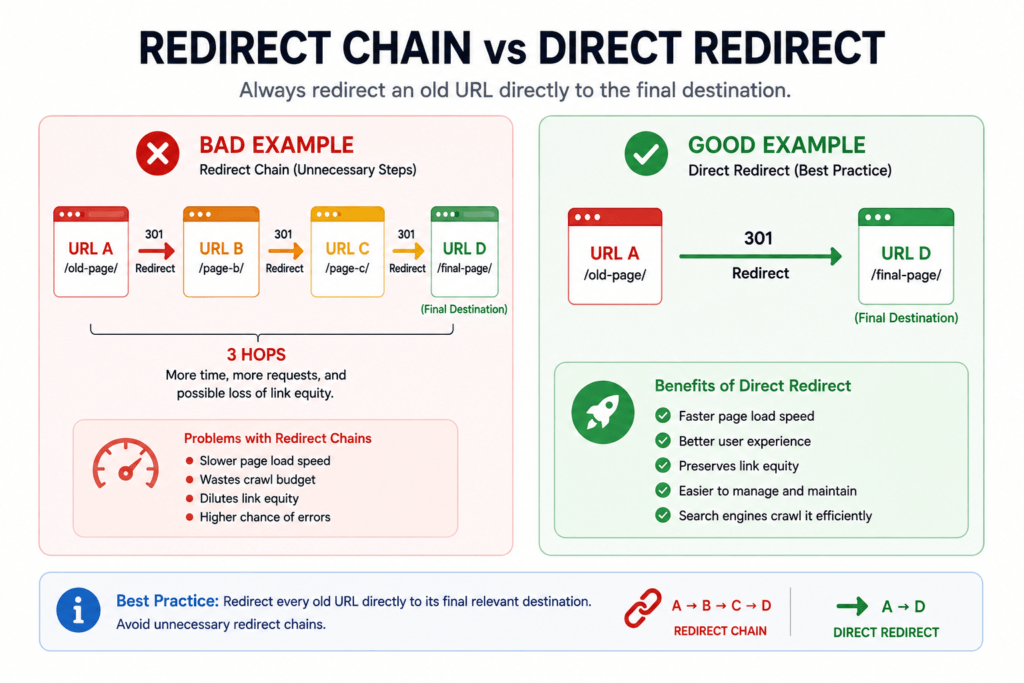
Image concept: One comparison graphic:
BAD: URL A → URL B → URL C → URL D
versus
GOOD: URL A → URL D
Filename: 301-redirect-chain-example.webp
ALT: 301 redirect chain compared with a direct redirect to the final URL
Caption: Where possible, redirect an old URL directly to its final relevant destination instead of creating unnecessary redirect chains.
3. Creating Redirect Loops
A redirect loop is more serious.
For example:
Page A → Page B
and:
Page B → Page A
The browser keeps being redirected between the URLs and cannot reach a final page.
Redirect loops need to be corrected as soon as they are discovered.
4. Redirecting to Irrelevant Content
Suppose an old page discusses:
WordPress image optimization
but you redirect it to a page about:
email marketing software
The topics and user intent are unrelated.
A better redirect destination would be an updated image optimization article or another closely related resource.
5. Leaving Internal Links Pointing to Redirected URLs
A 301 redirect does not mean you should keep using the old URL throughout your website.
If an internal link currently points to:
/old-page/
and /old-page/ redirects to:
/new-page/
update the internal link so that it points directly to /new-page/.
This removes an unnecessary redirect step and keeps your internal linking structure cleaner.
6. Forgetting to Update the XML Sitemap
Your sitemap should generally contain the canonical URLs that you want search engines to crawl and index.
After a permanent URL migration, review your sitemap and make sure obsolete redirected URLs are not unnecessarily being submitted as current pages.
If you’re working with sitemap files, you can also use our XML Sitemap Generator to create a structured sitemap for your website.
Internal link:
Anchor: XML Sitemap Generator
URL: /xml-sitemap-generator/
7. Ignoring Canonical Tags
Redirects and canonical signals should not unnecessarily contradict one another.
After moving a page, review the canonical tag on the destination.
You can use the Canonical Tag Generator when you need help preparing a canonical element for a preferred URL.
Internal link:
Anchor: Canonical Tag Generator
URL: /canonical-tag-generator/
What Is a Redirect Chain?
Because redirect chains are a common technical SEO problem, they deserve a closer look.
Consider this:
old-page → updated-page → new-page → final-page
A visitor may eventually reach the final page, but the request passes through several unnecessary steps first.
A better setup would generally send the old URL directly to the final destination:
old-page → final-page
When reorganizing an older website, review existing redirect rules instead of continuously adding new redirects on top of previous ones.
What Is a Redirect Loop?
A redirect loop occurs when the redirect rules create a cycle with no reachable final destination.
For example:
URL A → URL B → URL C → URL A
Because the request eventually returns to the first URL, the browser cannot complete the navigation normally.
Common causes can include conflicting redirect rules, HTTPS or www configuration problems, WordPress settings, server configuration, or overlapping redirect systems.
If a browser reports that a page redirected too many times, review the redirect path before adding more rules.
How to Test a 301 Redirect
Creating a redirect is only half the job. Always test it after implementation.
A simple manual check is:
- Open a private/incognito browser window.
- Enter the old URL.
- Confirm that you arrive at the intended new URL.
- Check that the destination loads correctly.
- Make sure you were not sent through several unnecessary URLs.
For a more technical check, inspect the HTTP response and confirm that the old URL returns the expected redirect status and destination.
What Should a Correct Redirect Look Like?
Ideally:
Old URL → 301 → Final New URL → 200 OK
Not:
Old URL → 301 → URL 2 → 301 → URL 3 → 301 → Final URL
The first setup is simpler and easier to maintain.
301 Redirect Best Practices
Before implementing permanent redirects across your website, keep these practical guidelines in mind:
- Use a 301 when the move is genuinely permanent.
- Redirect old pages to the most relevant replacement.
- Prefer direct redirects over long redirect chains.
- Test every important redirect after implementation.
- Update internal links to point directly to new URLs.
- Update XML sitemaps after URL changes.
- Review canonical tags on destination pages.
- Keep a backup before editing
.htaccess. - Avoid redirect loops.
- Maintain a record of redirects during large migrations.
For large migrations, creating an old URL → new URL mapping sheet before making changes can save a great deal of troubleshooting later.
Create Your Redirect with the 301 Redirect Generator
If you don’t want to manually prepare every redirect rule, use the MeetMumtaz 301 Redirect Generator.
Internal link:
Anchor: 301 Redirect Generator
URL: /301-redirect-generator/
The basic workflow is simple:
Enter Old URL → Enter New URL → Generate Redirect → Review Code → Implement → Test
The generator can save time when preparing redirect rules, but you should still review the generated output and test your website after implementation.
301 Redirect Troubleshooting: What to Check When a Redirect Doesn’t Work
Even a correctly planned redirect can fail because of a small configuration mistake. If your 301 redirect is not working as expected, check the basics before adding more rules.
The Old URL Still Opens Normally
If the old URL loads without redirecting, first confirm that the redirect rule has actually been saved in the correct server configuration file.
For .htaccess redirects, also check that:
- The website is running on a server where
.htaccessrules are applicable. - The redirect syntax is correct.
- The old path matches the requested URL.
- Another rule is not overriding your redirect.
- Server or website caching is not showing an older response.
After making changes, clear relevant caches and test the old URL again.
The Redirect Goes to the Wrong Page
Check the destination URL carefully.
A small typo, incorrect path, HTTP/HTTPS mismatch, or conflicting redirect rule can send users somewhere you did not intend.
The destination should also be relevant to the original page. A technically working redirect is not necessarily a good redirect if it sends visitors to unrelated content.
The Browser Says “Too Many Redirects”
This commonly indicates a redirect loop or conflicting rules.
For example:
Page A → Page B → Page A
The browser never reaches a final destination.
Review your server rules, WordPress URL settings, HTTPS configuration, CDN rules, and any redirect plugins that may also be handling the same URLs.
The Redirect Works, but There Are Multiple Hops
Test the complete redirect path.
If you find:
Old URL → URL B → URL C → Final URL
update the redirect configuration where practical so the original URL points directly to the final destination:
Old URL → Final URL
This keeps the setup simpler and avoids unnecessary redirect chains.
301 Redirect Checklist
Before considering a URL migration complete, use this checklist:
| Check | What to Verify |
|---|---|
| Redirect type | Use 301 when the move is permanent |
| Old URL | Confirm the exact old path |
| New URL | Make sure the destination works |
| Relevance | Redirect to the closest relevant replacement |
| HTTP status | Confirm the old URL returns the intended redirect |
| Final response | Destination should load successfully |
| Redirect chain | Avoid unnecessary intermediate redirects |
| Redirect loop | Make sure URLs do not redirect back to each other |
| Internal links | Update links to point directly to the new URL |
| XML sitemap | Replace obsolete URLs with preferred current URLs |
| Canonical tag | Check that canonical signals support the preferred URL |
| Backlinks | Pay particular attention to old URLs with valuable links |
| Testing | Test important redirects after implementation |
| Backup | Back up configuration files before editing |
For a large website migration, maintaining a spreadsheet containing Old URL, New URL, Redirect Status, and Test Result can make the process much easier to manage.
Should You Keep 301 Redirects Permanently?
Because a 301 communicates a permanent move, you generally should not remove an important redirect immediately after search engines discover the new URL.
Old URLs can continue receiving requests from bookmarks, old internal references, external backlinks, cached pages, and other sources long after a migration.
For important URL changes, keeping the redirect in place for the long term is often the safer practical approach, particularly when the old address continues to receive traffic or backlinks.
The larger point is simple: don’t treat a redirect as something that can automatically be removed as soon as the new URL appears in search results.
Do You Need a 301 Redirect for Every Deleted Page?
No.
A deleted URL does not automatically need to redirect somewhere.
Ask:
Is there a genuinely relevant replacement for this page?
If yes, a 301 redirect may provide a useful path to the replacement.
If no appropriate replacement exists, forcing the visitor onto an unrelated page can create a poor experience.
This is particularly important during large website cleanups. Redirect mapping should be based on content relevance and user intent, not simply on finding somewhere to send every deleted URL.
301 Redirect Examples
Here are a few common scenarios.
Example 1: Changing a Blog Post URL
Old:
example.com/old-seo-tips/
New:
example.com/seo-tips/
A permanent redirect is appropriate when the new page replaces the old one.
Example 2: Consolidating Two Similar Articles
Suppose you have:
example.com/seo-basics/
and:
example.com/beginners-seo-guide/
You combine the useful information into:
example.com/seo-guide/
The outdated URLs can be mapped to the consolidated resource when it appropriately replaces them.
Example 3: Redirecting a Page with Backlinks
Old:
example.com/technical-seo-checklist-2024/
New:
example.com/technical-seo-checklist/
If external websites still link to the old URL, a 301 redirect backlink path allows those visitors to reach the current relevant resource.
Example 4: Moving an Entire Section
Old structure:
example.com/resources/seo/page-name/
New structure:
example.com/seo/page-name/
If many URLs follow the same predictable structure, carefully planned pattern-based redirects such as htaccess RedirectMatch may be more efficient than manually creating hundreds of individual rules.
Pattern-based rules should always be tested carefully before being applied broadly.
Frequently Asked Questions About 301 Redirects
What is a 301 Redirect Generator?
A 301 Redirect Generator is a tool that helps create permanent redirect rules by using information such as an old URL and its new destination. It reduces the need to manually write redirect syntax every time you move a URL.
Does a 301 redirect permanently redirect a URL?
Yes. HTTP status code 301 indicates that the requested resource has been permanently moved to another location.
Is a 301 redirect good for SEO?
301 redirects are useful for SEO when they correctly represent a permanent URL move. They help search engines and users find the replacement URL instead of reaching an outdated or missing page.
The quality of the implementation still matters. Relevant destinations, direct redirects, updated internal links, and consistent canonical signals are important.
Does a 301 redirect pass backlinks?
When a page with backlinks permanently moves, a properly implemented 301 redirect helps search engines and visitors follow those links to the replacement URL.
Redirecting to a relevant replacement is important. A redirect should not be used simply to funnel unrelated backlinks to an arbitrary page.
Can a 301 redirect cause an SEO penalty?
Using a legitimate 301 redirect for a genuine permanent move does not itself constitute an SEO penalty.
Problems can instead come from poor or manipulative redirect practices, such as irrelevant destinations, confusing redirect chains, loops, or deceptive behavior.
What is the difference between a 301 and 302 redirect?
A 301 redirect represents a permanent move, while a 302 redirect represents a temporary move.
Choose the status according to what is actually happening with the URL rather than selecting one solely for perceived SEO benefits.
How do I create a 301 redirect in .htaccess?
A basic Apache .htaccess 301 redirect can use syntax such as:
Redirect 301 /old-page/ https://example.com/new-page/Always back up your existing .htaccess file before modifying it and test the redirect afterward.
What is htaccess RedirectMatch?
RedirectMatch is an Apache directive that can use regular-expression patterns to redirect groups of matching URLs.
It can be useful during structured URL migrations, but pattern-based redirects should be tested carefully because an overly broad rule may affect unintended URLs.
How does Google handle 301 redirects?
When Google discovers a 301 redirect, it can follow the redirect and process the destination as the permanent replacement. Updating search results and related signals can take time because crawling and indexing are not instantaneous.
Should I redirect a deleted page to my homepage?
Only when the homepage is genuinely an appropriate replacement, which is often not the case.
Usually, the better destination is the closest relevant page. If there is no suitable replacement, forcing an unrelated homepage redirect may not help the visitor.
Can I have multiple 301 redirects?
Yes. Websites can have many permanent redirects.
The important distinction is between having many independent, necessary redirects and creating long redirect chains where one redirect unnecessarily leads through several other redirected URLs.
Final Thoughts
A URL change should not end with simply deleting the old address and publishing a new one.
A properly planned 301 redirect creates a clear path between the two.
For permanent URL changes, focus on three things:
Relevance → Direct Redirect → Testing
Send the old URL to the closest appropriate replacement, avoid unnecessary redirect chains, update your internal links and sitemap, and test the final result.
For websites undergoing a larger migration, create your redirect map before changing the URL structure. This makes it much easier to protect important pages, existing backlinks, and user journeys.
Create Your 301 Redirect
Instead of manually preparing every redirect rule, use the MeetMumtaz 301 Redirect Generator to generate the code you need.
Internal link to add:
Anchor text: 301 Redirect Generator
URL: /301-redirect-generator/
Enter your old URL and new destination, generate the redirect rule, review it, implement it carefully, and test the old URL afterward.