

What is internal links is a common question when you first start learning SEO. Internal links are hyperlinks that connect one page of your website to another page on the same domain, helping users navigate your content and search engines understand your website structure.
If you are learning SEO, you may be wondering what internal links are and why they matter for your website. Internal links connect one page of your website to another page on the same domain. They help visitors discover related content while also helping search engines understand your website’s structure, page relationships, and content hierarchy.
A well-planned internal linking strategy can make a website easier to navigate, distribute authority between relevant pages, and help search engines discover important content. However, simply adding large numbers of links is not enough. The destination page, placement, context, and anchor text all matter.
What Is Internal Links and How Does Internal Linking Work?
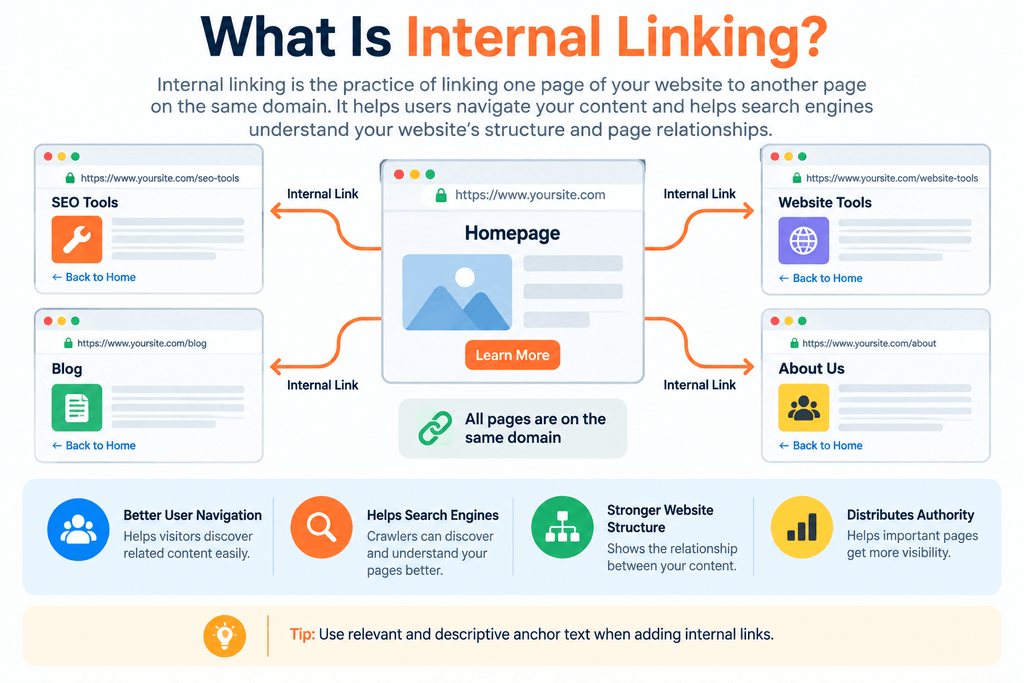
To understand what internal linking is, think of your website as a network of connected pages.
An internal link takes a visitor from one page on your domain to another page on the same domain. For example, if a blog post on MeetMumtaz links to the SEO Tools page, that is an internal link because both pages belong to the same website.
Internal linking can appear in several places, including:
- Main navigation menus
- Blog articles
- Related-post sections
- Category pages
- Breadcrumbs
- Sidebars
- Footer navigation
- Contextual links within paragraphs
Contextual internal links are particularly useful because they can direct readers to additional information exactly when that information is relevant.
Why Are Internal Links Important for SEO?
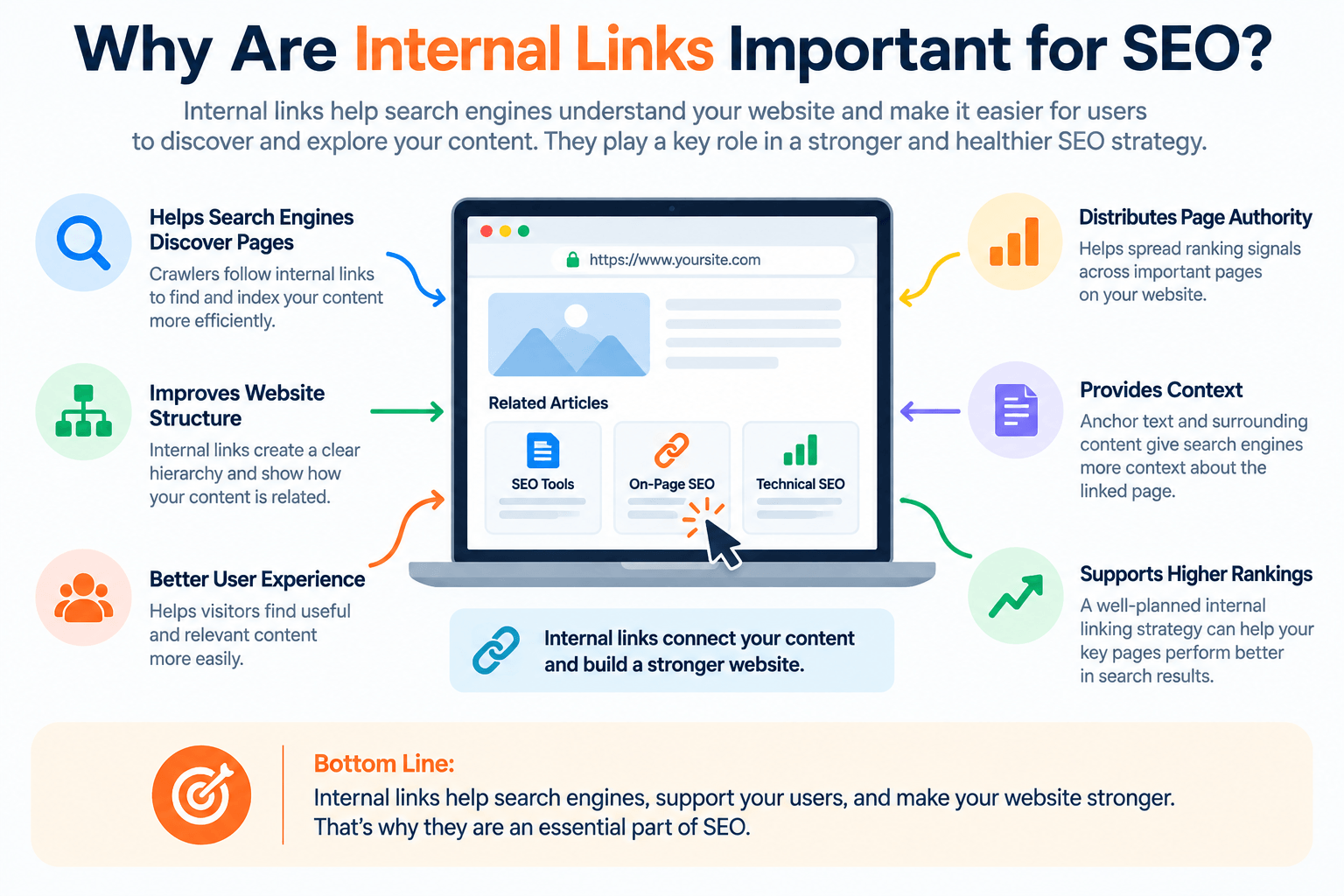
Internal links serve both users and search engines.
For visitors, they provide natural pathways to related pages instead of forcing users to search for additional information manually.
For search engines, internal links provide connections between URLs that can help crawlers discover pages and understand how different pieces of content relate to each other.
A logical internal linking structure can support:
Understanding what is internal links also helps you see why these connections are important for SEO and website navigation.
Page Discovery
Search-engine crawlers follow links to discover content. A useful internal link can provide another path to a page that might otherwise be difficult to find.
Website Structure
Internal links help establish relationships between your homepage, category pages, articles, tools, services, and other content.
Context
The surrounding content and clickable text can provide additional context about the destination page.
User Navigation
Relevant links make it easier for visitors to continue exploring your website.
Distribution of Internal Authority
Links can pass signals between pages. Strategic internal linking can therefore help important pages become better connected within the overall site architecture.
What Is Anchor Text?
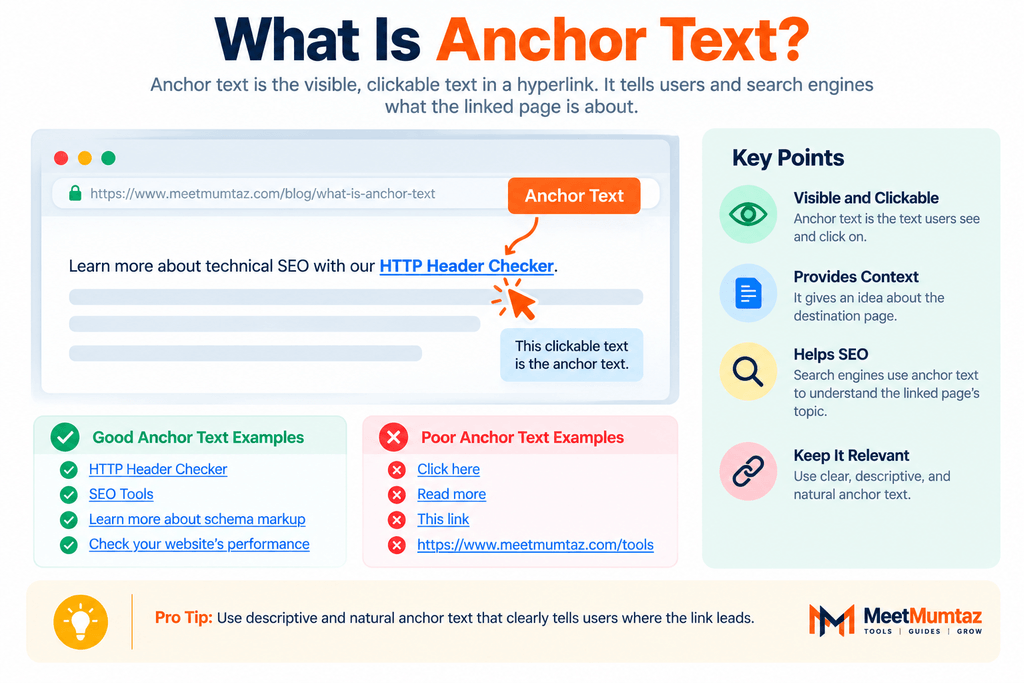
Another important concept is what anchor text is.
Anchor text is the visible, clickable text of a hyperlink.
For example:
Check our HTTP Header Checker to inspect HTTP response headers.
Here, HTTP Header Checker is the anchor text.
The user sees those words instead of seeing a long URL, and the text provides an indication of what they can expect after clicking the link.
Good anchor text should normally be descriptive, relevant, and natural within the surrounding sentence.
What Is a Text Anchor?
If you are asking what a text anchor is, it generally refers to the clickable words or phrase used to create a hyperlink.
Consider this sentence:
Learn more with our 301 Redirect Generator.
The words 301 Redirect Generator act as the text anchor and point users toward the relevant destination.
A text anchor should make sense to a reader even before they click it.
Generic phrases such as “click here” can sometimes be appropriate, but descriptive anchor text often provides more useful context.
Internal Links vs External Links
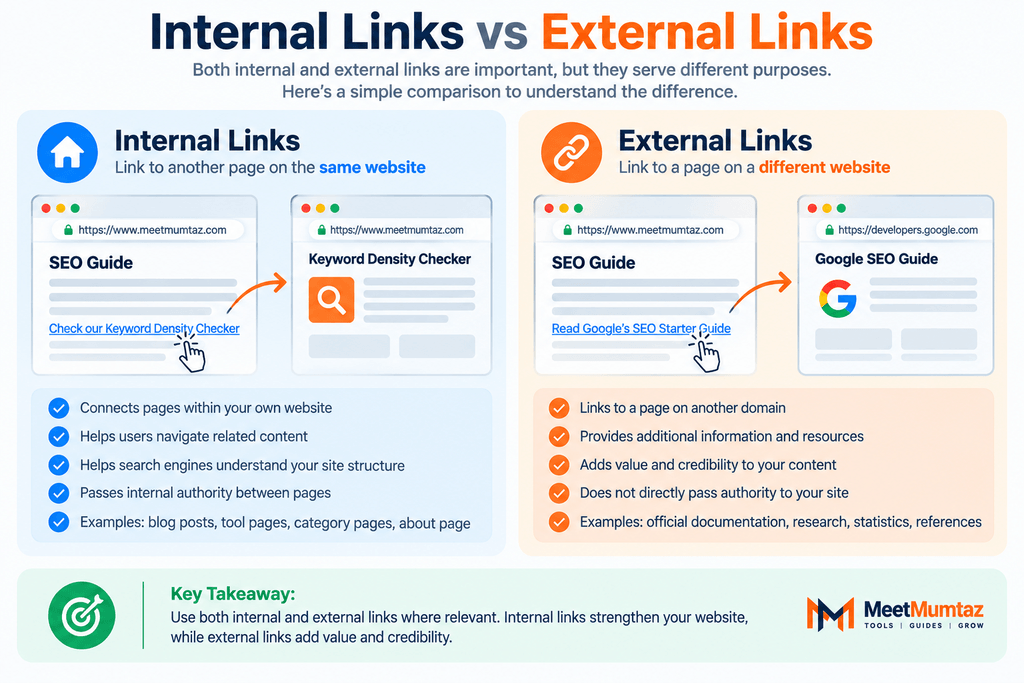
Internal and external links serve different purposes.
An internal link points to another URL on your own website:
meetmumtaz.com/page-a/ → meetmumtaz.com/page-b/
An external link points from your website to another domain:
meetmumtaz.com/page-a/ → example.com/resource/
Internal links help users navigate your own content and establish connections among your pages. External links can direct readers to useful third-party references, research, documentation, or supporting resources.
Once you understand what is internal links are, the difference between internal and external links becomes much easier to recognize.
A healthy content strategy can use both where they genuinely benefit the reader.
Different Types of Internal Links
Not every internal link serves the same purpose.
Navigational Links
These are commonly found in headers and menus. They connect users with major sections of a website.
Contextual Links
Contextual links appear naturally within page or article content and point to related resources.
For SEO-focused content, these can be particularly valuable because the link appears within relevant surrounding text.
Breadcrumb Links
Breadcrumbs show a visitor’s position within the site’s hierarchy and provide links back to higher-level sections.
Footer Links
Footers commonly contain links to important pages such as About, Contact, Privacy Policy, Terms, or major website sections.
Related Content Links
These direct visitors to additional articles, tools, products, or resources connected to the current topic.
What Makes Good Anchor Text?
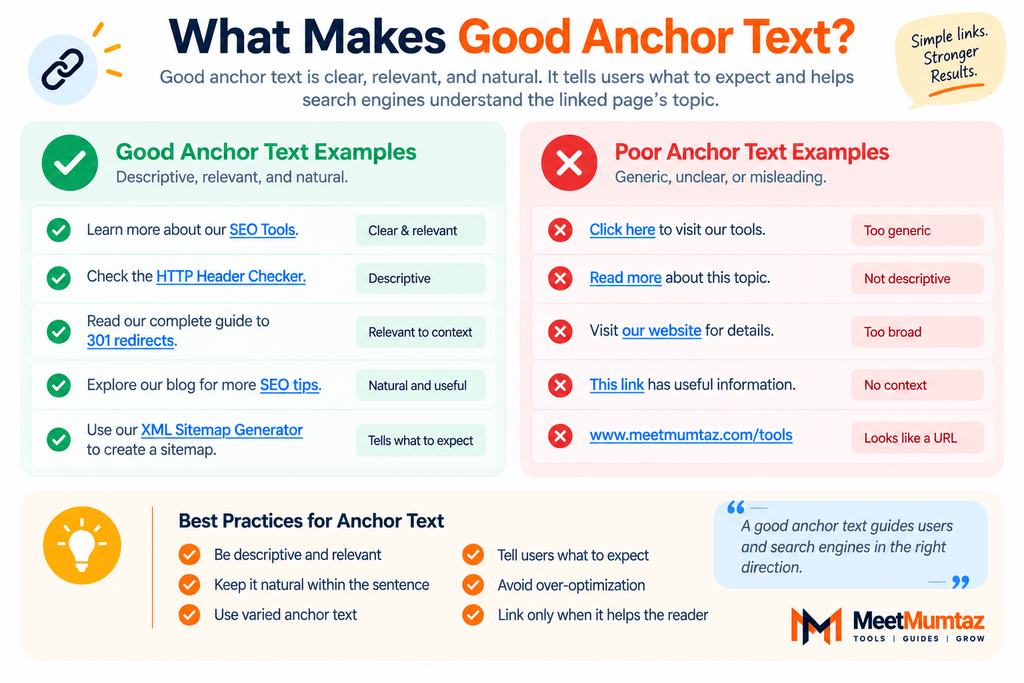
Good anchor text tells the reader something meaningful about the destination.
For example, suppose you want to link to a tool that checks canonical tags.
Instead of:
Click here to check canonical tags.
A more descriptive version would be:
Use our Canonical Tag Generator when creating canonical markup.
The second example gives the reader clearer context about the linked destination.
Good anchor text should generally be:
- Relevant to the destination
- Understandable to users
- Concise
- Naturally integrated into the sentence
- Varied when appropriate
- Helpful rather than forced
The goal is clarity—not inserting exact-match SEO keywords into every internal link.
Exact-Match vs Partial-Match Anchor Text
An exact-match anchor closely matches the main topic or target keyword of the destination page.
For example:
Broken Link Checker
A partial-match anchor incorporates the topic naturally into a broader phrase, such as:
check broken links on your website
Both approaches can be useful when they make sense in context.
You do not need to use the same keyword every time you link to a page. Natural variation can make your content more readable and prevent your linking strategy from looking mechanical.
How to Build an Internal Linking Strategy
Learning what is internal links is only the first step; the next is using them strategically across your website. A useful internal linking strategy starts with relevance rather than link quantity.
First, identify your most important pages. These might include primary service pages, category hubs, valuable tools, or comprehensive guides.
Next, find existing pages whose topics naturally relate to those destinations.
Add links where they genuinely help the reader understand a concept, complete a task, or explore a related subject.
For example, an article discussing redirects can naturally link to a 301 Redirect Generator, while an article about indexing could link to a Noindex Tag Checker.
This creates meaningful relationships instead of adding links simply for SEO.
How Many Internal Links Should a Page Have?
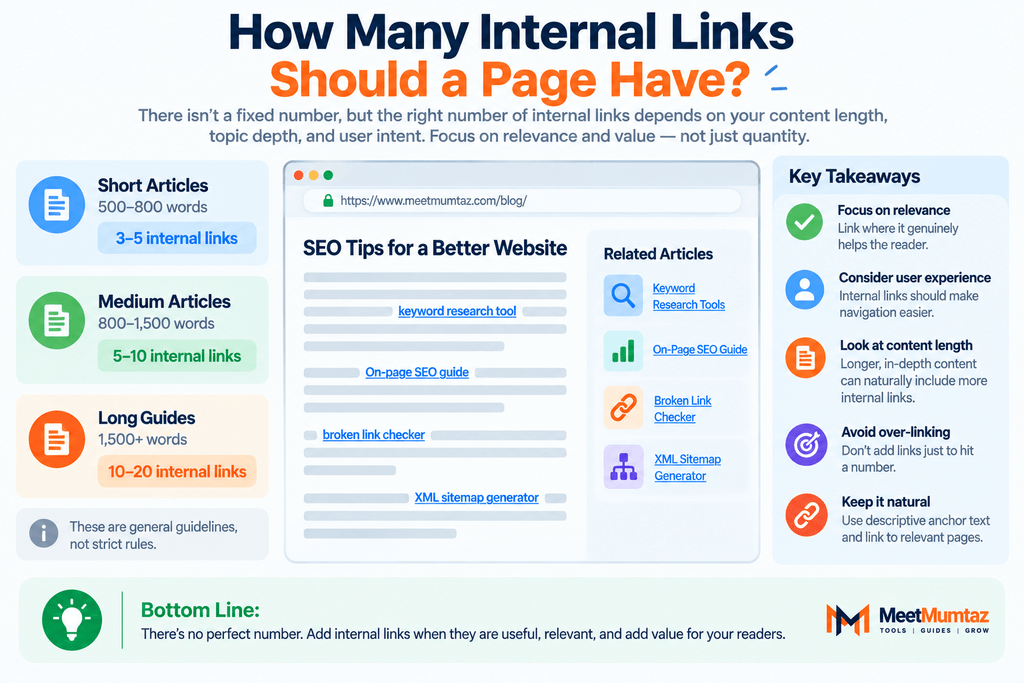
There is no universal number that every page must follow.
A short article may need only a handful of internal links, while a comprehensive guide may naturally contain considerably more.
Instead of targeting an arbitrary number, ask:
Would this link genuinely help someone reading this section?
If yes, it may be worth including. If the link exists only to increase the link count, it probably does not improve the page.
Common Internal Linking Mistakes
One common mistake is linking unrelated pages simply because you want to promote them.
Another is repeatedly using identical keyword-rich anchor text when a more natural phrase would read better.
Other issues can include broken internal links, links pointing through unnecessary redirects, orphan pages with few or no useful internal connections, and important pages buried too deeply within the website.
Internal linking should ultimately make your site easier—not harder—to navigate.
Internal Linking and Website Architecture
Your internal links contribute to the overall architecture of your website.
Important sections should normally be accessible through logical navigation paths. For example:
Homepage → SEO Tools → Individual SEO Tool
or:
Homepage → Blog → SEO Guide → Related Tool
This hierarchy gives both visitors and crawlers understandable pathways through the site.
When hundreds of pages exist without a clear structure, discovering relationships between them becomes more difficult. Category hubs and contextual internal links can help organize those pages into meaningful groups.
How to Audit Internal Links
An internal link audit helps you identify opportunities and problems across your website.
During an audit, you can look for:
- Broken internal links
- Redirecting internal links
- Orphan or poorly connected pages
- Important pages with too few internal links
- Irrelevant anchor text
- Excessively repetitive anchors
- Links pointing to outdated URLs
- Pages buried unnecessarily deep within the site
After identifying these issues, update links according to relevance and user value rather than trying to maximize the number of links.
Internal Linking Best Practices
Keep your internal linking strategy simple and purposeful.
Link related pages when doing so helps the reader. Use descriptive anchor text, maintain a logical website hierarchy, repair broken links, update links after URL changes, and make important content reasonably accessible.
Most importantly, write for people first. An internal link should feel like a useful next step in the content—not an SEO keyword inserted solely for a crawler.
Final Thoughts
Understanding what internal links are is an important part of learning how websites and SEO work together. Internal links create pathways between pages, improve navigation, support content discovery, and provide additional context about relationships within a website.
Knowing what internal linking is also means understanding the role of anchor text. Once you understand what anchor text is and what a text anchor is, you can create links that are clearer for users and more meaningful within your overall website structure.
A successful internal linking strategy does not depend on adding as many links as possible. It depends on connecting the right pages, in the right context, with useful anchor text.
If you understand what is internal links are, you can create a clearer website structure for both users and search engines.
FAQs
What are internal links in SEO?
Internal links are hyperlinks that connect one page of a website to another page on the same domain. They support navigation, content discovery, website structure, and contextual relationships between pages.
What is internal linking?
Internal linking is the practice of strategically connecting pages within the same website using hyperlinks. It can help users discover related content and help search engines understand how pages are connected.
What is anchor text?
Anchor text is the visible and clickable text used within a hyperlink. It provides users with context about the page or resource they will reach after clicking.
What is a text anchor?
A text anchor is the clickable word or phrase associated with a hyperlink. For example, in a link labeled “SEO Tools,” the words “SEO Tools” are the text anchor.
Are internal links important for SEO?
Yes. Internal links can help search engines discover pages and understand website structure while also helping users navigate between related content.
How many internal links should I add to a blog post?
No fixed number applies to every article. Add internal links when they are relevant and useful to readers rather than trying to reach an arbitrary link count.
Should every internal link use an exact-match keyword?
No. Anchor text should be descriptive and natural. Exact-match anchors can sometimes be appropriate, but repeatedly forcing the same keyword into links is unnecessary.
What is the difference between internal and external links?
Internal links connect pages within the same website, while external links direct users from your website to a different domain.


