

A webpage can have excellent content, strong internal links, and relevant keywords—but if search engines are instructed not to index it, the page may never appear in search results.
That’s where a noindex checker becomes useful.
A noindex checker helps you determine whether a webpage contains directives that may prevent search engines from indexing it. This can be especially valuable when troubleshooting pages that aren’t appearing in Google, auditing a website after a redesign, or checking whether an important page was accidentally set to noindex.
In this guide, you’ll learn what noindex means, how to check a webpage for indexing directives, how noindex follow works, what an index tag is, and what else you should investigate when a page isn’t appearing in search results.
What Is a Noindex Checker?
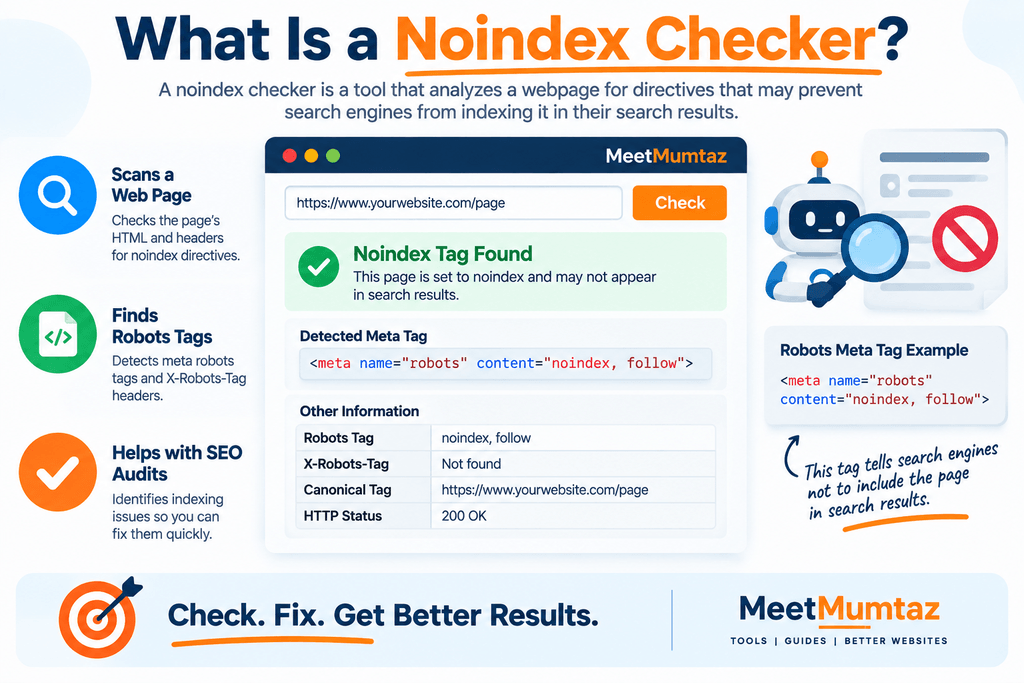
A noindex checker is a tool that analyzes a webpage for directives related to search-engine indexing.
One of the most important directives it looks for is:
<meta name="robots" content="noindex">
When a supported search engine crawls a page and processes this directive, it is instructed not to include that page in its search results.
A checker makes this information easier to find without requiring you to manually inspect large amounts of HTML.
Depending on the tool, it may also identify related robots directives and provide a clearer picture of the page’s indexing configuration.
What Does Noindex Mean?
noindex is a robots directive telling compatible search engines that a webpage should not appear in their search results.
It is commonly implemented through a robots meta tag in the <head> section of a page:
<meta name="robots" content="noindex">
It can also be delivered through an HTTPX-Robots-Tag, which is particularly useful for resources where an HTML meta tag may not be appropriate.
Noindex itself isn’t an error.
Many situations intentionally exclude a page from search results. The problem occurs when an important page that should attract organic traffic is accidentally marked noindex.
Why Is Checking for Noindex Important?
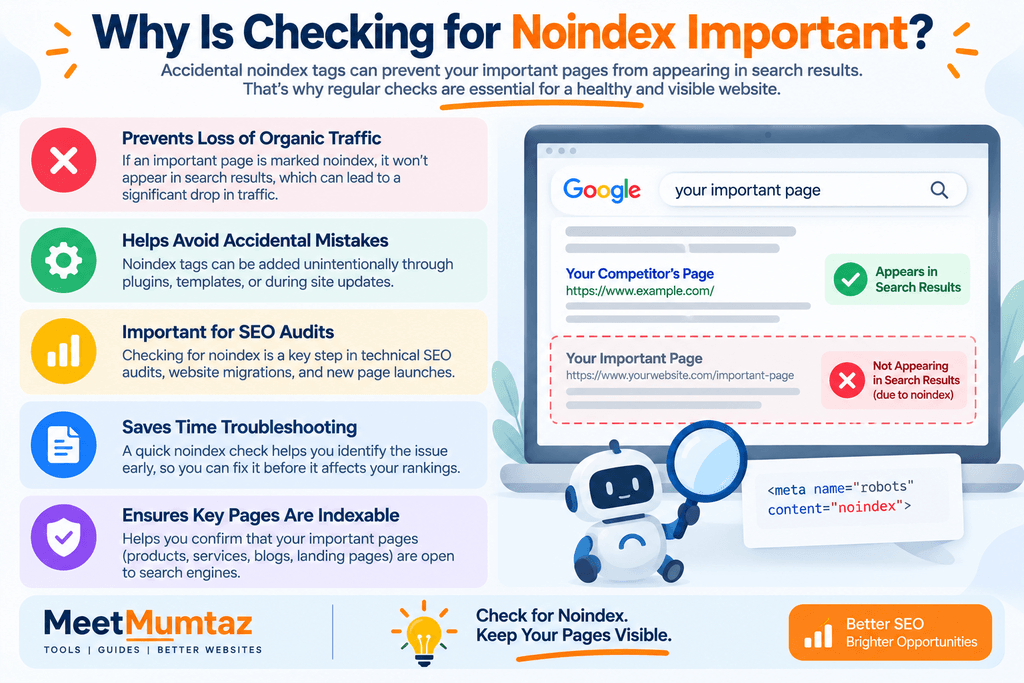
Accidental noindex directives can create serious SEO problems.
Imagine publishing an important landing page, product category, article, or service page and spending weeks optimizing it.
If that page contains a noindex directive, those optimization efforts cannot produce normal organic visibility while the page remains excluded from the search index.
This is why checking indexing directives should be part of:
- Technical SEO audits
- Website migrations
- New page launches
- CMS changes
- SEO plugin changes
- Staging-to-production migrations
- Indexing investigations
A quick noindex checker can help identify one of the most obvious causes before you spend time investigating more complicated possibilities.
How Does a Noindex Checker Work?
A noindex checker typically starts with the URL you want to inspect.
The tool retrieves the webpage and examines its HTML for robots-related metadata.
For example, it may look for:
<meta name="robots" content="noindex">
or:
<meta name="robots" content="noindex, follow">
A more comprehensive implementation may also inspect relevant HTTP headers for X-Robots-Tag directives.
The result can then tell you whether a noindex directive was detected.
This saves time compared with manually searching through source code every time you want to investigate a page.
How to Use a Noindex Checker
Using a noindex checker is straightforward.
First, copy the complete URL of the webpage you want to investigate.
Enter the URL into the checker and run the analysis.
Once the result appears, determine whether a noindex directive has been detected.
If the page is intentionally excluded from search results, you may not need to do anything.
If the page should be indexed, investigate where the directive is coming from before removing it.
It could originate from:
- The page’s HTML
- An SEO plugin
- CMS visibility settings
- A page template
- An HTTP header
- Custom code
- A staging configuration that was carried into production
Don’t remove directives blindly. First determine what the page is supposed to do.
What Is Noindex Follow?
A common robots configuration is:
<meta name="robots" content="noindex, follow">
This is often referred to as noindex follow.
The noindex part requests that the page itself not appear in search results.
The follow part indicates that links on the page may be followed.
Historically, this combination has been widely used when site owners wanted to exclude a page while still allowing crawlers to discover links from it.
However, you shouldn’t treat noindex, follow as a permanent method for guaranteeing that links on a long-term noindexed page will always function exactly like links on an indexed page. Search-engine crawling and processing can change over time.
If internal links are important to your site architecture, make sure important destinations are also linked from crawlable, indexable pages elsewhere on the website.
Noindex vs. Nofollow
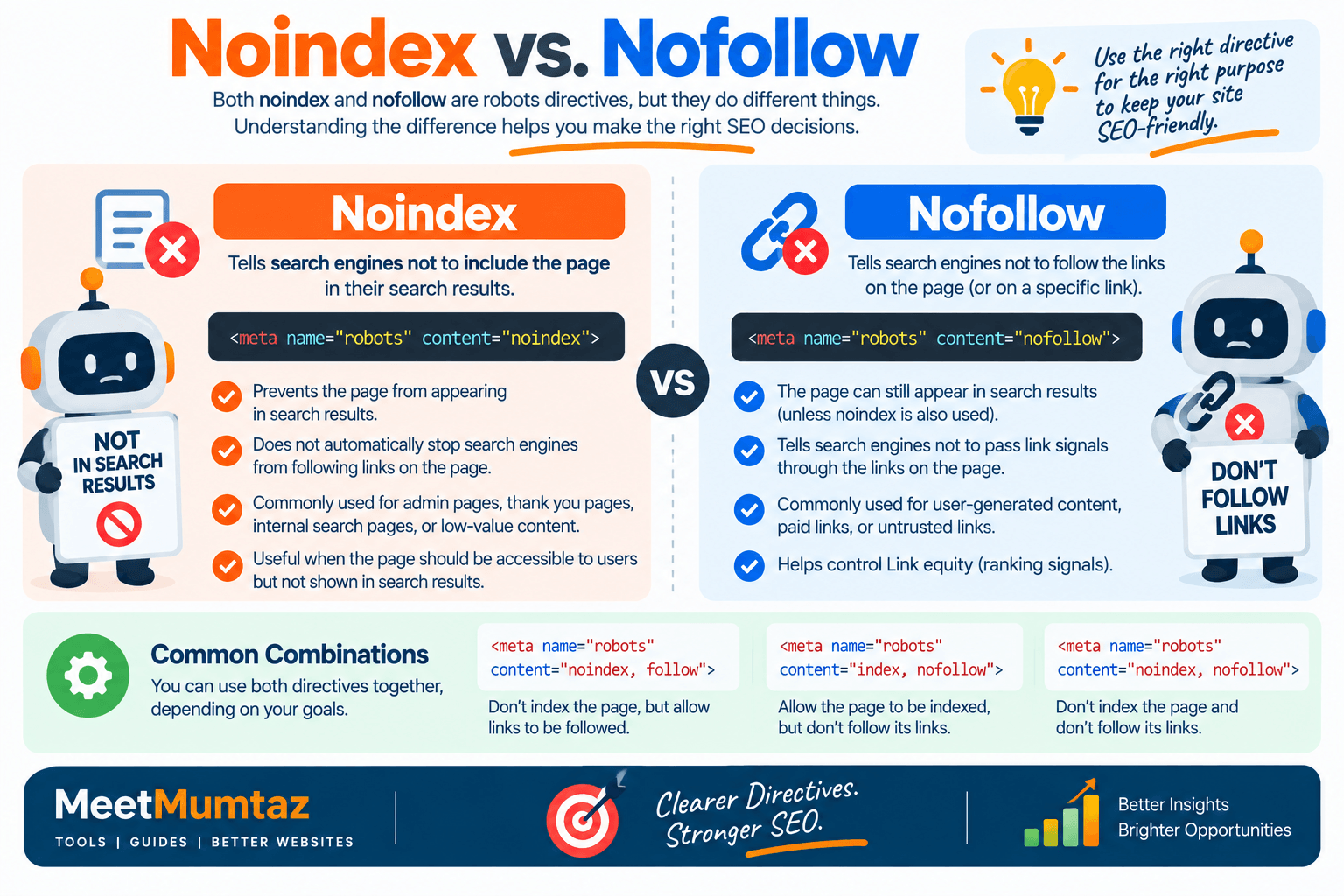
Noindex and nofollow perform different functions.
Noindex relates to whether the page should appear in search results.
Nofollow relates to whether links should be followed according to the directive.
For example:
<meta name="robots" content="noindex, nofollow">
requests both that the page not be indexed and that links on it not be followed.
By contrast:
<meta name="robots" content="index, follow">
indicates that the page can be indexed and its links followed, subject to the search engine’s normal crawling and indexing processes.
Understanding this difference is important when reviewing robots directives.
Is “Rel Noindex” a Valid HTML Attribute?
Some people search for rel noindex when trying to prevent a webpage from appearing in search results.
However, noindex is normally implemented as a robots directive rather than by adding something such as:
rel="noindex"
to a regular link.
For an HTML webpage, a common implementation is:
<meta name="robots" content="noindex">
The rel attribute is used for other relationships and directives, such as canonical references or nofollow on applicable links.
For example:
<link rel="canonical" href="https://example.com/page/">
and:
<a href="https://example.com/" rel="nofollow">Example</a>
These should not be confused with a robots noindex directive.
What Is an Index Tag?
Website owners sometimes use the phrase index tag when referring to robots metadata that controls indexing.
You may encounter:
<meta name="robots" content="index, follow">
The index directive indicates that the page may be included in search results.
However, having an index directive does not guarantee that Google or another search engine will index the page.
Search engines make indexing decisions based on many factors.
A page may still remain unindexed because of issues such as:
- Crawling problems
- Duplicate content
- Canonicalization
- Redirects
- Server errors
- Low-value or insufficient content
- Discovery problems
- Search-engine indexing decisions
Therefore, an index tag should be understood as permission, not a guarantee.
Noindex vs. Robots.txt
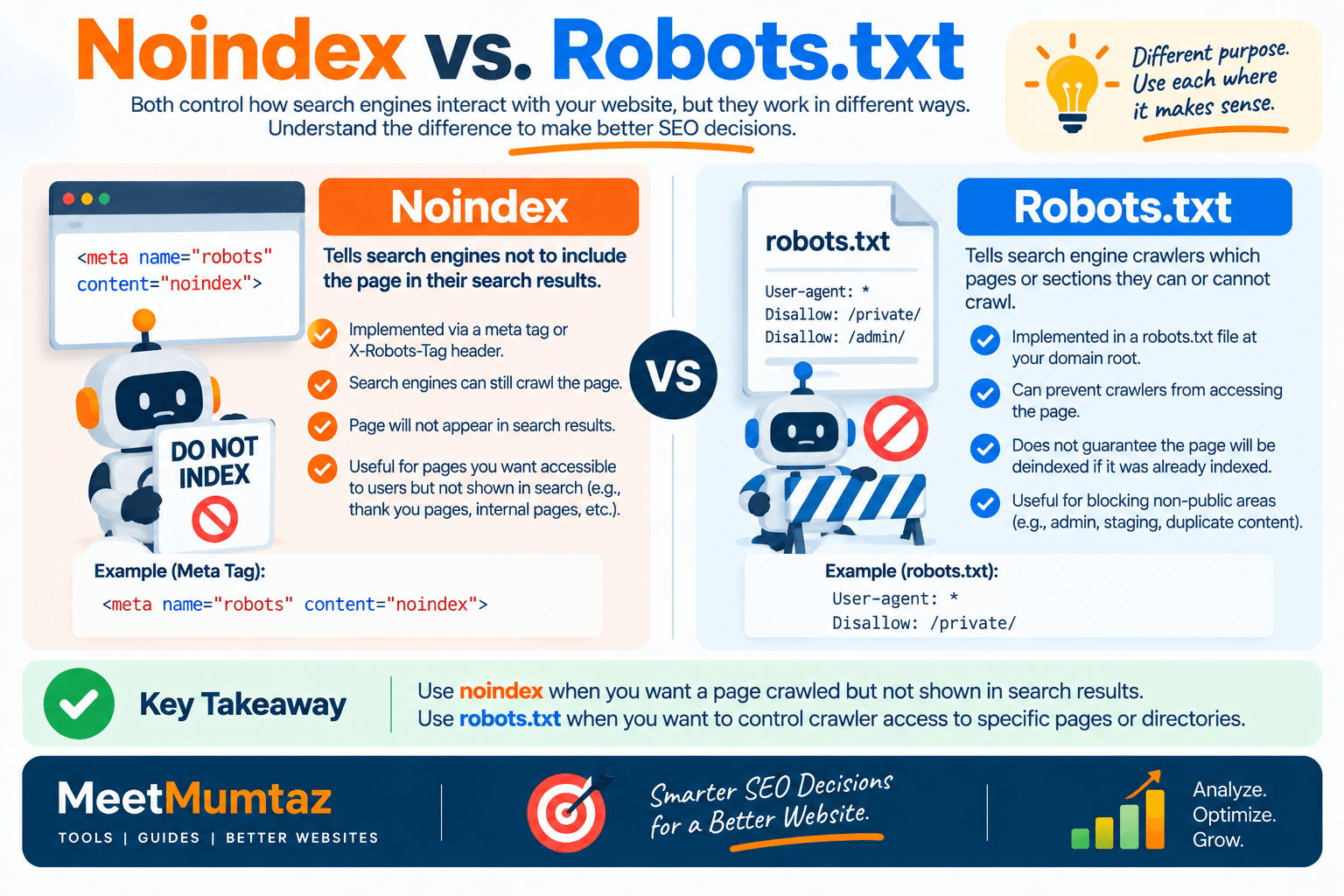
This distinction is extremely important.
A robots meta noindex directive and a robots.txt rule serve different purposes.
A noindex directive tells a compatible search engine not to include a crawled page in its search results.
A robots.txt rule primarily controls crawler access.
If you block a URL from crawling through robots.txt, a search engine may not be able to access the page and see its noindex meta directive.
Therefore, if your goal is to let a search engine process a noindex directive, the crawler generally needs access to the page.
Don’t automatically combine a robots.txt block with noindex without understanding how the two mechanisms interact.
Noindex vs. Canonical Tag
Noindex and canonical tags also solve different problems.
A noindex directive requests that a page be excluded from search results.
A canonical element indicates which URL you prefer as the representative version among duplicate or highly similar pages.
For example:
<link rel="canonical" href="https://example.com/preferred-page/">
If you have duplicate URLs that should consolidate signals to one preferred version, canonicalization may be appropriate.
If a page should simply not appear in search results, noindex may be more appropriate.
Avoid treating canonical and noindex as interchangeable SEO controls.
Noindex vs. 404 and Redirects
Another common mistake is using noindex where a different technical solution is more appropriate.
If a page has permanently moved to another URL, a redirect may be the better solution.
If a resource has been permanently removed and no replacement exists, an appropriate 404 or 410 response may be relevant.
Noindex is generally more suitable when the page should remain accessible to users but shouldn’t appear in search results.
Choosing the right method helps search engines interpret your website more accurately.
How to Search for Noindex Code on a Website
If you’re looking for code to search for index text on website pages, there are several ways to investigate.
For a single webpage, open its source code and search for:
noindex
You can usually use your browser’s Find feature to locate the text quickly.
Look particularly for code such as:
<meta name="robots" content="noindex">
You can also search for:
robots
to find the complete robots meta tag.
However, checking the visible HTML alone may not reveal every indexing directive.
For a more complete technical investigation, HTTP response headers should also be examined for an X-Robots-Tag.
For multiple URLs, using an SEO crawler or automated auditing process is much more efficient than manually checking every page.
Meta Robots Noindex vs. X-Robots-Tag
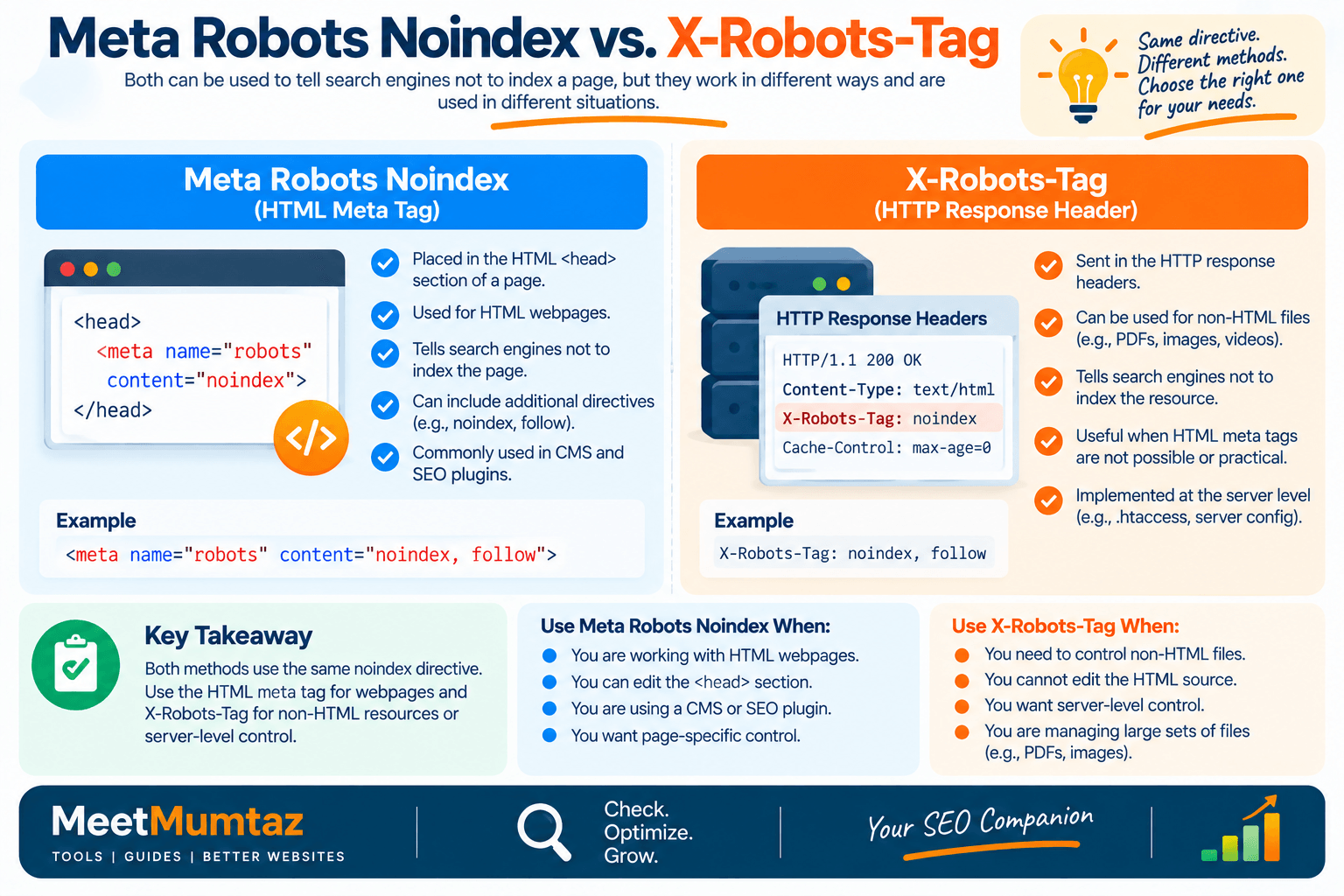
There are two important places where noindex can appear.
Meta Robots Tag
This appears within the HTML <head>:
<meta name="robots" content="noindex">
It’s commonly used for HTML webpages.
X-Robots-Tag
An indexing directive can also be returned through an HTTP response header.
Conceptually, the response may contain:
X-Robots-Tag: noindex
This is particularly useful for controlling indexing of non-HTML resources or implementing directives at the server level.
A robust indexing audit should therefore consider both HTML metadata and HTTP headers.
Common Causes of Accidental Noindex
Accidental noindex issues often occur during website development or configuration changes.
Common causes include:
Staging settings carried to production
A development website may intentionally be noindexed, but those settings can accidentally remain after launch.
SEO plugin configuration
An SEO plugin may be configured to noindex certain post types, categories, archives, or individual pages.
CMS visibility settings
Some content-management systems provide settings that discourage or restrict search-engine indexing.
Template-level directives
A noindex tag placed in a shared template can affect many pages simultaneously.
Manual code changes
A developer may add noindex for testing and forget to remove it.
HTTP header configuration
Server rules can add an X-Robots-Tag without the directive appearing in visible HTML source.
These are good places to investigate when a checker detects unexpected noindex behavior.
Which Pages Should Be Noindexed?
Noindex isn’t inherently bad.
Some pages may have little or no value in public search results.
Depending on the website, candidates can include:
- Private account pages
- Internal search-result pages
- Certain thank-you pages
- Staging or testing pages
- Thin utility pages
- Duplicate or low-value archives
However, every website is different.
Don’t apply site-wide noindex rules based on a generic list.
Consider the purpose, content, internal linking role, and search value of each page type before deciding whether it should be indexed.
Which Pages Should Usually Remain Indexable?
Pages intended to attract organic search traffic generally need to be accessible and eligible for indexing.
Examples may include:
- Important blog articles
- Product pages
- Product categories
- Service pages
- Landing pages designed for organic search
- Useful guides and resources
- Important tool pages
Again, being indexable does not guarantee indexing or rankings.
It simply ensures that you’re not intentionally telling compatible search engines to exclude the page through a noindex directive.
Why Is My Page Still Not Indexed Without a Noindex Tag?
This is one of the most important points to understand.
If your noindex checker reports that no noindex directive exists, that doesn’t automatically mean the page will appear in Google.
You may need to investigate:
Crawlability
Can search-engine crawlers access the URL?
Discovery
Does the page have internal links or other discovery paths?
HTTP status
Does it return a successful response?
Canonicalization
Is another URL declared or selected as canonical?
Redirects
Does the URL redirect elsewhere?
Content quality
Does the page provide useful and sufficiently distinct content?
Duplication
Is substantially similar content available at another URL?
Search Console information
What does Google’s URL inspection information say about the page?
A noindex check is therefore an excellent starting point, but not a complete indexing diagnosis.
Noindex Checker vs. Rapid Index Checker
People searching for a noindex checker or rapid index checker may actually be trying to answer two different questions:
Is my page allowed to be indexed?
and:
Is my page currently indexed?
These aren’t the same thing.
A noindex checker examines directives that can prevent indexing.
An index-status check attempts to determine whether a search engine currently has the URL in its index.
A page can have no noindex directive and still not be indexed.
Similarly, removing noindex doesn’t mean the page will instantly enter search results.
After making technical changes, search engines generally need to recrawl and process the page.
How to Fix an Accidental Noindex Tag
If an important page is accidentally noindexed, first identify where the directive originates.
For example, you may find:
<meta name="robots" content="noindex">
If noindex isn’t intentional, update the relevant CMS, SEO plugin, template, server configuration, or code responsible for generating it.
Then verify that the live page no longer returns the directive.
Don’t stop after editing the setting.
Clear relevant website/cache layers if necessary and inspect the live URL again.
For important Google-indexed content, you can then use Google Search Console’s URL Inspection functionality to review the page and, where appropriate, request indexing.
Noindex Checklist for SEO Audits
When reviewing an important URL, check the following:
Robots Meta Tag
Is a robots meta tag present, and what directives does it contain?
X-Robots-Tag
Are indexing directives being returned through HTTP headers?
Robots.txt
Can crawlers access the page to process its directives?
Canonical URL
Does the canonical point to the intended version?
HTTP Status
Does the URL return the expected status?
Redirects
Is the page unexpectedly redirecting?
Internal Links
Can users and crawlers discover the page naturally?
Search Console
What indexing information does Google provide for the URL?
Looking at these elements together provides a much more reliable picture than checking a single HTML tag.
Frequently Asked Questions
What is a noindex checker?
A noindex checker examines a webpage for directives that request search engines not to include the page in their search results. Depending on the tool, it may inspect robots meta tags and other indexing-related information.
What does noindex follow mean?
noindex, follow requests that the page itself not appear in search results while allowing links on the page to be followed. It should not be treated as a permanent guarantee of how links on a long-term noindexed page will be processed.
Is rel noindex valid?
rel="noindex" is not the standard way to noindex an HTML webpage. Noindex is commonly implemented using a robots meta directive or an appropriate X-Robots-Tag HTTP header.
What is an index tag?
The term index tag commonly refers to a robots directive such as index. It allows a page to be considered for indexing but does not guarantee that a search engine will actually index or rank it.
How do I find noindex in website code?
Open the webpage’s source code and search for noindex or robots. For a complete check, also inspect HTTP response headers because noindex can be delivered through an X-Robots-Tag.
Can robots.txt noindex a page?
Robots.txt is primarily used to control crawler access and should not be treated as a substitute for a supported noindex directive.
Why isn’t my page indexed if there is no noindex tag?
Many other factors can affect indexing, including crawling, discovery, canonicalization, redirects, HTTP errors, duplication, content quality, and search-engine indexing decisions.
Does removing noindex immediately index a page?
No. Removing noindex makes the page eligible to be considered for indexing, assuming no other blocking issues exist. Search engines still need to crawl and process the updated page.
Should I noindex duplicate pages?
Sometimes noindex may be appropriate, but duplicate or similar pages often require a broader decision involving canonicalization, redirects, consolidation, or site architecture. The correct solution depends on why the duplicate URLs exist.
Final Thoughts
A noindex checker is a simple but valuable technical SEO tool because a single indexing directive can determine whether an otherwise important page is eligible to appear in search results.
Use it to detect accidental noindex directives, investigate noindex follow configurations, understand the difference between noindex and an index tag, and identify situations where website code or server headers may be affecting indexing.
But remember that noindex is only one part of the indexing process.
If a page isn’t appearing in search results, check its robots directives first, then investigate crawlability, canonicalization, redirects, HTTP status, internal linking, content quality, and Search Console data.
Finding the actual cause is more valuable than simply assuming that every indexing problem is caused by a noindex tag.


