

QR codes have become a simple way to connect physical materials with digital information. A small square code can direct someone to a website, display text, share contact information, provide WiFi details, or connect users with other digital content.
If you want to create a free QR code, you don’t necessarily need complicated design software. A browser-based QR Code Generator can turn your information into a scannable code within seconds.
But creating the code is only the beginning. You also need to think about readability, contrast, size, placement, colors, and testing.
In this guide, we’ll explain how QR codes work, how to generate one, when to use a colored QR, whether a white QR code can work, and what to check before publishing or printing your final code.
What Is a QR Code?
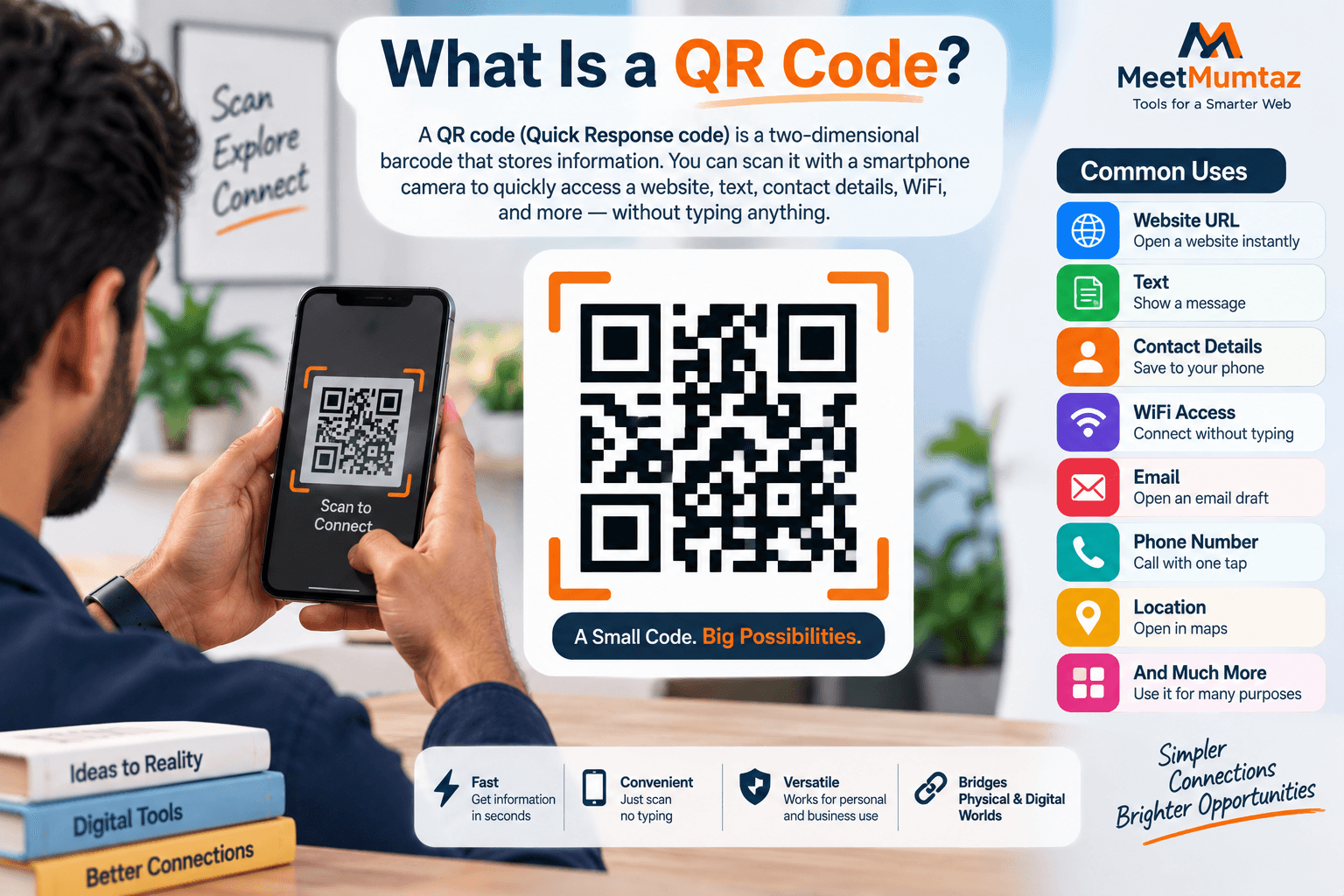
QR stands for Quick Response.
A QR code is a two-dimensional barcode that stores information in a pattern of dark and light modules.
Unlike traditional one-dimensional barcodes, QR codes can store information across both horizontal and vertical dimensions.
A smartphone camera or QR scanner can read the pattern and interpret the encoded information.
Depending on the content, scanning a QR code might:
- Open a website
- Display text
- Show contact details
- Connect to WiFi
- Open an email action
- Display a phone number
- Provide other encoded information
This makes QR codes useful for both digital and printed materials.
Why Create a Free QR Code?
There are many situations where you may want to create a free QR code instead of asking users to type information manually.
Imagine printing a long website address on a poster.
A visitor would need to read the URL, open a browser, and type it correctly.
With a QR code, the process can be much simpler:
Open Camera → Scan Code → Access Information
QR codes can therefore reduce friction between offline and online experiences.
They are commonly used on:
- Business cards
- Flyers
- Posters
- Product packaging
- Restaurant materials
- Event signage
- Brochures
- Receipts
- Instruction sheets
- Marketing campaigns
The best use cases are those where scanning genuinely saves the user time.
What Is a QR Code Generator?
A QR Code Generator is a tool that converts information into a QR code.
You enter the content you want to encode, and the generator creates the corresponding visual pattern.
For a website, you might enter:
The tool then creates a QR code representing that URL.
Users can scan the code with a compatible smartphone or QR reader.
A good generator should make the process straightforward without requiring you to understand how the QR pattern itself is calculated.
How Does a QR Code Generator Work?
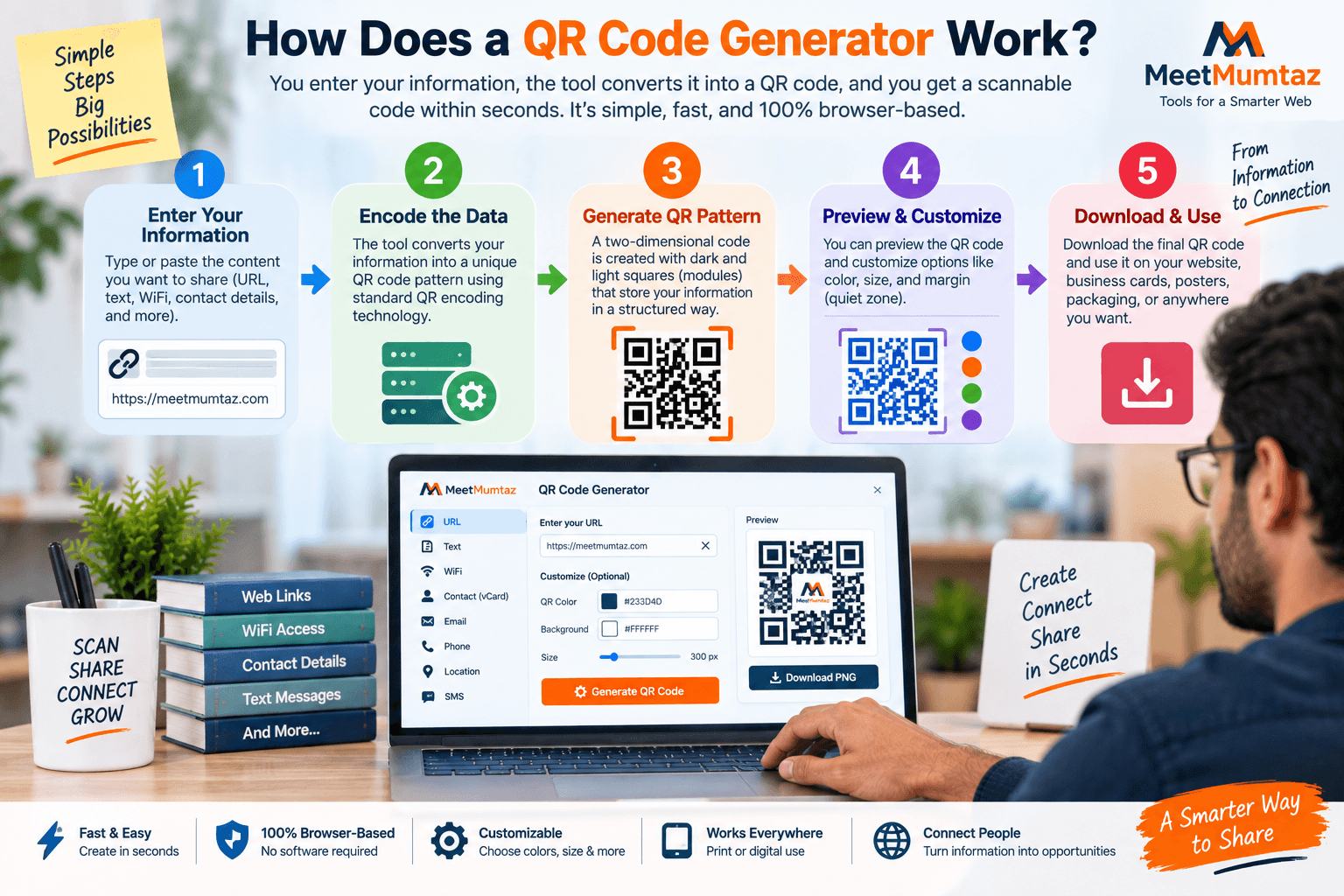
A QR code generator takes the information you provide and encodes it into a structured two-dimensional pattern.
At a simplified level, the process looks like:
Input → Encode Data → Generate QR Pattern → Preview → Download → Test
The pattern contains more than random-looking black and white squares.
Specific areas help scanners identify orientation and interpret the encoded data.
That’s why manually drawing or editing the internal QR pattern is generally a bad idea.
Let the generator create the functional code, then customize it only within safe design limits.
How to Create a Free QR Code
You can create a free QR code in a few simple steps.
Step 1: Choose What You Want to Encode
First, decide what the QR code should contain.
For example:
- Website URL
- Text
- Contact information
- WiFi information
- Email information
- Phone number
The available options depend on the generator you’re using.
Step 2: Enter the Information
Paste or type the content into the generator.
For a website QR code, use the correct final URL.
For example:
Check the URL carefully before generating the code.
A QR code can work perfectly while still sending users to the wrong page if you encoded an incorrect URL.
Step 3: Generate the QR Code
Select the generate option.
The tool should create a QR code based on your input.
Step 4: Preview the Code
Check the generated result before downloading it.
Make sure the code appears complete and isn’t accidentally cropped.
Step 5: Download the QR Code
Save the generated image in the available format.
Choose a suitable size and format for how you intend to use it.
Step 6: Test Before Publishing
This is one of the most important steps.
Scan the downloaded code with multiple devices if possible.
Confirm that it opens or displays exactly what you intended.
Only then should you place it on printed or public materials.
What Can You Put Inside a QR Code?
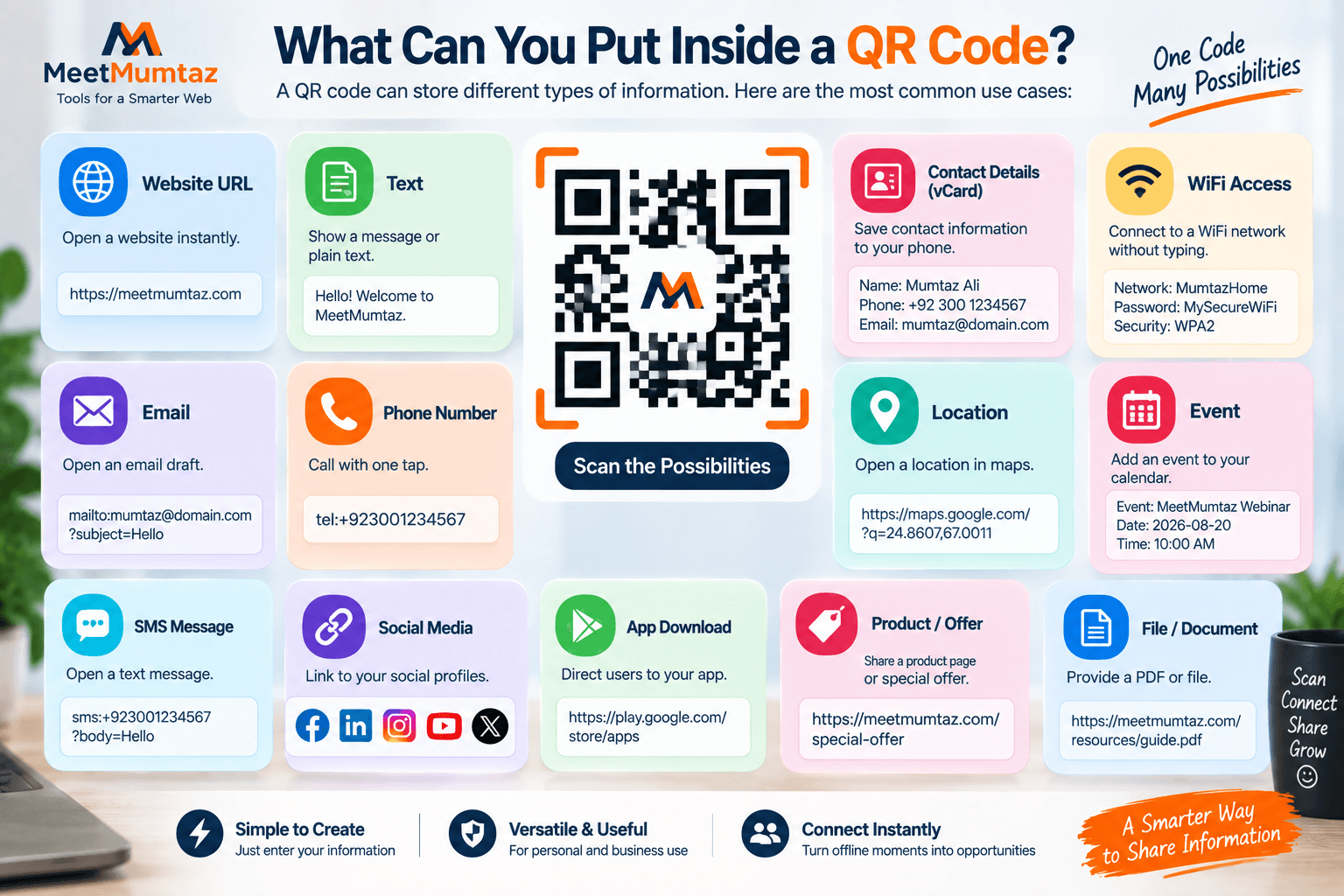
QR codes can represent different types of information.
The exact capabilities depend on the generator and scanner.
Common examples include:
Website URLs
Send users directly to a webpage.
This is one of the most common QR code uses.
Plain Text
Display a short text message after scanning.
WiFi Information
Some QR implementations can help users connect to a wireless network without manually typing credentials.
Contact Information
QR codes can be used to provide contact details.
Email Information
A QR code can encode information associated with an email action.
Phone Numbers
Scanning can make it easier for users to access a phone number on a compatible device.
The most important rule is to encode only the information necessary for the intended action.
Static vs. Dynamic QR Codes
When researching QR generators, you may encounter the terms static QR code and dynamic QR code.
They are not the same.
Static QR Code
A static QR code directly contains the information you encoded.
If it contains a URL and you later want the code itself to represent a completely different URL, you generally need to generate a new QR code.
Dynamic QR Code
A dynamic QR solution commonly uses an intermediary redirect or managed service.
The destination may be changed later without replacing the printed QR pattern, depending on the service.
Dynamic systems may also provide tracking or management features.
For simple permanent URLs and basic information, a static QR code can be sufficient.
For campaigns requiring destination changes or analytics, a managed dynamic system may be more appropriate.
Does a Free QR Code Expire?
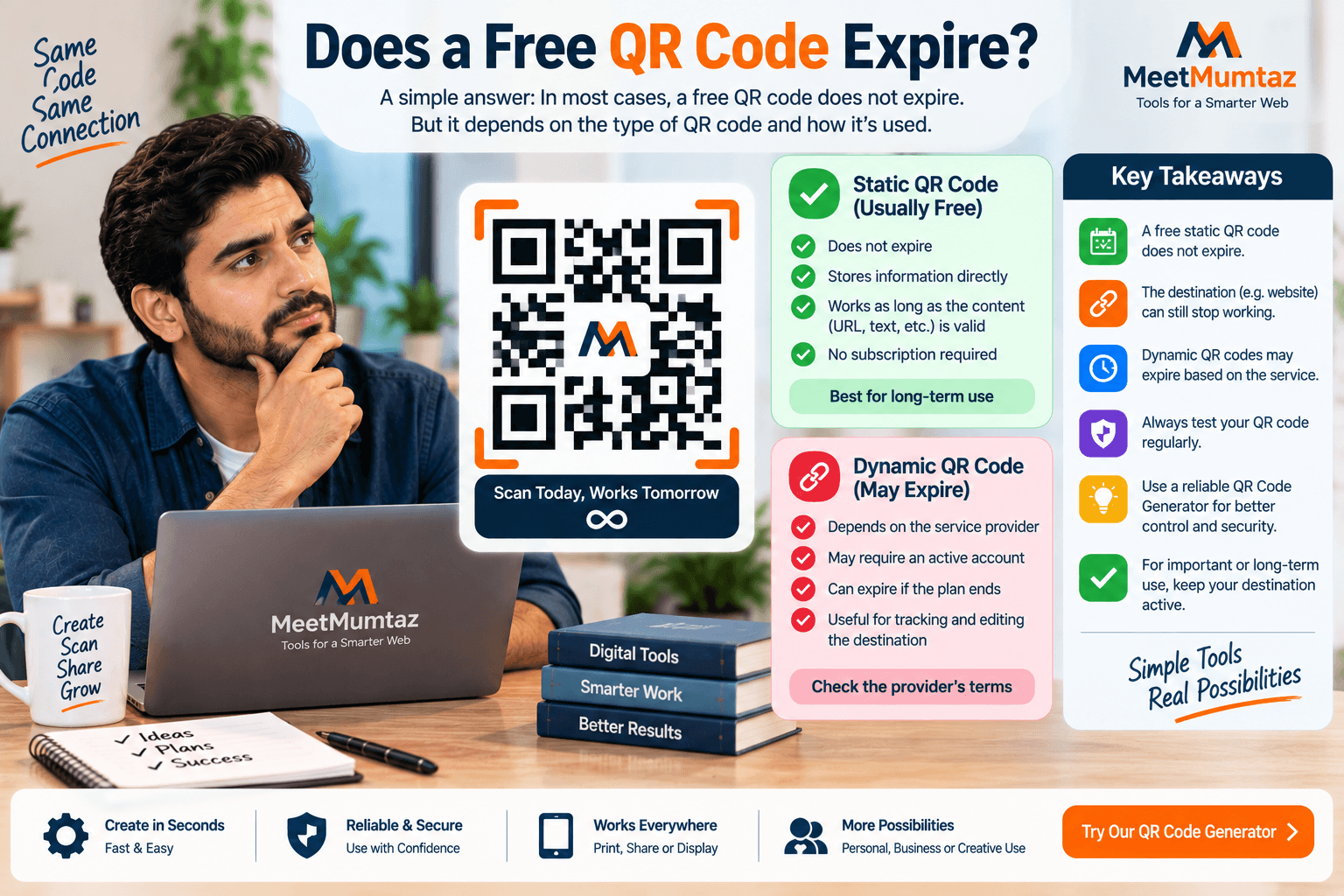
A basic static QR code doesn’t inherently have an expiration date simply because it was generated for free.
If the encoded information remains valid, the pattern can continue representing that information.
For example, a static QR code containing:
can continue pointing to that URL as long as the URL remains accessible.
However, QR services that use redirects, dynamic links, subscriptions, or managed features may impose their own conditions.
That’s why it is useful to understand whether you’re creating a direct static QR code or using a hosted dynamic service.
What Is a Colored QR?
A colored QR is a QR code that uses colors other than the traditional black pattern on a white background.
For example, a brand might use:
- Dark navy on white
- Dark green on cream
- Deep purple on white
- Brand-colored modules on a light background
Color can make a QR code fit better with a website, poster, business card, or packaging design.
However, visual appearance should never come at the expense of scannability.
A beautiful QR code that users cannot scan is not useful.
Can QR Codes Be Colored?
Yes, QR codes can use color, but contrast matters.
The scanner needs to distinguish the QR pattern clearly from its background.
A safe general principle is:
Dark QR Pattern + Light Background
For example:
Good approach:
Dark navy QR → white background
Potentially problematic approach:
Pale yellow QR → white background
The second combination may not provide enough contrast.
Always test a colored QR after customization.
Best Colors for a QR Code
Traditional black on white remains a reliable choice because it provides strong contrast.
If you want branding, choose a sufficiently dark foreground color against a light background.
Examples might include:
- Navy on white
- Dark green on white
- Dark purple on white
- Deep charcoal on cream
Avoid assuming that a combination is safe simply because it looks attractive on your computer screen.
The final code may be:
- Printed
- Resized
- Viewed under poor lighting
- Scanned from a distance
- Displayed on another screen
Test the actual use case.
What Is a White QR Code?
A white QR code usually refers to a design where the QR modules themselves are white or very light.
This creates a challenge because QR codes traditionally use a dark foreground against a light background.
A white QR pattern can potentially work when it is placed on a sufficiently dark, clean background and the scanner can distinguish the pattern clearly.
For example:
White QR + solid dark navy background
may provide substantial contrast.
But:
White QR + light gray background
is likely to be much more difficult to scan reliably.
So the important question isn’t simply whether the QR is white.
The important question is whether the foreground and background provide sufficient contrast and whether the finished design scans reliably.
White QR Code vs. Traditional QR Code
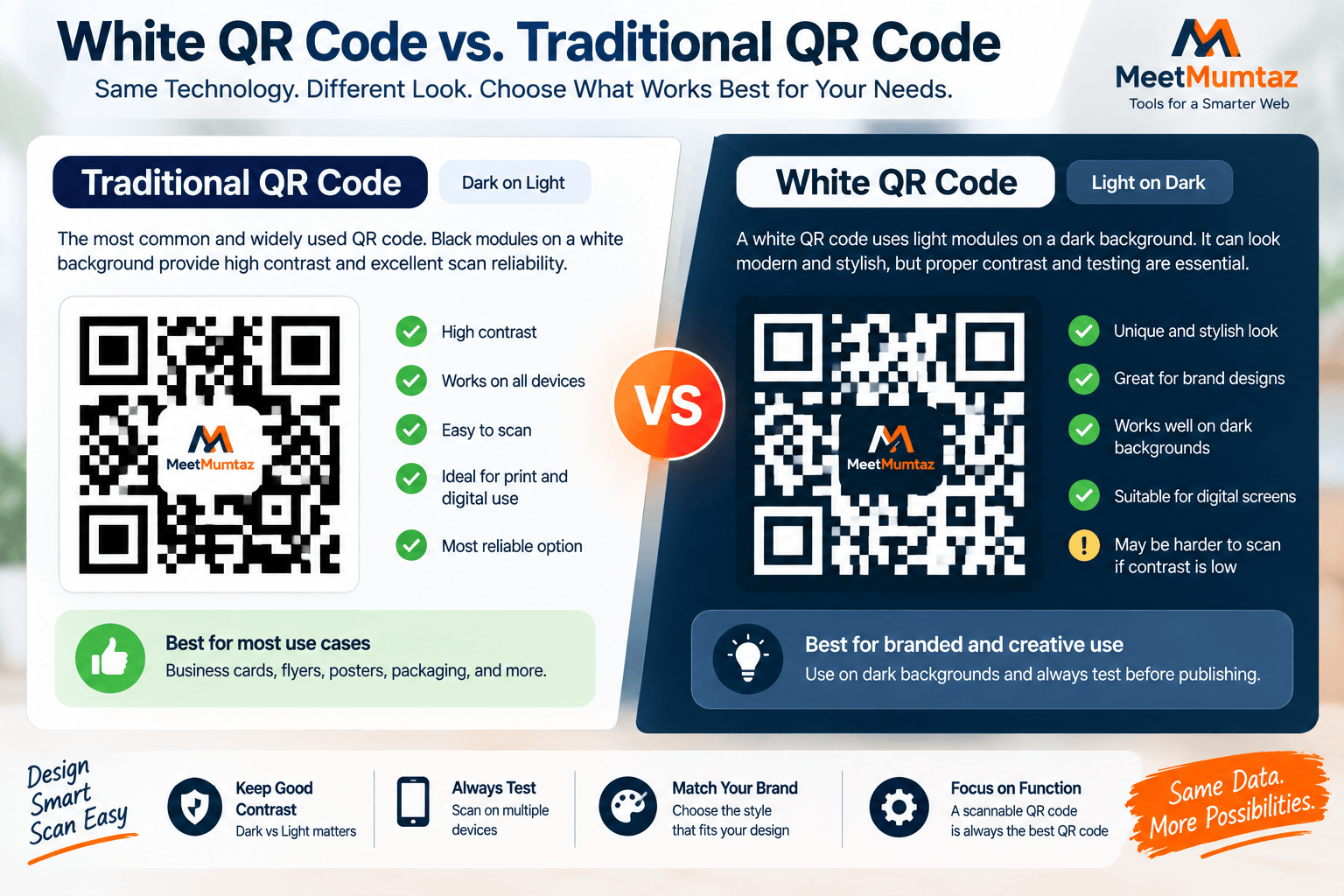
A traditional QR code typically uses:
Dark modules → Light background
A white QR code reverses that visual relationship:
Light modules → Dark background
The traditional approach is usually the safer default.
Reversed or customized QR designs should be tested more carefully because scanner behavior can vary.
If visual branding isn’t essential, prioritize reliability over novelty.
Colored QR vs. Black and White QR
Both designs have their place.
Black and White QR
Advantages:
- Strong contrast
- Familiar appearance
- Easy to reproduce
- Reliable starting point
Colored QR
Advantages:
- Better brand integration
- More visual flexibility
- Can complement marketing materials
Potential disadvantage:
- Poor color choices can reduce readability
For most users, start with black or a very dark brand color on a light background.
Then test before finalizing.
Can You Add a Logo to a QR Code?
Some QR generators allow logos or icons to be placed in or around a QR design.
This can improve branding, but it also introduces additional risk.
A logo placed over too much of the functional pattern can make the code harder to scan.
If you customize a QR code with a logo:
- Keep the logo reasonably small
- Don’t cover critical areas unnecessarily
- Maintain strong contrast
- Export at good quality
- Test on multiple devices
- Test the actual printed version
QR codes have error-correction capabilities, but that should not be treated as permission to cover large portions of the code.
What Is QR Code Error Correction?
QR codes can include error correction that helps them remain readable even when some parts are damaged, obscured, or imperfect.
Different error-correction levels provide different amounts of redundancy.
Higher error correction can make a code more tolerant of some visual obstruction, but it can also increase the complexity of the generated pattern.
Error correction is especially relevant when:
- Adding a logo
- Printing on packaging
- Using QR codes outdoors
- Working with surfaces that may become scratched
- Creating highly customized designs
Even with error correction, always test the final QR code.
What Is the Quiet Zone Around a QR Code?
A QR code needs clear space around its outer edges.
This empty margin is commonly known as the quiet zone.
The quiet zone helps scanners distinguish the QR code from surrounding text, images, borders, and other visual elements.
Don’t place:
- Text directly against the QR
- Decorative patterns into the margin
- Borders too close to the modules
- Logos overlapping the edges
- Other graphics immediately beside the code
Giving the QR code breathing room improves its chances of being recognized correctly.
How Large Should a QR Code Be?
There isn’t one perfect physical size for every QR code.
The appropriate size depends on factors such as:
- Scanning distance
- Amount of encoded data
- Print quality
- Placement
- Device camera
- Environmental conditions
A QR code on a business card is viewed from a short distance.
A QR code on a large event poster may need to be scanned from much farther away.
As distance increases, the code generally needs to be larger.
Instead of relying on a universal dimension, create the code at high quality and test it at the actual intended size and distance.
QR Code for Business Cards
Business cards are a natural use case for QR codes.
A QR code can direct users to:
- Portfolio
- Website
- Contact page
- LinkedIn profile
- Booking page
- Digital business card
Don’t make the QR code so small that scanning becomes difficult.
Also avoid surrounding it with excessive design elements.
A simple label such as:
Scan to Visit My Portfolio
can tell users why they should scan.
QR Code for Flyers and Posters
Flyers and posters often use QR codes to connect viewers to:
- Event registration
- Product pages
- Offers
- Menus
- Landing pages
- Contact forms
- Download pages
Placement matters.
Don’t hide the QR code at the bottom in an area users are unlikely to notice.
Give it enough size and contrast for the expected viewing distance.
Most importantly, provide a reason to scan.
Instead of displaying only the code, add a short call to action such as:
Scan to Learn More
or
Scan to View the Offer
QR Codes for Restaurants
Restaurants can use QR codes for:
- Menus
- Reservations
- Feedback
- Location information
- Promotions
- Loyalty pages
If the QR code points to a menu, make sure the destination page is mobile-friendly.
Users scanning from their phones shouldn’t land on a desktop-only PDF or a page that is difficult to navigate.
The QR code is only the entry point.
The experience after scanning matters just as much.
QR Codes for Product Packaging
Packaging can use QR codes to provide information that doesn’t fit comfortably on the physical package.
Examples include:
- Product instructions
- Tutorials
- Ingredients
- Warranty information
- Registration
- Support
- Brand story
- Related products
Consider the lifetime of the packaging.
If the product may remain in circulation for years, use a destination that you expect to maintain.
QR Codes for WiFi Sharing
A WiFi QR code can simplify network access for guests.
Instead of manually typing a long WiFi password, users may be able to scan the code and connect using compatible devices.
This can be useful for:
- Homes
- Offices
- Cafes
- Hotels
- Guest areas
- Events
Be thoughtful about where you display WiFi QR codes.
A code containing access credentials shouldn’t be publicly displayed if the network itself is intended to remain private.
QR Code for Marketing Campaigns
QR codes can connect physical advertising with online campaigns.
For example:
Poster → QR Code → Landing Page
or:
Product Packaging → QR Code → Tutorial
or:
Flyer → QR Code → Offer Page
The destination should match the message printed beside the QR code.
If a flyer says “Scan for 20% Off”, users should not land on a generic homepage where they have to search for the offer.
Reduce friction after the scan.
QR Code Generator vs. Barcode Generator
QR codes and traditional barcodes are different technologies.
Traditional one-dimensional barcodes are commonly used for product identification and inventory-related purposes.
QR codes store information in two dimensions and are commonly used for URLs, text, contact information, and digital interactions.
A QR Code Generator creates QR patterns.
A barcode generator creates the appropriate barcode format.
Choose the format based on what you need the code to accomplish.
QR Code Generator vs. URL Shortener
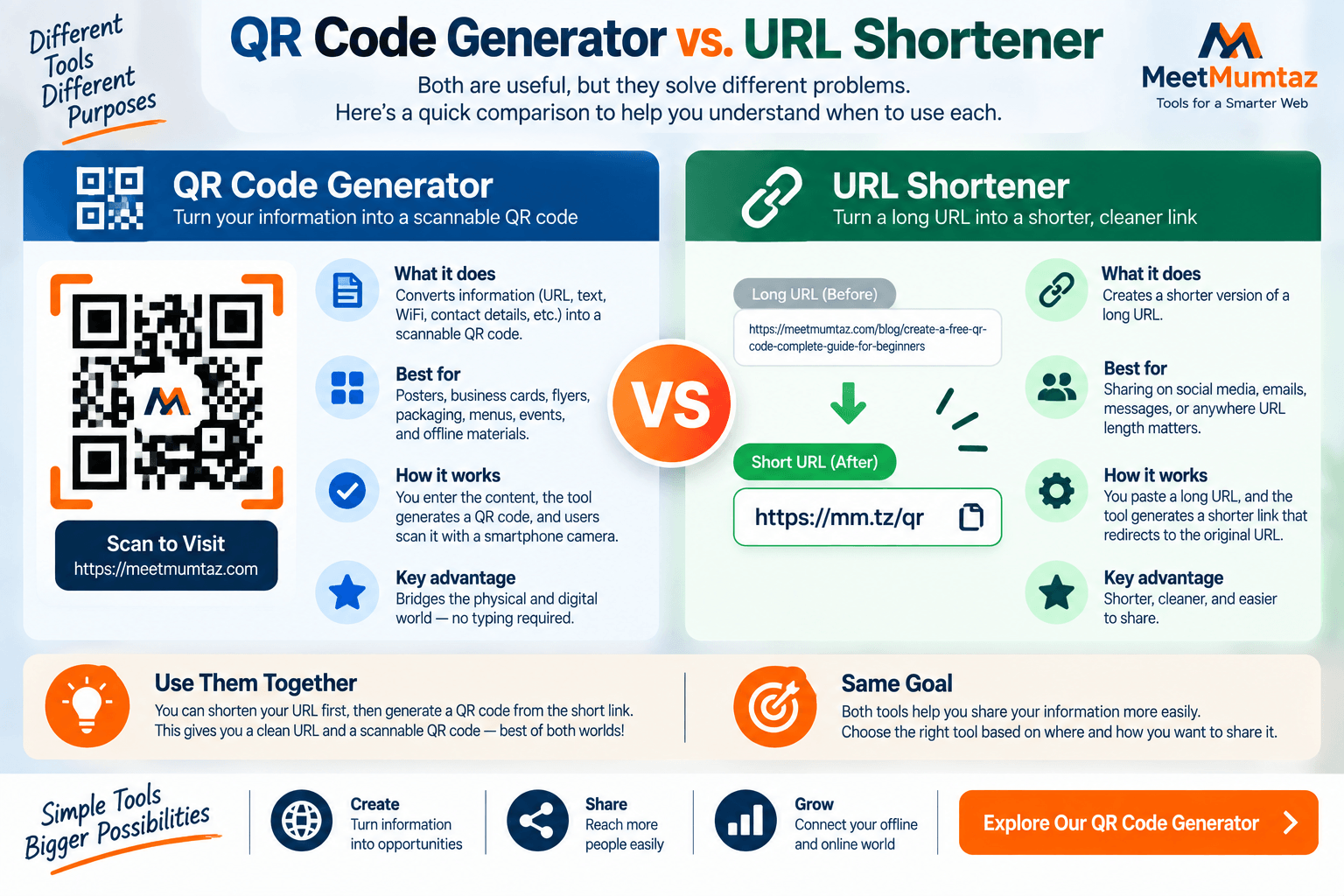
A URL shortener and QR generator also solve different problems.
A URL shortener creates a shorter web address.
A QR Code Generator converts information into a scannable visual code.
You can sometimes use both together, but it isn’t always necessary.
If your QR code directly encodes the intended URL, users don’t need to see or type the full address.
However, shorter URLs can sometimes produce less dense QR patterns.
Should You Use a Short URL in a QR Code?
Longer URLs contain more data.
More encoded data can make a QR pattern denser.
If you control the website, a clean and reasonably short destination URL can therefore be useful.
For example:
example.com/menu
is simpler than a very long URL containing numerous unnecessary parameters.
But don’t use an unfamiliar redirect service purely to shorten the URL without considering reliability and long-term control.
For permanent printed materials, destination stability matters.
How to Test a QR Code
Never publish a QR code without testing it.
A basic test process should include:
Test the Original
Scan the QR code immediately after generation.
Test the Downloaded File
Make sure the exported version still works.
Test After Resizing
If you resize the image for a flyer or card, test again.
Test the Final Design
Scan the QR after it has been placed into your complete design.
Test the Printed Version
Digital previews don’t perfectly represent physical printing.
Scan an actual printed sample before producing hundreds or thousands of copies.
Test More Than One Device
Where practical, test with different phones or scanning applications.
This gives you more confidence that the final code is robust.
Why Is My QR Code Not Scanning?
If a QR code doesn’t scan, check several common causes.
Low Contrast
The foreground and background may be too similar.
Code Is Too Small
The final display or print size may be inadequate.
Poor Image Quality
Compression or resizing may have blurred the pattern.
Missing Quiet Zone
Surrounding design elements may interfere with recognition.
Excessive Customization
Logos, gradients, graphics, or other decorations may obscure important areas.
Bad Printing
Ink spreading, reflections, folds, or poor print quality can affect scanning.
Incorrect Color Reversal
A white QR code or reversed design may not work reliably in its final environment.
Return to a simpler high-contrast design and test again.
Common QR Code Design Mistakes
Avoid these mistakes when creating QR codes:
Low contrast
Light foreground on light background.
Stretching the image
Changing the proportions can distort the code.
Cropping the edges
Important parts of the code or quiet zone may be removed.
Making it too small
Users may struggle to scan it.
Placing text over the code
This can interfere with the pattern.
Using a busy background
The scanner may have difficulty distinguishing the code.
Not testing
A QR code should always be verified before distribution.
Function comes before decoration.
What Does “QR QR QR” Mean?
Some search queries contain unusual repetitions such as qr qr qr.
This isn’t a separate QR code technology or special QR format.
Users entering phrases like this may simply be trying to find QR-related tools, examples, generators, or information.
If your goal is to generate a functional QR code, what matters is choosing the correct content, creating the code with a reliable generator, and testing the finished result.
Repeating “QR” doesn’t change how a QR code works.
Is It Safe to Create a Free QR Code?
Generating a QR code is generally a straightforward process, but you should still consider the information you’re encoding and the tool you’re using.
Avoid unnecessarily submitting highly sensitive information to unfamiliar online services.
For normal public information such as a website URL, a basic QR generator can be a convenient option.
For sensitive applications, understand how the generator processes your information.
Also remember that QR codes hide their destination from casual visual inspection.
Users should be cautious when scanning unknown QR codes from untrusted sources.
Are QR Codes Safe to Scan?
A QR code itself is a way of encoding information.
The destination or action behind it determines the risk.
A malicious QR code could potentially direct a user to:
- Phishing page
- Fake login page
- Misleading website
- Suspicious download
- Other harmful destination
Before opening an unfamiliar QR destination, review the URL preview when your device provides one.
Businesses should also protect physical QR codes from unauthorized replacement or tampering.
Can Someone Replace a Printed QR Code?
Yes.
A physical attacker could potentially place another QR sticker over a legitimate code.
This is especially relevant for QR codes placed in public locations.
Businesses should periodically inspect physical QR materials for tampering.
Users should also be cautious when a QR sticker appears to have been placed over another printed code.
Physical security matters alongside digital security.
Free QR Code Checklist
Before publishing your QR code, check the following:
Content
- Is the encoded URL or information correct?
- Is the destination publicly accessible?
Design
- Is there strong contrast?
- Is the QR code clearly visible?
- Is the quiet zone preserved?
- Have you avoided unnecessary distortion?
Color
- Does your colored QR remain easy to scan?
- If using a white QR code, is the background sufficiently dark?
Size
- Is the code large enough for its intended scanning distance?
Destination
- Is the webpage mobile-friendly?
- Does the destination match the call to action?
Testing
- Did you scan the original?
- Did you test the final design?
- Did you test the printed version?
- Did you test more than one device where possible?
Only publish after the final version passes your tests.
Frequently Asked Questions
How can I create a free QR code?
Enter the information you want to encode into a QR Code Generator, generate the QR pattern, download it, and test the final code before publishing or printing it.
Do free QR codes expire?
A basic static QR code does not inherently expire. However, the destination it points to can stop working, and managed or dynamic QR services may have their own conditions.
Can I make a colored QR code?
Yes. A colored QR can work when there is sufficient contrast between the QR pattern and its background. Dark foreground colors on light backgrounds are generally a safer starting point.
Can I use a white QR code?
A white QR code may work on a sufficiently dark and clean background, but reversed designs should be tested carefully. Traditional dark-on-light QR codes remain a safer default.
What is a QR code generator?
A QR code generator is a tool that converts information such as a URL or text into a scannable QR code.
What does qr qr qr mean?
QR QR QR isn’t a special QR standard. It is an unusual search phrase that may be used by someone looking for QR code tools, generators, or general QR information.
Can I put my logo inside a QR code?
Some QR designs support a central logo, but covering too much of the code can reduce scan reliability. Keep customization conservative and test the finished result.
Should I test a QR code before printing?
Yes. Always test the final QR code, including the actual printed version, before mass production.
Can a QR code link to any website?
A QR code can encode a valid URL, but whether that destination remains available depends on the website. Use stable URLs for long-term printed materials.
Is a free QR code safe?
For ordinary public information such as website URLs, QR code generation can be straightforward. Avoid submitting sensitive information to services you don’t trust and always verify the generated result.
Final Thoughts
You can create a free QR code in seconds, but creating a reliable QR code requires more than simply pressing a Generate button.
Start with accurate information, use a suitable QR Code Generator, maintain strong contrast, preserve clear space around the code, and choose an appropriate size for its intended placement.
If you want a colored QR code, prioritize readability over decoration. If you choose a white QR code, place it against a sufficiently dark background and test it carefully.
Most importantly, test every final QR code before publishing or printing it.
The best QR code isn’t the most complicated or decorative one. It’s the one users can notice, scan, understand, and use without difficulty.


