

If you want your product pages to communicate clearer information to search engines, a free product listing schema generator can make the process much easier. Instead of manually writing structured data and worrying about JSON-LD syntax, you can enter your product information and generate ready-to-use schema markup within seconds.
Product schema can describe important details such as a product’s name, image, description, brand, price, currency, availability, SKU, ratings, and reviews. Search engines can use this structured information to better understand what a product page contains.
In this guide, you’ll learn what product listing schema is, how a product schema generator works, what information you should include, how to validate your markup, and how product schema differs from organization and local business schema.
What Is Product Listing Schema?
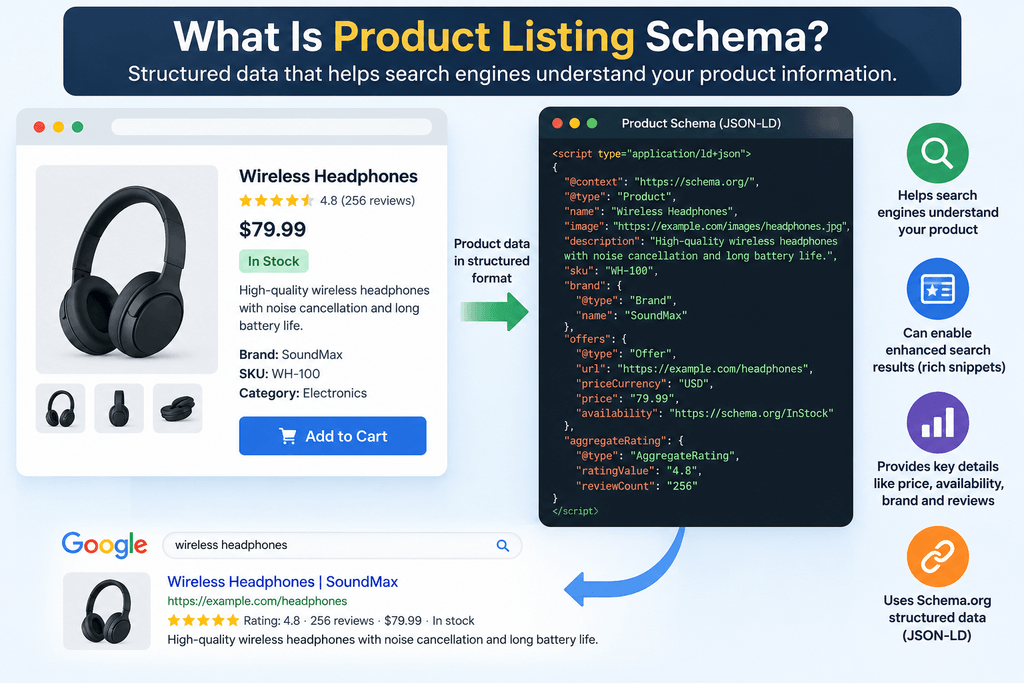
Product listing schema is structured data that describes products on a webpage in a machine-readable format.
The markup is usually implemented using JSON-LD and follows Schema.org vocabulary. Rather than relying only on visible page content, structured data explicitly identifies information such as:
- Product name
- Product description
- Product image
- Brand
- SKU
- Price
- Price currency
- Availability
- Product URL
- Ratings and reviews, when applicable
For example, a visitor may immediately understand that “$49.99” represents the price of a product. Structured data helps communicate that relationship explicitly to search engines.
Why Use a Free Product Listing Schema Generator?
Writing JSON-LD manually is possible, but even a small syntax mistake can make structured data invalid.
A free product listing schema generator simplifies the process by converting information entered into a form into properly structured markup.
This is particularly useful for website owners, SEO professionals, affiliate marketers, developers, and eCommerce businesses that regularly work with product pages.
Instead of repeatedly creating markup from scratch, you can generate a base schema and customize it for the product being published.
You can also use the free Schema Markup Generator by MeetMumtaz to create structured data for your website. Review the generated JSON-LD and validate it before adding it to your page.
How to Create Product Schema Markup Using a Free Generator
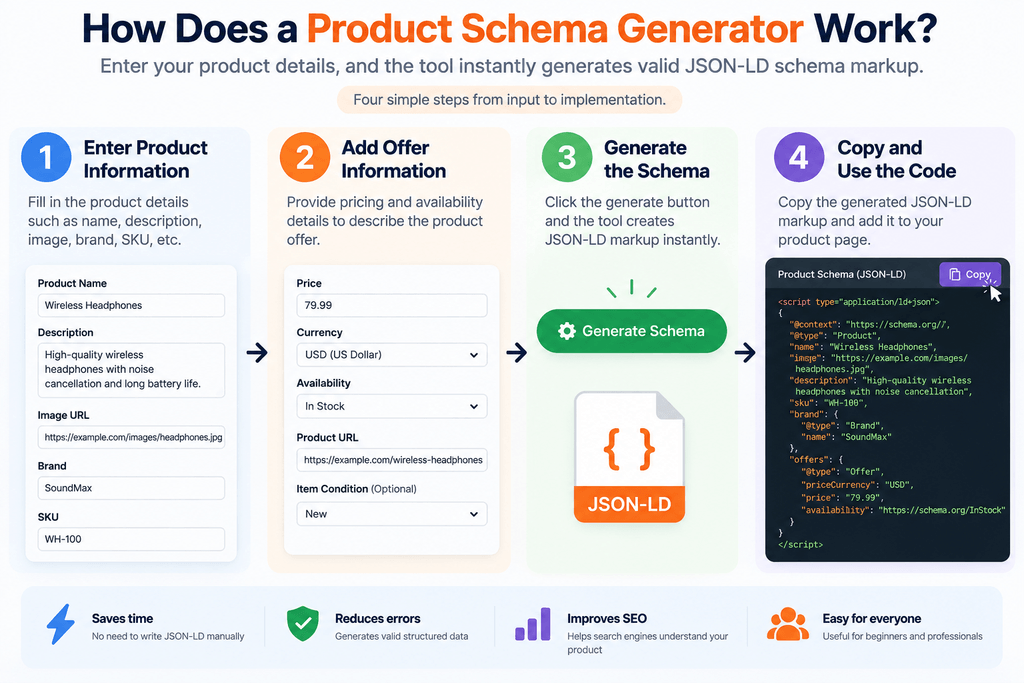
A product schema generator normally asks you to enter information about your product.
The process generally involves three steps.
Step 1: Enter Product Information
Start by providing the essential details, such as the product name, description, image URL, SKU, and brand.
Use information that actually appears on the page. Structured data should accurately represent the content visitors can see.
Step 2: Add Offer Information
Next, provide commercial information when applicable, including:
- Price
- Currency
- Availability
- Product URL
- Item condition
These properties help describe the product’s offer.
Step 3: Generate the Schema
The tool converts your information into JSON-LD markup.
You can then review the generated code, validate it, and add it to the appropriate webpage.
Product Schema Example
A basic Product schema may look like this:
<script type="application/ld+json">
{
  "@context": "https://schema.org/",
  "@type": "Product",
  "name": "Example Wireless Headphones",
  "image": "https://example.com/images/headphones.jpg",
  "description": "Wireless headphones with noise cancellation.",
  "sku": "WH-100",
  "brand": {
    "@type": "Brand",
    "name": "Example Brand"
  },
  "offers": {
    "@type": "Offer",
    "url": "https://example.com/wireless-headphones/",
    "priceCurrency": "USD",
    "price": "79.99",
    "availability": "https://schema.org/InStock"
  }
}
</script>
This is only an example. Your markup should reflect the actual information available on your product page.
What Information Should You Add to Product Schema?
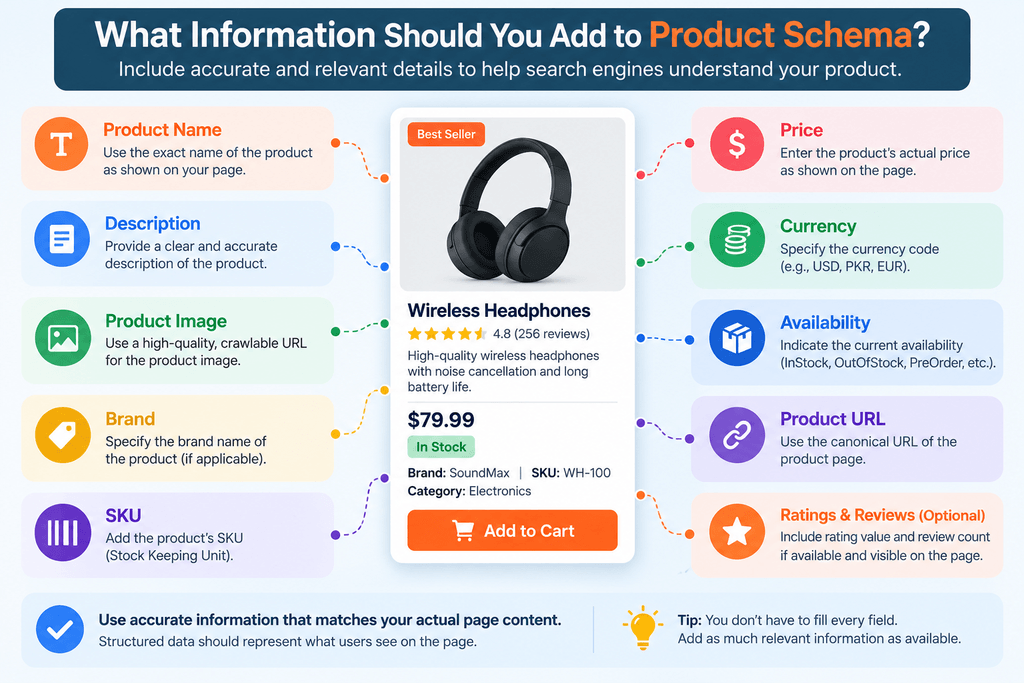
Accurate data is more important than simply adding as many properties as possible.
Product Name
Use the actual name of the product shown on the page.
Avoid inserting unrelated keywords into the schema purely for SEO purposes.
Description
Provide an accurate description of the product. Ideally, it should correspond with the product information users can see on the page.
Product Image
Use a crawlable URL pointing to an image representing the product.
Brand
If the product has a known brand, specify it using the appropriate structured-data property.
SKU
An SKU can help uniquely identify a product in your inventory.
Price and Currency
When the page contains an offer, make sure the price and currency in your schema match the information displayed to visitors.
Availability
Availability can indicate whether the product is currently in stock, out of stock, available for preorder, or in another supported state.
Keeping this property updated is particularly important when inventory changes frequently.
Product Schema and SEO
Structured data does not automatically guarantee higher search rankings.
Its main purpose is to help search engines understand page entities and relationships more precisely. Eligible structured data may also make a page suitable for certain enhanced search appearances, subject to the search engine’s requirements and policies.
Therefore, product schema should be considered part of technical and on-page SEO rather than a shortcut to rankings.
Strong product pages still need useful content, crawlable URLs, sensible internal linking, good performance, appropriate metadata, and accurate product information.
Product Schema Generator vs. Schema Organization Generator
A schema organization generator serves a different purpose from a product schema tool.
Product schema describes an individual product or relevant product information. Organization schema describes the company or organization behind a website.
Organization markup can contain information such as:
- Organization name
- Official URL
- Logo
- Contact information
- Social profiles
- Other relevant organizational details
A business website may therefore use both Product and Organization structured data when each type accurately represents the content and entities on its pages.
The important point is to select schema according to what the page actually represents.
Product Schema vs. Local Business Schema Generator
A local business schema generator is designed for businesses associated with a physical location or local service area.
LocalBusiness structured data can describe details such as the business name, address, telephone number, opening hours, location, and relevant business type.
Product schema, on the other hand, describes products and their associated properties.
For example, a local electronics store may have LocalBusiness structured data representing the store while individual product pages use Product structured data.
These schema types aren’t necessarily competitors. They solve different structured-data requirements.
Free Product Schema Generator vs. Other Schema Tools
When researching structured-data tools, you may encounter searches for a free schema markup generator tool by Livekod.com and other online schema generators.
Different generators may support different schema types and fields. Some focus on Product schema, while others support Article, FAQ, Organization, LocalBusiness, Breadcrumb, Event, or other structured-data types.
Regardless of which generator you use, don’t assume generated code is automatically correct for your webpage.
Always check that:
- The selected schema type matches the page.
- Generated properties contain accurate information.
- Required or recommended properties are included where relevant.
- The JSON-LD syntax is valid.
- The markup reflects visible page content.
A generator should make implementation easier, but validation remains an important final step.
Merkle Schema Markup Generator and Alternative Approaches
The Merkle schema markup generator has been a familiar name among SEO professionals researching structured-data generation.
Whether you use Merkle or another schema tool, the basic workflow remains similar: choose the appropriate structured-data type, enter accurate information, generate JSON-LD, and validate the result before publishing.
A dedicated product schema tool may be more convenient when your main goal is generating product markup because the interface can focus specifically on product and offer properties.
The best generator isn’t necessarily the one with the most fields. It’s the one that helps you create accurate, standards-compliant markup efficiently.
How to Add Product Schema to Your Website
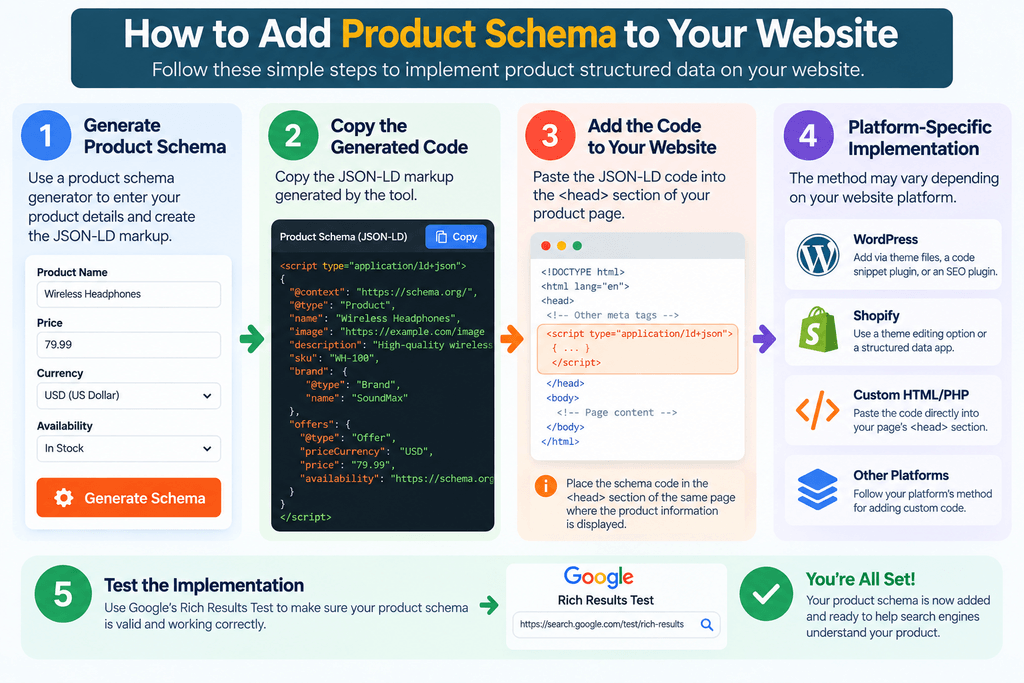
Once you’ve generated the JSON-LD, it needs to be added to the relevant product page.
For a custom HTML or PHP website, the JSON-LD <script> can be included in the page’s HTML.
WordPress users may implement structured data through a theme, custom code, an SEO/schema plugin, or another suitable integration.
However, avoid creating conflicting or duplicate structured data.
If your eCommerce or SEO plugin already generates Product schema, inspect the existing markup before manually adding another Product object.
How to Test Generated Product Schema
Generating markup is only part of the job. Testing should come next.
Two useful resources are Google’s Rich Results Test and the Schema.org validator.
Testing can help identify syntax problems, missing properties, incorrect values, and other implementation issues.
Fix errors before publishing whenever possible, and review warnings to determine whether additional recommended information is appropriate for your page.
Common Product Schema Mistakes to Avoid
One of the most common mistakes is generating structured data and never checking whether it still matches the webpage.
Prices, availability, images, ratings, and product details can change over time.
Other common problems include adding fake reviews, using incorrect prices, marking unavailable products as in stock, using irrelevant schema types, inserting information not supported by the page content, and creating duplicate Product markup through multiple plugins or scripts.
Structured data should describe reality, not manufacture information for search engines.
Can Affiliate Websites Use Product Schema?
Affiliate and product-review websites need to be particularly careful about choosing structured data that accurately reflects their pages.
A page mentioning or reviewing a product isn’t automatically equivalent to a merchant product page offering the item directly for sale.
Before adding Product or offer-related markup, consider what the page actually represents and follow the applicable search-engine structured-data guidelines.
This prevents schema from communicating misleading information about the website’s relationship to the product.
Benefits of Using a Product Listing Schema Generator
A well-designed generator can save considerable time, particularly if you’re creating markup for multiple pages.
It can reduce manual JSON-LD formatting, provide consistent output, make structured data more accessible to non-developers, and help users understand which product properties belong in the markup.
For developers and experienced SEOs, a generator can also serve as a quick starting point before more advanced customization.
Is a Free Product Schema Generator Enough?
For many straightforward product pages, a free generator can provide everything needed to create the initial markup.
More complex eCommerce implementations may require additional structured-data logic, particularly when websites have product variants, multiple offers, dynamic prices, shipping information, merchant return policies, or frequently changing inventory.
In those situations, automated server-side or eCommerce-platform integration can be more reliable than manually maintaining schema on every page.
Frequently Asked Questions
What is a free product listing schema generator?
A free product listing schema generator is a tool that converts product information into structured-data markup, typically JSON-LD, without requiring users to write the entire schema manually.
Is Product schema free to use?
Schema.org vocabulary itself can be used without paying for a schema-generation service. You can write structured data manually or use a free generator to create it.
What is the difference between Product and Organization schema?
Product schema describes a product and related information. Organization schema describes an organization, such as its name, website, logo, and other organizational properties.
What does a local business schema generator create?
A local business schema generator creates structured data describing a local business and may include information such as its name, address, telephone number, opening hours, and business type.
Does Product schema improve rankings?
Adding Product schema does not guarantee a ranking increase. Structured data primarily helps search engines understand content and may make eligible pages suitable for supported enhanced search features.
Should I use a product schema generator or write JSON-LD manually?
Both approaches can work. A generator is usually faster and easier, while manual implementation provides more control for advanced or dynamic websites.
Should generated schema be validated?
Yes. Validate generated structured data and make sure the information accurately matches the webpage before relying on it in production.
Final Thoughts
A free product listing schema generator provides a convenient way to create structured data without manually building JSON-LD from scratch.
The key isn’t simply generating code. Your schema should accurately represent the product, match visible page information, use the appropriate schema type, and remain updated as product details change.
Whether you’re comparing a product schema generator, schema organization generator, local business schema generator, Merkle schema markup generator, or another free schema markup generator tool, the same principle applies: generate accurate markup, validate it, and use structured data to describe your content clearly rather than trying to manipulate search results.
With a careful implementation, product schema can become a valuable part of a technically sound eCommerce and product-page SEO strategy.


