

Every webpage you visit is built from code working behind the scenes. While visitors normally see text, images, buttons, menus, and other visual elements, developers and website owners often need to look underneath the design to understand how a page is structured.
A website source code viewer makes this process easier. Instead of manually searching through browser menus, you can enter a URL online and inspect the source returned for that webpage.
Whether you are learning HTML, reviewing SEO elements, troubleshooting a website, or simply curious about how another page is built, knowing how to view the source can be extremely useful.
In this guide, you’ll learn what a source code viewer does, how to use one, what information you can find, and the difference between source code and the live DOM.
What Is a Website Source Code Viewer?
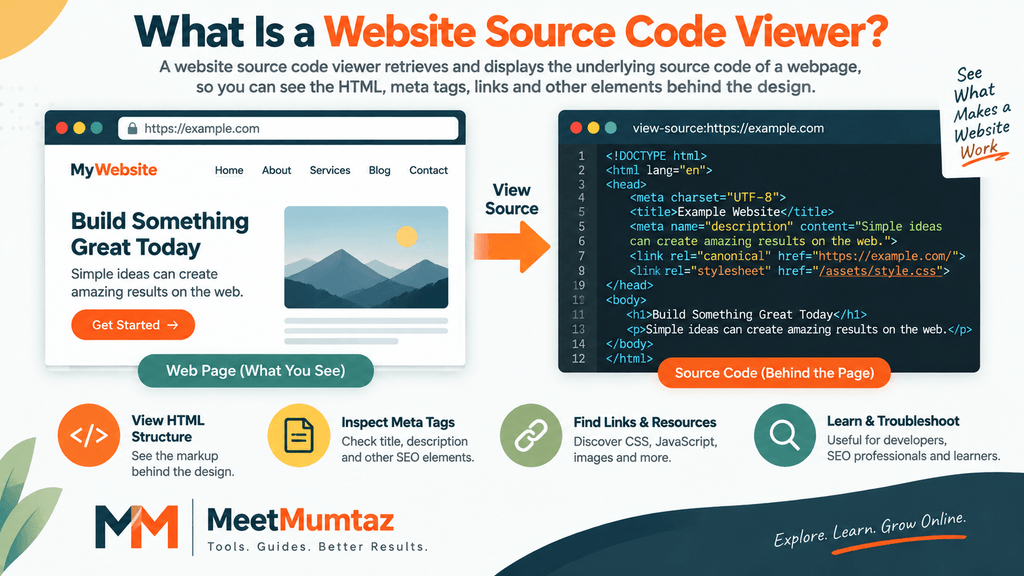
A website source code viewer is a tool that retrieves and displays the underlying source of a webpage in a readable format.
For an HTML webpage, the source may contain elements such as:
<!DOCTYPE html>
<html>
<head>
    <title>Example Page</title>
    <meta name="description" content="Example description">
</head>
<body>
    <h1>Example Heading</h1>
    <p>Example content.</p>
</body>
</html>
Instead of looking only at the visual page, a source code reader lets you examine the markup behind it.
If you want to try this yourself, enter a webpage URL into the Website Source Code Viewer on MeetMumtaz and inspect the returned source.
IMAGE 1 — place here: What Is Website Source Code?
ALT: Website source code viewer showing webpage HTML source
How to View Website Source Code Online
Using a website source code viewer – enter URL online workflow is straightforward.
Copy the complete URL of the webpage you want to examine, such as:
Paste the address into the Website Source Code Viewer and run the tool.
The viewer can then retrieve the available source and display it so you can inspect the HTML and references to other resources.
This approach is useful when you don’t want to manually navigate through browser developer options.
Some browsers also support mechanisms for displaying a resource’s source. MDN, for example, documents view-source as a URI scheme associated with the source code of a resource.
MDN documentation on URI schemes
IMAGE 2 — place here: Enter a URL → Fetch Source → View HTML
ALT: How to view website source code online by entering a URL
Example: View Source Using a Browser
To view a webpage’s HTML source directly in a supported browser, type view-source:https://example.com into the address bar and press Enter. Replace https://example.com with the website URL you want to inspect. This opens the page’s available HTML source, where you can examine headings, meta tags, links, and other HTML elements.
What Can You Find in Website Source Code?
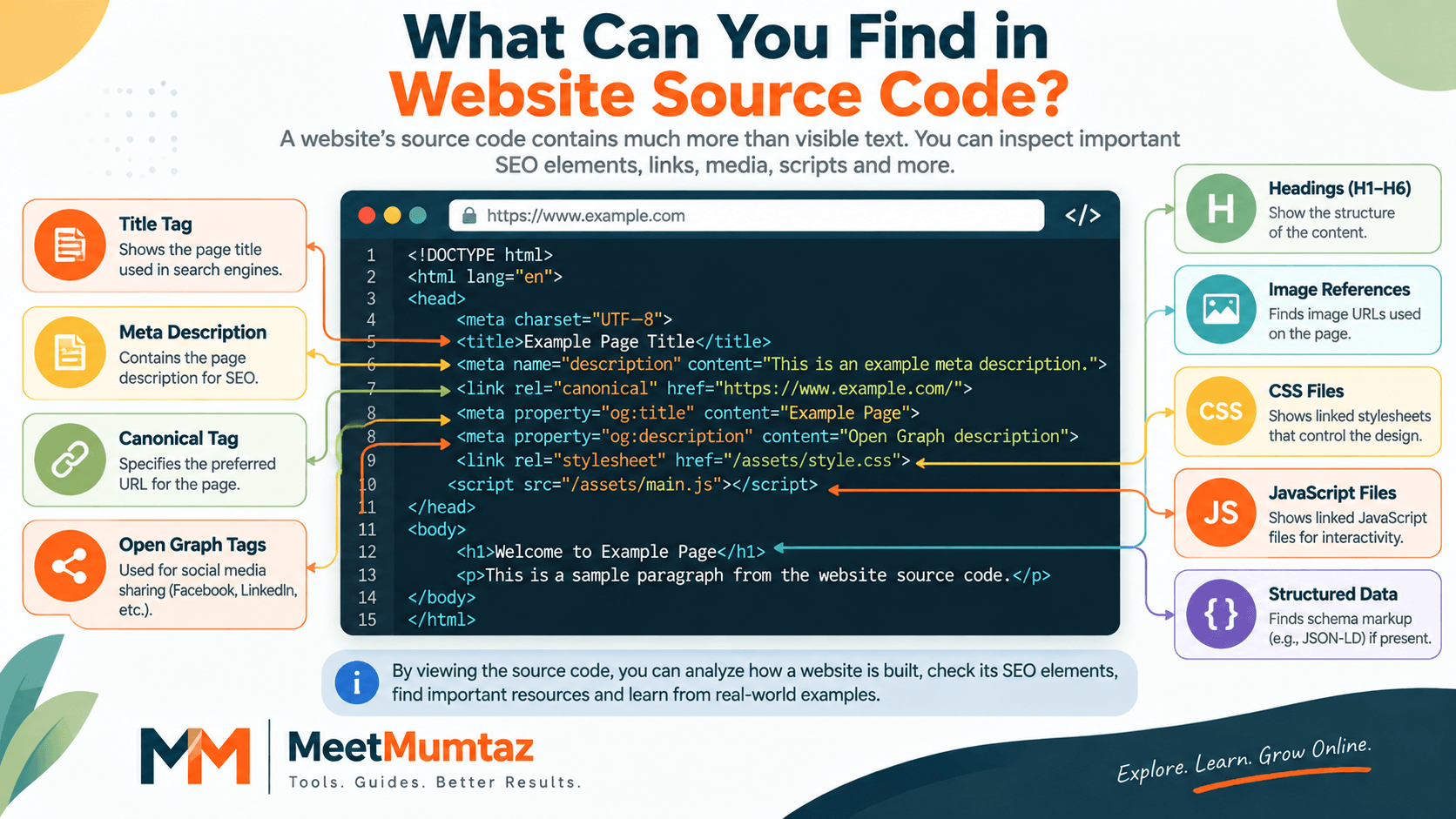
Once you view the source of a webpage, you may find considerably more than the visible text.
Depending on how the website is built and what is present in the returned HTML, you can inspect page titles, meta descriptions, headings, canonical tags, links, image references, Open Graph tags, structured-data markup, CSS references, JavaScript references, analytics snippets, and other HTML elements.
For example, an SEO title may appear inside:
<title>Example SEO Title</title>A meta description may look like:
<meta name="description" content="Example page description">And a canonical URL may appear as:
<link rel="canonical" href="https://example.com/page/">For SEO work, this makes source inspection especially useful because you can compare what you expect a page to contain with what is actually present in its returned markup.
If you’re specifically checking canonical implementation, MeetMumtaz’s Canonical Tag Generator can also help you create the appropriate canonical markup.
IMAGE 3 — place here: What Can You Find in Source Code? showing Title, Meta Description, Canonical, H1–H6, Schema, CSS and JavaScript.
ALT: SEO elements found using a website source code viewer
Website Source Code vs. What You See on the Page
This distinction is important.
The code retrieved from a webpage and the final page displayed in your browser are related, but they aren’t necessarily identical representations.
When a browser receives HTML, it parses that input and constructs a document tree. The WHATWG HTML Standard describes HTML parsing as tokenization followed by tree construction, producing a Document object.
WHATWG HTML parsing specification
JavaScript can subsequently interact with and modify the document. Consequently, something that appears in the live DOM after scripts run may not necessarily appear in exactly the same form in the initially retrieved HTML source.
This is one reason View Source and browser developer tools should not always be treated as interchangeable.
IMAGE 4 — place here: Page Source vs. Live DOM
ALT: Difference between website page source code and live DOM
Can a Source Code Viewer Show CSS and JavaScript?
You will often find references to CSS and JavaScript files in HTML source.
A stylesheet might appear as:
<link rel="stylesheet" href="/assets/style.css">while JavaScript might be referenced as:
<script src="/assets/main.js"></script>This tells you that the webpage references those resources. It doesn’t necessarily mean that the full contents of every external CSS or JavaScript file will be embedded directly inside the HTML.
The HTML Standard distinguishes links to external resources from other types of links and describes external resources as resources obtained and processed by the user agent.
Therefore, a source code viewer is particularly useful for understanding which resources a page references and how its basic document structure is organized.
How Source Code Viewing Helps With SEO
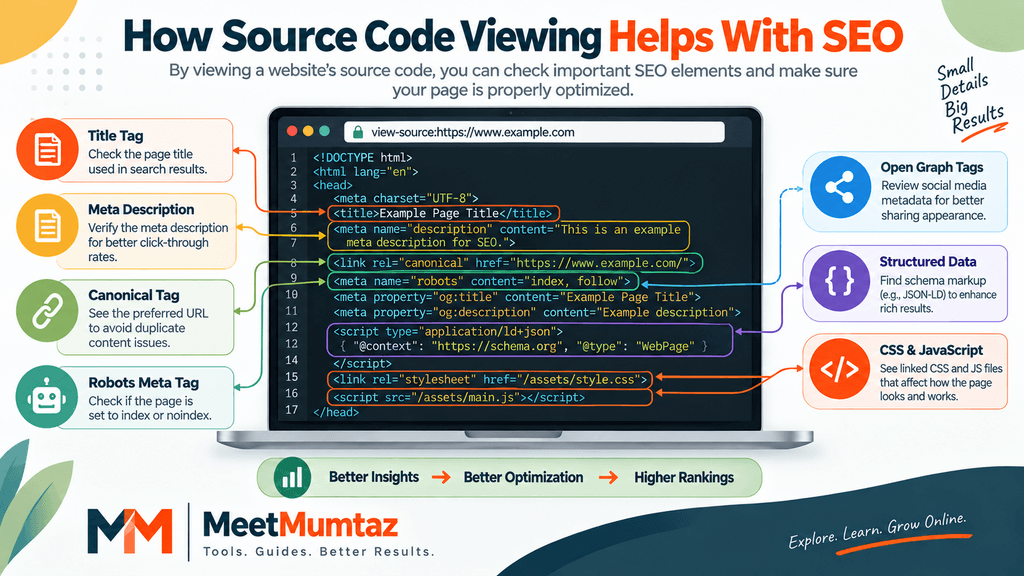
Viewing source code can be useful during basic on-page and technical SEO checks.
For example, you can look for:
Title tag
<title>SEO Tools for Website Optimization</title>Meta description
<meta name="description" content="Explore useful SEO tools...">Robots directive
<meta name="robots" content="index, follow">Canonical tag
<link rel="canonical" href="https://example.com/">Open Graph title
<meta property="og:title" content="Example Title">For pages where you’re specifically concerned about indexing directives, use the Noindex Tag Checker to complement manual source inspection.
And when you’re preparing social-sharing metadata, the Open Graph Generator can help create the necessary Open Graph tags.
Can You Find Schema Markup in Source Code?
Sometimes, yes.
For example, JSON-LD structured data can appear inside HTML as:
<script type="application/ld+json">
{
  "@context": "https://schema.org",
  "@type": "Article",
  "headline": "Example Article"
}
</script>
If you’re implementing structured data on your own website, the Schema Markup Generator can help generate suitable markup that you can then add to the appropriate page.
Remember that inspecting source is only one part of validating an implementation. How a page is processed can matter too, particularly on JavaScript-heavy websites.
What Are URL Parameters?
A URL parameter is information added to a URL, commonly after a ?.
For example:
Here:
category=shoes
is a query parameter.
Multiple parameters can also occur:
Parameters can affect which content a server returns or how an application behaves.
This is where the phrase website source code viewer URL parameter can become relevant: if two parameterized URLs return different HTML, examining each response can help you compare their source.
For example, you might compare:
with:
to see whether important HTML elements differ.
IMAGE 5 — place here: URL Anatomy & Parameters showing protocol → domain → path → ?parameter=value → ¶meter2=value2.
ALT: Website source code viewer URL parameter example
Source Code Viewer vs. Inspect Element
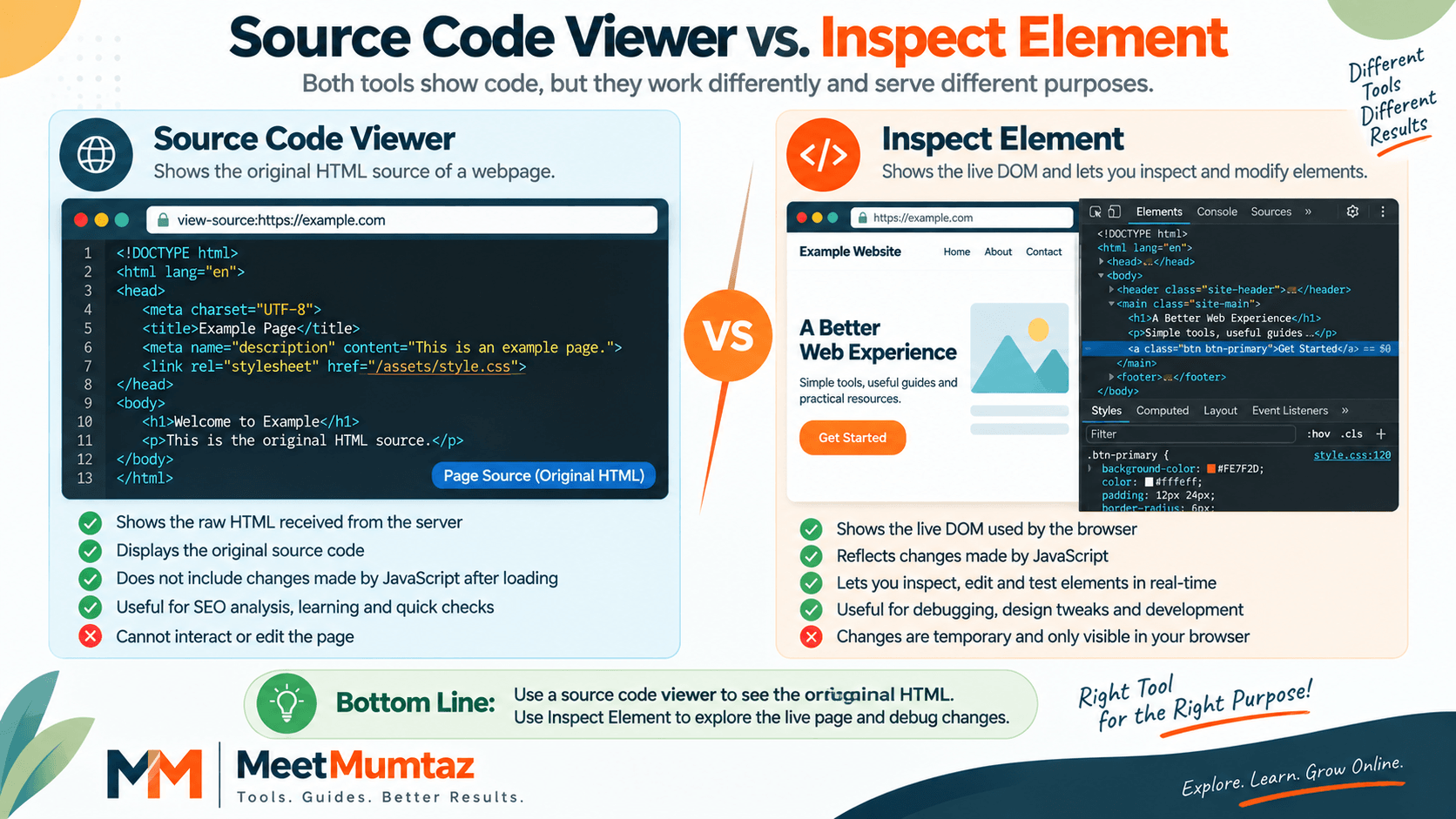
These two approaches serve related but different purposes.
A source viewer is useful when you want to examine the source returned for a webpage. Browser developer tools, on the other hand, expose the document as the browser is working with it and provide debugging capabilities.
This matters on modern websites because scripts can manipulate the document after the initial HTML is processed.
So if something isn’t visible in the original source but appears on the rendered page, inspect the live DOM as well before assuming the element doesn’t exist.
Why Developers Use Source Code Readers
A source code reader can help developers understand unfamiliar webpages without editing them.
For example, developers might inspect source to learn how semantic HTML is structured, locate stylesheet or script references, investigate metadata, compare implementations, or understand how different parts of a document are connected.
The WHATWG HTML specification explains that HTML documents are represented as Document objects and elements become part of the DOM representation used by browsers.
HTML Standard for web developers
For beginners, examining real HTML alongside documentation can also make web-development concepts easier to understand.
Using Source Code for Competitor Research
Source inspection can also help with legitimate competitive research.
You might review publicly accessible markup to understand how another site structures headings, implements metadata, references structured data, or organizes publicly delivered frontend resources.
However, source viewing should be used for learning and analysis rather than copying another site’s proprietary content or design wholesale.
Instead, use what you learn to identify opportunities to improve your own implementation.
Common Problems When Viewing Website Source Code
Sometimes a source viewer may not retrieve the page you expect.
A website can restrict automated requests, require authentication, depend heavily on client-side JavaScript, redirect requests, or return different responses depending on request conditions.
A failed retrieval therefore doesn’t automatically mean the webpage has no source code.
Likewise, source viewers generally cannot expose server-side application code that was never sent to the browser. PHP, database queries, private API credentials, and other backend logic normally remain on the server rather than being delivered as webpage HTML.
Is It Safe to View Website Source Code?
Viewing source that a public website delivers to your browser is a normal web-development and troubleshooting practice.
Still, source visibility should not be confused with permission to misuse content, credentials, copyrighted assets, private information, or systems.
For your own website, source inspection can be especially useful for checking whether sensitive information has accidentally been exposed in frontend markup.
Frequently Asked Questions
What is a website source code viewer?
A website source code viewer retrieves and displays the available source markup of a webpage so you can examine its HTML structure and references to other resources.
How do I view the source of a website?
You can use a browser’s source-viewing functionality or enter the webpage URL into an online source code viewer such as the MeetMumtaz Website Source Code Viewer.
Can I view website source code by entering a URL online?
Yes. A suitable online source viewer can accept a webpage URL and retrieve the source that is accessible to the tool.
Is View Source the same as Inspect Element?
No. Source viewing focuses on source retrieved for the page, while developer tools can show and interact with the live DOM after the browser has parsed the document and scripts may have modified it.
Can I see PHP code using a source code viewer?
Normally, no. Server-side PHP executes on the server. The browser typically receives its output rather than the original PHP source.
Can I use a source code viewer for SEO?
Yes. It can assist with manually reviewing HTML elements such as titles, meta tags, canonicals, robots directives, structured data present in source, links, and other markup.
Does View Source show JavaScript-generated content?
Not necessarily. Content inserted or modified after initial page processing may be better examined through the live DOM in developer tools.
Final Thoughts
A website source code viewer provides a straightforward way to look behind the visual layer of a webpage and understand the markup being delivered.
By learning how to view the source, you can examine HTML structure, SEO metadata, links, resource references, structured data, and other publicly accessible frontend information. Developers can use it for learning and debugging, while SEO professionals can use it as one component of technical and on-page checks.
If you want to explore a webpage yourself, open the Website Source Code Viewer, enter the URL you want to analyze, and inspect the available source.


