

A good laptop stand can make a simple desk setup more comfortable, organized, and practical. Whether you work from home, spend hours studying, travel with your laptop, or use a powerful gaming machine, raising your screen to a more comfortable viewing position can noticeably improve your workspace.
Laptop stands, however, are not all designed for the same purpose. Some prioritize portability, others add height for sit-to-stand work, while gaming-oriented models focus on airflow and active cooling.
We compared five popular options across different use cases, including a foldable laptop stand, tall laptop stand, gaming laptop stand, and adjustable desk laptop stand. Our selections are based on product specifications, compatibility, design features, and information available in the manufacturers’ Amazon listings rather than hands-on testing.
Affiliate Disclosure: Some links in this article may be affiliate links. If you make a purchase through them, MeetMumtaz may earn a commission at no additional cost to you.
Quick Comparison of the Best Laptop Stands
| Laptop Stand | Best For | Laptop Size | Standout Feature | Check Price |
|---|---|---|---|---|
| Nulaxy Ergonomic Adjustable Laptop Stand | Best Overall | 10–16″ | Dual-folding design | Check Price on Amazon → |
| OMOTON LA10 360° Rotating Laptop Stand | Rotation & Collaboration | Up to 17″ | 360° swivel base | Check Price on Amazon → |
| Ergonomic Foldable Laptop Stand | Foldable & Portable Use | 10–15.6″ | Compact fold-flat design | Check Price on Amazon → |
| tounee Telescopic Laptop Stand | Tall / Sit-to-Stand Setup | 10–17″ | Up to 21″ height | Check Price on Amazon → |
| llano V10 Gaming Laptop Cooling Pad | Gaming & Cooling | 13–17.3″ | 3500 RPM turbo fan | Check Price on Amazon → |
1. Nulaxy Ergonomic Adjustable Laptop Stand — Best Overall
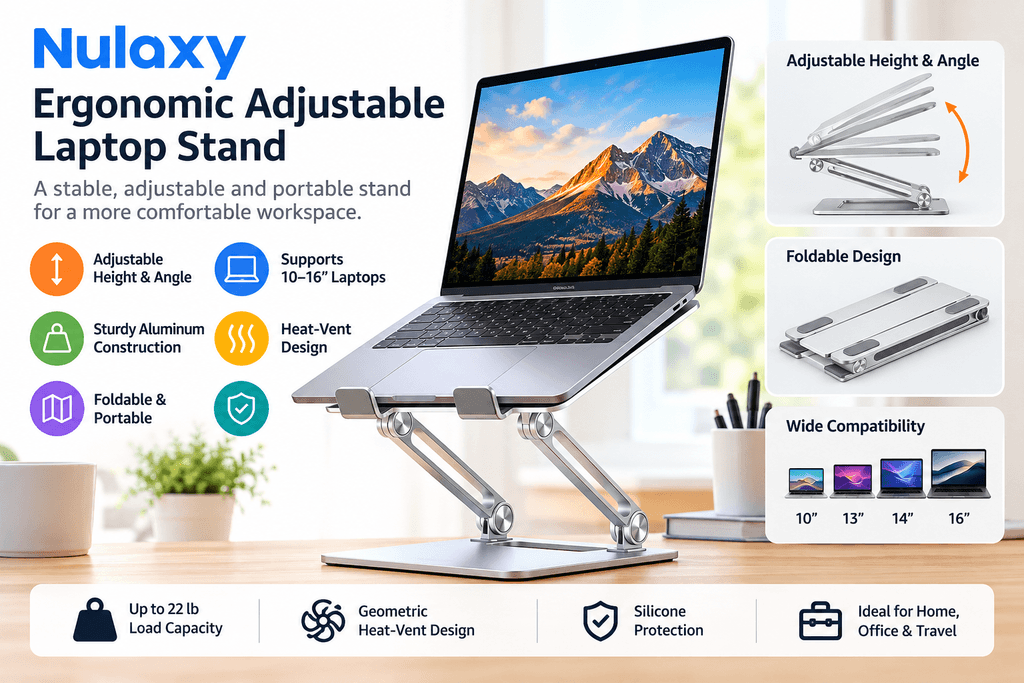
For anyone looking for a versatile desk laptop stand, the Nulaxy Ergonomic Adjustable Laptop Stand offers a strong mix of adjustability, stability, portability, and ventilation.
The stand uses a dual-rod support mechanism and is rated by the manufacturer to support devices weighing up to 22 lb (10 kg). Its adjustable design lets you raise the laptop instead of leaving the screen flat on the desk.
This matters because screen placement is an important part of workstation ergonomics. The U.S. Occupational Safety and Health Administration recommends positioning a computer display so that the top of the screen is at or slightly below eye level and arranging the workstation to avoid awkward head and neck positions.
The Nulaxy accommodates laptops from 10 to 16 inches, including many MacBook, Dell, HP, Lenovo, ASUS, and Chromebook models. Its upper platform also features a geometric heat-vent design that allows airflow around the laptop.
Another advantage is portability. The dual-folding structure can collapse relatively flat, making it more convenient to carry than a large fixed desktop riser.
Key features: dual-rod adjustable construction, up to 22 lb stated load capacity, 10–16″ compatibility, ventilated upper panel, anti-slip silicone pads, and foldable aluminum construction.
Pros: strong load capacity, good balance of portability and adjustability, ventilation-friendly design, and broad laptop compatibility.
Cons: it does not offer the 360° rotation of the OMOTON or tounee models, and it does not provide active fan cooling like the Llano V10.
Check the latest price and availability on Amazon →
→
2. OMOTON LA10 360° Rotating Laptop Stand — Best for Rotation
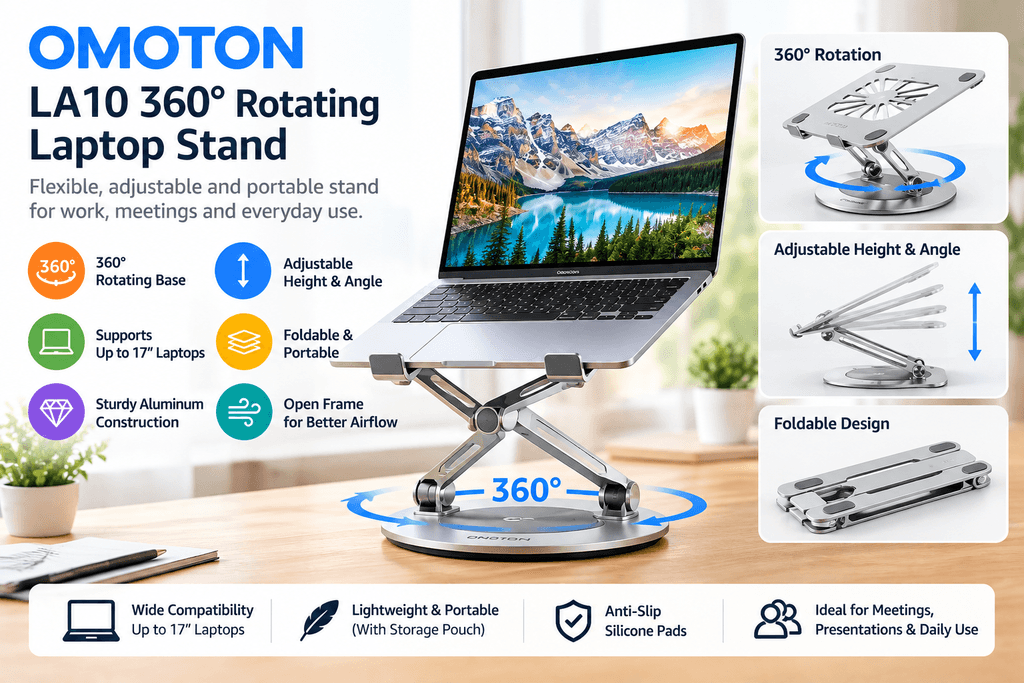
The OMOTON LA10 is particularly interesting if you frequently share your screen during meetings, presentations, collaborative work, or video calls.
Its defining feature is a 360-degree rotating base. Instead of lifting the entire stand whenever you want another person to see the screen, you can rotate the laptop toward them.
The stand provides tool-free height and angle adjustment using friction-tight aluminum joints. According to the product listing, its screen-height adjustment spans approximately 1.8 to 10.4 inches.
It also supports laptops and tablets up to 17 inches, giving it broader size compatibility than several compact stands.
Portability hasn’t been ignored either. OMOTON states that the stand weighs approximately 1.85 lb (840 g) and folds down to roughly 11.4 × 1.7 inches. A storage pouch is included.
The X-shaped open frame leaves space underneath the laptop for airflow rather than covering most of the bottom panel.
Key features: 360° rotating X-base, adjustable height and tilt, up to 17″ compatibility, foldable aluminum body, anti-slip silicone protection, open-frame ventilation, and storage pouch.
Pros: excellent rotation, broad compatibility, useful for collaborative environments, and relatively portable.
Cons: users who never need rotation may not benefit much from its main selling point, while users wanting extreme height adjustment should look at the Tounee model instead.
Best for: offices, shared workspaces, meetings, presentations, and video calls.
Check the latest price and availability on Amazon →
3. Amazon Basics Ergonomic Laptop Stand — Best Foldable Laptop Stand
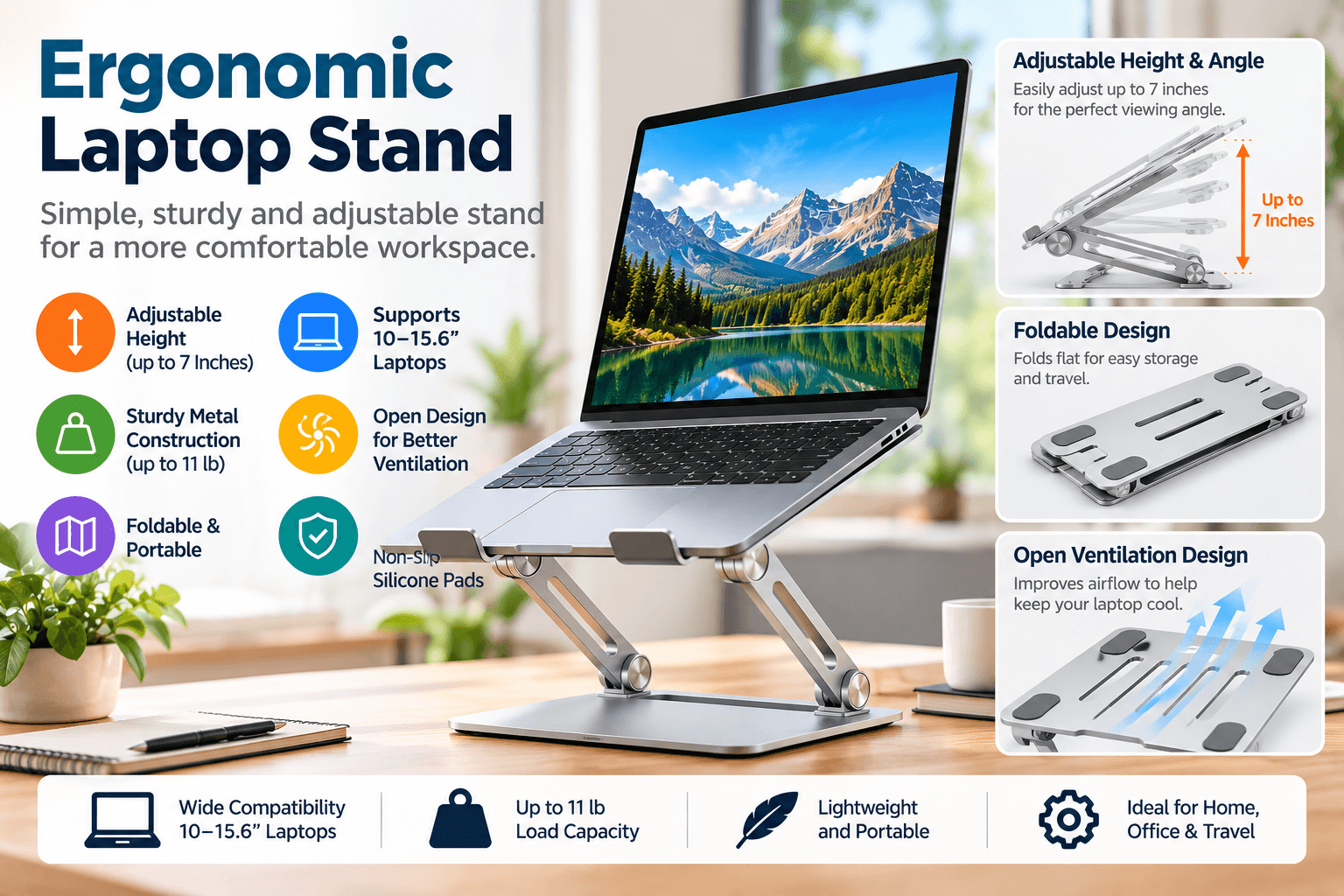
If portability is high on your priority list, the Amazon Basics model is a straightforward foldable laptop stand designed for everyday desk and travel use.
It provides up to 7 inches of height adjustment and supports laptops and tablets from approximately 10 to 15.6 inches.
The aluminum construction has a manufacturer-stated loading capacity of 11 lb (5 kg). Silicone pads and front hooks help keep the computer in place while protecting it from direct metal contact.
The center of the platform is largely open. This allows air to move around the underside of the computer rather than trapping heat against a solid platform.
Its biggest advantage, however, is the folding mechanism. According to the listing, it folds to approximately 10 × 8.7 × 1.8 inches and weighs around 1.7 lb (0.77 kg).
That makes it an attractive computer stand for laptop users who regularly move between home, office, university, coworking spaces, or other locations.
Key features: up to 7″ height adjustment, 10–15.6″ compatibility, 11 lb stated capacity, aluminum construction, open ventilation design, silicone protection, and fold-flat construction.
Pros: compact when folded, lightweight, simple design, and good everyday compatibility.
Cons: lower maximum load capacity than Nulaxy and tounee, no rotating base, and compatibility tops out at 15.6 inches according to the listing.
Best for: commuters, students, hybrid workers, and anyone prioritizing portability.
Check the latest price and availability on Amazon →
4. tounee Telescopic Laptop Stand — Best Tall Laptop Stand
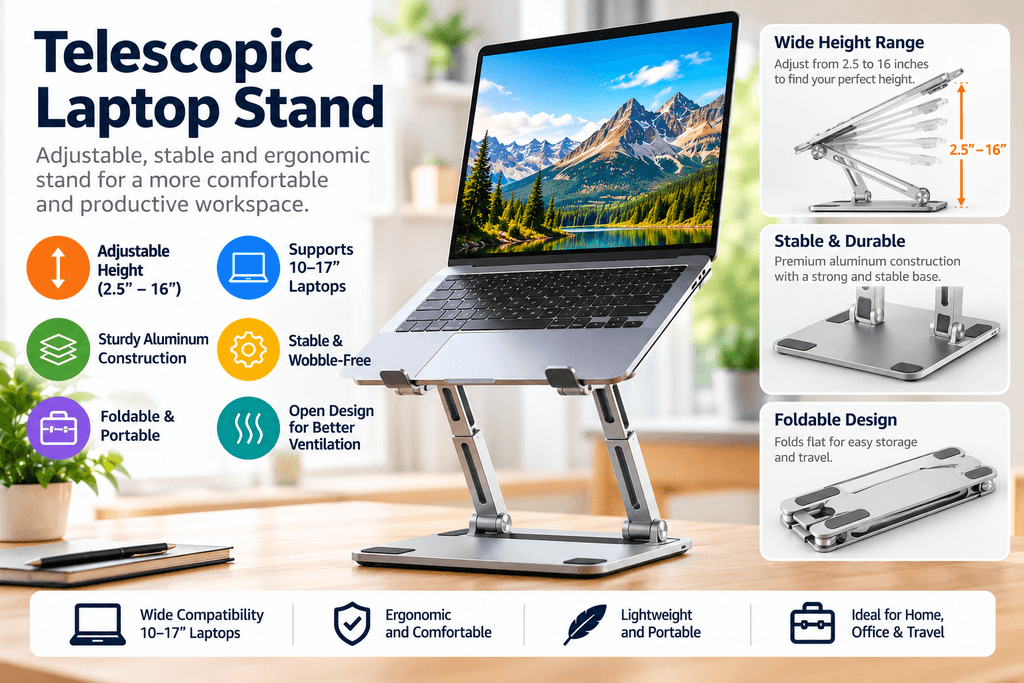
A conventional laptop riser is usually designed for seated use. The tounee Telescopic Laptop Stand takes a different approach by providing substantially more vertical adjustment.
Its height range extends from approximately 2.1 inches to 21 inches, according to the listing. That makes this tall laptop stand particularly interesting for people who want to alternate between seated and standing positions at a suitable desk.
The stand also incorporates a 360° rotating base, making it possible to turn the screen without moving the entire unit.
Its aluminum-alloy construction and larger base are designed for stability, while the manufacturer rates it for loads up to 22 lb. Dual pivot joints provide additional structural support.
Compatibility is broad at 10 to 17-inch laptops, and the stand can fold down when additional desk space is needed.
If you’re building a sit-to-stand workstation, remember that raising only the screen isn’t the entire ergonomic equation. OSHA’s workstation guidance also considers keyboard, mouse, chair, desk, viewing distance, and overall body posture. For laptops used as a primary computer, its evaluation checklist recommends applying desktop ergonomic principles and providing a separate keyboard and input device.
Key features: approximately 2.1–21″ height range, 360° rotation, 10–17″ laptop compatibility, 22 lb stated capacity, aluminum construction, dual-pivot mechanism, and foldable design.
Pros: exceptional height range, useful for sitting and standing, rotating base, high stated load capacity, and broad compatibility.
Cons: larger and more substantial than a basic portable stand, and buyers who only need a small screen lift may not need its extensive height range.
Best for: standing desks, taller workstation setups, home offices, and users who frequently switch between sitting and standing.
Check the latest price and availability on Amazon →
5. llano V10 Gaming Laptop Cooling Pad — Best Gaming Laptop Stand for Cooling
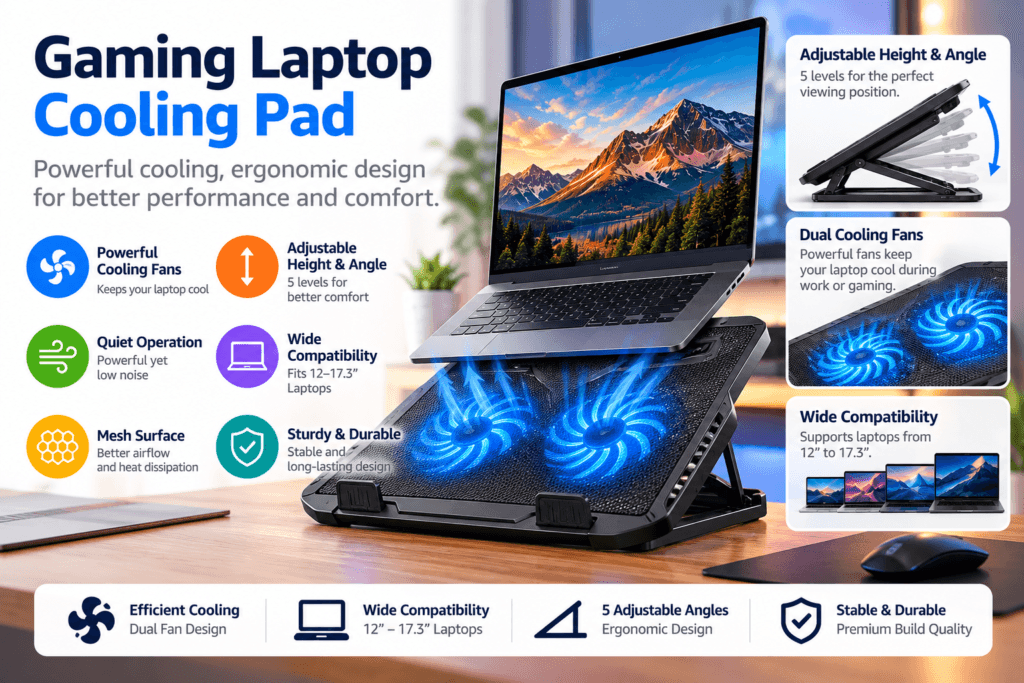
Gaming laptops create a different challenge. They can run demanding hardware for extended periods, so many gamers look beyond a passive gaming laptop stand and consider an actively cooled platform.
The llano V10 is technically a laptop cooling pad/stand rather than a traditional passive riser. That’s precisely what makes it different from the other four products in this comparison.
At its center is a 4.72-inch turbo fan capable of running at up to 3500 RPM, according to the manufacturer. llano makes specific temperature-reduction claims for the product, but actual cooling performance will vary depending on the laptop, workload, ambient temperature, fan settings, and vent layout.
The V10 supports laptops from approximately 13 to 17.3 inches and includes a three-level ergonomic stand for adjusting its position.
Gaming aesthetics are also a major part of the design. It offers 12 RGB lighting modes with memory recall, along with physical controls for the fan and lighting.
Connectivity is another differentiator. The listing specifies four USB ports — three USB-A and one USB-C — which can help offset ports occupied by the cooler or accommodate peripherals.
A removable dust filter and anti-slip baffles round out the design.
Key features: 4.72″ turbo fan, up to 3500 RPM, 12 RGB modes, physical controls, 13–17.3″ compatibility, three-level stand, removable dust filter, and four USB ports.
Pros: active cooling, designed specifically with gaming laptops in mind, RGB lighting, physical fan controls, and extra USB connectivity.
Cons: considerably more specialized than a normal laptop riser, bulkier for travel, and active cooling adds fan noise and power requirements that passive stands don’t have.
Best for: gamers and performance-laptop users who prioritize active cooling over maximum portability.
Check the latest price and availability on Amazon →
How to Choose the Best Laptop Stand for Your Desk
Don’t choose a laptop stand simply because it looks good in product photos. Start with how and where you’ll actually use it.
Height and angle adjustment should come first for a permanent workstation. OSHA recommends arranging displays so the top of the screen is at or slightly below eye level and keeping the head and neck in a neutral position. There is no single perfect workstation configuration for every person, so adjustability matters.
Next, check laptop size and weight compatibility. A compact stand intended for a 13-inch ultrabook isn’t automatically appropriate for a heavy 17-inch gaming laptop.
For travel, look for a foldable laptop stand with manageable dimensions and weight. For a permanent office setup, stability may matter more than portability.
Ventilation is also worth considering. Open-frame designs leave more of the laptop’s underside exposed, while users with demanding gaming systems may prefer an active cooling solution such as the llano V10.
Finally, consider your keyboard and mouse setup. Raising a laptop’s screen also raises its built-in keyboard. For prolonged laptop use, an external keyboard and pointing device can help you arrange the screen and input devices independently; OSHA explicitly includes separate input devices in its laptop workstation guidance.
Foldable vs. Tall vs. Gaming Laptop Stands
A foldable laptop stand makes the most sense when portability matters. The Amazon Basics model is the clearest example in this comparison because it folds relatively flat and remains lightweight.
A tall laptop stand is better suited to users who need substantially more vertical adjustment. The tounee’s telescopic design provides much more height than a conventional desktop riser and can support sit-to-stand configurations.
A gaming laptop stand may prioritize airflow and stability. For users dealing with heat during demanding workloads, an active cooling stand such as the llano V10 goes a step further by adding a powered fan.
For general office use, however, a conventional adjustable desk laptop stand such as the Nulaxy or OMOTON may be simpler and easier to carry.
Is a Laptop Stand Worth It?
A laptop stand can be worthwhile when it solves a specific problem: a screen positioned too low, limited desk organization, the need to share or rotate a display, portability between workspaces, or additional airflow around a laptop.
It isn’t a complete ergonomic solution on its own. Your chair, keyboard, mouse, desk height, viewing distance, screen position, and working habits all contribute to the overall setup. OSHA notes that workstation components should be arranged together to promote neutral postures rather than treating the monitor in isolation.
For people who work on a laptop for long periods, pairing an elevated laptop with an external keyboard and mouse is generally a more flexible arrangement than simply raising the laptop and continuing to type on its built-in keyboard.
Frequently Asked Questions
What is the best laptop stand for a desk?
It depends on the setup. The Nulaxy offers a balanced combination of adjustment, portability, ventilation, and broad compatibility, while the OMOTON is particularly useful when 360° screen rotation matters. A tall model such as the Tounee is more suitable when significant vertical adjustment is required.
Are foldable laptop stands stable?
They can be, provided the stand is used within its stated laptop-size and weight limits and placed on a stable surface. Construction, hinge design, base width, and the weight of the laptop all affect stability.
What should I look for in a tall laptop stand?
Check the maximum and minimum height, base stability, load capacity, laptop compatibility, tilt adjustment, and whether you’ll use an external keyboard and mouse. A tall stand should allow you to position the screen appropriately without creating an awkward typing position.
Is a gaming laptop stand different from a regular laptop stand?
Sometimes. A conventional gaming laptop stand may simply provide elevation and passive airflow. Cooling stands such as the Llano V10 add powered fans and gaming-focused features such as RGB lighting and fan controls.
Does a laptop stand help with cooling?
An open stand can expose more of the laptop’s underside to ambient airflow, but the effect depends heavily on the laptop’s own cooling design and vent locations. Active cooling pads add fans, although results can vary significantly between laptop models.
Should I use an external keyboard with a laptop stand?
For prolonged use, it can be particularly useful because it lets you position the laptop screen and keyboard independently. OSHA’s workstation evaluation guidance recommends a separate keyboard and input device when laptops are used as a primary computer.
What Features Matter Most When Comparing Laptop Stands?
When comparing laptop stands, focus on height and angle adjustment, laptop compatibility, stability, portability, and ventilation. An adjustable laptop stand can improve screen positioning, while a foldable design is useful for travel. For desk setups, choose a sturdy stand that supports your laptop’s weight and allows comfortable use with an external keyboard and mouse. Gaming users should also consider airflow and cooling performance.
Final Thoughts
The right laptop stand depends less on finding one universal winner and more on matching the design to your workspace.
The Nulaxy Ergonomic Adjustable Laptop Stand provides a versatile option for everyday desk use. The OMOTON LA10 adds 360° rotation for collaborative environments. The Amazon Basics Ergonomic Laptop Stand focuses on foldable portability, while the tounee Telescopic Laptop Stand provides substantially more height for sit-to-stand setups. For gaming laptops where active cooling is the priority, the llano V10 offers a specialized cooling-pad design with a high-speed fan and gaming-focused features.
Before buying, check the latest laptop-size compatibility, specifications, availability, and current price on the product listing, as these details can change over time.
Looking for more useful resources? Explore our free online tools for everyday browser-based utilities, check out our website tools for managing and analyzing websites, or browse our developer tools for practical web development tasks.
Links:
free online tools → https://meetmumtaz.com/tools/
website tools → https://meetmumtaz.com/website-tools/
developer tools → https://meetmumtaz.com/developer-tools/


