Starting a WordPress website should not require an expensive hosting plan or complicated server configuration. Whether you are launching your first blog, creating a business website, or moving an existing WordPress project, choosing the right hosting service can make a major difference in your website’s long-term cost and maintenance.
If you are searching for easywp hosting free, you probably want to know whether Namecheap offers free WordPress hosting, how much its paid plans cost, and which EasyWP package delivers the best value.
The short answer is that EasyWP is a paid managed WordPress hosting service, although Namecheap has advertised a free trial for its monthly Starter plan. The availability of that promotion can change, so always verify the current offer before signing up. Namecheap
In this guide, we compare the EasyWP Starter, Turbo, and Supersonic plans, examine their features and limitations, and explain the difference between EasyWP and traditional shared hosting.
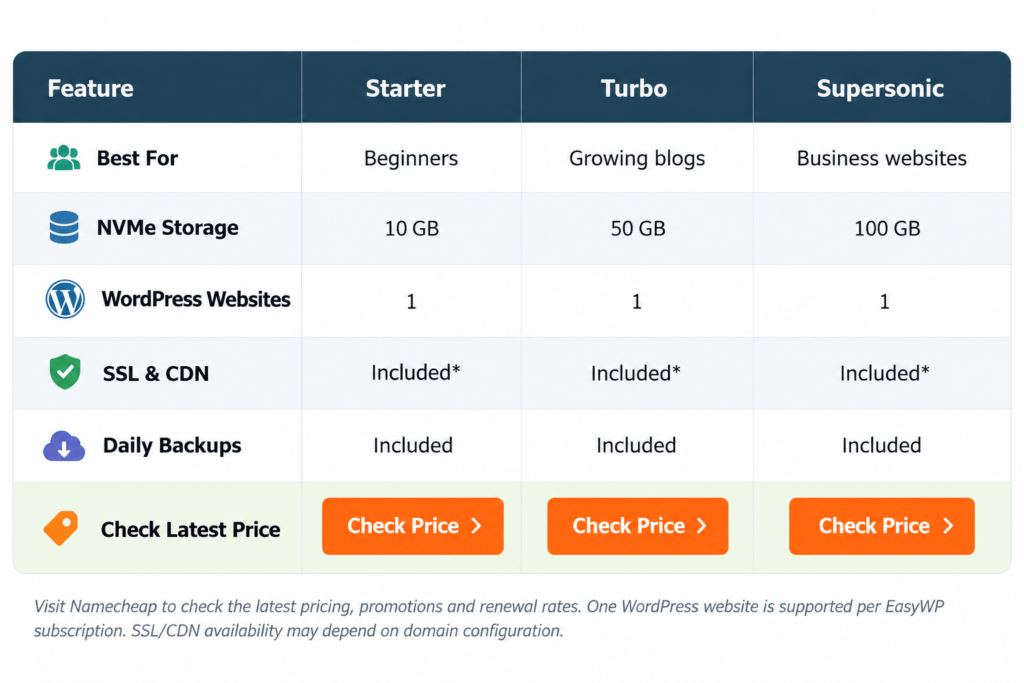
Quick Comparison: EasyWP Starter vs Turbo vs Supersonic
Namecheap offers three main EasyWP managed WordPress hosting plans. Each is designed for a different type of website, from beginner blogs to more demanding business projects.
The following prices reflect the annual-billing offers displayed on Namecheap’s official pricing page when checked in October 2026. Promotions and renewal prices may change. Namecheap
| Feature | Starter | Turbo | Supersonic |
|---|---|---|---|
| Best For | Beginners | Growing blogs | Business websites |
| NVMe Storage | 10 GB | 50 GB | 100 GB |
| WordPress Websites | 1 | 1 | 1 |
| SSL & CDN | Included* | Included* | Included* |
| Daily Backups | Included | Included | Included |
| Check Latest Price | Check Price | Check Price | Check Price |
Visit Namecheap to check the latest pricing, promotions and renewal rates. One WordPress website is supported per EasyWP subscription. SSL/CDN availability may depend on domain configuration.
For most first-time WordPress users, Starter is a reasonable entry point. Turbo provides more storage and processing resources, while Supersonic is intended for more demanding websites.
Is EasyWP Hosting Free in 2026?
The phrase easywp hosting free can be misleading because a free trial and permanently free hosting are not the same thing.
EasyWP is a commercial hosting service. Namecheap has offered a first-month-free promotion on the monthly EasyWP Starter plan, but this does not mean the hosting remains free indefinitely.
Under the advertised free-trial terms, the monthly Starter subscription renews at its regular price after the promotional period unless canceled. Trial availability, eligibility restrictions, and billing terms should be checked directly on the official checkout page. Namecheap
What can you get for free?
Depending on the selected plan and current promotion, EasyWP may provide:
- A temporary domain for setting up a WordPress website.
- SSL and CDN features, subject to domain compatibility.
- A limited-time Starter trial when offered.
- Automated WordPress updates and built-in hosting management.
A temporary domain is useful for testing your website before connecting a permanent domain. However, it is not the same as receiving a free custom domain registration.
Our recommendation: If you only want to experiment with WordPress, check the current Starter trial. If you plan to run a serious website for several months, compare the annual purchase price and renewal cost instead of choosing solely based on a free promotion.
EasyWP Hosting Price: How Much Does Namecheap Charge?
Understanding the easywp hosting price is important when choosing the right WordPress hosting plan for your website. Namecheap offers flexible billing options, including monthly, yearly, and two-year subscriptions, so users can choose a payment schedule that fits their needs.
The three main EasyWP hosting plans are Starter, Turbo, and Supersonic. Each plan offers different storage, performance resources, and features to meet various website needs.
| Hosting Plan | Best For | Key Benefits |
|---|---|---|
| EasyWP Starter | Beginners and personal blogs | Essential WordPress hosting features with simple website management |
| EasyWP Turbo | Growing blogs and small businesses | Additional storage and resources for expanding websites |
| EasyWP Supersonic | Established and resource-intensive websites | Higher resource allocations and priority support |
When comparing namecheap hosting pricing, it is important to consider introductory offers, renewal terms, available features, and long-term hosting requirements. Promotional discounts may apply only to the initial billing period, while renewal conditions can differ.
The overall easywp hosting cost also depends on optional services such as domain registration, professional email, premium WordPress themes, and additional website tools.
Before selecting a plan, review the latest offers on the official Namecheap EasyWP pricing page to find the most suitable hosting solution for your website.g namecheap hosting pricing, consider the following additional expenses: domain registration and renewal, professional email, premium WordPress themes, paid plugins, and any optional hosting resources.
1. EasyWP Starter Review — Best for Beginners
EasyWP Starter is designed for individuals who want to launch a WordPress website without managing a traditional hosting control panel.
It offers 10 GB of NVMe storage, managed WordPress updates, backups, security features, and access to Namecheap’s EasyWP dashboard. Namecheap
Starter is particularly suitable for a personal blog, portfolio, small informational website, or first WordPress project.
Its biggest advantage is simplicity. Instead of configuring cPanel and installing WordPress manually, users can work with a hosting environment designed specifically for WordPress.
However, Starter is not an unlimited hosting solution. Its storage allocation and resource capacity may be restrictive for large websites, media-heavy projects, or more demanding applications.
EasyWP Starter — Key Features, Pros & Cons
| EasyWP Starter | |
|---|---|
| Key Features |
10 GB NVMe storage Managed WordPress hosting Automatic WordPress updates SSL and CDN features* Daily backup tools |
| Pros |
✓ Affordable introductory pricing ✓ Beginner-friendly dashboard ✓ Built-in WordPress management ✓ Suitable for smaller websites |
| Cons |
✗ Limited storage ✗ One website per subscription ✗ No traditional cPanel access ✗ Renewal costs more than intro price |
| Latest Offer | Check Starter Price |
Verdict: Starter is the most sensible choice if you are creating your first WordPress blog and do not need substantial storage or advanced hosting resources.
2. EasyWP Turbo Review — Best for Growing WordPress Websites
EasyWP Turbo is designed for website owners who have outgrown an entry-level hosting plan.
It includes 50 GB of NVMe storage and higher CPU and RAM allocations than Starter, along with the core managed WordPress features. Namecheap also advertises an AI website builder and selected domain and business-email offers with Turbo, subject to promotional terms. Namecheap
The additional storage is useful for websites with a growing library of images, blog posts, product descriptions, and other content.
Turbo can be a practical choice for affiliate blogs, content websites, small business sites, and WordPress projects that need more resources without moving to VPS hosting.
Nevertheless, increased resources do not guarantee a particular website speed. Performance also depends on the WordPress theme, plugins, image optimization, database usage, and traffic patterns.
EasyWP Turbo — Key Features, Pros & Cons
| EasyWP Turbo | |
|---|---|
| Key Features |
50 GB NVMe storage Higher CPU and RAM allocation Managed WordPress updates Backup and security features AI website builder offering |
| Pros |
✓ More storage than Starter ✓ Better resource allowance ✓ Suitable for growing content sites ✓ Managed hosting convenience |
| Cons |
✗ Higher renewal cost ✗ One WordPress website per subscription ✗ No traditional cPanel environment ✗ Some offers have eligibility conditions |
| Latest Offer | Check Turbo Price |
Verdict: Turbo offers a useful middle ground between Starter’s affordability and Supersonic’s higher resource allocation. It is our preferred option for a growing WordPress content website, provided its renewal price fits the budget.
3. EasyWP Supersonic Review — Best for Demanding WordPress Projects
EasyWP Supersonic is the highest-tier plan in Namecheap’s standard EasyWP lineup.
It offers 100 GB of NVMe storage, more processing resources than Turbo, priority support, and an advertised 99.99% uptime commitment. Namecheap
This makes Supersonic worth considering for resource-intensive WordPress projects, established business websites, and larger content platforms.
It can also be relevant for WordPress-based e-commerce websites, although store owners should confirm plugin compatibility, database limits, resource requirements, and backup arrangements before purchasing.
An important distinction is that Supersonic does not automatically become the best choice simply because it is the most expensive plan. A small blog may never use its additional capacity.
EasyWP Supersonic — Key Features, Pros & Cons
| EasyWP Supersonic | |
|---|---|
| Key Features |
100 GB NVMe storage Higher CPU and RAM allocation 99.99% advertised uptime Priority support Managed WordPress security and backups |
| Pros |
✓ Largest standard EasyWP storage plan ✓ Higher resource allowance ✓ Priority support ✓ Suitable for demanding WordPress sites |
| Cons |
✗ Highest price among these plans ✗ One WordPress website per subscription ✗ WordPress-only hosting environment ✗ May be unnecessary for smaller blogs |
| Latest Offer | Check Supersonic Price |
Verdict: Supersonic is worth considering when a WordPress website genuinely needs more resources, additional storage, or priority support. For smaller projects, Starter or Turbo may provide better value.
EasyWP Namecheap Hosting: Important Features Explained
Beyond price, the value of easywp namecheap hosting depends on the features included in the service.
Managed WordPress Environment
EasyWP is designed specifically for WordPress. Namecheap handles much of the underlying hosting configuration, allowing users to focus on website content and management.
Unlike conventional shared hosting, EasyWP uses a dedicated dashboard instead of cPanel.
NVMe Storage and Built-In Caching
EasyWP includes NVMe storage and built-in caching technologies intended to improve data access and WordPress performance.
However, actual page-loading speed will still depend on website optimization, visitor location, content complexity, and other technical factors.
Automatic Backups
Namecheap advertises automated backups and provides backup management through the EasyWP dashboard.
Website owners should also maintain independent backups. Namecheap’s support documentation distinguishes its server-restoration backups from the user’s responsibility to protect website content. namecheap.com
SSL and Website Security
EasyWP includes WordPress-oriented security features, including a Web Application Firewall and HackGuardian.
Namecheap also provides Let’s Encrypt SSL options, although its support documentation identifies restrictions for domains registered outside Namecheap. Confirm compatibility if you plan to use an externally registered domain. namecheap.com
WordPress Migration
EasyWP includes a migration tool for moving an existing WordPress website.
Before migration, create a complete backup and verify that your themes, plugins, and required hosting functionality are compatible with the new environment.
EasyWP Hosting Cost vs Namecheap Shared Hosting
A common question is whether EasyWP offers better value than traditional Namecheap shared hosting.
The answer depends on what you need from your hosting account.
| Feature | EasyWP | Shared Hosting |
|---|---|---|
| Primary purpose | Managed WordPress | General website hosting |
| Control panel | EasyWP Dashboard | cPanel |
| WordPress setup | Managed setup | WordPress installer |
| Multiple websites | Separate subscription per site | Depends on plan |
| Other CMS platforms | Not supported | Supported |
| Hosting-level email | Separate or promotional service | Included by plan |
| Server configuration | More restricted | More flexible |
| Best for | WordPress-focused users | Multi-purpose hosting |
Namecheap confirms these fundamental differences in its hosting comparison documentation. namecheap.com
For readers considering both products, our Namecheap Shared Hosting Review explains how Stellar, Stellar Plus, and Stellar Business compare. The linked URL should be checked against the published article’s actual permalink before publication.
You can also explore our Hosting & Deals page for additional hosting comparisons and offers.
Which Hosting Type Should You Choose?
Choose EasyWP if your main goal is to operate a WordPress website with less hosting-side administration.
Choose shared hosting if you want to run several websites, use cPanel, manage conventional hosting email accounts, or install other content management systems.
For developers building custom PHP applications or websites that are not based on WordPress, traditional shared hosting or another flexible hosting environment may be more appropriate.
How to Start a WordPress Website With EasyWP
Getting started with EasyWP generally involves a straightforward process.
- Visit the official EasyWP pricing page and review the available plans.
- Choose Starter, Turbo, or Supersonic according to your website’s requirements.
- Select a billing cycle and review the introductory and renewal prices.
- Complete checkout and create or access your Namecheap account.
- Set up your WordPress website through the EasyWP dashboard.
- Connect your domain, configure SSL, install your preferred theme, and begin building your website.
If you already own a WordPress website, investigate the available migration option instead of creating a new installation from scratch.
Before launching, test your website’s mobile layout, forms, navigation, security settings, and backup system.
Is EasyWP Worth It in 2026?
EasyWP can be a worthwhile option for users who prioritize straightforward WordPress management over traditional hosting flexibility.
Its main advantages include a managed environment, WordPress-specific features, built-in caching, and multiple resource tiers.
Its limitations are equally important. Each subscription supports one WordPress website; it does not provide the same cPanel functionality as shared hosting, and renewal costs can be noticeably higher than promotional introductory prices.
The right decision depends on your technical requirements rather than the advertised discount alone.
For a personal blog, Starter is a reasonable starting point. For a growing affiliate or business website, Turbo may provide a more comfortable resource allowance. Supersonic is better reserved for projects with demonstrably higher requirements.
Frequently Asked Questions
1. Is EasyWP hosting free forever?
No. EasyWP is a paid managed WordPress hosting service. Namecheap has advertised a limited-time free trial for its monthly Starter plan, but hosting becomes chargeable under the applicable renewal terms.
2. What is the EasyWP hosting price in 2026?
At the time of writing, Namecheap advertises annual introductory equivalents starting at $3.24 per month for Starter, $5.16 for Turbo, and $6.57 for Supersonic. These require annual billing, and renewal prices differ. Namecheap
3. What is the difference between EasyWP Starter and Turbo?
Turbo provides more NVMe storage and higher resource allocations than Starter. It is better suited to websites that need additional capacity.
4. Does EasyWP include a free domain?
EasyWP provides a temporary domain for website setup. Certain paid plans also advertise promotional domain offers, but eligibility, extensions, and renewal charges must be checked before purchase.
5. Can I host multiple WordPress websites on EasyWP?
Each EasyWP subscription supports one WordPress website. Hosting multiple sites requires separate subscriptions. namecheap.com
6. Does EasyWP support WooCommerce?
EasyWP is designed for WordPress, and WooCommerce is a WordPress plugin. However, compatibility with your particular store configuration, payment extensions, resource requirements, and database usage should be verified before choosing a plan.
7. Is EasyWP better than shared hosting?
EasyWP is often more convenient for a single managed WordPress website. Shared hosting may be preferable when you need multiple websites, cPanel, hosting email, or support for non-WordPress applications.
8. Can I upgrade my EasyWP plan later?
Yes. Namecheap advertises upgrades between EasyWP plans and the ability to adjust certain resources as your website grows. Namecheap
Final Verdict: Which EasyWP Plan Should You Buy?
The best EasyWP plan depends on your website’s size, budget, and technical requirements.
For a first WordPress website, EasyWP Starter provides the most affordable entry point. For a growing blog or affiliate website, EasyWP Turbo offers a practical balance of resources and cost. For more demanding WordPress projects, EasyWP Supersonic provides additional capacity and priority support.
If your main goal is finding easywp hosting free, start by checking whether the monthly Starter trial is currently available. If you intend to maintain a website long term, compare the full first-year cost, renewal pricing, and plan limitations before committing.
Find the Right EasyWP Hosting Plan
Compare Starter, Turbo and Supersonic on Namecheap’s official pricing page. Check current offers before purchasing.
Affiliate Disclosure: This article contains affiliate links. If you purchase through these links, MeetMumtaz may earn a commission at no additional cost to you. Our recommendations are based on published plan features and suitability, not hands-on performance testing.Turn what you learned into action.
Use practical browser-based tools for SEO, content, development and website management.
Explore All Tools →