
An HTTP header checker online helps you quickly inspect the response headers returned by a website’s server. These headers provide useful information about HTTP status, caching, content type, redirects, security policies, and server behavior. Whether you’re troubleshooting a technical issue, reviewing SEO signals, or performing a security header check, understanding these headers can reveal how a website communicates with browsers and search engines.
What Are HTTP Headers?
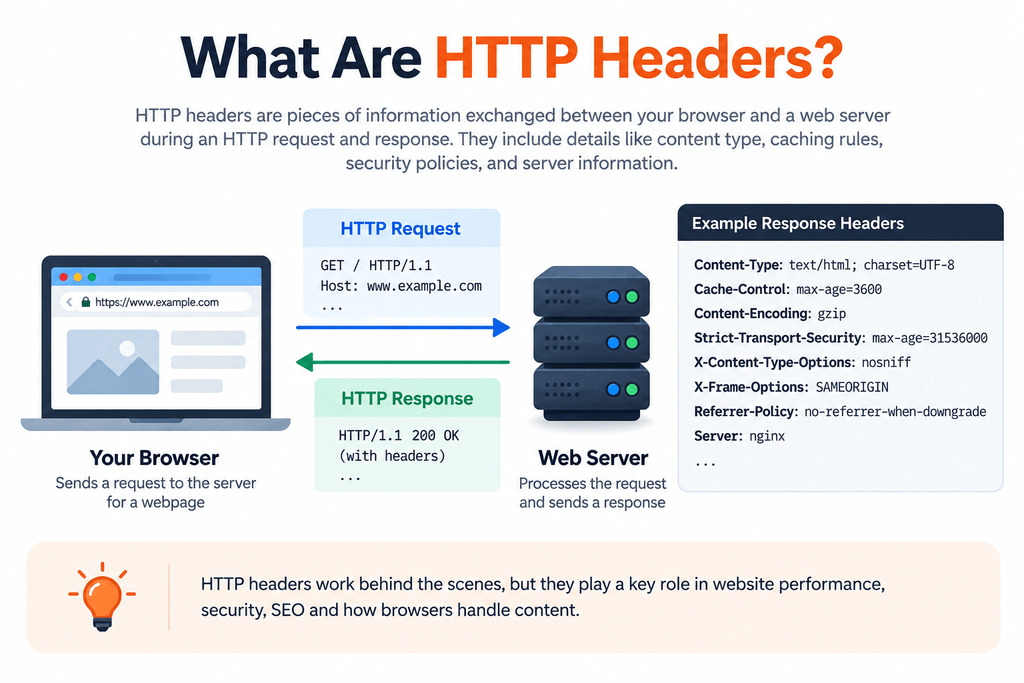
HTTP headers are pieces of information exchanged between a client, such as a web browser, and a web server during an HTTP request and response.
When someone opens a webpage, the browser sends a request to the server. The server then responds with the requested content along with response headers containing additional instructions and information.
For example, HTTP response headers may indicate:
- The type of content being returned
- Whether the page can be cached
- The HTTP status of the request
- Security policies applied by the website
- Redirect information
- Server-related information
- Content encoding
- Browser behavior instructions
These headers normally work behind the scenes, but they can reveal useful technical information when troubleshooting or auditing a website.
What Is an HTTP Header Checker Online?
An HTTP header checker online is a web-based tool that retrieves and displays the HTTP response headers returned by a URL.
Instead of opening developer tools or running commands manually, you enter a webpage URL into the checker and review the information returned by the server.
This can be useful for developers, website owners, SEO professionals, and technical auditors who want a quick overview of how a URL responds.
You can use the MeetMumtaz HTTP Header Checker to inspect a webpage’s response information directly from your browser.
Why Should You Check HTTP Headers?
An HTTP header checker online makes these technical checks accessible directly from your browser.
For example, an unexpected response status could indicate a redirect or inaccessible resource. Incorrect caching instructions may affect how frequently content is retrieved. Missing security-related headers may also indicate that additional browser protections could be considered.
Running an HTTP header test gives you another technical view of a webpage beyond what is visible on the screen.
It is particularly useful when investigating:
- Unexpected redirects
- HTTP status codes
- Caching behavior
- Content types
- Server responses
- Security configurations
- Website migrations
- Technical SEO problems
How Does an HTTP Header Test Work?
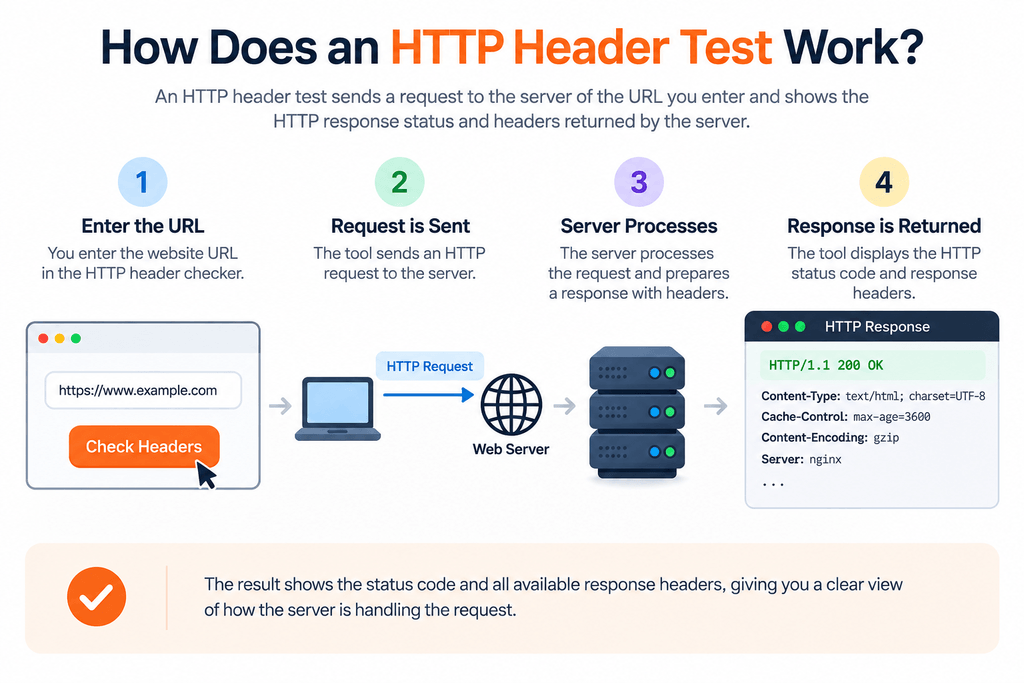
With an HTTP header checker online, you can quickly review the returned status code and available response headers.
That response generally includes a status code, response headers, and—in a normal browser request—the page content.
A header checker focuses primarily on the response information.
For example, you may encounter a response beginning with a successful 200 status. A redirected URL may instead return a 301 or 302 response, while unavailable resources may return a 404 status.
The headers accompanying those responses provide further context about how the server is handling the request.
Important HTTP Response Headers to Understand
Not every website returns the same set of headers. The headers you see depend on the web server, hosting environment, CDN, caching configuration, application, and security settings.
Some commonly encountered headers include:
Content-Type
The Content-Type header tells the browser what type of content has been returned.
For a normal HTML webpage, this commonly identifies the response as HTML.
Cache-Control
Cache-Control provides instructions related to caching. It can influence how browsers and intermediary caches store and reuse a response.
This is particularly relevant when reviewing website performance and caching configurations.
Location
The Location header is commonly associated with redirects.
For example, when one URL redirects to another, this header can identify the destination URL.
Content-Encoding
This header indicates whether the response content uses an encoding or compression method supported by the server and client.
Server
Some servers return a Server header containing information about the software handling the response.
Exposing unnecessary server details can sometimes provide more implementation information than a website owner intends to reveal.
What Are Security Headers?
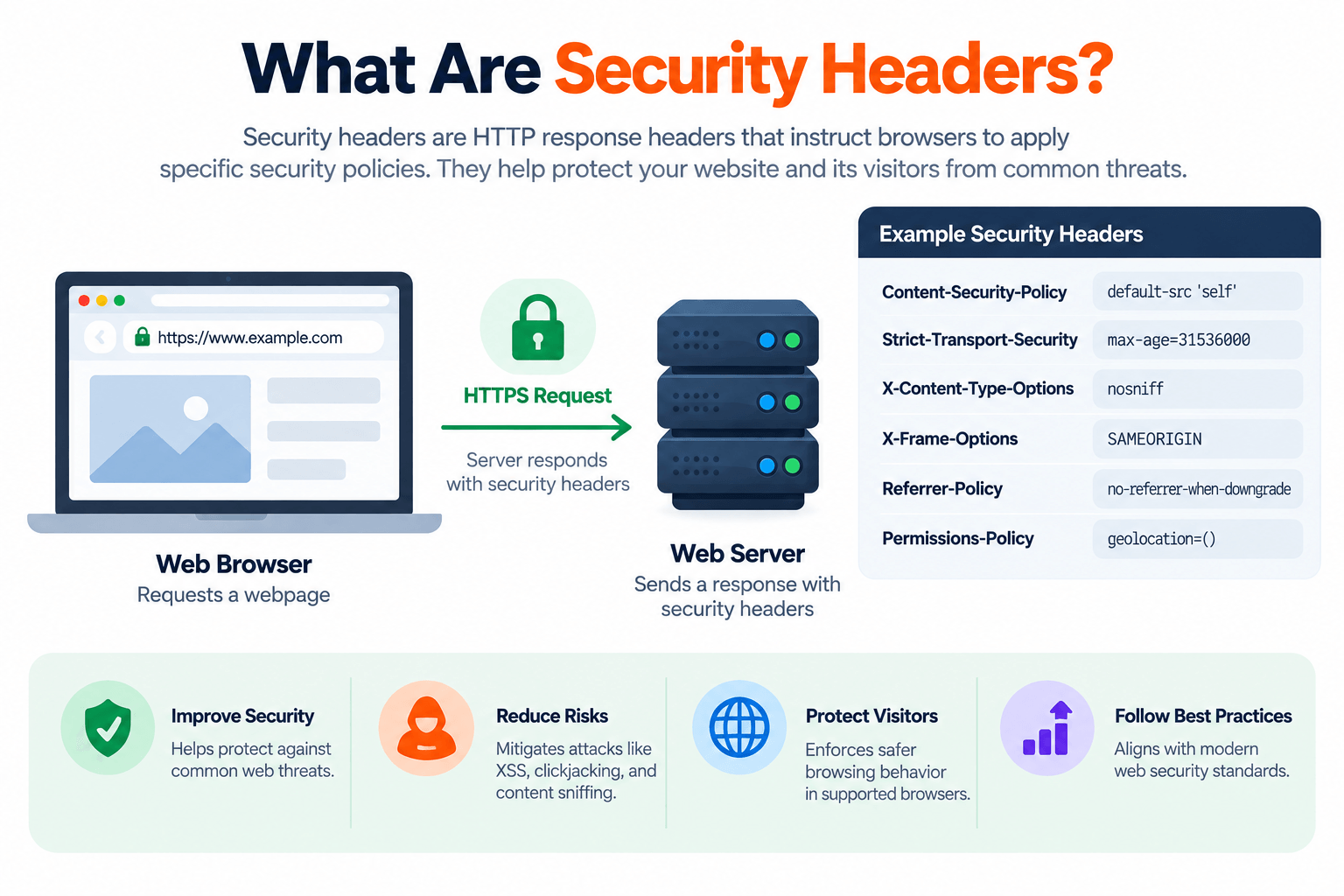
Security headers are HTTP response headers that instruct browsers to apply particular security-related policies.
They do not replace secure development, server configuration, updates, authentication, or other security measures. Instead, they can form one part of a broader website security strategy.
This is where a security header checker becomes useful. It can help you review whether relevant security headers are present in a website’s response.
Important Security Headers to Check
A security header check may include several browser-focused protections.
Content-Security-Policy
Content-Security-Policy (CSP) can restrict which sources are allowed to provide scripts, styles, images, frames, and other resources.
A carefully configured CSP can help reduce risks associated with certain types of content injection, although it needs to be implemented carefully to avoid breaking legitimate website functionality.
Strict-Transport-Security
Strict-Transport-Security (HSTS) tells supporting browsers to access a site using HTTPS according to the policy defined by the website.
It should be configured with an understanding of its scope and duration.
X-Content-Type-Options
X-Content-Type-Options can instruct browsers not to interpret resources as a different MIME type from the one declared.
A commonly used value is nosniff.
X-Frame-Options
X-Frame-Options controls whether a page can be displayed within certain frames or iframes.
Modern sites may also manage framing policies through Content Security Policy directives.
Referrer-Policy
Referrer-Policy controls how much referrer information a browser sends when navigating from one resource to another.
Permissions-Policy
Permissions-Policy can control access to certain browser features and APIs.
The appropriate policy depends on which browser capabilities a website actually requires.
HTTP Header Checker vs Security Header Checker
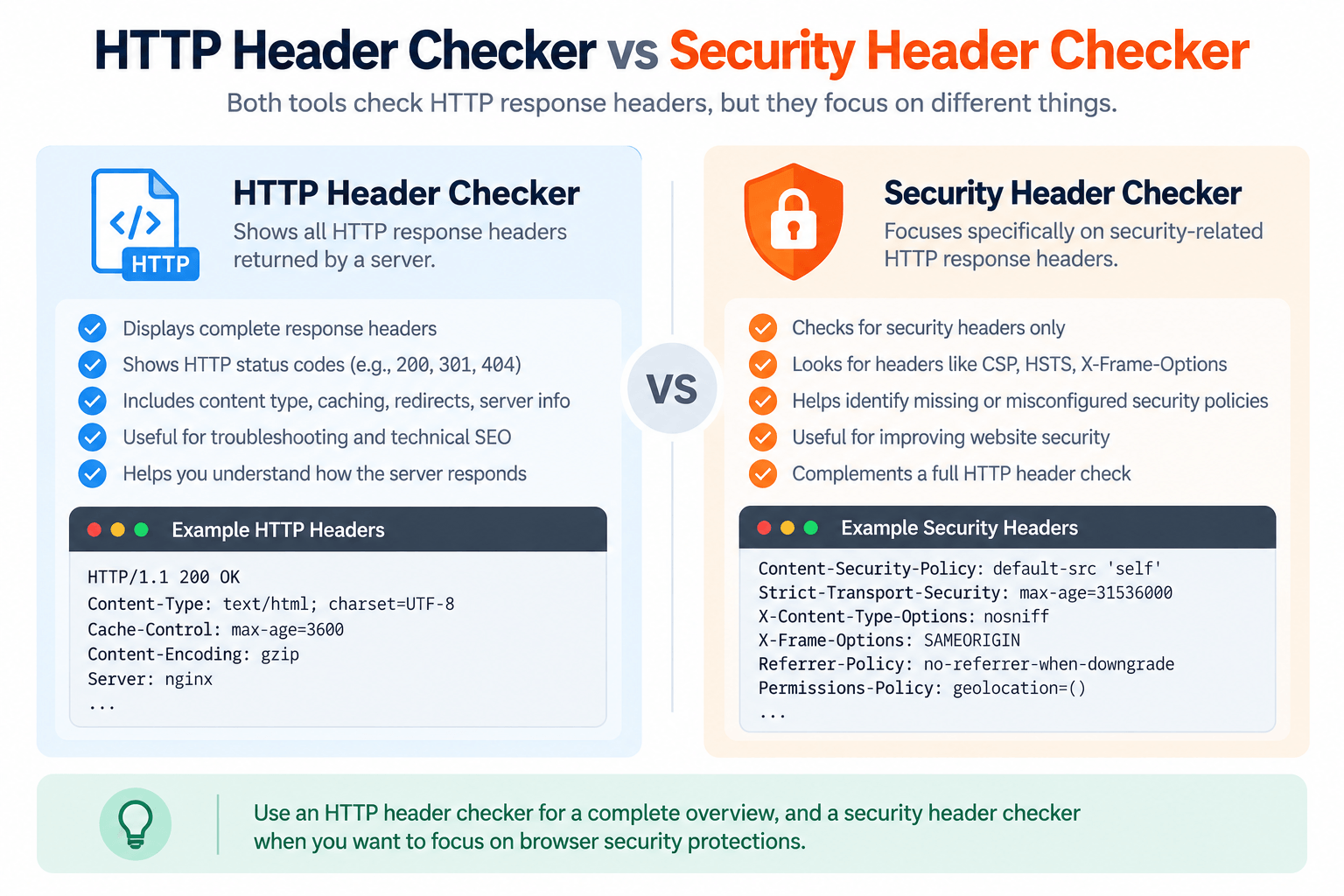
Although the terms are sometimes used together, they are not the same.
An HTTP header checker can display the broader set of response headers returned by a server. A security header checker, on the other hand, focuses specifically on headers related to browser security policies.
For example, an HTTP header test might reveal caching, content type, redirect, server, and security information at the same time.
A security-focused check would pay closer attention to headers such as CSP, HSTS, X-Content-Type-Options, Referrer-Policy, and Permissions-Policy.
Understanding this distinction helps you interpret the results correctly.
How to Use the MeetMumtaz HTTP Header Checker
Checking a URL should only take a few moments.
Step 1: Open the HTTP Header Checker.
Step 2: Enter the complete URL you want to inspect, including https://.
Step 3: Start the check and allow the tool to retrieve the available response information.
Step 4: Review the returned status and HTTP headers.
Step 5: Look more closely at headers relevant to your goal, such as redirects, caching, content handling, or security.
If you’re performing a security header check, pay particular attention to the security-related headers returned by the website rather than assuming that every missing header automatically represents a vulnerability.
How HTTP Headers Can Affect Technical SEO
An HTTP header checker online can therefore be useful when diagnosing redirects, response codes, and other technical SEO issues.
Search engines need to receive appropriate responses when crawling URLs. For example, permanent redirects, temporary redirects, unavailable pages, and successful pages should communicate their status correctly.
Incorrect server responses can make crawling and indexing harder to diagnose.
HTTP headers can therefore be useful when investigating:
- Redirect behavior
- HTTP status codes
- Crawl accessibility
- Cached responses
- Content delivery
- Server configuration
However, checking headers is only one part of a technical SEO audit. Sitemap configuration, robots directives, canonical tags, internal links, indexability, content quality, and other signals should also be reviewed where relevant.
Common HTTP Header Problems
An HTTP header test may reveal configurations worth investigating further.
One common issue is an unexpected redirect. A URL that should load directly may pass through unnecessary redirects before reaching its final destination.
Another issue is excessive disclosure of server information. Depending on the configuration, unnecessary version or platform information may be exposed.
Security policies can also be missing, incomplete, or incorrectly configured. At the same time, simply adding every possible security header without understanding its effect can break legitimate functionality.
The goal should therefore be correct configuration, not merely achieving the largest possible number of headers.
Are Missing Security Headers Always Dangerous?
No.
A missing header should be evaluated in the context of the website, its functionality, server configuration, and existing protections.
For example, a website that does not require a particular browser capability may use different policies from an application that depends heavily on third-party scripts and embedded resources.
A security header checker is therefore best treated as a diagnostic tool. Its results can highlight areas for review, but they should not automatically be interpreted as proof that a website is insecure.
How Often Should You Test HTTP Headers?
You do not necessarily need to check headers every day.
It is useful to run another test after significant changes such as:
- Moving to a new host
- Changing CDN settings
- Enabling or modifying caching
- Changing HTTPS configuration
- Updating security policies
- Modifying redirect rules
- Migrating a website
- Making major server changes
Periodic checks can also help identify unexpected configuration changes.
Final Thoughts
HTTP headers provide valuable information about how a website communicates with browsers, crawlers, and other clients. They can reveal response status, content handling, caching behavior, redirects, and browser security policies that are not visible from the webpage itself.
Using an HTTP header checker online gives you a quick way to inspect this information without relying on command-line tools. An HTTP header test can help with troubleshooting and technical SEO, while a security header checker can help identify security-related policies that deserve closer review.
The important part is not simply whether a particular header exists. You should understand what the header does, whether your website needs it, and whether it has been configured correctly.
Use the MeetMumtaz HTTP Header Checker whenever you need a quick view of a URL’s HTTP response and headers.
FAQs
What is an HTTP header checker online?
Using an HTTP header checker online can save time when you need to inspect server responses without using command-line tools.
What is an HTTP header test?
An HTTP header test examines the response headers returned when a server receives a request for a URL. It can be useful for troubleshooting redirects, caching, server behavior, technical SEO, and security-related configurations.
What is a security header checker?
A security header checker focuses on HTTP response headers associated with browser security policies, such as Content-Security-Policy, Strict-Transport-Security, Referrer-Policy, and X-Content-Type-Options.
Is an HTTP header checker useful for SEO?
Yes, particularly for technical diagnostics. HTTP responses can help identify redirects, status-code problems, accessibility issues, and other server behaviors. However, header checking should be used alongside other technical SEO checks.
Does having all security headers make a website secure?
No. Security headers can strengthen browser-side protections, but they are only one part of website security. Secure development practices, software updates, access controls, server configuration, backups, and other protections are also important.
Can I check HTTP headers without installing software?
Yes. An online HTTP header checker allows you to inspect response headers directly through a browser without installing command-line or desktop software.