

When someone shares your webpage on social media, the preview they see can influence whether they click, scroll past, or share it with others. A clear title, useful description, and attractive image can make your content look much more professional.
An Open Graph Generator helps you create the metadata used to describe your webpage when it is shared on platforms and services that support Open Graph information.
Instead of manually writing every Open Graph property, you can enter your page information and generate the required markup quickly.
But creating the tags is only part of the process. You should also understand how to perform an Open Graph test, troubleshoot previews with an Open Graph debugger, evaluate images with an Open Graph image tester, and maintain consistent social metadata across your website.
This guide covers the complete process.
What Is Open Graph?
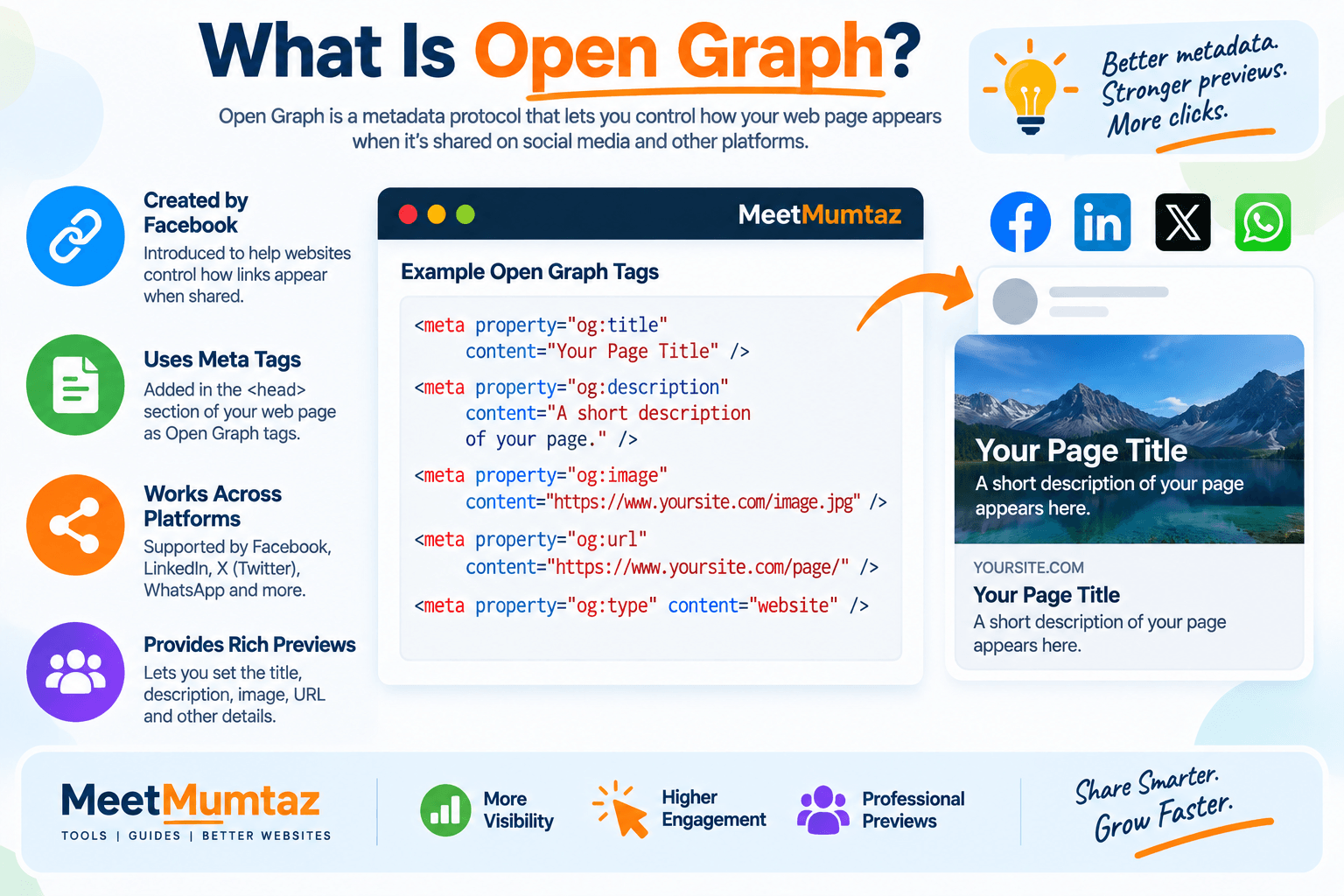
Open Graph is a metadata protocol originally introduced by Facebook that allows webpages to describe how their content should be represented when shared.
Open Graph metadata is placed within the <head> section of a webpage.
A basic implementation can contain properties such as:
og:title
og:description
og:image
og:url
og:type
These properties provide structured information that compatible platforms can use when creating link previews.
For example, instead of displaying only a plain URL, a platform may be able to show a title, description, and featured image.
What Is an Open Graph Generator?
An Open Graph Generator is a tool that helps create Open Graph meta tags without requiring you to write all of the HTML manually.
You provide information such as:
- Page title
- Description
- Page URL
- Image URL
- Content type
- Other supported properties
The generator then converts that information into Open Graph markup.
For example, the output may contain tags conceptually similar to:
<meta property="og:title" content="Your Page Title">
<meta property="og:description" content="A useful description of your page.">
<meta property="og:image" content="https://example.com/image.jpg">
<meta property="og:url" content="https://example.com/page/">
This is especially useful for bloggers, marketers, developers, ecommerce stores, and website owners who want more control over how their pages are represented when shared.
Why Are Open Graph Tags Important?
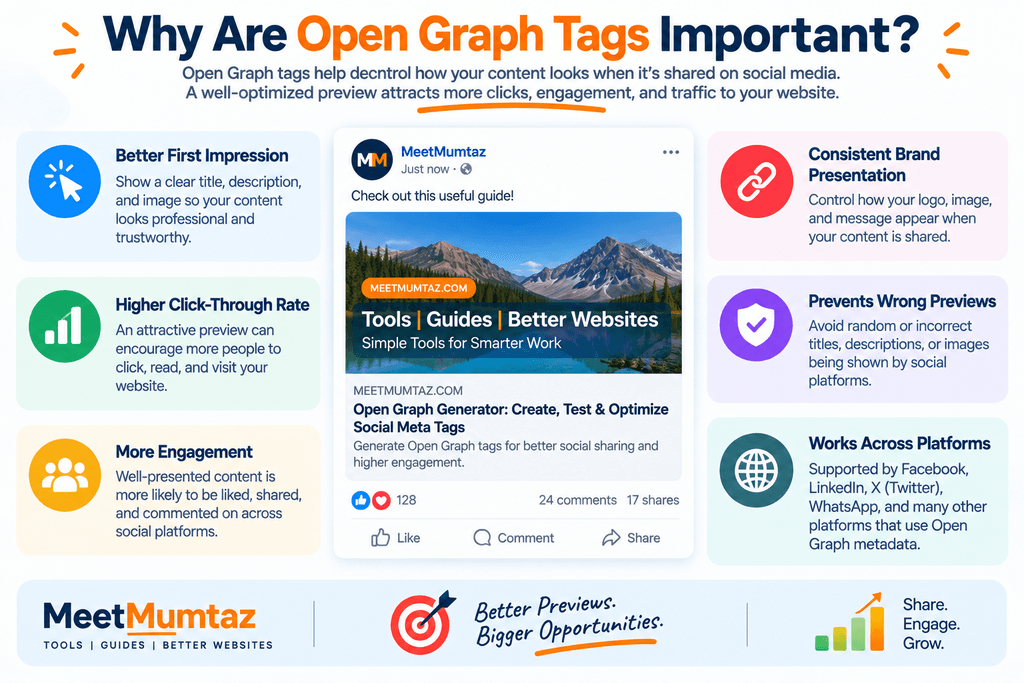
Without suitable social metadata, platforms may have to determine a page’s title, description, and image from other available information.
That can sometimes result in an incomplete or unattractive preview.
A properly configured Open Graph implementation gives compatible services explicit information about how you want the page described.
This can help create more consistent previews containing:
A relevant title
Users can immediately understand the topic.
A useful description
The preview provides context before someone clicks.
An appropriate image
Visual content can make the shared link more noticeable.
The correct URL
The metadata clearly identifies the webpage being represented.
Open Graph isn’t a replacement for quality content, but it can improve how that content is packaged when shared.
How Does an Open Graph Generator Work?
An Open Graph Generator takes information you provide and formats it into valid Open Graph meta elements.
The process usually works like this:
First, enter your page title.
Then add a description summarizing the content.
Provide the canonical or preferred page URL you want represented.
Add an image URL for the social preview.
Select the appropriate content type where required.
The tool then generates the corresponding markup.
You can copy the generated tags and add them to the <head> section of your webpage or implement them through your CMS, theme, SEO plugin, or development framework.
The exact implementation method depends on how your website is built.
Essential Open Graph Tags
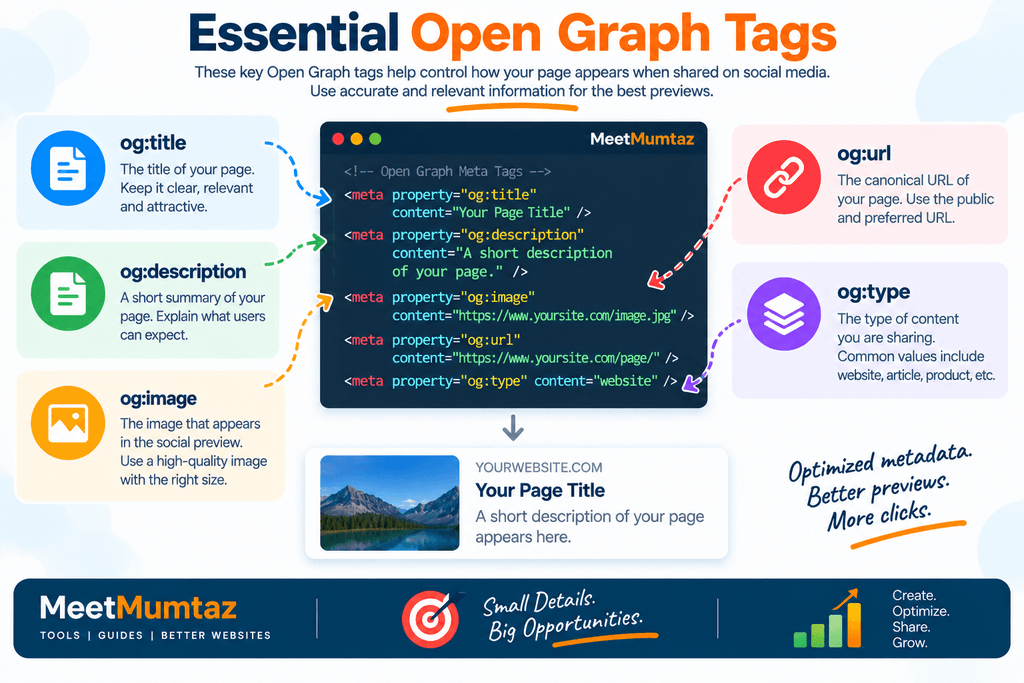
Not every website needs every possible Open Graph property.
For many webpages, the following properties form the core of a useful implementation.
og
The og:title property defines the title associated with the shared page.
It should clearly represent the content and remain understandable when viewed outside your website.
Avoid keyword stuffing.
Write it for real people who may encounter the link in a social feed or messaging application.
og
The og:description property provides a summary of the page.
It should explain what users can expect after clicking.
Keep it concise, relevant, and aligned with the actual content.
og
The og:image property identifies an image associated with the webpage.
This is one of the most important visual elements of a social preview.
Use an image that represents the page clearly and remains understandable when displayed outside the context of your website.
og
The og:url property identifies the URL associated with the shared object.
Use the intended public URL rather than temporary, tracking, staging, or development URLs.
og
The og:type property describes the type of object being represented.
The appropriate value depends on the content.
For example, different implementations may distinguish between a general website and article-style content.
What Is Social Metadata?
Social metadata is structured information that helps platforms understand how webpage content should be represented when shared.
Open Graph tags are one form of social metadata.
Other platform-specific metadata systems may also exist.
Social metadata can describe:
- Title
- Description
- Image
- URL
- Content type
- Site information
- Other sharing-related properties
The goal is not simply to add more tags.
The goal is to provide accurate information that helps compatible platforms create useful previews.
SEO Open Graph: Does Open Graph Improve Rankings?
The relationship between SEO Open Graph optimization and search rankings is often misunderstood.
Open Graph tags should not be treated as a direct shortcut to higher Google rankings.
Their primary purpose is to improve how content is described when shared on compatible platforms.
However, good social presentation can still support your broader digital marketing strategy.
Better previews may encourage more users to notice and engage with shared content.
That can increase exposure and potentially bring more referral traffic to your website.
So, think of Open Graph as part of your overall content distribution and presentation strategy rather than as a direct ranking trick.
Open Graph vs. Traditional SEO Meta Tags
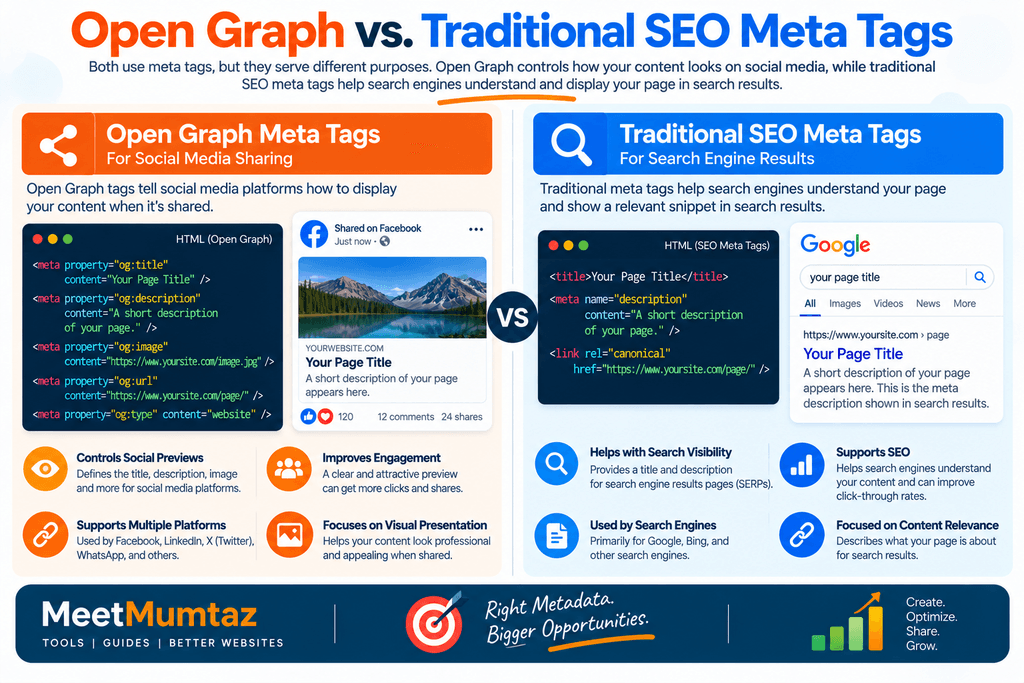
Open Graph tags and traditional SEO metadata have different primary purposes.
A standard page title and meta description are associated primarily with webpage and search contexts.
Open Graph metadata is designed for social sharing and compatible preview systems.
For example, your webpage may have:
SEO Title:
Open Graph Generator – Create Social Meta Tags
and an Open Graph title such as:
OG Title:
Create Better Social Previews with Open Graph Tags
They can be similar, but they don’t necessarily need to be identical.
This flexibility allows you to optimize the wording for different contexts.
Open Graph vs. Schema Markup
Open Graph and schema markup are also different technologies.
Open Graph primarily describes how a page or object can be represented in social-sharing environments.
Schema markup provides structured information that search engines and other systems can use to understand entities and content types.
For example, schema may describe:
- Articles
- Products
- Organizations
- Events
- Breadcrumbs
- Recipes
Open Graph may describe the same page’s title, image, URL, and social-sharing information.
A website can use both when appropriate.
One does not replace the other.
What Is an Open Graph Test?
An Open Graph test is the process of checking whether a webpage’s Open Graph metadata is present and configured correctly.
After implementing your tags, verify them rather than assuming they work.
A basic test should check:
- Is
og:titlepresent? - Is
og:descriptionpresent? - Is
og:imagepresent? - Is
og:urlcorrect? - Is
og:typeappropriate? - Are the values accurate?
- Can the image be accessed?
- Does the metadata reflect the actual page?
Testing is especially important after website migrations, redesigns, theme changes, or SEO plugin updates.
How to Perform an Open Graph Test
Start with the public URL of the webpage.
Analyze the page using an Open Graph testing or inspection tool.
Review each property individually.
First, check the title.
Then review the description and make sure it accurately summarizes the page.
Check the image URL and confirm that it points to the intended image.
Verify that og:url contains the correct public URL.
Finally, inspect the actual preview where the testing platform provides one.
If something looks incorrect, determine whether the problem comes from the metadata, image, caching, or platform-specific behavior.
What Is an Open Graph Debugger?
An Open Graph debugger is a tool used to inspect and troubleshoot Open Graph metadata.
It can be especially helpful when you have updated your tags, but a social platform continues showing an older title, description, or image.
Depending on the service, a debugger may help you:
- Inspect detected Open Graph properties
- Identify missing tags
- Detect malformed metadata
- View warnings
- Preview interpreted information
- Trigger or encourage a fresh scrape of the webpage
This makes debugging tools valuable after metadata changes.
When Should You Use an Open Graph Debugger?
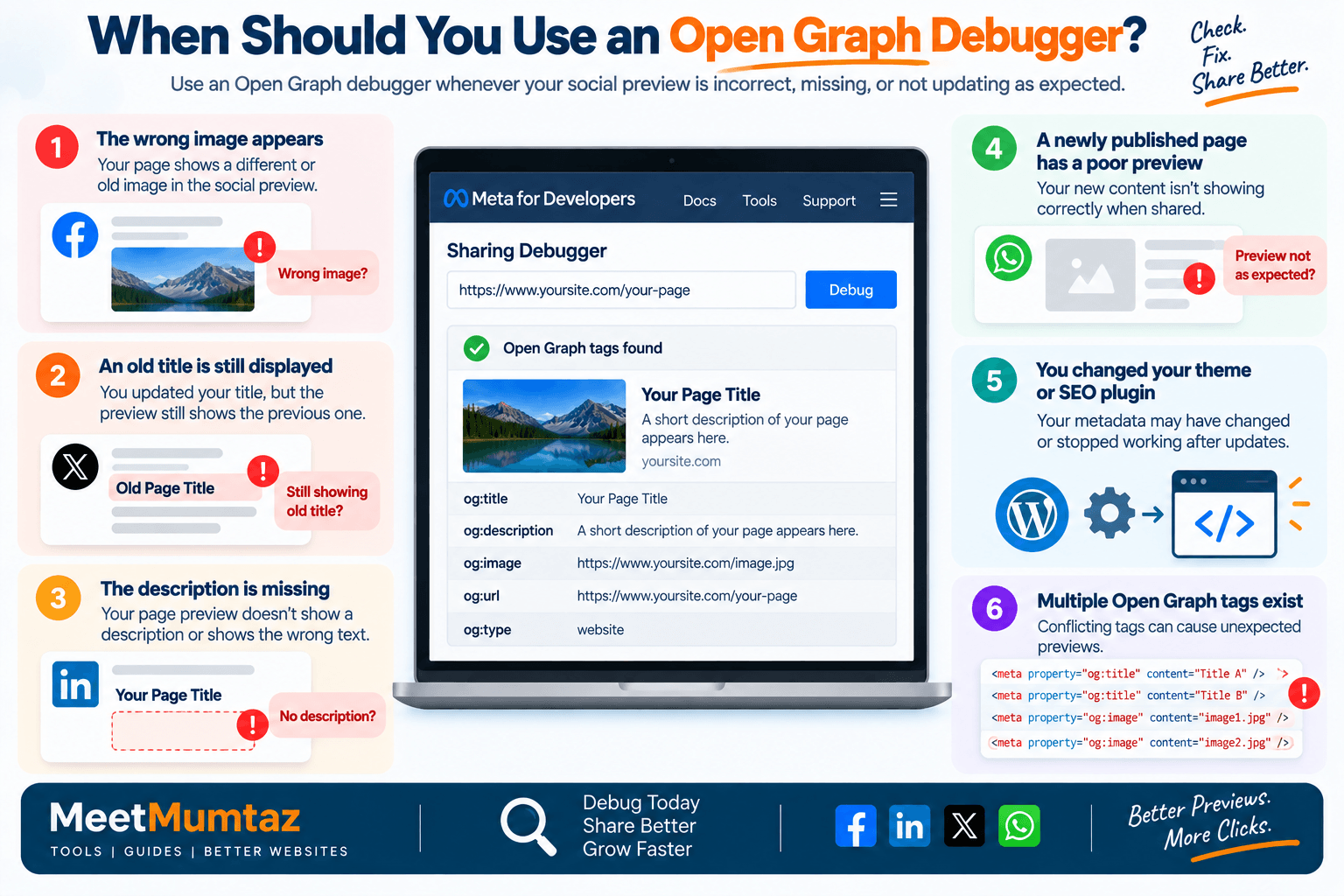
Use an open graph debugger when:
The wrong image appears
The platform may have cached an older image or selected a different source.
An old title is still displayed
The page may have been scraped before your update.
The description is missing
The tag may be absent, malformed, inaccessible, or ignored.
A newly published page has a poor preview
Debugging can reveal what metadata the platform detects.
You changed your website theme or SEO plugin
Metadata output may have changed unexpectedly.
Multiple Open Graph tags exist
Conflicting tags can make troubleshooting more difficult.
A debugger helps separate implementation problems from caching or platform interpretation issues.
What Is an Open Graph Image Tester?
An Open Graph image tester helps you verify the image used for a social preview.
The og:image value may exist in your HTML while the actual image still fails to display properly.
Potential problems include:
- Incorrect image URL
- Broken image
- Restricted access
- Unsupported image configuration
- Poor aspect ratio
- Image too small for a useful preview
- Redirect problems
- Cached older image
- Image that crops badly
An image tester or social preview tool can help identify these problems before users start sharing the page widely.
How to Choose a Good Open Graph Image
Your Open Graph image should represent the page clearly.
Use a high-quality image that remains understandable when resized or cropped.
Avoid placing essential information too close to the edges because some platforms may crop previews differently.
For blog posts, the image can visually communicate the main subject.
For products, use a clear product image.
For tools, consider a branded graphic that demonstrates the tool or its purpose.
For landing pages, use imagery that supports the offer or message.
Consistency also matters.
Using a recognizable visual style across your website can strengthen your brand when links are shared.
Open Graph Image Size and Aspect Ratio
There is no single presentation that every social platform will always use.
Different platforms, devices, placements, and preview formats can crop or resize images differently.
For that reason, prioritize a high-resolution, landscape-oriented image with the important visual information positioned safely away from the edges.
When targeting a specific platform, consult its current documentation because image requirements and recommendations can change.
The most important practical step is to test the live page rather than relying entirely on design dimensions.
Why Is My Open Graph Image Not Showing?
If og:image exists but no image appears, investigate the image itself and the page configuration.
Common causes include:
Broken image URL
Open the image URL directly and verify that it loads.
Relative URL problems
Use an appropriate absolute public URL when required.
Blocked access
The platform’s crawler may be unable to retrieve the image.
Caching
A platform may still have an older version stored.
Redirects
Multiple redirects can complicate retrieval.
Incorrect metadata
The property may contain a typo or invalid value.
Duplicate tags
Multiple competing og:image properties may create unexpected results.
An open graph image tester combined with a debugger can make these issues easier to identify.
Open Graph Image Tester Checklist
When testing your image, verify:
Image URL
Does it load publicly?
Image quality
Is it clear at common preview sizes?
Aspect ratio
Does it work in a landscape preview?
Text placement
Will important text survive cropping?
Branding
Is the branding readable but not overwhelming?
Relevance
Does the image genuinely represent the page?
Updated version
Is the platform showing the newest image?
Testing before publishing can prevent poor-looking social shares later.
Common Open Graph Problems
Several problems appear repeatedly during Open Graph audits.
Missing og
Without an explicit Open Graph title, a platform may rely on other available page information.
Missing og
The preview may lack useful context or use other text.
Missing og
A shared link may appear less visually engaging or another image may be selected.
Incorrect og
The metadata may reference a staging URL, HTTP version, old URL, or another unintended location.
Duplicate Open Graph Tags
Themes, plugins, and custom code can sometimes generate overlapping metadata.
Old Cached Information
Even after updating the website, a platform may continue displaying previously scraped information.
Poor Image Selection
An image may technically work but still crop badly or fail to communicate the page’s topic.
Regular testing helps catch these issues early.
Open Graph Generator vs. Open Graph Debugger
An Open Graph Generator and an Open Graph Debugger serve different purposes.
The generator helps you create metadata.
The debugger helps you inspect and troubleshoot metadata after implementation.
A simple workflow is:
Generate → Implement → Test → Debug → Recheck
For example, you can generate the required tags, add them to your webpage, run an Open Graph test, and then use a debugger if the preview doesn’t appear as expected.
These tools complement each other rather than compete with each other.
Open Graph Generator vs. Open Graph Image Tester
An Open Graph Generator creates the metadata that points to your image.
An Open Graph image tester helps determine whether that image works properly in a sharing context.
For example, your generator may produce:
<meta property="og:image" content="https://example.com/social-image.jpg">
The markup may be correct.
But the image could still be inaccessible, poorly sized, outdated, or badly cropped.
That’s why image testing should be part of your social metadata workflow.
Open Graph Generator vs. Meta Tag Generator
A general meta tag generator may create traditional webpage metadata such as titles, descriptions, robots directives, and other HTML tags.
An Open Graph Generator focuses specifically on Open Graph properties.
Depending on your workflow, you may use both.
For example:
Meta Tag Generator → SEO/page metadata
Open Graph Generator → social sharing metadata
SERP Preview Tool → search-result-style preview
Open Graph Test → social metadata validation
Each tool solves a different part of the optimization process.
How to Add Open Graph Tags to WordPress
WordPress websites can implement Open Graph metadata in several ways.
A compatible SEO plugin may generate social metadata automatically.
Some themes or social plugins may also provide Open Graph functionality.
Developers can implement tags programmatically when appropriate.
The most important consideration is avoiding duplicate output.
If your SEO plugin already generates Open Graph metadata, manually adding another complete set can result in duplicate tags.
After implementation, inspect the live page and perform an Open Graph test to confirm which tags are actually being output.
How to Add Open Graph Tags Manually
If your website doesn’t use a CMS or plugin that handles Open Graph metadata, you can add the properties inside the HTML <head>.
A basic example may look like:
<meta property="og:title" content="Example Page Title">
<meta property="og:description" content="A short description of the page.">
<meta property="og:image" content="https://example.com/image.jpg">
<meta property="og:url" content="https://example.com/page/">
<meta property="og:type" content="website">
The exact properties you need depend on your content and implementation.
After adding them, test the public URL.
Never assume that correct-looking source code automatically produces the preview you expect on every platform.
How to Optimize Social Metadata
Good social metadata should accurately represent the page while giving users a clear reason to explore it.
Start with the title.
Make it understandable without relying on surrounding website context.
Next, write a description that communicates the page’s value.
Then choose an image that supports the message visually.
Finally, make sure the URL and content type are correct.
Don’t turn social metadata into another place for keyword stuffing.
A title written entirely for algorithms is less likely to attract real users.
Clarity should come first.
Social Metadata for Blog Posts
For blog posts, social metadata should communicate the topic and value of the article quickly.
Your title can emphasize the main question, benefit, or outcome.
The description can summarize what readers will learn.
The image should visually reinforce the topic.
For example, an article about checking noindex tags could use an image showing a search page, robots directive, and indexing status rather than a generic stock photo.
The more accurately the preview represents the content, the more useful it becomes to potential readers.
Social Metadata for Product Pages
Product pages require a slightly different approach.
The Open Graph title should clearly identify the product.
The description can highlight an important benefit or differentiator.
The image should display the product clearly.
The URL should point to the intended product page.
Avoid misleading promotional claims that aren’t supported by the page itself.
The preview should set accurate expectations before the visitor clicks.
Social Metadata for Tool Pages
For online tools, your social preview should communicate what the tool does.
For an Open Graph Generator, for example, the preview could emphasize that users can create social meta tags for webpages.
The image could show a clean visual representation of a social preview or Open Graph code.
This makes the shared link understandable even to someone who has never visited your website before.
How Often Should You Test Open Graph Tags?
You don’t need to run an Open Graph test every day.
However, testing is useful when:
- Publishing an important new page
- Updating a social image
- Changing a page title
- Changing the description
- Migrating the website
- Changing domains
- Switching themes
- Updating SEO plugins
- Changing social metadata settings
- Troubleshooting an incorrect preview
For important evergreen pages, occasional checks can also help identify problems introduced by later website changes.
Open Graph Testing Checklist
Before considering your setup complete, check:
og
- Present
- Accurate
- Readable
- Relevant to the page
og
- Present
- Useful
- Accurate
- Not keyword stuffed
og
- Publicly accessible
- High quality
- Relevant
- Suitable for cropping
og
- Correct
- Public
- Uses the intended URL
og
- Appropriate for the content
Preview
- Title displays correctly
- Description is useful
- Image appears correctly
- No outdated information remains
A simple checklist can prevent many common social-sharing problems.
Frequently Asked Questions
What is an Open Graph Generator?
An Open Graph Generator creates Open Graph metadata such as og:title, og:description, og:image, og:url, and other supported properties without requiring you to manually write every tag.
What is an open graph test?
An Open Graph test checks whether Open Graph metadata is present and configured correctly on a webpage. It can help identify missing, incorrect, or inaccessible properties.
What is an open graph debugger?
An Open Graph debugger helps inspect and troubleshoot social metadata. Depending on the platform, it may show detected tags, warnings, preview information, or cached data.
What is an Open Graph image tester?
An Open Graph image tester helps verify whether the image associated with og:image is accessible and suitable for a social preview.
Does Open Graph improve SEO?
Open Graph tags shouldn’t be treated as a direct Google ranking factor. Their primary purpose is social presentation. Better social previews can nevertheless support content distribution, branding, engagement, and referral traffic.
What is social metadata?
Social metadata is information embedded in a webpage that helps compatible platforms understand how content should be represented when shared. Open Graph tags are a common example.
Do I need Open Graph tags on every page?
Prioritize important public pages that users are likely to share, including articles, product pages, landing pages, tools, and key website resources.
Can I use the same SEO title and Open Graph title?
Yes, but you don’t have to. The two titles can be similar or customized for their respective search and social contexts.
Why does Facebook show my old Open Graph image?
A previously scraped image may still be cached. Check that the live og:image value is correct and use the platform’s debugging or rescraping functionality where available.
Can I have multiple og tags?
Open Graph implementations can support multiple image values, but the ordering and platform interpretation matter. If you only need one primary social image, keeping the implementation clear and intentional can simplify troubleshooting.
Final Thoughts
An Open Graph Generator makes it easier to create the metadata that helps control how your webpages are represented when shared across compatible social platforms.
But generating the tags is only the beginning.
A complete workflow should include an Open Graph test to verify implementation, an Open Graph debugger when previews don’t update correctly, and an Open Graph image tester to make sure your visual content displays as intended.
At the same time, remember the role of SEO Open Graph optimization: Open Graph isn’t a shortcut to higher rankings. Its real strength is helping your content look accurate, professional, and engaging when it moves beyond your website.
Treat social metadata as part of the user experience.
Create accurate tags, use relevant images, test your implementation, fix problems when they appear, and make every shared link a clear representation of the page behind it.


