

If your website serves visitors in different languages or countries, publishing translated content is only part of the job. Search engines also need a clear way to understand which version of a page should appear for a particular language or region. This is where hreflang becomes important.
So, what is hreflang? Hreflang is an HTML attribute that helps search engines understand the language and, when necessary, the geographical targeting of alternate versions of a webpage. It allows a website to indicate that several URLs contain equivalent or closely related content created for different audiences.
For example, a business may have one page for English-speaking visitors in the United States, another for users in the United Kingdom, and a Spanish version for Spanish-speaking visitors. Hreflang annotations help search engines connect those pages and choose a more appropriate version for each user.
For websites targeting an international audience, a correctly configured hreflang setup can make multilingual and multi-regional content easier for search engines to interpret.
What Is Hreflang?
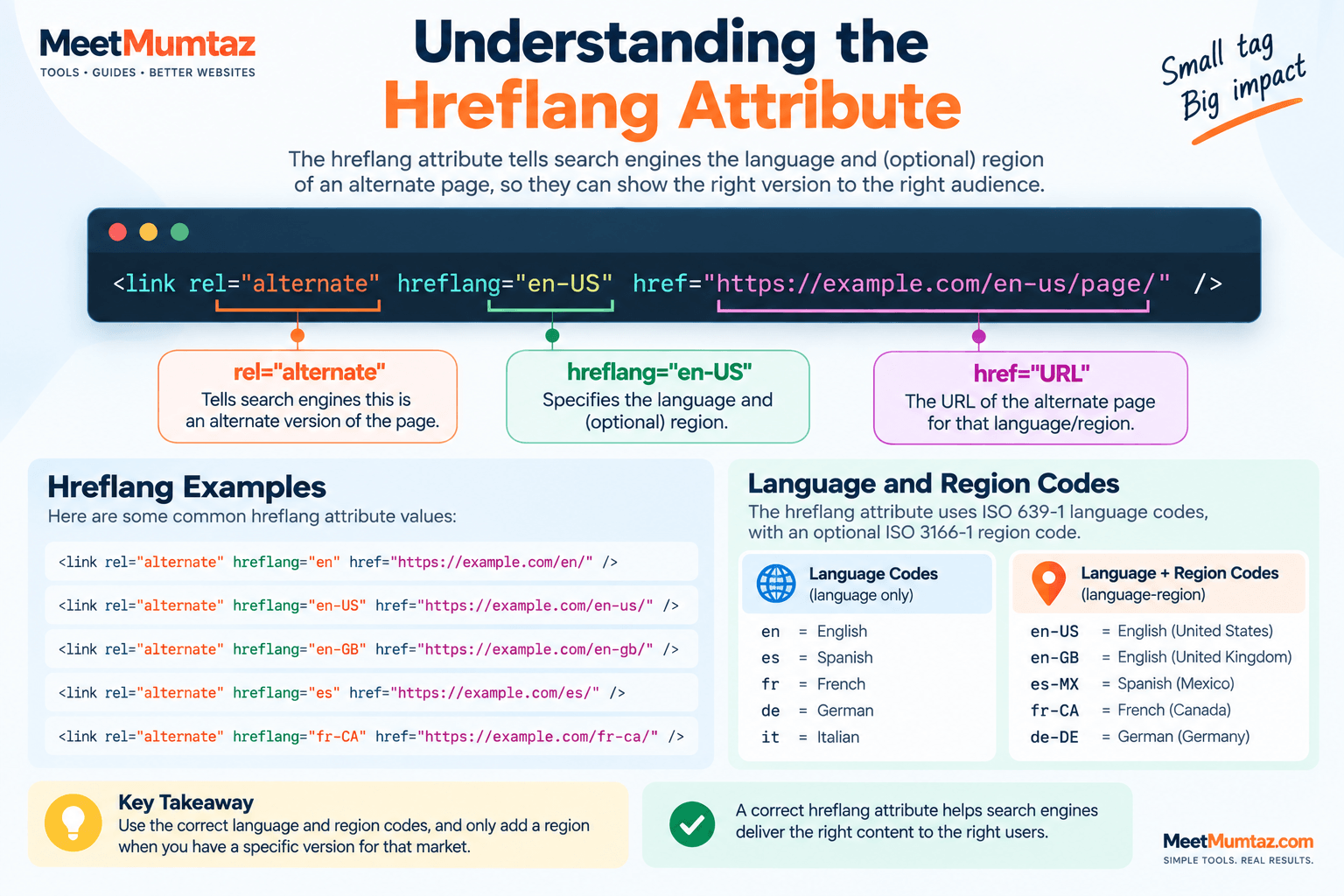
Hreflang is commonly implemented through the rel="alternate" relationship together with a hreflang value. The annotation identifies an alternate version of the current page intended for a particular language or language-region combination.
A simple HTML hreflang tag can look like this:
<link rel="alternate" hreflang="en" href="https://example.com/en/page/" />In this example:
rel="alternate"tells the search engine that the URL is an alternate version of the page.hreflang="en"identifies English as the intended language.hrefprovides the URL of that alternate page.
Suppose the same content is available in English and Spanish. The pages could include annotations such as:
<link rel="alternate" hreflang="en" href="https://example.com/en/page/" />
<link rel="alternate" hreflang="es" href="https://example.com/es/page/" />
These annotations create a relationship between the language versions rather than treating them as unrelated pages.
Why Are Hreflang Tags Important?
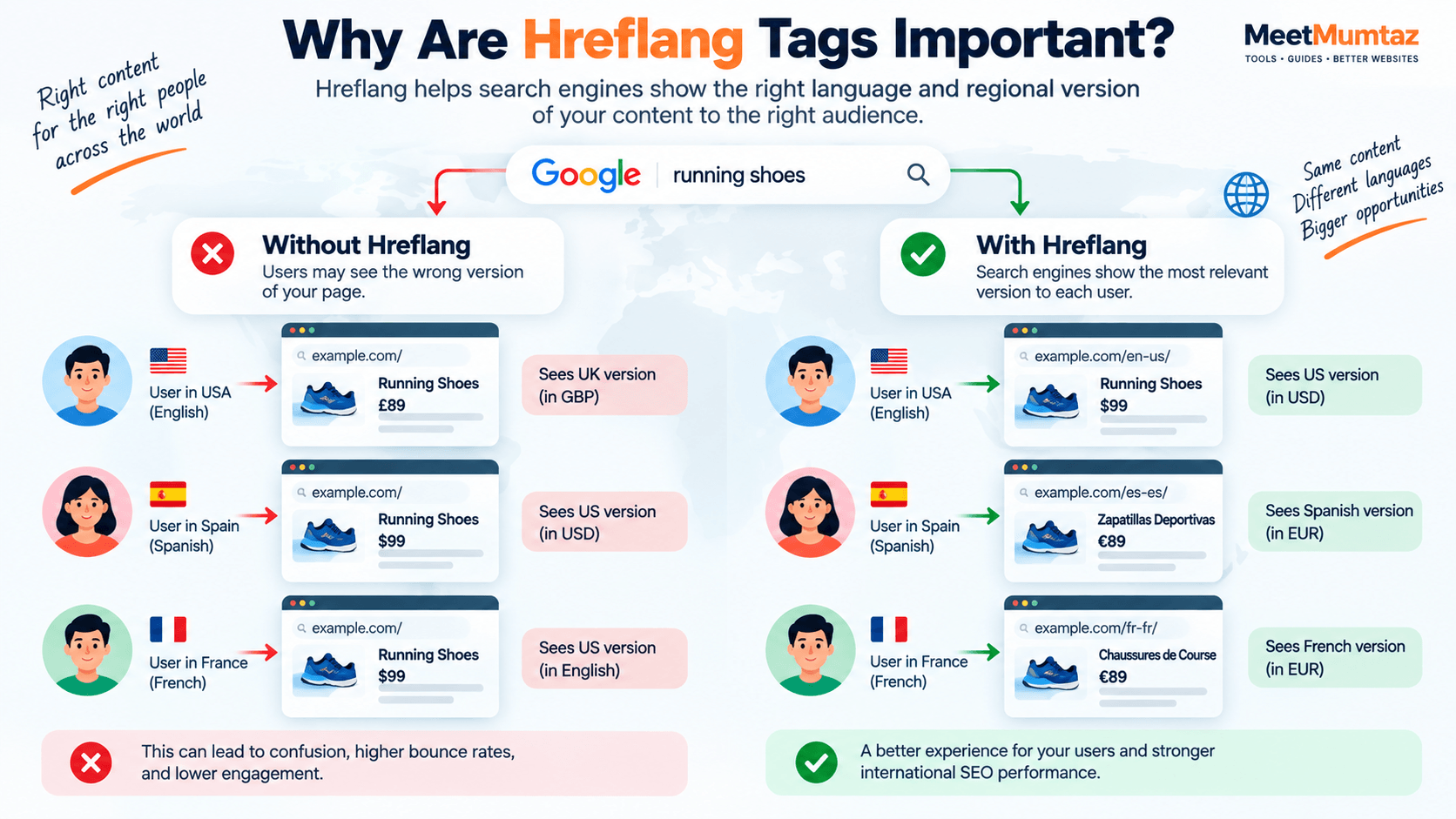
International websites often contain pages that are very similar in structure and meaning. Sometimes only the language changes. In other cases, the language remains the same while pricing, spelling, shipping information, currency, or other regional details differ.
Without clear international targeting signals, a search engine may have difficulty determining which URL is most appropriate for a particular searcher.
Hreflang tags help provide that context.
A properly planned hreflang implementation can help a website:
- connect alternate language and regional versions of a page;
- show search engines which URL is intended for which audience;
- reduce the chance of an unsuitable regional version appearing in search;
- provide users with a more relevant landing-page experience;
- organize multilingual and multi-regional SEO more clearly.
For example, imagine that a website has these URLs:
https://example.com/us/product/
https://example.com/gb/product/
https://example.com/es/product/
The first two pages may both be written in English but target different markets. The third may contain a Spanish version of the same product information.
Hreflang can distinguish those audiences using values such as:
en-US
en-GB
es
This gives search engines more specific information about how the alternate URLs relate to one another.
How Does Hreflang Work?
Hreflang works by creating a group of alternate URLs.
Each participating page should identify the relevant alternatives, including itself. Search engines can then use these annotations alongside other signals when deciding which URL is most suitable for a user.
Consider three versions of one page:
English – United States
English – United Kingdom
Spanish
Their annotations might be:
<link rel="alternate" hreflang="en-US" href="https://example.com/us/page/" />
<link rel="alternate" hreflang="en-GB" href="https://example.com/uk/page/" />
<link rel="alternate" hreflang="es" href="https://example.com/es/page/" />
The important point is that hreflang is not a redirect. It does not automatically send a visitor from one URL to another. Instead, it supplies information that search engines can use when selecting a result.
This distinction matters. A visitor can still open any of the URLs directly, while search engines receive additional information about the intended audience of each version.
Understanding the Hreflang Attribute
The hreflang attribute normally contains a language code and can optionally include a regional code.
A language-only value might be:
hreflang="en"A language combined with a regional target might be:
hreflang="en-US"Here, en represents English and US specifies the United States.
Similarly:
hreflang="en-GB"targets English content intended for the United Kingdom, while:
hreflang="fr-CA"can identify French content intended for Canada.
Language and region should not be added arbitrarily. The hreflang values need to use recognized language and regional codes, and the region is generally added only when the website genuinely has different versions for those markets.
A useful way to think about the distinction is:
Language targeting
en
es
fr
de
Language + regional targeting
en-US
en-GB
es-MX
fr-CA
If all English-speaking visitors should receive the same page, a language-only annotation may be sufficient. If separate English pages exist for different markets, language-region combinations can describe those relationships more precisely.
Hreflang HTML: Correct Syntax and Examples
Once you understand what hreflang does, the next step is learning how to implement it correctly. For many websites, the most common method is to add HTML hreflang tags inside the <head> section of each alternate page.
A standard hreflang tag follows this structure:
<link rel="alternate" hreflang="en-US" href="https://example.com/us/page/" />Each part has a specific purpose. rel="alternate" identifies the URL as an alternate version, hreflang="en-US" defines the intended language and region, and href points to the corresponding URL.
If the same page is available for users in the United States, United Kingdom, and Spain, the HTML could look like this:
<link rel="alternate" hreflang="en-US" href="https://example.com/us/page/" />
<link rel="alternate" hreflang="en-GB" href="https://example.com/uk/page/" />
<link rel="alternate" hreflang="es-ES" href="https://example.com/es/page/" />
These annotations tell search engines that the URLs belong to the same group of alternate pages but are intended for different audiences.
An important detail is that the relationship should be consistent across all participating pages. Adding hreflang tags to only one version can create an incomplete implementation.
Self-Referencing Hreflang Tags
One of the most important parts of a reliable hreflang setup is self-referencing hreflang.
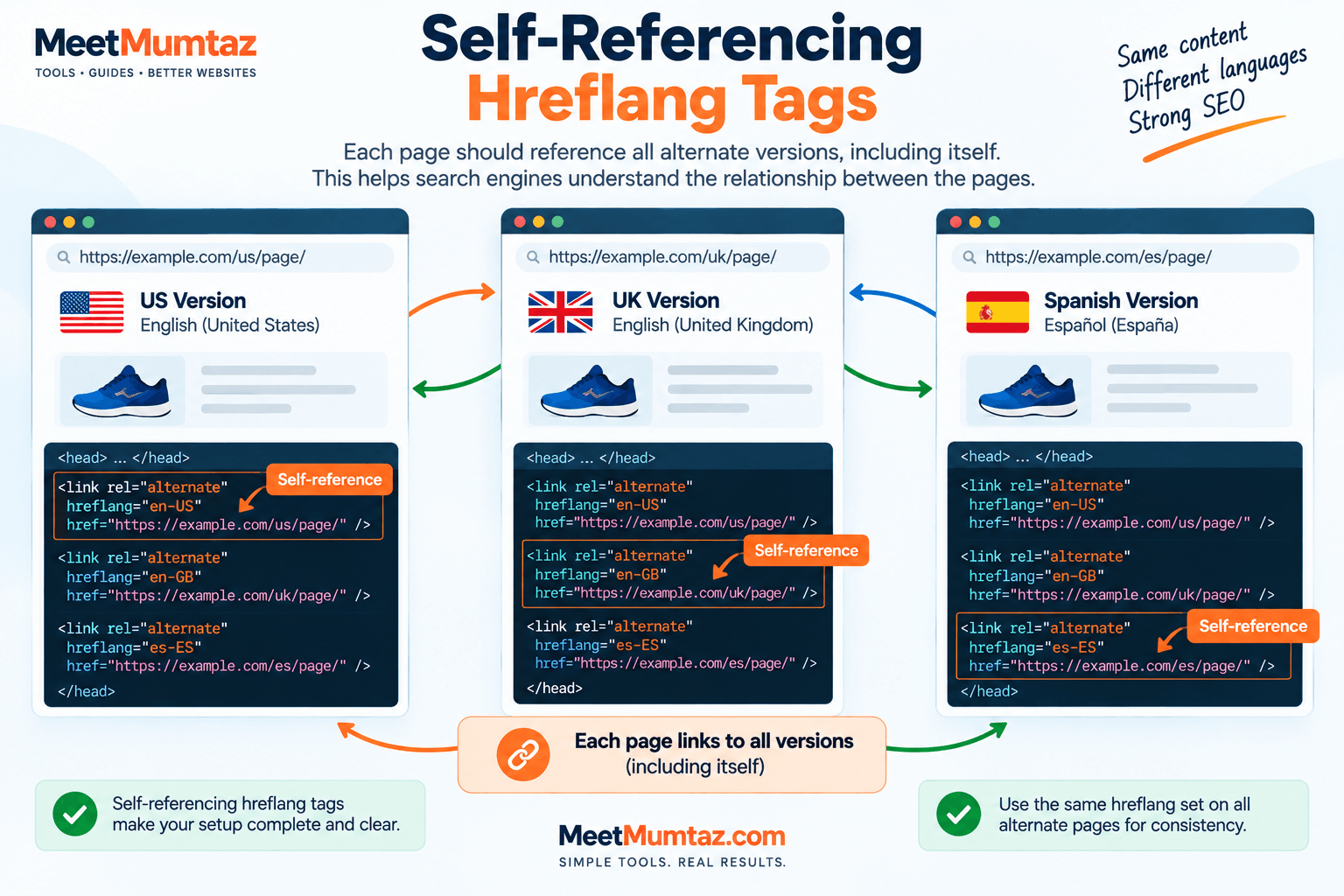
A page should not only reference its alternate versions—it should also include itself in the hreflang set.
Suppose you have these three URLs:
https://example.com/us/page/
https://example.com/uk/page/
https://example.com/es/page/
The US page could contain:
<link rel="alternate" hreflang="en-US" href="https://example.com/us/page/" />
<link rel="alternate" hreflang="en-GB" href="https://example.com/uk/page/" />
<link rel="alternate" hreflang="es-ES" href="https://example.com/es/page/" />
The first line is the self-reference because the current US page points to itself with hreflang="en-US".
The UK and Spanish pages should contain the same complete set of alternate URLs, with each page naturally having its own self-referencing entry.
This creates a clear and consistent relationship between all versions.
Why is self-referencing hreflang important? A self-referencing hreflang tag identifies the current page as part of its own language and regional alternate set. For example, an English US page should include an en-US hreflang reference to its own URL alongside references to other language versions. This helps search engines understand the relationship between localized pages and supports consistent hreflang implementation.
Reciprocal Hreflang: Why Return Links Matter
Hreflang relationships should work in both directions.
If Page A identifies Page B as an alternate version, Page B should also identify Page A as an alternate. These are sometimes called return links or reciprocal hreflang links.
Imagine an English page references a Spanish page:
<link rel="alternate" hreflang="es" href="https://example.com/es/page/" />The Spanish version should point back to the English version:
<link rel="alternate" hreflang="en" href="https://example.com/en/page/" />For a complete implementation, both pages would normally include themselves and all relevant alternate versions.
Why does this matter?
Reciprocal annotations help confirm that the pages genuinely belong to the same alternate group. A one-way relationship can indicate an incomplete or incorrectly configured hreflang setup.
As the number of languages grows, manually maintaining these relationships can become increasingly difficult. This is one reason consistent URL structures and automated generation can be useful for larger international websites.
What Is x-default in Hreflang?
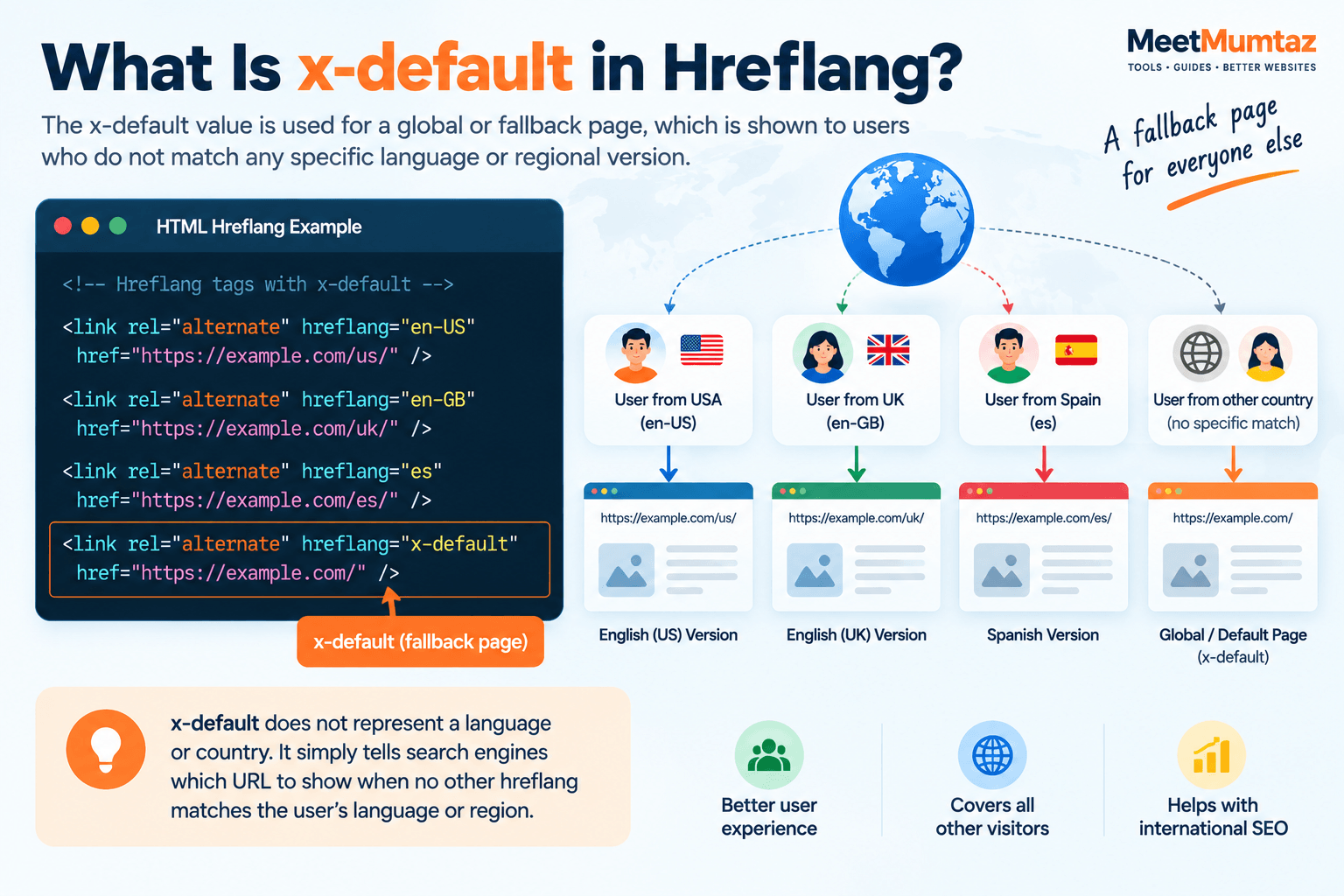
Not every visitor fits neatly into one language or regional target. A website may also have a global page, language selector, or general landing page intended for users who do not match any specifically defined hreflang version.
For this situation, hreflang supports the special value:
hreflang="x-default"For example:
<link rel="alternate" hreflang="en-US" href="https://example.com/us/" />
<link rel="alternate" hreflang="en-GB" href="https://example.com/uk/" />
<link rel="alternate" hreflang="es" href="https://example.com/es/" />
<link rel="alternate" hreflang="x-default" href="https://example.com/" />
Here, the homepage acts as the default option for users who are not specifically represented by the other hreflang annotations.
x-default does not represent a language or country. Instead, it identifies a fallback URL that is not targeted to one particular language or region.
This can be especially useful for international websites that provide a global homepage or allow visitors to choose their preferred country or language.
Three Ways to Implement Hreflang
Although hreflang HTML tags are common, HTML is not the only way to provide hreflang information. Depending on the type and size of the website, hreflang can be implemented through:
1. HTML <link> elements
Hreflang annotations are placed inside the <head> section of the webpage.
<link rel="alternate" hreflang="en" href="https://example.com/en/page/" />
<link rel="alternate" hreflang="es" href="https://example.com/es/page/" />
This method is straightforward for ordinary HTML pages and is often the easiest approach to understand.
2. HTTP headers
Hreflang information can also be provided through HTTP headers. This can be useful for non-HTML resources where adding <link> elements to an HTML <head> is not possible.
Conceptually, the header can identify alternate URLs and their corresponding languages without modifying an HTML document.
3. XML sitemaps
Large multilingual websites may implement hreflang through their XML sitemaps. This can help centralize alternate-language relationships instead of placing a large number of annotations directly into every page.
The important principle is consistency. You do not need to use all three methods simply because they exist. Choose an implementation approach that can be maintained accurately across the website.
Hreflang and Canonical Tags: They Are Not the Same
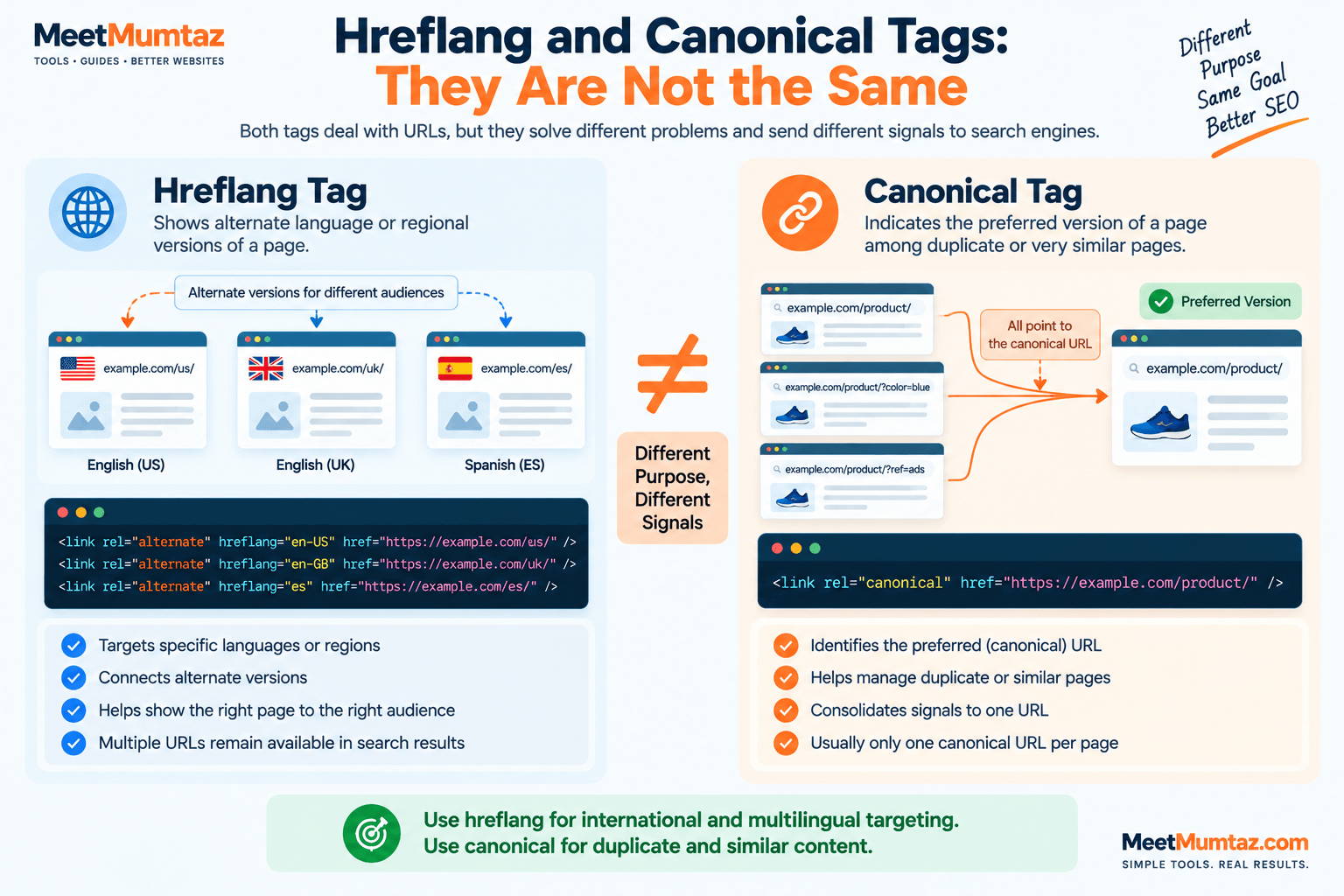
Hreflang and canonical tags are sometimes confused because both deal with relationships between URLs. However, they solve different problems.
A canonical tag helps indicate which URL should be treated as the preferred version among duplicate or very similar URLs.
A hreflang tag, on the other hand, identifies alternate pages intended for different languages or regions.
Consider these two annotations:
<link rel="canonical" href="https://example.com/us/page/" />and:
<link rel="alternate" hreflang="en-GB" href="https://example.com/uk/page/" />They are sending different signals.
For localized pages that are intended to remain available in search, each version will generally need a canonical setup that is consistent with that page being an indexable regional or language version. Pointing every localized page to one different-language “master” URL can conflict with the purpose of maintaining distinct international versions.
In simple terms:
Canonical asks: Which URL is the preferred version of this page?
Hreflang asks: Which alternate version is appropriate for this language or regional audience?
Both can exist on the same page, but they should be configured with their different purposes in mind.
Common Hreflang Mistakes to Avoid
Hreflang syntax may look simple, but problems often appear when several pages and languages must reference one another.
Some common mistakes include:
- using incorrect language or country codes;
- forgetting self-referencing hreflang annotations;
- creating one-way relationships without return links;
- pointing hreflang tags to broken or unavailable URLs;
- referencing pages that should not be indexed;
- mixing up language and country codes;
- using inconsistent URLs across alternate pages;
- treating
x-defaultas if it were a language code; - creating hreflang relationships between pages that are not genuine alternatives;
- configuring canonical signals that conflict with the intended localized URLs.
For a website with two languages, manually checking these relationships may be manageable. With five, ten, or twenty regional versions, the number of relationships grows quickly.
That makes accuracy and consistency especially important.
Generate Hreflang Tags Without Writing Them Manually
Writing a couple of hreflang tags by hand is easy. Maintaining a complete set across multiple languages and regions is where mistakes can happen.
MeetMumtaz’s Hreflang Tag Generator can simplify this process by helping you create the required hreflang markup from your language, region, and URL information.
Instead of repeatedly writing tags such as:
<link rel="alternate" hreflang="en-US" href="..." />
<link rel="alternate" hreflang="en-GB" href="..." />
<link rel="alternate" hreflang="es" href="..." />
you can generate the markup and then review it before adding it to your website.
This is particularly useful when a page has several alternate versions and you want to reduce syntax mistakes while keeping the hreflang structure consistent.
How to Check Hreflang Tags
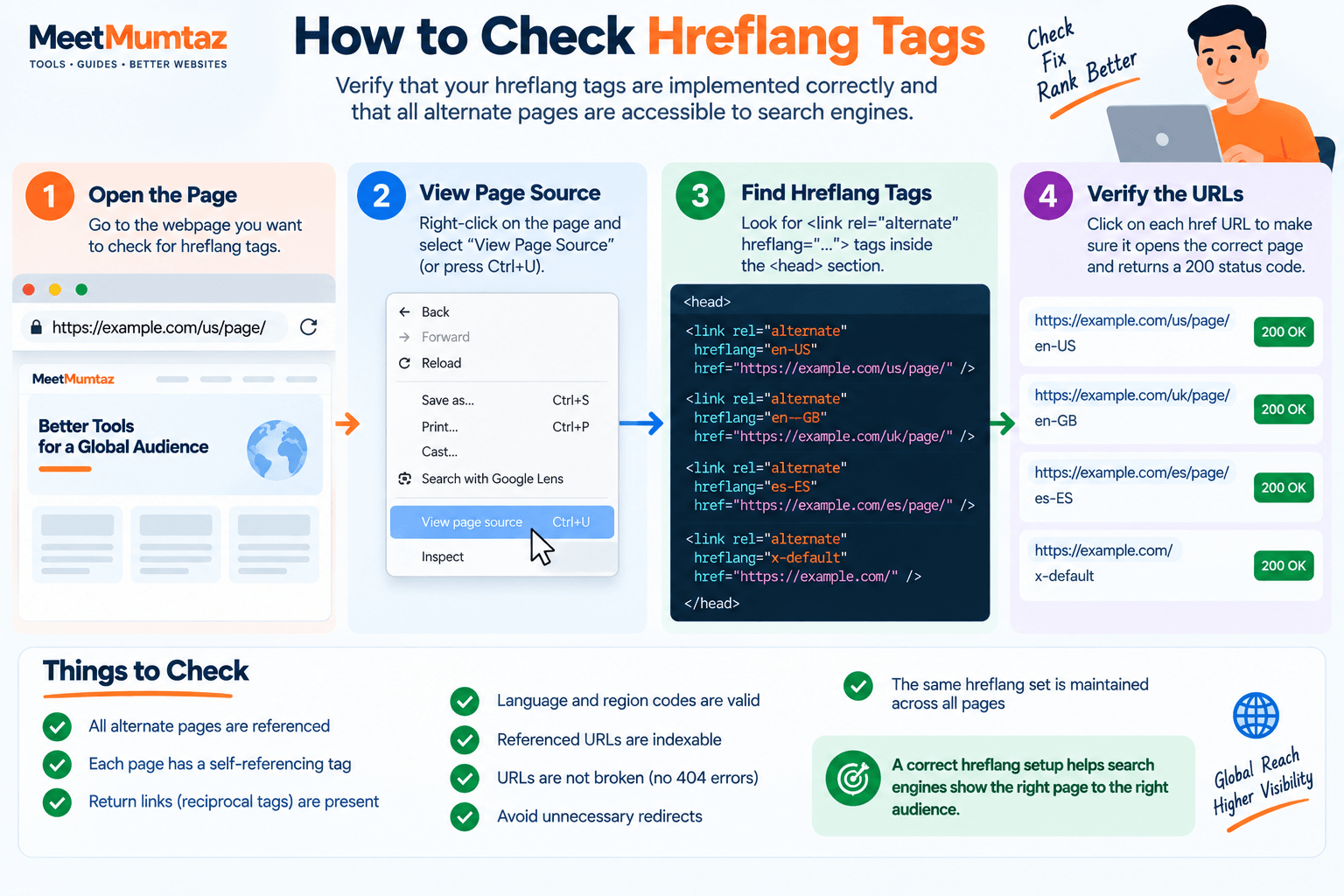
Once you understand what is hreflang and why it matters, the next step is checking whether your implementation is working correctly. Adding hreflang tags is only half of the process. You should also verify that the implementation is technically correct and that every alternate page is accessible to search engines.
Start by checking the source code of the page and locating the hreflang annotations inside the <head> section. A typical implementation may look like this:
<link rel="alternate" hreflang="en-US" href="https://example.com/us/page/" />
<link rel="alternate" hreflang="en-GB" href="https://example.com/uk/page/" />
<link rel="alternate" hreflang="es-ES" href="https://example.com/es/page/" />
<link rel="alternate" hreflang="x-default" href="https://example.com/" />
When reviewing the tags, confirm that each URL is correct and loads successfully.
You should also check whether:
- every alternate page references the other relevant versions;
- each page contains a self-referencing hreflang entry;
- language and region codes are valid;
- referenced URLs are indexable;
- URLs do not lead to broken pages;
- unnecessary redirecting URLs are avoided;
- the same alternate-page relationship is maintained across the entire hreflang set.
For websites with many international pages, checking these relationships manually can become difficult. Regular validation is therefore useful whenever URLs, translations, regional pages, or site structure change.
How to Fix Common Hreflang Errors
Most hreflang problems are caused by inconsistent relationships, incorrect codes, or URLs that search engines cannot use properly. Understanding what is hreflang can also make these errors easier to identify and fix before they affect your international SEO setup.
Here are some common problems and how to approach them.
1. Missing Return Links
Suppose the English page references the Spanish version, but the Spanish page does not reference the English version.
The relationship is incomplete.
Make sure both pages include each other in their hreflang sets.
For example, the English page references:
<link rel="alternate" hreflang="es" href="https://example.com/es/page/" />and the Spanish page should include the corresponding English alternative:
<link rel="alternate" hreflang="en" href="https://example.com/en/page/" />2. Incorrect Language or Region Codes
Do not create your own abbreviations for countries or languages.
For example:
en-US
en-GB
es-ES
fr-CA
combine a language with an optional regional target.
Always verify the codes before implementing them across hundreds or thousands of pages.
3. Hreflang Points to a Broken URL
An hreflang annotation is not useful if its destination no longer exists.
For example, if:
https://example.com/es/page/returns a 404 error, update the hreflang set to reference the correct live Spanish URL.
This is especially important after website migrations, URL restructuring, or deleting translated content.
4. Missing Self-Reference
Each participating page should include its own URL in the hreflang set.
If the US page is:
https://example.com/us/page/its hreflang group should include the US URL alongside the other alternate versions.
This makes the relationship between all pages explicit and consistent.
5. Conflicting Canonical Signals
Hreflang and canonical annotations should support rather than contradict the structure of your international pages.
If several localized URLs are intentionally maintained as separate indexable pages, review their canonical tags carefully. Avoid automatically pointing every language or regional version to one different localized URL simply because the content is similar.
The goal is to make it clear which pages should be indexed and how those pages relate to alternate language or regional versions.
Hreflang Best Practices
A technically correct implementation is easier to maintain when you follow a consistent structure from the beginning. Knowing what is hreflang is only the beginning; following consistent implementation practices is equally important for international SEO.
Keep these hreflang best practices in mind:
- Use valid language codes and valid region codes when regional targeting is necessary.
- Include self-referencing hreflang annotations.
- Maintain reciprocal links between alternate pages.
- Reference the final, accessible version of each URL.
- Keep alternate-page sets consistent.
- Use
x-defaultwhen a genuine global or fallback page exists. - Make sure hreflang URLs are available to search engines.
- Review canonical tags alongside hreflang implementation.
- Update annotations whenever an alternate URL changes.
- Periodically audit large multilingual websites for broken or missing relationships.
Most importantly, only connect pages that are genuine alternatives.
For example, an English product page should normally be connected to the translated or region-specific version of that same product—not an unrelated category page simply because it exists in another language.
Make Hreflang Implementation Easier
For anyone still learning what is hreflang, using a generator can make the implementation process easier to understand and manage. The basic hreflang HTML syntax is not difficult. The challenge is keeping every language, region, URL, self-reference, and return relationship correct as a website grows.
Instead of manually constructing every tag, you can use the MeetMumtaz Hreflang Tag Generator to create hreflang markup for your alternate pages.
Add the relevant URLs and language or regional information, generate the tags, review the output, and then implement them using the appropriate method for your website.
Internal link placement: Link the text “Hreflang Tag Generator” above directly to your existing Hreflang Tag Generator tool page.
Frequently Asked Questions About Hreflang
These frequently asked questions provide quick answers for readers researching what is hreflang and how it should be implemented correctly.
What is hreflang in SEO?
Hreflang is an annotation used to identify alternate versions of a webpage intended for different languages or regions. It helps search engines understand the relationship between those URLs and select a more appropriate version for users.
Is hreflang necessary for every website?
No. A website serving only one language and one audience generally does not need hreflang.
It becomes relevant when equivalent or closely related pages are available for different languages, countries, or regional audiences.
Where do I put hreflang tags in HTML?
When using the HTML method, hreflang <link> elements are placed inside the <head> section of the page.
For example:
<head>
    <link rel="alternate" hreflang="en" href="https://example.com/en/page/" />
    <link rel="alternate" hreflang="es" href="https://example.com/es/page/" />
</head>
Hreflang can also be implemented through HTTP headers or XML sitemaps where appropriate.
Do hreflang tags prevent duplicate content?
Hreflang helps search engines understand that similar pages are alternate language or regional versions. It should not, however, be treated as a general-purpose duplicate-content solution.
Canonicalization and hreflang serve different purposes, as discussed earlier in this guide.
What is the difference between hreflang=”en” and hreflang=”en-US”?
hreflang="en" targets English-language content without specifying a particular region.
hreflang="en-US" identifies English content intended specifically for users in the United States.
If one English page serves all English-speaking audiences, a language-only value may be appropriate. If different English versions exist for particular markets, language-region combinations can distinguish them.
What does x-default mean in hreflang?
x-default identifies a fallback or global URL for users who do not match the specifically defined language or regional versions.
It is not a language or country code.
Does every hreflang page need to link back?
Alternate pages should provide reciprocal hreflang relationships. If one page identifies another page as an alternate, the corresponding alternate should also reference it as part of the same hreflang set.
Can hreflang and canonical tags be used together?
Yes. They address different SEO requirements and can appear on the same page.
Canonical annotations deal with preferred URLs, while hreflang identifies language and regional alternatives. Their configuration should remain logically consistent so that one signal does not undermine the other.
Final Thoughts: What Is Hreflang and Why Does It Matter?
So, what is hreflang?
Hreflang is a way of telling search engines how different language or regional versions of your content relate to one another. When implemented correctly, it can help search engines present a more appropriate page to users based on language and regional context.
The individual tag is simple. The real challenge is maintaining accurate language codes, URLs, self-references, return links, canonical signals, and alternate-page relationships across an international website.
For a small site, this may involve only a few tags. For a large multilingual website, careful implementation and regular validation become much more important.
If you want to create the markup without manually writing every line, use the MeetMumtaz Hreflang Tag Generator, review the generated tags, and add them to your website using the implementation method that best fits your setup.
For additional guidance on preferred URLs, see Google’s documentation on canonicalization.


