A light bar monitor setup is a simple way to illuminate your keyboard and desk without giving up valuable desk space to a traditional lamp. Instead of sitting beside your monitor, a monitor light bar mounts along the top edge of the display and directs light toward the workspace.
That design can be particularly useful for home offices, gaming desks, reading, studying, and late-night computer work. However, choosing the right light bar for monitor use requires more than checking brightness. Monitor thickness, curved-screen compatibility, mounting design, glare control, dimming, and controls can all make a difference.
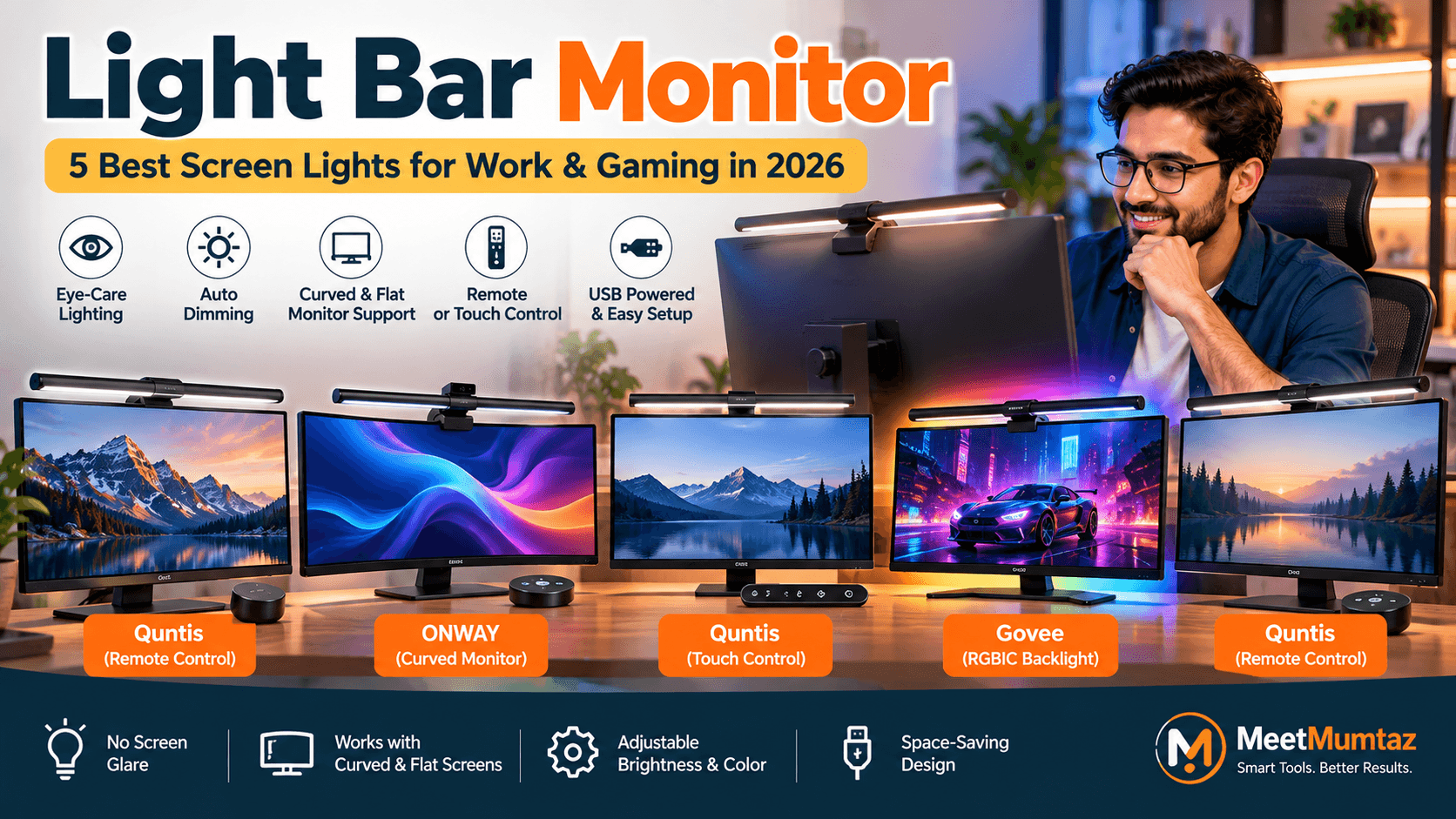
Below, we compare five options from Quntis, ONWAY, and Govee—including choices for curved displays, thin monitors, office setups, and RGB gaming desks.
Affiliate Disclosure: This article contains affiliate links. If you purchase through one of these links, MeetMumtaz may earn a commission at no additional cost to you.
Quick Comparison
1. Quntis Monitor Light Bar Monitor With Remote Control
The first Quntis monitor light bar combines remote-controlled lighting with support for both curved and flat monitors. According to Quntis’s current specifications for its Focus 51 cm PRO+ model, its mounting system supports flat, curved, and ultrawide displays between 0.12 and 2.36 inches thick. Quntis
The wireless remote provides stepless brightness and color-temperature adjustment from 3000K to 6500K. There is also auto-dimming, a two-hour timer, and memory functionality. Quntis uses an asymmetric optical design intended to direct light toward the desk and keyboard rather than reflecting it into the screen. Quntis
That combination makes this an interesting general-purpose choice for a home office that may also double as a gaming setup.
| Category | Details |
|---|---|
| Key Features | Wireless remote • Auto-dimming • Stepless brightness • Adjustable color temperature • Curved/flat monitor support • No-glare asymmetric lighting |
| ✓ Pros | Remote makes adjustments convenient • Works with multiple monitor styles • Space-saving design • Useful for office and gaming setups |
| ✕ Cons | Monitor thickness and top-bezel clearance should be checked • More controls than basic light bars |
| Check Price on Amazon → | |
2. ONWAY Curved Monitor Light Bar With Wireless Remote
The ONWAY model is specifically interesting for shoppers looking for a curved monitor light bar.
The supplied product listing describes a wireless remote control, automatic dimming, a camera base, and compatibility across different screen styles. It also emphasizes a no-screen-glare lighting arrangement.
The camera-base feature could be particularly useful on workstations where a webcam already occupies the monitor’s top edge—an important detail because mounting space is often overlooked when choosing a screen light.
Since I could not independently verify a current manufacturer specification sheet for this exact ONWAY model, check the Amazon listing’s current dimensions and monitor-thickness requirements against your display before ordering.
| Category | Details |
|---|---|
| Key Features | Wireless remote • Auto-dimming • Curved-monitor design • Camera base • No-glare lighting |
| ✓ Pros | Useful option for curved screens • Remote operation • Camera-conscious mounting design • Space-saving desk lighting |
| ✕ Cons | Exact monitor-fit specifications should be confirmed on the current listing • Fewer independently verified specifications available |
| Check Price on Amazon → | |
3. Quntis Computer Monitor Lamp With Touch Control
Not everyone needs a wireless remote. This Quntis Computer Monitor Lamp takes a simpler approach with touch controls while retaining useful features such as automatic dimming and adjustable lighting.
The supplied listing describes it as a USB-powered LED task lamp with no-glare lighting and a space-saving design.
Quntis explains that its monitor-light products use asymmetric illumination to concentrate light on the desk and keyboard while minimizing light directed toward the display. Quntis
This makes the touch-control version relevant for users who want straightforward desk lighting without adding another remote to their workspace.
| Category | Details |
|---|---|
| Key Features | Touch control • Auto-dimming • USB-powered design • Adjustable illumination • No-glare desk lighting |
| ✓ Pros | Simple controls • Saves desk space • Useful for reading, work and study • No separate remote required |
| ✕ Cons | Touch operation requires reaching toward the monitor • Less convenient than remote control for frequent adjustments |
| Check Price on Amazon → | |
4. Govee Monitor Light Bar With RGBIC Backlight
The Govee is the most distinctive product in this group because it combines practical monitor illumination with RGBIC ambient lighting.
Govee’s official specifications list compatibility with 22- to 34-inch monitors, screen thickness from 0.12 to 6.3 inches, and curved displays of 800R or greater. Its flexible support can bend through 180 degrees, while the light bar itself can tilt by 30 degrees. us.govee.com
This makes it particularly relevant if you’re trying to fit a light bar for thin monitor setups as well as unusually thick displays.
The white task light offers brightness adjustment from 1–100% and color temperature from 2700K–6500K. Govee also provides RGBIC lighting, more than 90 dynamic effects through its app, music synchronization, and compatibility with Matter, Google Assistant, and SmartThings. us.govee.com
So this one bridges two different use cases: practical desk illumination during work and ambient RGB lighting during gaming.
| Category | Details |
|---|---|
| Key Features | RGBIC lighting • 0.12–6.3 inch monitor thickness support • Curved-screen support ≥800R • 2700K–6500K white light • App control • Smart-home integration |
| ✓ Pros | Very broad monitor-thickness range • Suitable for curved and thin screens • Task lighting plus RGB ambience • Smart controls and lighting effects |
| ✕ Cons | More features than users wanting only a basic desk lamp may need • No dedicated handheld remote |
| Check Price on Amazon → | |
Govee’s current product specifications can also be checked on the official Govee Monitor Light Bar page. us.govee.com
5. Quntis Monitor Light Bar With Remote Control
The fifth option returns to Quntis and is another remote-controlled monitor lighting solution.
Based on the product title you supplied, its emphasis is again on compatibility with curved and flat displays, eye-comfort-oriented lighting, USB power, dimming, and glare control.
Quntis currently offers several light-bar variants with remote controls, including models for flat, curved, and ultrawide displays. Because your fifth Amazon title is truncated, I would not claim a specific thickness range, light-bar length, or color-temperature range for this exact listing without confirming the model number. Quntis
| Category | Details |
|---|---|
| Key Features | Remote control • Curved/flat monitor support • Dimmable screen lighting • USB-powered design • Eye-care-oriented illumination |
| ✓ Pros | Convenient remote operation • Saves desk space • Suitable for work or gaming desks • Multiple lighting adjustments |
| ✕ Cons | Exact model specifications should be checked before ordering • Similar Quntis models can have different mounting and lighting specifications |
| Check Price on Amazon → | |
What Is a Monitor Light Bar?
A monitor light bar is a compact lamp designed to sit along the top edge of a computer monitor.
Unlike a traditional desk lamp, it does not require a large base on the desk. Instead, the light is positioned above the display and directed downward toward the keyboard and working area.
A well-designed light bar for monitor use also tries to keep direct light and reflections away from the screen.
For example, Quntis describes its asymmetric optical system as directing illumination toward the desk and keyboard rather than the display. Quntis
How to Choose a Light Bar for Monitor Use
Start with the monitor itself.
Check its thickness, top bezel, rear shape, and curvature before considering lighting features. A light bar with excellent illumination is of little use if its clamp does not sit securely on your particular display.
Next, consider the controls. Touch controls keep the setup simple, while a wireless remote lets you change brightness without reaching toward the screen. Smart models can add apps, automation, and voice control.
Lighting adjustment is another useful consideration. Being able to change brightness and color temperature lets you adapt the desk between bright daytime work and lower-light evening use.
Finally, consider your purpose. A work-focused setup may benefit most from clean white task lighting and auto-dimming. A gaming setup may benefit from RGB backlighting in addition to front-facing illumination.
If you’re building a complete workstation, our Universal Laptop Docking Station guide covers connectivity for larger desktop setups, while our Laptop Stand With Cooling Pad comparison covers laptop cooling and positioning.
Choosing a Curved Monitor Light Bar
A curved screen introduces an extra compatibility issue because a mounting system designed around a conventional flat display may not sit correctly.
For a curved monitor light bar, check both the monitor curvature and the manufacturer’s mounting specifications.
The Quntis curved Focus model, for example, officially supports curved and flat monitors between 17 and 34 inches and monitors up to 3.54 inches thick. Quntis
Govee takes a different approach with a flexible support structure and officially lists curved-screen compatibility at 800R or greater. us.govee.com
That is why “supports curved monitors” should not automatically be interpreted as “fits every curved monitor.”
How to Fit a Light Bar for a Thin Monitor
If you’re trying to fit a light bar for thin monitor hardware, don’t assume a thinner screen automatically makes installation easier.
The clamp still needs enough contact to remain stable without obstructing the visible display area.
The current Quntis Focus PRO+ officially supports monitors beginning at 0.12 inches thick, while the current Govee Monitor Light Bar also lists a minimum thickness of 0.12 inches. Quntis
Also check the bezel and rear housing. A very thin panel with an unusual rear profile can behave differently from a conventional monitor even when its thickness falls within the stated range.
Quntis Monitor Light Bar: What Makes It Different?
There are three Quntis products in this comparison because Quntis currently has a substantial range of monitor lighting products covering touch controls, wireless remotes, curved screens, auto-dimming, and RGB-equipped variants. Quntis
The company’s light bars generally emphasize asymmetric desk illumination and space-saving monitor mounting. Individual specifications vary significantly by model, however, so buyers should compare the exact Quntis model rather than assuming every Quntis light bar has the same remote, clip, size range, or lighting modes.
Monitor Light Bar vs. Desk Lamp
A conventional desk lamp provides flexibility in where the light originates, but it also occupies desk space.
A monitor light bar moves the lighting source above the screen, freeing the desk for a keyboard, mouse, speakers, and other accessories.
The trade-off is compatibility. A normal desk lamp does not care how thick or curved your monitor is; a screen-mounted light does.
For a compact computer workstation, however, the space-saving design can be particularly attractive.
Frequently Asked Questions
Is a monitor light bar worth using?
It can be useful when you want dedicated keyboard and desk illumination without placing a traditional lamp beside the monitor. Adjustable brightness and color temperature can also make one light useful across different working conditions.
Does a monitor light bar cause screen glare?
Products designed with asymmetric lighting aim to direct light toward the desk rather than directly onto the display. Actual reflections can still depend on the light-bar angle, screen coating, and surrounding lighting.
Can a monitor light bar fit a curved monitor?
Some can, but compatibility varies. Check the supported curvature, monitor thickness, and mounting mechanism rather than relying only on the word “curved” in the product description.
Can I use a light bar on a thin monitor?
Yes, provided the mounting mechanism supports its thickness and shape. Some current Quntis and Govee models list compatibility beginning at 0.12 inches, but exact specifications should always be checked for the particular model. Quntis
Is Quntis monitor light bar good for office use?
Quntis offers models specifically designed around desk illumination, asymmetric no-glare lighting, dimming, and monitor mounting. Which model fits an office best depends on whether you prefer touch, remote, auto-dimming, or other controls. Quntis
Should I choose RGB or normal white lighting?
For primarily office and reading use, adjustable white task lighting may be enough. RGB backlighting is more relevant when you also want ambient lighting for gaming, streaming, or a decorative desk setup.
Final Thoughts
Choosing a light bar monitor setup comes down to monitor compatibility and how you use your desk.
The Quntis remote-controlled options focus on adjustable, space-saving task lighting; ONWAY targets curved-screen users with remote control and a camera-oriented mounting design; the Quntis touch-control lamp keeps operation simpler; and Govee combines task lighting with RGBIC effects and smart controls.
Before buying, check your monitor’s thickness, curvature, top bezel, and rear profile against the exact product specifications. That’s particularly important when shopping for a curved monitor light bar or trying to fit a light bar to an unusually thin display.