Affiliate Disclosure: This article contains affiliate links. If you purchase through these links, MeetMumtaz may earn a commission at no additional cost to you.
Finding the best ergonomic mouse for small hands can make a noticeable difference in your daily computer experience. Many standard computer mice are designed around average-sized hands, making them uncomfortable for users with smaller palms or shorter fingers.
An oversized mouse may force you to stretch your fingers to reach the buttons, adjust your grip repeatedly, or move your entire hand more than necessary.
An ergonomic mouse designed for smaller hands aims to provide a more natural and comfortable grip. Depending on the model, it may also offer wireless connectivity, adjustable sensitivity, quieter clicks, and additional scrolling controls.
Whether you’re working from home, studying, editing documents, or spending long hours on a laptop, choosing a mouse that fits your hand is important.
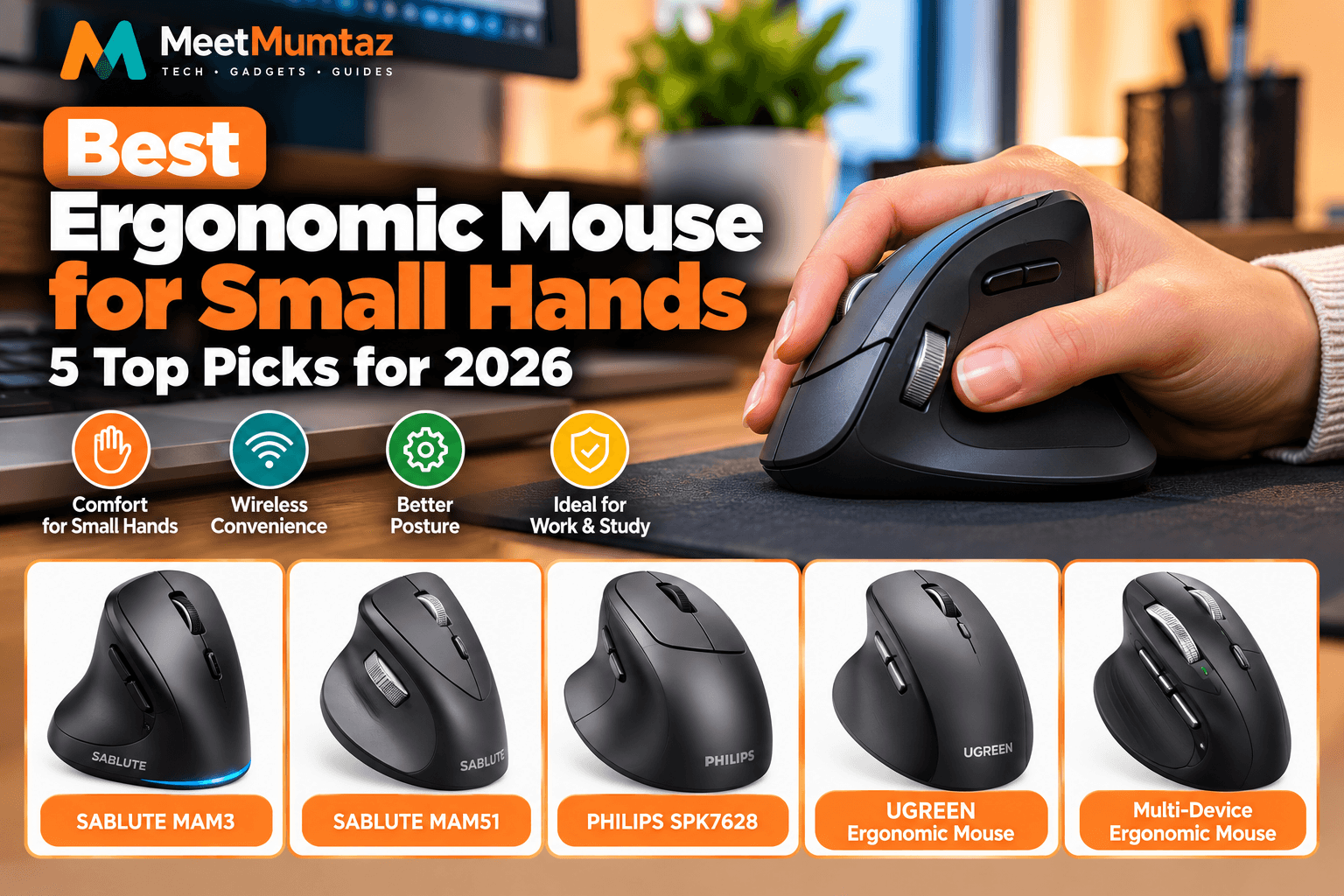
In this guide, we’ll compare five ergonomic wireless mice, explain their main features, and help you identify the best option for your hand size and working style.
Quick Comparison: Best Ergonomic Mouse for Small Hands
The following products offer different designs, connection options, and productivity features. Not every model is specifically marketed for small hands, so checking dimensions and grip comfort is essential.
| Product | Best For | Key Highlight | Price | Amazon |
|---|---|---|---|---|
| SABLUTE MAM3 | Small and medium hands | Bluetooth ergonomic design | Check price | Check Price ↗ |
| SABLUTE MAM51 | Productivity workflows | Side scroll wheel | Check price | Check Price ↗ |
| PHILIPS SPK7628 | Adjustable pointer control | Three adjustable DPI settings | Check price | Check Price ↗ |
| UGREEN Ergonomic Wireless Mouse | Flexible connectivity | Bluetooth, 2.4GHz and quiet clicks | Check price | Check Price ↗ |
| Rechargeable Multi-Device Ergonomic Mouse | Multi-device productivity | Thumb wheel, flying scroll and up to 4800 DPI | Check price | Check Price ↗ |
1. SABLUTE MAM3 Ergonomic Mouse — Best for Small and Medium Hands
The SABLUTE MAM3 Ergonomic Mouse is the most directly relevant option in this comparison for buyers specifically looking for a mouse marketed toward small and medium hands.
Its ergonomic design aims to support a more comfortable hand position than a conventional flat mouse. Bluetooth connectivity also makes it a practical choice for users who want to reduce cable clutter.
A correctly sized mouse should allow you to reach the main buttons and scroll wheel without excessive finger extension.
The SABLUTE MAM3 may be particularly appealing for laptop users, remote workers, and people who prefer a compact ergonomic pointing device.
However, hand size alone does not guarantee comfort. Your preferred grip style, wrist position, and the mouse’s actual dimensions all matter.
SABLUTE MAM3 — Key Features, Pros and Cons
| Category | Details |
|---|---|
| Key Features | Ergonomic mouse design; Bluetooth connectivity; marketed for small and medium hands. |
| Pros | Specifically targets smaller hands; wireless convenience; suitable for laptop and desktop workflows. |
| Cons | Exact dimensions and compatibility should be checked; comfort depends on personal grip preference. |
| Best For | Users prioritizing an ergonomic mouse designed for smaller hands. |
| Price | See current Amazon price. |
| Buy Now | Check Price on Amazon ↗ |
Our verdict: The SABLUTE MAM3 is a sensible starting point for shoppers whose main concern is finding an ergonomic mouse marketed for small or medium hands.
2. SABLUTE MAM51 Ergonomic Wireless Mouse — Best for Productivity
The SABLUTE MAM51 Ergonomic Mouse is aimed at users who want more than basic cursor movement.
Its standout advertised feature is a side scroll wheel, which may be useful when navigating wide spreadsheets, timelines, or other applications that support horizontal scrolling.
For office professionals, content creators, and users who work with large documents, additional scrolling controls can make certain tasks more convenient.
The MAM51 is a wireless ergonomic mouse, but its exact suitability for small hands depends on its physical dimensions and button placement.
Buyers should compare the mouse’s length, width, and height with their hand measurements before choosing it specifically for a small-hand setup.
SABLUTE MAM51 — Key Features, Pros and Cons
| Category | Details |
|---|---|
| Key Features | Ergonomic design; wireless operation; side scroll wheel. |
| Pros | Additional scrolling control; useful for productivity applications; wireless desk setup. |
| Cons | Side scrolling depends on application support; physical fit for small hands needs verification. |
| Best For | Office work, spreadsheets, editing workflows, and productivity tasks. |
| Price | See current Amazon price. |
| Buy Now | Check Price on Amazon ↗ |
Our verdict: The SABLUTE MAM51 is worth considering if you want an ergonomic wireless mouse with additional scrolling functionality.
3. PHILIPS SPK7628 Ergonomic Mouse — Best for Adjustable DPI
The PHILIPS SPK7628 Ergonomic Wireless Mouse offers three adjustable DPI settings, allowing users to change cursor sensitivity according to their preferences.
DPI settings affect how far the pointer moves in response to physical mouse movement.
A lower setting may provide more controlled cursor movement, while a higher setting can help the pointer travel farther with less physical movement.
This flexibility can be helpful when switching between document editing, web browsing, and general desktop tasks.
However, adjustable DPI does not automatically make a mouse more comfortable. The device must still fit your hand and support your preferred grip.
PHILIPS SPK7628 — Key Features, Pros and Cons
| Category | Details |
|---|---|
| Key Features | Ergonomic mouse design; wireless connectivity; three adjustable DPI settings. |
| Pros | Adjustable pointer sensitivity; wireless convenience; suitable for everyday computer tasks. |
| Cons | Exact DPI values and hand-fit dimensions should be confirmed; three presets may offer less customization than advanced models. |
| Best For | Users who want simple cursor sensitivity adjustment. |
| Price | See current Amazon price. |
| Buy Now | Check Price on Amazon ↗ |
Our verdict: The PHILIPS SPK7628 is an option for buyers who want straightforward wireless operation with adjustable pointer sensitivity.
4. UGREEN Ergonomic Wireless Mouse — Best for Flexible Connectivity
The UGREEN Ergonomic Wireless Mouse combines Bluetooth and 2.4GHz wireless connectivity with advertised quiet-click buttons.
This combination can be useful for professionals who switch between different computer setups or prefer a quieter working environment.
Bluetooth can reduce dependence on a dedicated USB receiver when used with compatible devices, while 2.4GHz connectivity offers another connection option.
Quiet-click operation may be particularly appealing in shared offices, libraries, or home workspaces.
As with other ergonomic mice, small-hand compatibility depends on the exact body dimensions and the placement of the primary controls.
UGREEN Ergonomic Wireless Mouse — Key Features, Pros and Cons
| Category | Details |
|---|---|
| Key Features | Bluetooth connectivity; 2.4GHz wireless option; ergonomic design; quiet-click buttons. |
| Pros | Multiple wireless connection options; quieter clicking; convenient for office and laptop setups. |
| Cons | Exact switching functionality and dimensions require confirmation; quiet clicks do not eliminate all operating noise. |
| Best For | Shared workspaces, laptops, and users who value flexible wireless connectivity. |
| Price | See current Amazon price. |
| Buy Now | Check Price on Amazon ↗ |
Our verdict: UGREEN is worth considering if you want an ergonomic wireless mouse with Bluetooth, 2.4GHz connectivity, and quieter buttons.
5. Rechargeable Multi-Device Ergonomic Bluetooth Mouse — Best for Advanced Scrolling
The Rechargeable Ergonomic Bluetooth Mouse with Multi-Device Switching is aimed at users who want additional controls for productivity.
Its advertised features include silent clicking, a thumb wheel, flying scroll functionality, multi-device switching, and up to 4800 DPI.
These controls may be helpful when working with wide documents, long web pages, spreadsheets, and multiple connected devices.
Rechargeable operation can also reduce the need for frequent disposable battery replacements.
However, buyers should verify the exact brand, physical dimensions, device compatibility, and connection limits before purchasing.
Rechargeable Multi-Device Mouse — Key Features, Pros and Cons
| Category | Details |
|---|---|
| Key Features | Rechargeable wireless design; multi-device switching; silent clicks; flying scroll; thumb wheel; advertised 4800 DPI. |
| Pros | Additional scrolling controls; rechargeable operation; multiple-device workflow features. |
| Cons | Exact manufacturer and dimensions need confirmation; advanced features may be unnecessary for basic users. |
| Best For | Professionals who switch devices and frequently navigate large documents. |
| Price | See current Amazon price. |
| Buy Now | Check Price on Amazon ↗ |
Our verdict: This mouse may appeal to users seeking multi-device support and advanced scrolling, provided its dimensions suit their hands.
Why Hand Size Matters When Choosing an Ergonomic Mouse
Hand size is one of the most important considerations when shopping for an ergonomic computer mouse.
A mouse that is too large can force your fingers to stretch toward the buttons or scroll wheel. A mouse that is too small may provide insufficient palm support for your preferred grip.
The ideal size depends on several factors, including palm length, hand width, finger reach, and whether you use a palm, claw, or fingertip grip.
An ergonomic shape may encourage a different hand position, but no single mouse design is guaranteed to prevent discomfort or repetitive strain.
For a more comfortable workstation, mouse selection should be considered alongside desk height, keyboard position, and regular movement breaks.
If you’re organizing a compact workstation, our laptop vertical stand buying guide explains how upright laptop storage can create additional room for a comfortable mouse and keyboard arrangement.
Ergonomic Vertical Computer Mouse vs. Traditional Mouse
An ergonomic vertical computer mouse positions the hand at a different angle from a conventional flat mouse.
Vertical designs often aim to reduce the amount of forearm rotation required during use.
Traditional mice typically keep the palm facing more directly downward, while vertical models encourage a more sideways hand position.
| Feature | Vertical Ergonomic Mouse | Traditional Mouse |
|---|---|---|
| Hand position | More sideways | More palm-down |
| Adjustment period | May take time | Usually familiar |
| Shape | Taller, angled body | Generally flatter |
| Small-hand suitability | Depends on model dimensions | Depends on model dimensions |
| Best use | Users preferring angled grip | Users preferring familiar grip |
A vertical design is not automatically better for every person.
Some users find vertical mice comfortable, while others prefer a compact conventional ergonomic shape.
The most important factor is whether the mouse allows you to operate its controls without unnecessary stretching or gripping force.
Ergonomic Mouse Vertical Wireless: What Should You Look For?
When choosing an ergonomic vertical wireless mouse model, consider the following features.
1. Mouse Dimensions
Look beyond the product’s marketing description.
Check the length, width, height, and recommended hand size whenever available.
A mouse described as ergonomic may still be too large for smaller hands.
2. Wireless Connectivity
Bluetooth and 2.4GHz wireless connectivity are common options.
Bluetooth can be convenient for compatible laptops and tablets, while 2.4GHz models may use a dedicated USB receiver.
Choose the connection method that suits your devices.
3. Button Placement
You should be able to reach the primary buttons and scroll wheel without excessive finger extension.
Additional thumb buttons are useful only if they can be reached comfortably.
4. DPI Adjustment
Adjustable DPI allows you to change cursor sensitivity.
This can be useful when switching between tasks, monitors, and personal preferences.
5. Battery and Charging
Some wireless mice use replaceable batteries, while others include rechargeable batteries.
Consider charging convenience, battery life, and whether the mouse can be used while charging.
6. Grip Comfort
A good mouse should feel stable in your hand without requiring excessive gripping pressure.
If possible, choose a retailer with a suitable return policy so you can evaluate the fit during normal use.
Ergo Vertical Mouse: Is It Better for Small Hands?
An ergo vertical mouse may be worth considering if you prefer a more angled hand position.
However, vertical mouse designs vary significantly in size.
Some are relatively compact, while others have large bodies that may be difficult for users with smaller hands to grip comfortably.
Before purchasing, check whether your fingers naturally reach the main buttons and whether your thumb can access any side controls without strain.
Do not assume that a vertical mouse is the best option simply because it is marketed as ergonomic.
Comfort is individual, and your desk setup also plays an important role.
Best Computer Mouse for Large Hands vs. Small Hands
The search for the best computer mouse for large hands involves different sizing priorities from choosing a mouse for smaller hands.
Users with larger hands may prefer a longer body or more palm support, while users with smaller hands may prioritize shorter reach distances and compact dimensions.
| Buying Factor | Small Hands | Large Hands |
|---|---|---|
| Mouse length | Shorter may be easier to control | Longer may provide more support |
| Button reach | Close, accessible controls | Adequate spacing for longer fingers |
| Grip style | Compact palm, claw, or fingertip options | Larger palm or claw-grip options |
| Thumb controls | Easy reach is especially important | Placement still matters |
| Main priority | Comfortable fit without stretching | Support without cramped fingers |
Neither hand size has one universally correct mouse design.
The best approach is to compare actual dimensions with your hand measurements and preferred grip.
How to Set Up Your Desk for Better Mouse Comfort
Choosing the right mouse is only one part of creating a comfortable workstation.
Start by positioning your keyboard and mouse close enough that your upper arms can remain relatively relaxed.
Avoid reaching far forward or sideways to operate your mouse.
Your forearm should have appropriate support, and your wrist should not remain in an awkward position for prolonged periods.
If you’re building a multi-monitor workstation, our dual monitor stand comparison explores ways to position screens more effectively while maintaining usable keyboard and mouse space.
Cable clutter can also affect how freely you move accessories around your desk. Our under-desk cable management tray guide covers solutions for keeping charging cables and peripheral connections organized.
Take regular movement breaks and adjust your workstation when discomfort develops.
For general computer workstation guidance, refer to the OSHA Computer Workstations eTool.
Common Mistakes When Buying a Mouse for Small Hands
Choosing based on appearance alone: A stylish ergonomic mouse may still be uncomfortable if it is too large.
Ignoring physical dimensions: Check actual measurements instead of relying only on labels such as compact or ergonomic.
Assuming vertical means more comfortable: Different users respond differently to vertical mouse shapes.
Overlooking button reach: Extra controls are not useful if they require awkward finger movement.
Buying based only on DPI: Higher DPI does not automatically improve comfort or productivity.
Ignoring desk ergonomics: Even a well-fitting mouse can feel uncomfortable when positioned too far from the keyboard.
Frequently Asked Questions
What is the best ergonomic mouse for small hands?
The best choice depends on your hand measurements and preferred grip. Among these five options, the SABLUTE MAM3 is specifically marketed for small and medium hands, making it a relevant starting point.
Is a vertical mouse better for small hands?
Not necessarily. A vertical mouse may suit users who prefer an angled hand position, but its dimensions must still match their hand size.
Are wireless ergonomic mice good for office work?
Yes, many wireless ergonomic mice are designed for everyday office tasks. Consider connection stability, battery requirements, comfort, and button placement.
What is the difference between Bluetooth and 2.4GHz wireless mice?
Bluetooth connects through compatible Bluetooth hardware, while many 2.4GHz wireless mice use a dedicated USB receiver. Available features and compatibility depend on the specific model.
Does a higher DPI make a mouse more ergonomic?
No. DPI controls pointer sensitivity. Ergonomic comfort depends more on physical fit, grip, positioning, and how the mouse is used.
Can an ergonomic mouse prevent wrist pain?
An ergonomic mouse may improve comfort for some users, but it cannot guarantee prevention or treatment of wrist pain. Persistent pain, numbness, or weakness should be evaluated by a qualified healthcare professional.
Should I choose a small mouse or a vertical mouse?
Choose based on your hand dimensions, preferred grip, and comfort. A compact conventional mouse may suit some users better than a larger vertical design.
Final Verdict: Which Ergonomic Mouse for Small Hands Should You Buy?
Choosing the best ergonomic mouse for small hands starts with finding a design that fits your palm and allows easy access to the controls.
The SABLUTE MAM3 is the most directly targeted option in this shortlist for small and medium hands.
The SABLUTE MAM51 may appeal to users who want additional scrolling controls for productivity tasks.
The PHILIPS SPK7628 offers adjustable DPI settings for users who want simple pointer-sensitivity control.
The UGREEN Ergonomic Wireless Mouse is worth considering for its Bluetooth and 2.4GHz connectivity options.
Finally, the Rechargeable Multi-Device Ergonomic Mouse offers advanced scrolling and switching features for users with more demanding workflows.
Before purchasing, compare the exact dimensions, connection options, and return policies of each product.
A comfortable mouse should fit your hand naturally, allow you to reach the buttons easily, and work well with the rest of your desk setup.