Starting a WordPress website doesn’t have to cost a fortune. Whether you’re launching a personal blog, building a portfolio, creating a small business website, or starting an affiliate marketing project, choosing cheap WordPress hosting can help you control expenses without sacrificing the features your website actually needs.
However, not every affordable hosting plan delivers the same value. Some providers advertise low introductory prices but charge significantly more at renewal. Others offer attractive features while limiting storage, backups, email hosting, or the number of websites you can manage.
One option worth considering is Namecheap EasyWP — a managed WordPress hosting platform designed to simplify website setup and everyday management.
But is EasyWP the right choice for beginners? How does it compare with traditional shared hosting? And what should you look for when choosing the best web site hosting for your budget?
In this guide, we’ll explore Namecheap EasyWP’s features, advantages, limitations, pricing considerations, and alternatives so you can make an informed decision.
Affiliate Disclosure: This article contains affiliate links. MeetMumtaz may earn a commission if you purchase through our links, at no additional cost to you. Our evaluation is based on published product information and hosting requirements, not independent performance testing.
Quick Comparison: Cheap WordPress Hosting Options
Before choosing a plan, it’s important to understand the differences between managed WordPress hosting, shared hosting, and cloud server hosting.
| Hosting Type | Best For | Main Advantage | Explore |
|---|---|---|---|
| Namecheap EasyWP | WordPress beginners and bloggers | Managed WordPress environment | View EasyWP Plans |
| Namecheap Shared Hosting | Multiple websites and custom applications | cPanel and broader hosting flexibility | View Shared Plans |
| Other Managed WordPress Hosting | Users wanting specialized WordPress management | Provider-managed WordPress features | Compare provider plans |
| Cloud Server Hosting | Growing websites and technical users | Greater infrastructure control and scalability | Evaluate cloud resources |
Quick Verdict: Namecheap EasyWP is a promising choice for users who want a simple managed WordPress environment. Traditional shared hosting may offer better flexibility for multiple websites, while cloud server hosting is more suitable for projects requiring additional infrastructure control.
What Is Cheap WordPress Hosting?
Cheap WordPress hosting refers to hosting services that support WordPress websites at a relatively affordable cost.
These services typically provide the storage, processing resources, database functionality, and web server environment required to run WordPress.
However, inexpensive hosting does not always mean low quality. The real question is whether the hosting plan includes enough resources and features for your particular website.
For example, a new personal blog may work well on an entry-level plan, while a growing WooCommerce store or a heavily visited affiliate website may require more resources.
Common Types of Affordable WordPress Hosting
Shared Hosting: Multiple websites use resources from the same server environment. This is commonly an affordable starting point for beginners.
Managed WordPress Hosting: The provider handles selected WordPress-related maintenance tasks, potentially including updates, caching, backups, and security tools.
VPS Hosting: A virtual private server provides a more isolated environment with greater configuration flexibility, but often requires additional technical knowledge.
Cloud Hosting: Websites run on cloud infrastructure, with scalability and resource management depending on the service and plan.
For most beginners, shared hosting and entry-level managed WordPress hosting are the first options worth comparing.
Namecheap EasyWP Overview: Affordable Managed WordPress Hosting
Namecheap EasyWP is a managed WordPress hosting service developed for users who want to create and manage WordPress websites without working extensively with traditional hosting controls.
Instead of relying on a conventional cPanel interface, EasyWP uses a dedicated dashboard for WordPress-related management.
The service is designed for blogs, portfolios, small business websites, and other WordPress-based projects.
Its main attraction is simplicity. Users can focus on their WordPress website while the hosting platform handles selected infrastructure and maintenance tasks.
Who Should Consider EasyWP?
EasyWP may be suitable for:
- Beginners launching their first WordPress blog.
- Freelancers creating online portfolios.
- Small businesses building WordPress websites.
- Affiliate marketers starting content-focused websites.
- Website owners who prefer a managed hosting dashboard.
However, EasyWP is not intended to replace every type of web hosting.
If you need to host custom PHP applications, manage multiple unrelated websites in one conventional hosting account, or use cPanel-based tools, shared hosting may be more appropriate.
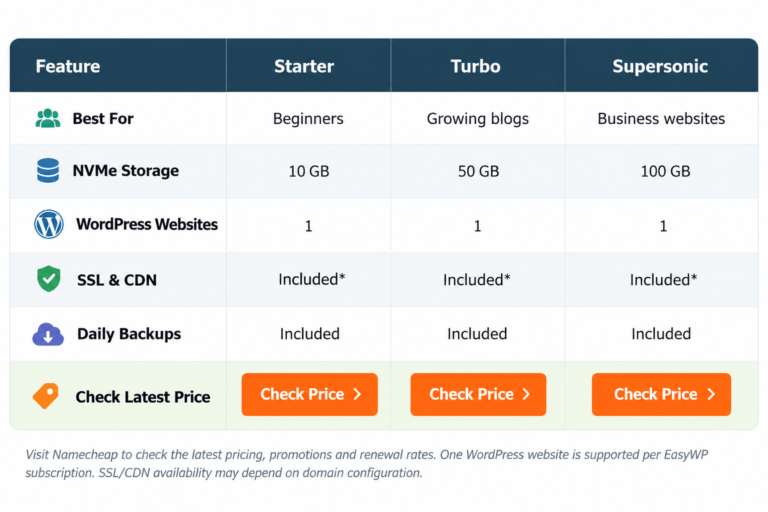
Namecheap EasyWP Plans: Starter, Turbo and Supersonic
EasyWP has traditionally offered three main hosting tiers: Starter, Turbo, and Supersonic.
These plans are designed for different levels of website activity and resource requirements.
The exact storage allocations, visitor guidelines, included features, and pricing should be verified on Namecheap’s current product page before purchasing.
1. EasyWP Starter — For New WordPress Websites
EasyWP Starter is aimed at users launching a small WordPress website.
It is most relevant for personal blogs, portfolios, and early-stage websites that do not require substantial hosting resources.
2. EasyWP Turbo — For Growing WordPress Websites
EasyWP Turbo is positioned as an option for websites that need more resources than an entry-level plan.
It may be worth considering for growing blogs and business websites with additional content and visitor activity.
3. EasyWP Supersonic — For More Demanding WordPress Projects
EasyWP Supersonic is designed for websites requiring higher resource allocations.
It may suit larger content websites or business projects that need more room to grow.
EasyWP Plans Comparison
| Plan | Suggested Use | Considerations | Affiliate Link |
|---|---|---|---|
| EasyWP Starter | New blogs and small portfolios | Entry-level resource allocation | Check Price |
| EasyWP Turbo | Growing blogs and business websites | Additional resources over Starter | Check Price |
| EasyWP Supersonic | More demanding WordPress websites | Higher-tier resources; check exact limits | Check Price |
Pricing Note: Hosting promotions and renewal rates can change. Check the current monthly or annual billing terms and total renewal cost before choosing a plan.
Namecheap EasyWP: Key Features, Pros and Cons
EasyWP focuses on simplifying WordPress management while providing hosting resources and selected maintenance tools.
Its exact features vary by plan, so buyers should confirm which functions are included before checkout.
| Namecheap EasyWP — Key Features, Pros & Cons | |
|---|---|
| Key Features | Managed WordPress environment, EasyWP dashboard, WordPress installation and management, caching, SSL options, backups and security-related tools depending on the plan. |
| ✓ Pros | Beginner-friendly management; dedicated WordPress hosting environment; less reliance on traditional cPanel administration; multiple plan tiers; suitable for blogs and small businesses. |
| − Cons | Designed specifically for WordPress; one website per EasyWP subscription; no conventional cPanel; resource limits vary by plan; domain and email services may require separate arrangements. |
| Best For | WordPress beginners, bloggers, freelancers and small business website owners. |
| Explore EasyWP | Check EasyWP Plans |
Our Verdict: EasyWP is worth considering if you want a dedicated WordPress hosting environment without managing a conventional cPanel account.
Is Namecheap EasyWP Good for Beginners?
One of the biggest challenges for new website owners is understanding the technical side of hosting.
Traditional hosting accounts often include file managers, databases, DNS settings, email configurations, PHP versions, and numerous other tools.
While these features are useful, beginners may find them overwhelming.
EasyWP takes a more focused approach by providing a WordPress-oriented management environment.
Simple WordPress Setup
EasyWP is designed to simplify the process of creating a WordPress installation.
After purchasing a suitable plan, users can follow the setup process to create their website and access WordPress administration.
Dedicated Management Dashboard
Rather than managing everything through cPanel, users work with EasyWP’s dedicated hosting dashboard.
This can simplify routine tasks for website owners who only need WordPress.
WordPress-Focused Features
EasyWP provides managed hosting functionality, with specific caching, backup, and security capabilities depending on the selected plan.
Fewer Unnecessary Hosting Controls
If you only intend to run a WordPress website, you may not need every tool included with conventional hosting.
A simpler interface can reduce the learning curve.
Beginner Verdict: EasyWP is a reasonable option for someone launching a first WordPress blog, provided its website limits and included services meet their needs.
Cheap WordPress Hosting vs Traditional Shared Hosting
A common question is whether managed WordPress hosting is better than ordinary shared hosting.
Both options can run WordPress websites, but they differ in flexibility and management.
Traditional shared hosting typically provides a broader hosting environment where users can manage website files, databases, email accounts, and multiple supported applications.
Managed WordPress hosting focuses more directly on WordPress.
Namecheap EasyWP vs Namecheap Shared Hosting
| Feature | Namecheap EasyWP | Namecheap Shared Hosting |
|---|---|---|
| Primary Purpose | WordPress websites | WordPress and other supported applications |
| Management | Dedicated EasyWP dashboard | cPanel |
| Websites | One WordPress site per subscription | Multiple sites on eligible plans |
| Business Email | Separate email solution may be needed | Email features included, subject to plan |
| Custom PHP Applications | Not intended for general-purpose hosting | Supported within hosting limits |
| Best For | WordPress-focused beginners | Users needing broader hosting flexibility |
| Explore | View EasyWP | View Shared Hosting |
When Should You Choose EasyWP?
Choose EasyWP when your primary goal is to launch and manage a WordPress website with a simplified hosting dashboard.
When Should You Choose Shared Hosting?
Choose shared hosting when you need to manage multiple websites, use cPanel, configure email accounts, or run applications beyond WordPress.
For a more detailed provider comparison, read our Namecheap vs GoDaddy guide, which explores hosting features, WordPress compatibility, and long-term value.
Best Cheap Domain Hosting: Should You Buy Your Domain and Hosting Together?
Many beginners searching for the best cheap domain hosting want an affordable package that includes both a domain name and web hosting.
Buying both services from the same company can simplify account management, billing, and DNS configuration.
However, combining domain registration and hosting is not always the cheapest long-term option.
What to Check Before Buying a Domain and Hosting Package
Domain Registration Cost: Check the introductory registration fee for your preferred extension, such as .com, .net, or .org.
Domain Renewal Cost: Renewal fees may differ from the first-year promotional price.
Domain Privacy: Confirm whether privacy protection is available for your chosen extension.
Hosting Renewal Cost: Compare the total cost of your hosting plan beyond the initial promotional period.
DNS Management: Make sure you can manage DNS records and connect your domain to your hosting service.
Email Hosting: Determine whether professional email accounts are included or require an additional purchase.
Can You Use a Domain from Another Registrar with EasyWP?
In general, WordPress hosting does not require your domain and hosting to come from the same provider.
You can connect a compatible domain by configuring the appropriate DNS records according to your hosting provider’s instructions.
This gives you flexibility when comparing domain registration offers.
Our Recommendation: Evaluate the domain and hosting costs separately, even if you intend to purchase both from Namecheap.
Best Web Site Hosting: What Features Actually Matter?
When searching for the best web site hosting, it’s easy to become distracted by promotional claims.
Instead, focus on features that directly affect your website’s requirements.
1. Total Hosting Cost
The cheapest advertised monthly equivalent may require a longer billing commitment.
Compare introductory costs, renewal prices, and any additional services you need.
2. Storage and Resource Limits
Consider how many images, pages, plugins, and other files your website will contain.
For a new blog, modest resources may be enough. Larger websites may need additional capacity.
3. Website Speed
Fast hosting can contribute to a better user experience, but performance also depends on your WordPress theme, plugins, images, and caching configuration.
4. Security
Look for SSL support, appropriate security controls, updates, and backup options.
No hosting provider can guarantee that a website will never experience a security incident.
5. Technical Support
Responsive support and clear documentation can be valuable when setting up WordPress or troubleshooting configuration issues.
6. Upgrade Options
Choose a provider that offers a practical upgrade path if your website grows beyond its initial hosting resources.
For website owners working on search engine visibility, hosting is only one part of the equation. Our Broken Link Checker Guide explains why keeping website links functional is important for site maintenance and user experience.
Namecheap EasyWP Performance: Is Cheap Hosting Fast Enough?
Website performance matters for blogs, business websites, and affiliate marketing projects.
Visitors may leave a website if pages take too long to load, especially on mobile devices.
However, no hosting provider should be judged solely by an advertised speed claim.
What Affects WordPress Website Speed?
Several factors influence loading performance:
- Hosting server resources.
- Website theme and design.
- Image sizes and compression.
- WordPress plugins.
- Caching configuration.
- Content delivery network availability.
- Visitor location.
- Website traffic and database activity.
EasyWP offers WordPress-oriented hosting features, but real-world performance depends on the plan and website configuration.
A lightweight WordPress blog may perform adequately on an entry-level plan, while a resource-intensive website could require an upgrade.
How to Improve WordPress Performance
Start by choosing a responsive, lightweight theme and avoiding unnecessary plugins.
Compress images before uploading them and use appropriate image dimensions.
Enable suitable caching and optimize third-party scripts where possible.
Monitor your website with tools such as Google PageSpeed Insights and Google Search Console.
Performance Verdict: EasyWP may provide sufficient resources for many smaller WordPress websites, but actual speed should be evaluated using your own website and comparable hosting conditions.
Namecheap EasyWP Security and Backups
Website security is especially important for WordPress users because themes, plugins, and outdated software can introduce vulnerabilities.
A managed hosting environment can simplify certain maintenance tasks, but website owners still have responsibilities.
SSL Certificates
SSL helps encrypt information exchanged between a visitor’s browser and your website.
Confirm the SSL coverage included with your chosen EasyWP plan.
WordPress Updates
Keeping WordPress core, themes, and plugins updated is an important part of website maintenance.
Managed hosting may automate some updates, but you should still review your site’s update settings.
Backups
Backups help you recover your website after accidental changes, corrupted files, or other problems.
Check the backup frequency, retention period, and restoration options included with your plan.
Maintain independent backups for important websites.
Login Protection
Use strong passwords and enable two-factor authentication wherever supported.
Limit administrator access to trusted users.
Security Verdict: EasyWP’s managed environment can simplify parts of WordPress maintenance, but security still requires regular attention from the website owner.
Best Cloud Server Hosting vs Cheap WordPress Hosting
Another keyword often encountered during hosting research is best cloud server hosting.
Although cloud server hosting and cheap managed WordPress hosting can serve similar websites, they are not necessarily interchangeable.
Cloud server hosting generally provides more infrastructure-level control and resource configuration, depending on the provider.
Managed WordPress hosting emphasizes convenience and WordPress-specific administration.
Key Differences
| Factor | Managed WordPress Hosting | Cloud Server Hosting |
|---|---|---|
| Main Focus | Simplified WordPress management | Infrastructure flexibility |
| Technical Knowledge | Usually lower | Often higher |
| Server Control | More limited | Depends on service; often greater |
| Scalability | Plan-dependent | Often offers flexible resource options |
| Best For | Blogs and WordPress business sites | Custom applications and demanding workloads |
| Maintenance | Provider handles selected tasks | Depends on managed or unmanaged service |
When Is Cloud Hosting Worth Considering?
Cloud hosting may be appropriate if your website requires custom server configurations, specialized software, or resources that exceed the limits of your current hosting plan.
However, a new WordPress blog does not automatically need a cloud server.
For beginners, a suitable shared or managed WordPress hosting plan may be simpler and more economical.
Cloud Hosting Verdict: Choose cloud server hosting based on actual technical requirements, not simply because the word “cloud” sounds more advanced.
How to Start a WordPress Website with Namecheap EasyWP
Getting started with WordPress involves more than simply purchasing hosting.
Follow these steps to create a practical foundation for your website.
Step 1: Choose an EasyWP Plan
Visit Namecheap’s WordPress hosting page and compare the available EasyWP plans.
Select a plan based on your expected website size, budget, and resource requirements.
Explore Affordable WordPress Hosting
Compare Namecheap EasyWP plans and review current features, pricing and renewal terms before choosing.
Check Namecheap EasyWP PlansStep 2: Register or Connect a Domain
Choose a domain name that reflects your brand, business, or website topic.
If you already own a domain, check the instructions for connecting it to EasyWP.
Step 3: Create Your WordPress Website
Follow the EasyWP setup process to create a WordPress installation.
Use the dashboard to access the available website management options.
Step 4: Choose a Lightweight WordPress Theme
Select a responsive theme that works well on desktop, tablet, and mobile devices.
Avoid adding unnecessary design elements that slow down your website.
Step 5: Configure Important WordPress Settings
Review your permalink structure, website title, time zone, and search engine visibility settings.
Install only the plugins your website needs.
Step 6: Set Up Basic SEO
Create clear page titles, meta descriptions, and a logical internal linking structure.
You can use the free Meta Tag Analyzer to examine important metadata on your website.
If you’re managing website indexing, our Noindex Checker can also help you review whether pages contain noindex instructions.
Step 7: Publish Your First Content
Start with useful, original content that addresses your audience’s questions.
For an affiliate website, prioritize accurate product information, transparent disclosures, and helpful comparisons.
Step 8: Monitor Website Performance
Connect Google Search Console to monitor search visibility, indexing, and search queries.
Use PageSpeed Insights to identify potential performance issues.
Review your hosting resource usage as your website grows.
Common Mistakes When Buying Cheap WordPress Hosting
Choosing an affordable hosting plan can be a good decision, but avoiding common mistakes is equally important.
Ignoring Renewal Pricing
Always calculate the cost after the promotional period ends.
Buying Too Many Add-Ons
Some additional services are useful, but not every new website needs every optional product offered during checkout.
Choosing Insufficient Resources
An entry-level plan may be appropriate initially, but your needs can change as traffic grows.
Assuming Email Is Included
Managed WordPress hosting and business email hosting are separate services on some platforms.
Confirm email availability before purchasing.
Neglecting Backups
Do not rely entirely on one backup system. Keep independent copies of important website files and databases.
Installing Too Many Plugins
Unnecessary plugins can introduce performance, compatibility, and maintenance problems.
Who Should Buy Namecheap EasyWP?
EasyWP is not the perfect hosting solution for everyone.
However, it may be a good fit for several types of users.
Beginner Bloggers: Users who want to start a WordPress blog without learning extensive hosting administration.
Freelancers: Professionals creating portfolios and service websites.
Small Businesses: Businesses launching a relatively straightforward WordPress website.
Affiliate Marketers: Content publishers who need a WordPress environment for reviews, comparisons, and informational articles.
WordPress-Focused Users: People who do not require custom server applications or traditional cPanel features.
Who Should Consider an Alternative?
EasyWP may not be the right choice if you need multiple websites within a single conventional hosting account, specialized server access, custom applications outside WordPress, or a hosting package with specific email requirements.
In those situations, Namecheap Shared Hosting or another suitable hosting service may be more appropriate.
Is Namecheap EasyWP Worth It in 2026?
The value of EasyWP depends on what you expect from your hosting provider.
If your priority is a simplified WordPress environment, EasyWP deserves consideration.
Its dedicated management approach can be convenient for users who prefer to focus on website content rather than conventional hosting administration.
However, affordability should be evaluated over the full billing period.
Check the current plan features, renewal rates, storage limits, and any services you may need to purchase separately.
For a new WordPress blog or small business website, an entry-level EasyWP plan may be sufficient.
For more demanding websites, a higher-tier plan or a different hosting environment could be a better fit.
Our Assessment: Namecheap EasyWP is worth shortlisting for affordable managed WordPress hosting, particularly for beginners who prioritize simplicity. It is not automatically the cheapest or fastest option for every website.
Frequently Asked Questions About Cheap WordPress Hosting
What is the best cheap WordPress hosting in 2026?
The best option depends on your budget, expected traffic, and website requirements. Namecheap EasyWP is one option for affordable managed WordPress hosting, while conventional shared hosting may offer greater flexibility.
Is Namecheap EasyWP good for WordPress?
Yes. EasyWP is specifically designed for WordPress websites and provides a dedicated hosting management environment. Its suitability depends on your website’s resource needs.
Is cheap WordPress hosting reliable?
Affordable hosting can be suitable for smaller websites, but reliability varies by provider, plan, and infrastructure. Review uptime commitments, support policies, and independent performance information before purchasing.
Can I host multiple websites on Namecheap EasyWP?
Each EasyWP subscription is intended for one WordPress website. If you need multiple websites under one conventional hosting account, consider eligible shared hosting plans.
Does EasyWP include a free domain?
Domain offers can change depending on the plan and promotion. Check Namecheap’s current terms rather than assuming a free domain is included.
Is EasyWP better than cPanel shared hosting?
EasyWP may be easier for WordPress-focused users, while cPanel shared hosting provides broader management options for files, databases, email, and supported applications.
What is the difference between cheap WordPress hosting and cloud hosting?
Cheap WordPress hosting emphasizes affordability and WordPress compatibility. Cloud hosting describes an infrastructure approach that may offer different levels of flexibility, resource allocation, and management.
Can I move an existing WordPress website to EasyWP?
WordPress websites can generally be migrated between compatible hosting environments. Review EasyWP’s current migration process, plugin restrictions, and support documentation before moving an existing site.
Is Namecheap suitable for affiliate marketing websites?
Namecheap provides hosting options that can support WordPress-based affiliate websites. Your hosting choice should reflect the site’s traffic, plugins, content volume, and performance requirements.
Final Verdict: Should You Choose Namecheap EasyWP for Cheap WordPress Hosting?
Finding cheap WordPress hosting involves more than comparing promotional prices.
A good hosting plan should offer suitable resources, manageable long-term costs, useful security features, and an administration experience that matches your technical skills.
Namecheap EasyWP is worth considering if you’re launching a WordPress blog, portfolio, or small business website and prefer a managed hosting environment.
Its main appeal is its WordPress-focused approach, which may simplify everyday website management.
However, users who need multiple websites, cPanel, custom applications, or integrated email services should also compare conventional shared hosting.
For those seeking the best cheap domain hosting, evaluating domain registration and hosting costs separately is equally important.
Ultimately, the best web site hosting solution is the one that meets your requirements without unnecessary expense.
Ready to Start Your WordPress Website?
Compare Namecheap EasyWP plans for managed WordPress hosting, or explore shared hosting if you need more flexibility.
Editor’s Note: Hosting plans, features, introductory offers, and renewal prices may change. Verify the latest details on Namecheap’s official website before purchasing.