A mini label printer can make everyday organization easier, whether you are labeling kitchen containers, office folders, storage boxes, school supplies, or small-business inventory. Instead of writing labels by hand, a compact label maker helps you create neat, readable stickers for a variety of tasks.
Many modern mini label printers support Bluetooth connectivity, smartphone applications, and inkless thermal printing. Some models also include a built-in keyboard, allowing you to print labels without depending entirely on a mobile phone.
However, not every compact printer serves the same purpose. A Bluetooth label maker designed for pantry jars is different from a four-inch printer intended for product tags and warehouse labeling.
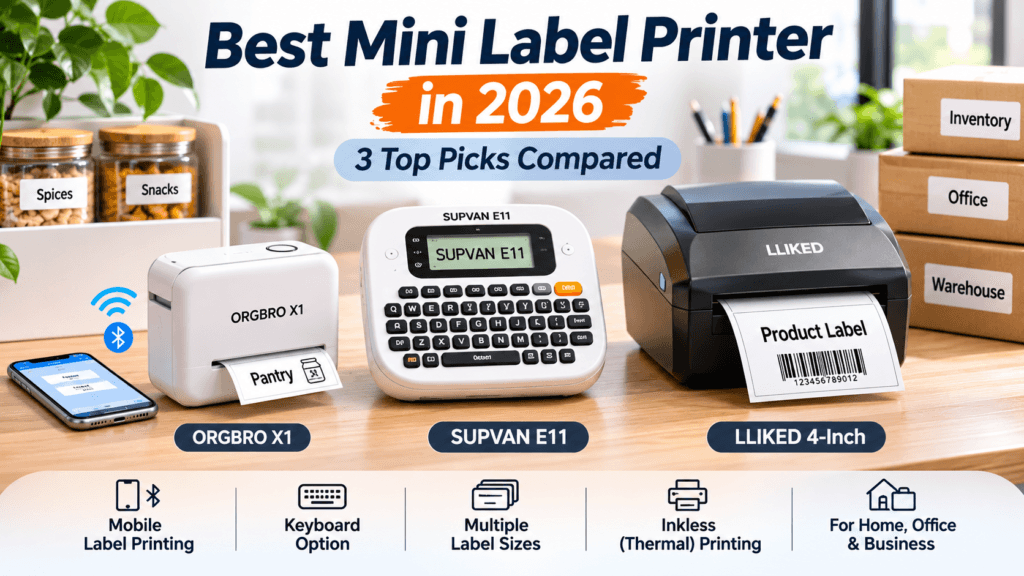
In this guide, we compare three products: ORGBRO X1, SUPVAN E11, and LLIKED 4-Inch Removable Label Printer. We explain their intended uses, advantages, limitations, and the important factors to consider before purchasing.
Affiliate Disclosure: This article contains affiliate links. If you purchase through these links, MeetMumtaz may earn a commission at no additional cost to you.
Quick Comparison: Best Mini Label Printers in 2026
| Product | Best For | Main Advantage | Check Price |
|---|---|---|---|
| ORGBRO X1 | Home organization | Compact Bluetooth label maker | Check Price |
| SUPVAN E11 | Keyboard and mobile printing | Built-in keyboard and Bluetooth app | Check Price |
| LLIKED 4-Inch | Wider business labels | Advertised for food, price tags, office and warehouse labeling | Check Price |
Quick recommendation: The ORGBRO X1 is a suitable starting point for everyday home organization. The SUPVAN E11 is worth considering if you want both a physical keyboard and smartphone-based label creation. The LLIKED model is aimed at wider labeling applications rather than pocket-sized label making.
1. ORGBRO X1 Bluetooth Mini Label Printer — Best for Home Organization
The ORGBRO X1 is a compact Bluetooth label maker designed for organizing everyday household, school, and office items. Its smartphone-based workflow makes it convenient for users who want to customize labels without using a built-in keyboard.
The printer uses thermal printing technology, eliminating the need for traditional ink cartridges. It is intended for small adhesive labels rather than standard documents or full-size shipping labels.
For home users, this type of mini label printer can be useful for identifying spice jars, storage boxes, stationery, charging cables, and office folders.
The ORGBRO X1 is described by its manufacturer as offering 203 DPI printing, a rechargeable battery, and support for compatible continuous and pre-cut labels. These features make it relevant for people looking for a portable labeling device.
ORGBRO X1 — Key Features, Pros and Cons
| Category | Details |
|---|---|
| Key Features |
|
| Pros |
|
| Cons |
|
| Check Price | Check Price on Amazon |
Who Should Buy the ORGBRO X1?
The ORGBRO X1 is a practical option for people who regularly organize household items and prefer designing labels through a smartphone.
If you mainly need short labels for kitchen containers, storage bins, folders, and charging accessories, its compact design may be more appropriate than a larger business printer.
2. SUPVAN E11 Keyboard & Bluetooth Label Maker — Best for Flexible Printing
The SUPVAN E11 combines a physical keyboard with Bluetooth smartphone connectivity, giving users two ways to create labels.
This is particularly useful when you want to print simple text labels quickly without opening an app. For more customized designs, compatible mobile software provides another option.
The SUPVAN E11 is suitable for organizing office files, school supplies, storage containers, cabinets, and household items.
The selected product bundle is advertised with four label tapes, although package contents should be confirmed before purchasing. The printer uses an inkless thermal printing system, which avoids conventional ink cartridges but still requires compatible label supplies.
SUPVAN E11 — Key Features, Pros and Cons
| Category | Details |
|---|---|
| Key Features |
|
| Pros |
|
| Cons |
|
| Check Price | Check Price on Amazon |
Who Should Buy the SUPVAN E11?
The SUPVAN E11 is worth considering if you want the flexibility to create labels directly from a keyboard or through your smartphone.
It is especially relevant for teachers, office workers, and home organizers who frequently print short text labels.
3. LLIKED 4-Inch Removable Label Printer — Best for Wider Business Labels
The LLIKED 4-inch removable label printer is marketed for food labeling, price tags, office organization, and warehouse applications.
Unlike narrow-format mini label makers, a four-inch label printer is intended for larger labeling tasks. This can make it relevant for businesses that need wider product tags, inventory labels, or shelf identification.
However, shoppers should not confuse this type of printer with a pocket-sized Bluetooth label maker. Its intended applications and physical format may be different.
Before purchasing, confirm the exact model’s supported label dimensions, connection methods, printing technology, and software compatibility.
LLIKED 4-Inch — Key Features, Pros and Cons
| Category | Details |
|---|---|
| Key Features |
|
| Pros |
|
| Cons |
|
| Check Price | Check Price on Amazon |
Who Should Buy the LLIKED 4-Inch Printer?
Consider the LLIKED model if your main priority is printing wider labels for product identification, office inventory, or retail applications.
For simple household labeling, the ORGBRO X1 or SUPVAN E11 is likely to be a more appropriate category of printer.
How to Choose the Best Mini Label Printer
Choosing the best mini label printer requires more than comparing prices. The ideal model depends on the types of labels you need, your preferred printing method, and how frequently you plan to use the device.
1. Identify Your Labeling Needs
Start by deciding what you want to label.
For household organization, a compact Bluetooth label maker may be sufficient for spice jars, storage containers, folders, and stationery.
For business applications, you may need wider labels, different materials, or specialized printing software.
2. Check Mobile Label Printing Compatibility
A mobile label printer should work with your smartphone and preferred operating system.
Before purchasing, verify whether the manufacturer provides an Android or iOS application and whether important features such as text formatting and label templates are supported.
3. Compare Label Widths
Label width determines how much information can fit on a sticker.
Narrow labels work well for names, dates, and basic organizational tags. Wider labels may be necessary for product information, inventory identification, or price tags.
Always check the printer’s supported label dimensions before purchasing replacement supplies.
4. Understand Thermal Printing
Many compact label makers use thermal printing instead of conventional ink cartridges.
This can simplify maintenance, but users still need compatible label rolls. Thermal-label durability can also vary depending on the label material and environmental conditions.
5. Consider Battery Life and Portability
If you plan to use your printer in different rooms, classrooms, or workstations, a compact rechargeable device may be convenient.
Check the manufacturer’s battery information, charging method, and physical dimensions before buying.
6. Calculate Replacement Label Costs
The initial purchase price is only one part of the overall cost.
Some mini label printers require specific label rolls or tapes. Compare their availability and cost before choosing a model.
7. Choose Between Keyboard and Smartphone Printing
Smartphone-connected label makers can offer convenient design customization.
Keyboard-equipped models may be faster for simple text labels, especially when you need to print several labels in succession.
A hybrid model such as the SUPVAN E11 combines both methods.
Mini Label Printer vs. Mobile Thermal Printer: What’s the Difference?
A mini label printer generally refers to a compact device designed to print small adhesive labels.
A mobile thermal printer is a broader category that can include portable label makers, receipt printers, and other devices using thermal printing technology.
Both categories may offer Bluetooth connectivity and inkless printing, but their supported media sizes and intended applications can differ.
If you primarily want labels for kitchen containers, office folders, and school supplies, a mini label maker is usually the more relevant category.
If you need receipts, larger product labels, or shipping labels, choose a printer designed for those specific tasks.
Best Uses for a Mini Label Printer at Home
A mini label printer can help improve organization in several areas of the home.
Kitchen and Pantry Organization
Use labels to identify spice jars, storage containers, shelves, and pantry supplies.
Clear labels make it easier to find ingredients and maintain a consistent organization system.
For food-related applications, select label materials suitable for the intended conditions and avoid assuming every adhesive label is safe for direct food contact.
Home Office Organization
Label file folders, drawers, storage boxes, stationery, and computer accessories.
A consistent labeling system can make frequently used supplies easier to locate.
Cable and Charger Identification
Small labels can help distinguish charging cables, adapters, and other accessories.
For additional workstation organization ideas, read our under desk cable management tray guide.
School Supplies
Students, teachers, and parents can use a portable label maker to identify notebooks, folders, storage containers, and classroom materials.
Are Mobile Label Printers Good for Small Businesses?
Mobile label printers can be useful for small businesses that need to organize supplies, identify inventory, or create basic product labels.
A compact Bluetooth label maker may be sufficient for labeling shelves, office equipment, or storage bins.
However, businesses requiring larger labels, specialized barcodes, or standardized shipping formats should verify that the printer supports their exact requirements.
For businesses managing multiple computer accessories, our universal laptop docking station guide explores options for connecting compatible office peripherals.
Choosing the correct label format from the beginning can help avoid unnecessary equipment replacement costs.
Common Mistakes to Avoid When Buying a Mini Label Printer
Buying the Wrong Label Size
Not every printer supports the same label dimensions. Always check compatible media before purchasing.
Ignoring Smartphone Compatibility
Bluetooth connectivity does not guarantee that a printer supports every phone or operating system.
Assuming All Thermal Labels Are Interchangeable
Different printers may require different label widths, materials, or roll formats.
Confusing Mini Label Makers With Shipping Printers
Many narrow-format mini label printers cannot print standard 4×6-inch shipping labels.
Overlooking Replacement Supply Costs
Compare the cost and availability of compatible label rolls rather than focusing only on the printer’s purchase price.
Frequently Asked Questions
What is the best mini label printer for home use?
The ORGBRO X1 is a relevant option for home organization because of its compact Bluetooth design. The SUPVAN E11 is another option for users who prefer both keyboard and smartphone-based label creation.
Can I print labels directly from my phone?
Yes. Many mobile label printers connect to compatible smartphones through Bluetooth applications. Check operating-system compatibility before purchasing.
Do mini label printers need ink?
Many compact label makers use thermal printing and do not require conventional ink cartridges. They still need compatible thermal label supplies.
Is a Bluetooth label printer better than a keyboard label maker?
Neither is automatically better. Bluetooth models are useful for smartphone customization, while keyboard models can be convenient for quick text labels.
Can a mini label printer print shipping labels?
Only if it supports the required label dimensions and printing format. Many narrow mini label makers are not designed for standard shipping labels.
What can I print with a mobile thermal printer?
Depending on the model, a mobile thermal printer may produce adhesive labels, receipts, or other compatible media.
Are mini label printers suitable for small businesses?
Yes. They can help with basic inventory identification, storage organization, and product labeling. Businesses needing larger or specialized labels may require a different printer category.
How long do thermal labels last?
Thermal-label durability depends on the material, printing method, and environmental exposure. Heat, sunlight, moisture, and friction can affect some labels.
Final Verdict: Which Mini Label Printer Should You Buy?
Best for everyday home organization: ORGBRO X1
A compact Bluetooth mini label printer suitable for kitchen containers, office supplies, storage boxes, and other everyday labeling tasks.
Best for flexible label creation: SUPVAN E11
A practical choice for users who want both a built-in keyboard and smartphone-based label customization.
Best for wider business labels: LLIKED 4-Inch
An alternative for shoppers who need larger labels for retail, office, or inventory applications, provided its exact specifications meet their requirements.
For most shoppers searching specifically for a mini label printer, the ORGBRO X1 and SUPVAN E11 are the more directly relevant options.
Before purchasing, compare label sizes, app compatibility, replacement supply costs, and current product details.