Affiliate Disclosure: This article contains affiliate links. MeetMumtaz may earn a commission from qualifying purchases at no additional cost to you. Our recommendations are based on product specifications, features, and intended use rather than hands-on testing.
A reliable game desktop microphone can make a significant difference when communicating with teammates, streaming gameplay, recording videos, or participating in online conversations. While most gaming headsets include built-in microphones, a dedicated desktop mic offers more flexibility in positioning, recording controls, and sound capture.
Whether you’re searching for a mic for gaming, a USB microphone for streaming, or an affordable recording solution, choosing the right model depends on your setup and expectations. Some microphones offer simple plug-and-play connectivity, while others include adjustable boom arms, RGB lighting, mute controls, and professional XLR connections.
The challenge is finding a microphone that delivers useful features without paying for equipment you don’t need.
In this guide, we compare five desktop microphones for gaming in 2026, including dynamic and condenser models. We’ll examine their features, advantages, limitations, and ideal use cases to help you choose a microphone for gaming, streaming, podcasting, and everyday recording.
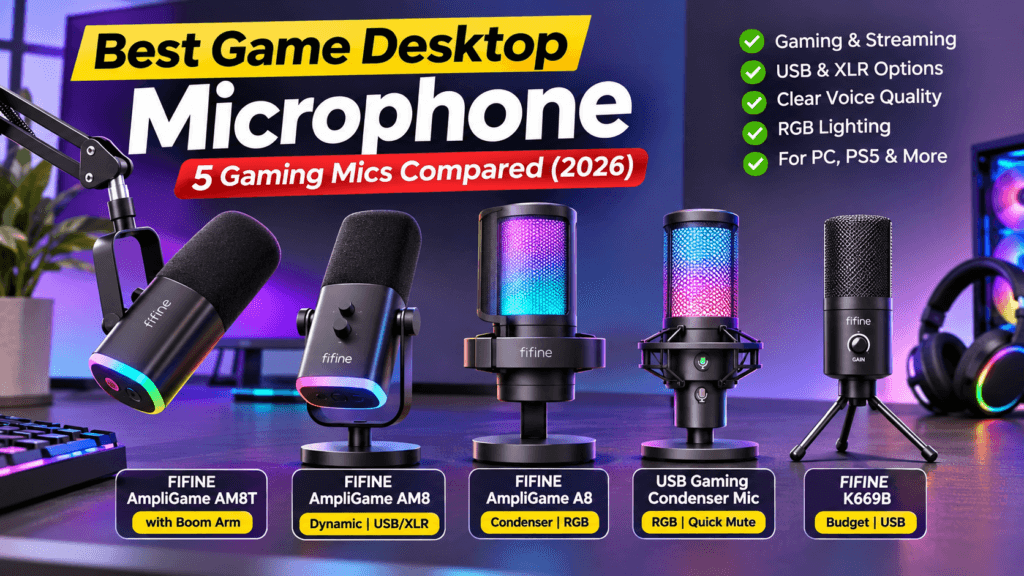
Quick Comparison: 5 Best Game Desktop Microphones
| Microphone | Best For | Microphone Type | Connection | Check Price |
|---|---|---|---|---|
| FIFINE AmpliGame AM8T | Best Complete Gaming Mic Kit | Dynamic | USB / XLR | Check Price |
| FIFINE AmpliGame AM8 | Best Overall Value | Dynamic | USB / XLR | Check Price |
| FIFINE AmpliGame A8 | Best RGB Gaming Microphone | Condenser | USB | Check Price |
| RGB USB Gaming Condenser Microphone | Best Alternative for Casual Gaming | Condenser | USB | Check Price |
| FIFINE K669B | Best Simple Budget Microphone | Condenser | USB | Check Price |
Product availability, included accessories, and prices may vary. Confirm the exact model and listing details before purchasing.
1. FIFINE AmpliGame AM8T — Best Complete Gaming Microphone Kit
The FIFINE AmpliGame AM8T is an attractive option for gamers who want a microphone and boom arm together rather than buying separate accessories.
This dynamic microphone supports both USB and XLR connections, making it suitable for beginners and users interested in upgrading their audio equipment later.
With USB connectivity, you can connect the microphone directly to a compatible computer and begin configuring your recording software. The XLR connection provides an alternative for users with a compatible audio interface or mixer.
One of the AM8T’s biggest advantages is its included boom arm. A boom arm helps position the microphone closer to your mouth while keeping your desktop relatively clear.
The AM8T also offers RGB lighting, a mute control, microphone gain adjustment, and headphone monitoring in USB mode.
For gamers who spend hours playing multiplayer games or streaming, this combination of flexibility and convenient positioning makes the AM8T worth considering.
Key Features, Pros and Cons
| Category | Details |
|---|---|
| Key Features | Dynamic cardioid microphone; USB and XLR connectivity; included boom arm and desk clamp; RGB lighting; microphone gain control; mute button; headphone monitoring in USB mode. |
| Pros | Complete microphone kit; flexible positioning; USB/XLR upgrade options; useful gaming controls; attractive RGB appearance. |
| Cons | Boom arm requires installation and suitable desk clearance; XLR needs additional equipment; onboard USB controls are not available in XLR mode. |
| Best For | Gaming, Twitch streaming, podcasting, Discord communication, and desktop recording. |
| Check Price | Check Price on Amazon |
Why Choose the FIFINE AM8T?
The AM8T is especially useful if you’re building a new gaming setup and want to avoid purchasing a separate microphone arm.
Its dynamic design and cardioid pickup pattern make it practical for close-range speech recording, particularly when your gaming room is not acoustically treated.
However, the microphone still needs proper positioning and gain adjustment. A dynamic microphone does not automatically eliminate background noise.
Our verdict: The FIFINE AM8T is a strong choice for gamers who want a ready-to-install microphone kit with room for future upgrades.
2. FIFINE AmpliGame AM8 — Best Overall Value Gaming Microphone
The FIFINE AmpliGame AM8 offers many of the AM8T’s microphone features in a desktop configuration.
It uses a dynamic capsule with a cardioid pickup pattern and supports both USB and XLR connectivity. This makes it a versatile option for gaming, streaming, online meetings, and voice recording.
For beginners, USB connectivity is particularly convenient because it avoids the immediate need for an audio interface.
The microphone includes a desktop stand, RGB lighting, a mute button, and microphone gain adjustment. Headphone monitoring is also available through its USB configuration.
The AM8 is a practical choice for gamers who want a dedicated microphone but don’t necessarily need a complete boom-arm kit.
Key Features, Pros and Cons
| Category | Details |
|---|---|
| Key Features | Dynamic cardioid microphone; USB/XLR connectivity; RGB lighting; desktop stand; tap-to-mute; gain adjustment; headphone monitoring in USB mode. |
| Pros | Flexible connection options; convenient USB setup; useful physical controls; suitable for gaming and streaming; upgradeable with an audio interface. |
| Cons | Standard package does not include a boom arm; XLR equipment costs extra; some controls are USB-only. |
| Best For | Gamers seeking a versatile desktop microphone without purchasing a full kit. |
| Check Price | Check Price on Amazon |
FIFINE AM8 vs. AM8T: Which Should You Buy?
The biggest practical difference is the included mounting setup.
The AM8 typically comes with a desktop stand, while the AM8T package includes a boom arm and desk clamp.
If you prefer a simple microphone that sits on your desk, the AM8 may be sufficient.
However, if you want to position your microphone above or beside your keyboard without occupying as much desk space, the AM8T kit may provide better overall convenience.
For a gaming setup with limited desk space, microphone placement matters almost as much as the microphone itself.
Our Dual Monitor Stand Buying Guide also explains how monitor arms can help organize a workstation with multiple accessories.
Our verdict: The FIFINE AM8 is our preferred overall value option for gamers who want USB/XLR flexibility without paying for a bundled microphone arm they may not need.
3. FIFINE AmpliGame A8 — Best RGB Microphone for Gaming
The FIFINE AmpliGame A8 is designed for gamers who want straightforward USB connectivity combined with an RGB gaming aesthetic.
Unlike the AM8 and AM8T, which use dynamic microphone capsules, the A8 is a condenser microphone.
Condenser microphones can capture detailed vocal audio, making them useful for streaming, online conversations, podcasts, and general recording.
The A8 features a cardioid pickup pattern, helping emphasize sound coming from the front of the microphone.
It also includes RGB lighting controls, a tap-to-mute function, headphone monitoring, and a pop filter.
These features make it a practical choice for gamers who want a visually appealing microphone with useful everyday controls.
Key Features, Pros and Cons
| Category | Details |
|---|---|
| Key Features | USB condenser microphone; cardioid pickup pattern; customizable RGB lighting; tap-to-mute; headphone monitoring; pop filter; shock mount. |
| Pros | Simple USB setup; gaming-friendly RGB design; useful recording controls; suitable for streaming and voice chat; included vibration and plosive-control accessories. |
| Cons | No XLR connection; may capture more room sound depending on placement and gain; RGB styling may not suit minimalist workspaces. |
| Best For | RGB gaming setups, Discord, casual streaming, video recording, and beginner content creators. |
| Check Price | Check Price on Amazon |
Is the FIFINE A8 a Good Microphone for Gaming?
Yes, the A8 offers a practical combination of voice-recording features and gaming-oriented styling.
Its USB connection makes setup relatively simple, while the mute and monitoring functions provide useful control during live conversations.
However, the microphone’s condenser design means careful placement is important, especially when your gaming desk is close to a mechanical keyboard or computer fans.
If you want a microphone primarily for Discord, multiplayer gaming, and occasional streaming, the A8 is worth comparing against the AM8.
Our verdict: The FIFINE A8 is a good option for gamers who prioritize RGB aesthetics, USB convenience, and condenser microphone features.
4. RGB USB Gaming Condenser Microphone — Best Alternative for Casual Gaming
The fourth option is a USB gaming condenser microphone marketed for PC gaming, podcasting, streaming, and video recording.
According to the supplied product listing, it includes RGB lighting, a quick-mute feature, and a pop filter.
It is also advertised as compatible with computers, laptops, PS4, and PS5.
For gamers who want a simple microphone for voice communication without investing in an XLR interface or complicated recording equipment, this type of USB microphone may be appealing.
However, the supplied listing does not clearly identify the brand or exact model. That makes it important to verify the seller, included accessories, warranty, and detailed specifications before purchasing.
Key Features, Pros and Cons
| Category | Details |
|---|---|
| Key Features | USB condenser microphone; RGB lighting; quick-mute function; pop filter; advertised PC, laptop, PS4, and PS5 compatibility. |
| Pros | Gaming-oriented design; USB connectivity; convenient mute feature; pop filter included according to the listing; potentially suitable for casual streaming. |
| Cons | Brand and model are not clearly identified; pickup pattern and detailed audio specifications require verification; actual accessories and console compatibility should be checked. |
| Best For | Casual gaming, voice chat, beginner streaming, and buyers comparing entry-level USB microphones. |
| Check Price | Check Price on Amazon |
Should You Buy This USB Gaming Microphone?
This microphone could be worth considering if its current price is attractive and its listing confirms the features you need.
However, when comparing two similarly priced microphones, a clearly identified model with accessible specifications and manufacturer support is generally easier to evaluate.
Before buying, check whether the microphone has a suitable pickup pattern, adjustable gain, the accessories you need, and compatibility with your gaming platform.
Our verdict: This is a possible entry-level alternative, but we would prioritize a fully identifiable microphone until its model and specifications are confirmed.
5. FIFINE K669B — Best Simple Budget Desktop Microphone
The FIFINE K669B is a straightforward USB condenser microphone for buyers who want basic voice recording without unnecessary features.
Unlike RGB-focused gaming microphones, the K669B emphasizes a simple desktop design and convenient USB connectivity.
It uses a cardioid pickup pattern and includes a microphone gain knob, allowing users to adjust input sensitivity without relying entirely on computer settings.
The microphone also includes a tripod-style desktop stand.
Its simple design makes it suitable for gaming chat, online meetings, voiceovers, and occasional recordings.
For users who don’t need RGB lighting, advanced audio routing, or XLR connectivity, the K669B offers a more minimal approach.
Key Features, Pros and Cons
| Category | Details |
|---|---|
| Key Features | USB condenser microphone; cardioid pickup pattern; microphone gain knob; metal microphone body; desktop tripod stand. |
| Pros | Simple setup; compact design; physical gain adjustment; suitable for gaming chat and online meetings; no separate audio interface required. |
| Cons | No XLR connectivity; lacks the dedicated mute and RGB controls of some gaming-focused models; microphone placement affects background noise pickup. |
| Best For | Budget-conscious gamers, students, online meetings, voice recording, and everyday computer use. |
| Check Price | Check Price on Amazon |
Is the FIFINE K669B Good for Gaming?
The K669B can be a practical microphone for gaming if your main goal is reliable voice communication.
It does not offer the same gaming-oriented features as the AM8, AM8T, or A8, but it provides a dedicated USB microphone option without requiring a complicated setup.
Its straightforward controls may appeal to users who prefer function over decorative lighting.
Our verdict: The FIFINE K669B is a sensible option for buyers who want a simple desktop microphone for gaming, meetings, and occasional recording.
How to Choose the Best Game Desktop Microphone
Choosing the right microphone involves more than comparing product descriptions.
Different mics for gaming serve different needs. A casual gamer may only require clear Discord communication, while a dedicated streamer may want advanced positioning, monitoring, and audio controls.
Here are the most important factors to consider.
1. Dynamic vs. Condenser Microphones
Dynamic and condenser microphones capture sound differently.
Dynamic microphones are often useful for close-range voice recording, especially in rooms with noticeable background noise.
The FIFINE AM8 and AM8T use dynamic capsules, making them practical candidates for gaming setups where the microphone can be positioned near the speaker.
Condenser microphones are typically more sensitive and can capture detailed vocals, but may also pick up more room sound depending on gain settings and placement.
The FIFINE A8 and K669B use condenser capsules.
Neither microphone type automatically guarantees better audio quality. Proper positioning, room conditions, and recording settings remain essential.
2. USB vs. XLR Connectivity
USB microphones are generally the easiest choice for beginners.
They connect directly to compatible computers and usually require minimal additional equipment.
XLR microphones connect through compatible audio interfaces or mixers, providing more options for building a larger recording setup.
The AM8 and AM8T offer both USB and XLR connections, making them useful for gamers who may upgrade their equipment later.
However, an XLR connection does not automatically improve sound quality. The microphone, audio interface, recording environment, and settings all influence the result.
3. Microphone Pickup Pattern
A microphone’s pickup pattern determines the directions from which it captures sound.
Cardioid microphones primarily capture sound from the front, making them a common choice for gaming, streaming, and solo recording.
All four identified FIFINE models in this comparison use cardioid pickup patterns.
A cardioid pattern can help reduce unwanted sound from certain directions, but it cannot completely eliminate keyboard clicks, fans, or conversations in the room.
For most gamers, a properly positioned cardioid microphone is a practical starting point.
4. Background Noise and Keyboard Sounds
Gaming desks often include mechanical keyboards, cooling fans, speakers, and other potential noise sources.
To improve recording clarity, position your microphone close enough to your mouth, keep the keyboard away from its most sensitive direction, and avoid setting microphone gain unnecessarily high.
A boom arm can make positioning easier.
Software noise suppression may also help reduce distracting sounds during Discord calls or livestreams.
Remember that aggressive noise suppression can affect voice quality, so test your settings before recording important content.
5. Desktop Stand vs. Boom Arm
A desktop stand is convenient because it requires little installation.
However, a microphone placed directly beside a keyboard may capture more vibration or typing noise.
A boom arm provides more positioning flexibility and can help keep the microphone away from the keyboard.
The FIFINE AM8T includes a boom arm, while the standard AM8 and K669B are supplied with desktop mounting options.
For a workspace with several accessories, keeping your desk organized can also improve comfort.
Our Best Laptop Stand Guide explores useful laptop positioning options for home offices and computer setups.
6. Mute Controls and Headphone Monitoring
A quick-mute button can be useful during gaming sessions, online meetings, or livestreams.
It allows you to silence your microphone without opening software settings.
Headphone monitoring is another valuable feature because it helps you hear your microphone signal and identify recording problems.
Not every microphone includes these controls, so decide which features matter before purchasing.
7. Compatibility With Your Gaming Setup
Before buying, confirm compatibility with your operating system, gaming console, and recording software.
A microphone that works with a Windows PC may not offer identical features on every console.
For PS4 or PS5 gaming, check the manufacturer’s compatibility guidance and the specific product listing.
If you use a laptop with an external display, our USB-C Portable Display Comparison can help you explore additional screen options for streaming controls, chat windows, and productivity.
Gaming Microphone vs. Headset Microphone: Which Is Better?
A dedicated desktop microphone and a gaming headset microphone both have advantages.
A headset microphone is convenient because it stays close to your mouth and moves with your head.
A desktop microphone offers more flexibility in positioning, physical controls, and recording setup.
| Feature | Desktop Gaming Microphone | Gaming Headset Microphone |
|---|---|---|
| Setup | May require desk positioning or a boom arm | Usually integrated into the headset |
| Voice Recording | More microphone and control options | Convenient for everyday communication |
| Desk Space | Requires some mounting space | No separate microphone stand needed |
| Audio Controls | May include gain, mute, and monitoring | Depends on the headset model |
| Best For | Streaming, podcasting, gaming, recording | Casual gaming and voice chat |
If you primarily communicate with teammates, a good headset microphone may already meet your needs.
However, if you regularly stream, record videos, or want greater control over microphone positioning, a dedicated desktop microphone is worth considering.
How to Set Up a Gaming Desktop Microphone for Clear Audio
Even a good microphone can produce disappointing results if it is poorly positioned or configured.
Follow these steps to improve your recording setup.
- Connect the microphone: Use the included USB cable or a compatible XLR audio interface.
- Select the microphone input: Open your computer’s sound settings and choose the correct recording device.
- Position the microphone: Follow the manufacturer’s instructions for speaking direction and recommended distance.
- Adjust microphone gain: Speak at your normal volume and reduce gain if the signal becomes distorted.
- Test background noise: Record a short sample while typing or using your computer normally.
- Configure gaming software: Select the microphone in Discord, OBS Studio, or your preferred application.
- Monitor the recording: Listen to a test recording and adjust positioning or settings as needed.
For streaming and video recording, you can also use OBS Studio to manage microphone inputs, recording levels, and audio filters.
The best results usually come from combining suitable equipment with careful setup rather than relying on microphone specifications alone.
Frequently Asked Questions
What is the best game desktop microphone in 2026?
The best microphone depends on your budget and intended use. The FIFINE AM8 is a versatile overall choice, the AM8T is attractive for buyers who want a complete boom-arm kit, and the K669B is a simpler option for everyday gaming and recording.
What is a good microphone for gaming and streaming?
A good microphone for gaming should capture speech clearly, provide reliable connectivity, and offer suitable controls. The FIFINE AM8, AM8T, and A8 are worth comparing for gaming and streaming setups.
Are USB microphones good for gaming?
Yes. USB microphones are convenient for gaming because they connect directly to compatible computers without requiring an external audio interface. They can work well for Discord, streaming, online meetings, and recording.
Is a dynamic microphone better than a condenser microphone for gaming?
Dynamic microphones can be useful in untreated rooms when positioned close to the speaker. Condenser microphones can also deliver good results but may capture more room sound depending on sensitivity and placement.
Can a desktop microphone reduce keyboard noise?
A suitable pickup pattern and careful microphone placement can help reduce unwanted keyboard noise. However, no microphone completely eliminates background sound. Proper gain settings and software noise suppression may provide additional improvements.
Do I need an XLR microphone for gaming?
No. A USB microphone is sufficient for many gamers and beginner streamers. XLR becomes more relevant when you want to use an external audio interface or expand your recording setup.
Can I use a gaming microphone for podcasting?
Yes. Many gaming microphones are suitable for podcasts, voiceovers, YouTube videos, and online meetings. Choose a model with appropriate recording controls, connectivity, and pickup characteristics.
Is the FIFINE AM8T better than the AM8?
Both offer similar core microphone functionality. The AM8T includes a boom arm, making it more convenient for buyers who want a complete mounting setup. The standard AM8 is a practical choice if you prefer a desktop stand or already own a microphone arm.
What is the best budget desktop microphone for gaming?
The FIFINE K669B is worth considering if you want a simple USB microphone without extra gaming features. Compare its current price with the FIFINE A8 and AM8 before deciding.
Can I use a gaming microphone with PS5?
Some USB gaming microphones support PS5, including several FIFINE models in this comparison. Always confirm the exact model’s compatibility and available features before purchasing.
Final Verdict: Which Game Desktop Microphone Should You Buy?
Finding the right game desktop microphone comes down to choosing features that match your gaming habits and recording needs.
For most buyers, the FIFINE AmpliGame AM8 is our preferred overall option. Its dynamic design, USB/XLR connectivity, and practical controls make it suitable for gaming, streaming, and general voice recording.
If you’re building a complete streaming setup and want a microphone arm included, the FIFINE AmpliGame AM8T is an appealing alternative.
The FIFINE AmpliGame A8 is worth considering if you prefer a USB condenser microphone with RGB lighting, quick mute, and monitoring features.
For a straightforward desktop microphone without gaming-focused extras, the FIFINE K669B offers a simpler approach.
The fourth RGB USB Gaming Condenser Microphone may also be worth comparing, but its brand and exact specifications should be confirmed before purchasing.
Ultimately, the best gaming mic is not necessarily the most expensive one. Choose a microphone that fits your budget, works with your computer or console, and provides the controls you actually need.
Before making a purchase, review the current product listing, check the included accessories, and confirm compatibility with your recording setup.